Jiyr0119/dsh-service-console
DeepSeek Harness 的本地开发服务控制台:发现监听端口,显示服务所属关系,并安全地检查/停止/重启服务。DSH 本地开发服务控制台。
项目介绍Project Overview
这是 DSH Web UI 的本地开发服务控制台插件,用于扫描监听 TCP 端口,关联 PID、命令、工作目录与会话/工作区归属,并在面板中检查、停止或重启服务。适合管理模型或用户启动的本地 dev server。注意:仅支持 macOS/Linux;未知、受保护及高权限进程只读,停止/重启需二次确认,且它不是通用进程管理器。
This is a local development service console plugin for the DSH web UI. It scans listening TCP ports, correlates PID, command, working directory, and chat/workspace ownership, and lets users inspect, stop, or restart services. Use it when a model or user starts local dev servers such as Vite, Next.js, Uvicorn, or Express. Caveat: macOS/Linux only; unknown, protected, and high-privilege processes are read-only, actions require confirmation, and it is not a general process manager.
请帮我了解并安装插件:【dsh-service-console】【https://github.com/Jiyr0119/dsh-service-console】把上面这条消息直接发给当前会话里的 DSH,让它帮你了解并安装。安装命令不一定准确,发给 DSH 更稳。Send this message to DSH in your current session. CLI install commands may not be accurate across systems — DSH will figure it out for you.
或使用命令行安装(适合开发者)Or use CLI install (for developers)
命令行安装CLI Install
dsh plugin --profile web add -w @jiyr0119/dsh-service-console@latest把 Jiyr0119/dsh-service-console 加入你的 DSH 配置(web profile)即可启用。
READMEREADME
DSH Service Console






⭐ Drop a Star if it helped — it makes the author's day · ★ Give a Star
A local development service console for DSH: discover listening ports, identify services related to the current conversation or workspace, and safely inspect, stop, or restart them.
Single-purpose plugin for the DeepSeek Harness web UI. When the model (or you) starts a local dev server (npm run dev, Vite, Next.js, Uvicorn, Express, Rust, …), Service Console shows it in one place: which ports it listens on, which command and working directory started it, whether it belongs to this conversation or workspace, and whether it is safe to stop or restart.
Features
- Discovery — scans listening TCP ports and correlates PID, PPID, command, working directory, process group and start time (macOS/Linux).
- Ownership & risk — five-level attribution:
This chat(matched against the session launch ledger),Workspace,Other local,Unknown,Protected. - Control — graceful stop to the process group, restart with a safe saved launch command. Every action is confirmed twice and re-validated against the current snapshot.
- Safeguards — PID-reuse / fingerprint checks before any signal; unknown and protected services are read-only; force-kill is off by default; no implicit auto-cleanup; command output is redacted.
- All local services — every listening service on this machine is visible; ownership is shown as a safety signal rather than a hidden category filter.
- Search, config, i18n — keyword filtering, graceful timeout / force-kill settings, and automatic Chinese/English labels from DSH's active locale.
- On-demand scanning — opening the console fetches the current snapshot once; use the refresh button for an explicit rescan. There is no background polling.
- DSH-native inspector — an expanded service record card presents process identity, ports, command, working directory and ownership evidence in the Web UI's token-based visual language.
Install
Native package (recommended):
dsh plugin --profile web add -w @jiyr0119/dsh-service-console@latest
Then refresh the DSH web UI — a 🖥 SC entry appears in the conversation header and opens the console panel.
Note: a plugin being listed in dsh-market/awesome does not mean its UI auto-appears — this package ships both Host routes and a browser bundle, so after
dsh plugin addthe panel is present. Works on macOS / Linux; Windows is not supported yet.
Alternative — dynamic paste (zero-build, process-local): paste dynamic/host.js + dynamic/client.js via the dynamic Cordis plugin flow.
UI preview
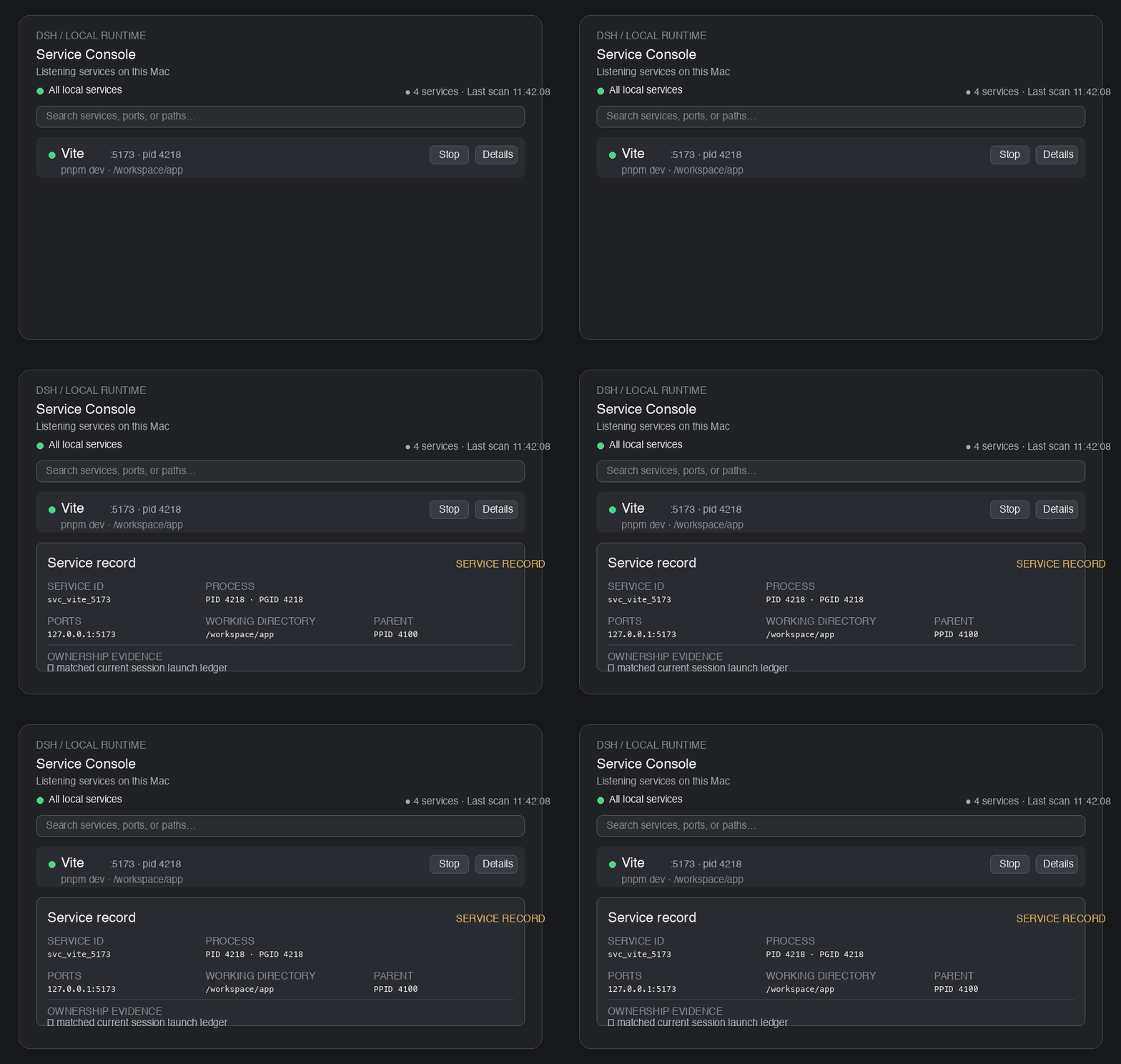
The preview shows the complete local listening-service list and the expanded inspector card. The ownership badge remains visible as a safety signal, while the list itself is no longer split into conversation/workspace/machine categories.
→ Interactive Demo — try the Service Console UI in your browser (no installation required).
Permissions & safety
- The client never sends raw PIDs or shell commands; it targets a service ID and the Host re-validates PID / start time / fingerprint before acting.
- Graceful termination first (SIGTERM to the process group); SIGKILL only when explicitly enabled and confirmed.
- Sensitive tokens/passwords in command summaries are redacted.
- This plugin is not a general process manager: system-critical, high-privilege, unknown and protected processes are read-only.
Development
pnpm install
npm run typecheck
npm run build
npm test          # unit + integration tests (node --test)
Testing
npm test builds once and runs the whole suite with Node's built-in test runner (node --test). No extra test framework is required.
| File | Type | What it covers |
|---|---|---|
test/process-inspector.test.mjs |
Unit | Platform output parsing (parseLstart, parseListenRows, parsePsRows, parseAddress), command redaction, five-level ownership classification |
test/host-more.test.mjs |
Unit | Config validation, session ledger, lifecycle state machine (stop/restart) with fake dependencies, service aggregation & fingerprint stability |
test/integration.test.mjs |
Integration | Real system commands + a temporary HTTP server spawned by the test itself; signals are only ever sent to test-owned processes |
npm test                                   # full suite
npm run build && node --test test/process-inspector.test.mjs   # run a single file
Unit tests import the built output under lib/, so the sources must be compiled first — npm test handles this automatically.
License
MIT
相关推荐Related
-
 nexu-io/open-design
🎨 Best DeepSeek Harness Design Plugin. The open-source Claude Design alternative. 🖥️ Local-first desktop app. 🖼️ Your…
nexu-io/open-design
🎨 Best DeepSeek Harness Design Plugin. The open-source Claude Design alternative. 🖥️ Local-first desktop app. 🖼️ Your…
-
 freestylefly/awesome-gpt-image-2
Prompt as Code | GPT-Image2 工业级提示词引擎与模板库,530+ 个案例逆向工程,20+ 套工业级模板,并提炼出Skills,持续更新中
freestylefly/awesome-gpt-image-2
Prompt as Code | GPT-Image2 工业级提示词引擎与模板库,530+ 个案例逆向工程,20+ 套工业级模板,并提炼出Skills,持续更新中
-
 anywhere-labs/dsh-desktop
为 DeepSeek Harness (DSH) 插件生态打造的现代化桌面端解决方案。万物皆「插件」,桌面本身也是「插件」。
anywhere-labs/dsh-desktop
为 DeepSeek Harness (DSH) 插件生态打造的现代化桌面端解决方案。万物皆「插件」,桌面本身也是「插件」。
- Nagi-ovo/voyager Enhancement suite for Gemini, AI Studio, Claude & ChatGPT — plus a prompt manager for any web UI, DeepSeek Harness inclu…
-
 walkinglabs/learn-harness-engineering
Harness engineering beginner tutorial, from 0 to 1
walkinglabs/learn-harness-engineering
Harness engineering beginner tutorial, from 0 to 1
-
 awesome-dsh-plugin/awesome-dsh-plugin
A curated list of plugins for DeepSeek Harness (dsh) · DeepSeek Harness 插件精选列表
awesome-dsh-plugin/awesome-dsh-plugin
A curated list of plugins for DeepSeek Harness (dsh) · DeepSeek Harness 插件精选列表
-
 MemTensor/MemOS
Self-evolving memory OS for LLM & AI Agents: ultra-persistent memory, hybrid-retrieval, and cross-task skill reuse, with…
MemTensor/MemOS
Self-evolving memory OS for LLM & AI Agents: ultra-persistent memory, hybrid-retrieval, and cross-task skill reuse, with…
- yjh051108/dsh-routing-suite dsh-routing-suite — injector + router-standard kit: install the runtime injector first, then the task-aware reasoning-mo…