kairoz9/dsh-mcp-admin
dsh 的 MCP 状态检查与服务管理插件
项目介绍Project Overview
dsh-mcp-admin 是 DSH 插件,提供 /mcp 命令跨配置列出 MCP 服务器及实时工具数,并在设置的 MCP 面板集中增删改与启停,每秒刷新状态。变更原子写回 cordis.patch.yml,DSH 自动热重载。适用于排查多 profile 下 MCP 连接与工具状态。Git 方式安装时需在 pnpm-workspace.yaml 的 allowBuilds 放行该包,并建议固定到 tag 或 commit,否则 prepare 脚本可能被 pnpm ≥10 拒绝。
dsh-mcp-admin is a DSH plugin that adds an /mcp command listing every MCP server across all profiles with live tool counts, plus a Settings MCP panel for adding, editing, enabling, disabling, and deleting servers, with status dots that refresh each second. Changes are written atomically back to each profile's cordis.patch.yml, and DSH hot-reloads mcp-client automatically. Use it to inspect and manage MCP inventory across profiles from one place. Caveat: Git installs fail under pnpm ≥10 unless allowBuilds: dsh-mcp-admin: true is added to the profile's pnpm-workspace.yaml, and you should pin a tag or commit.
请帮我了解并安装插件:【dsh-mcp-admin】【https://github.com/kairoz9/dsh-mcp-admin】把上面这条消息直接发给当前会话里的 DSH,让它帮你了解并安装。安装命令不一定准确,发给 DSH 更稳。Send this message to DSH in your current session. CLI install commands may not be accurate across systems — DSH will figure it out for you.
或使用命令行安装(适合开发者)Or use CLI install (for developers)
命令行安装CLI Install
dsh plugin --profile web add github:kairoz9/dsh-mcp-admin把 kairoz9/dsh-mcp-admin 加入你的 DSH 配置(web profile)即可启用。
READMEREADME
dsh-mcp-admin
English | 简体中文
A dsh (DeepSeek Harness) plugin: Inspect MCP status (/mcp command) + Manage MCP servers in Settings (add / edit / delete / enable / disable, written back to cordis.patch.yml). MIT licensed.
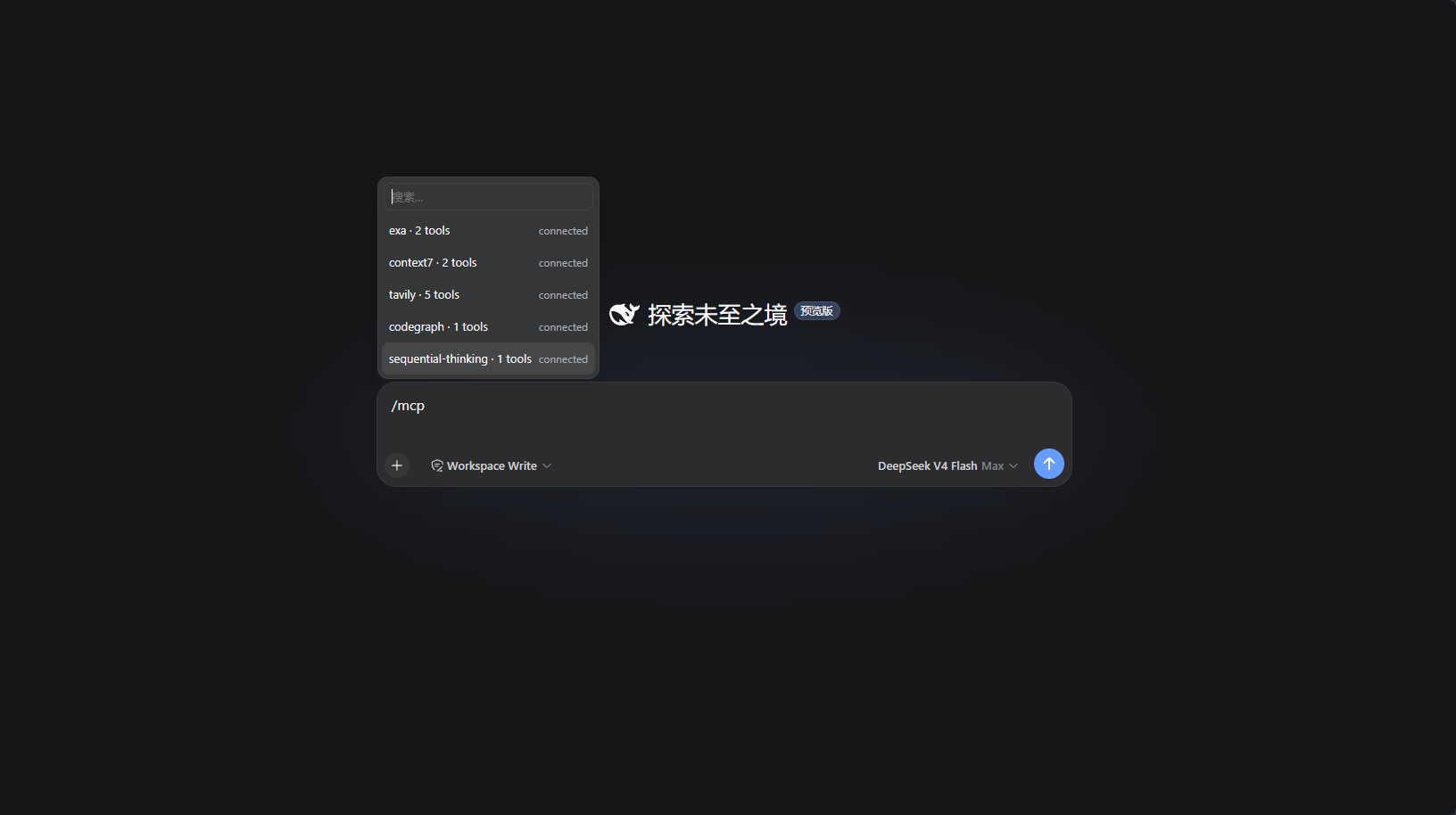
/mcp command output:
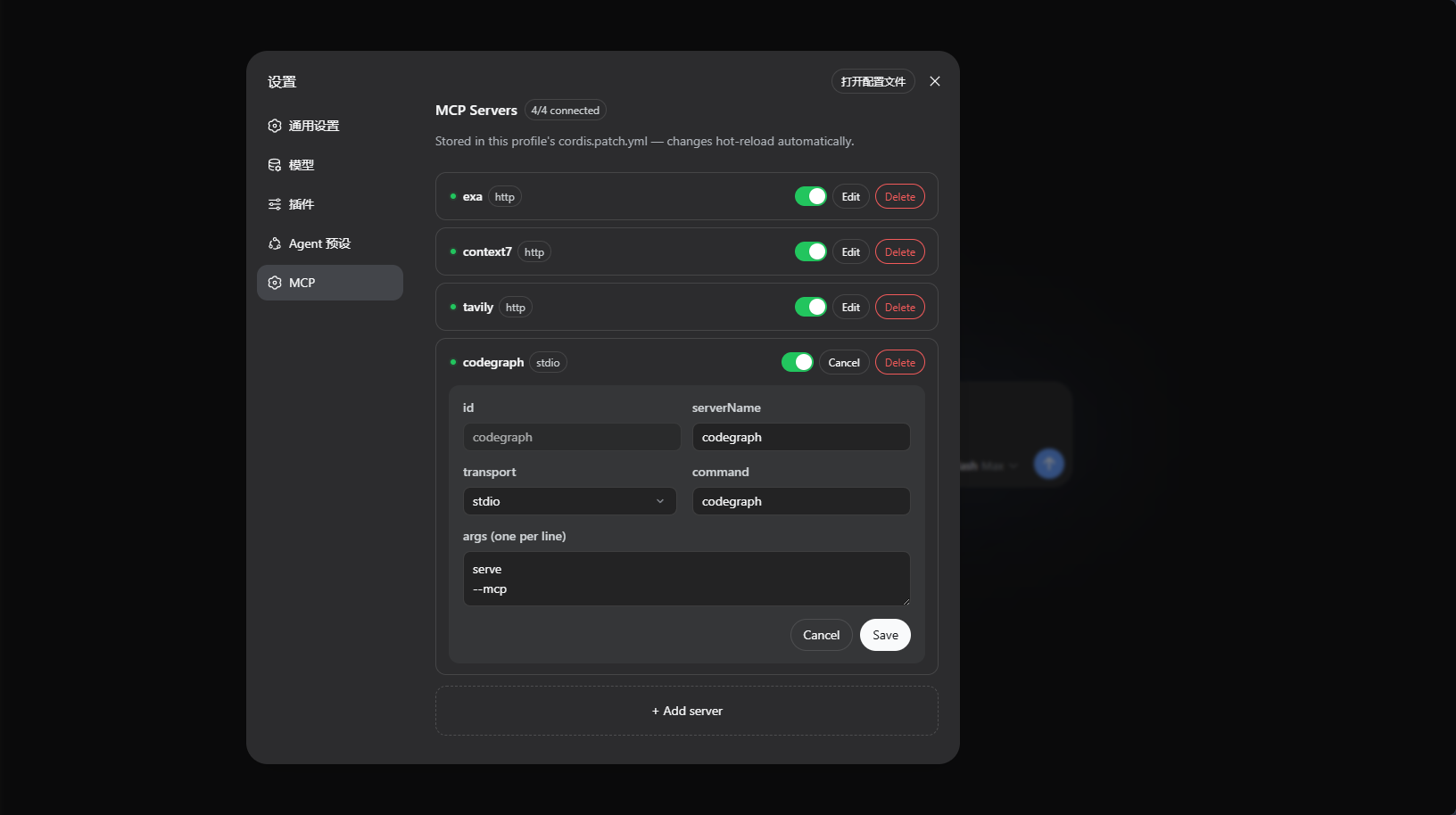
Settings page "MCP" panel:
Installation
Release tarball (Recommended, no build required): Download dsh-mcp-admin-<version>.tgz from Releases, then run:
dsh plugin --profile web add ./dsh-mcp-admin-0.2.0.tgz
Build tarball locally (if building yourself):
pnpm run build        # Builds to lib/
pnpm pack             # Packages into tarball
dsh plugin --profile web add ./dsh-mcp-admin-0.2.0.tgz
Git repository (installs from source via prepare build):
dsh plugin --profile web add github:kairoz9/dsh-mcp-admin
pnpm ≥10 refuses to run the
preparescript of git dependencies by default, which causes the initial Git installation to fail. dsh will print the fix in the error message: add the package key to that profile'spnpm-workspace.yamland re-runadd:allowBuilds: dsh-mcp-admin: trueIt is recommended to pin a commit or tag:
github:kairoz9/dsh-mcp-admin#v0.2.0.
Usage
/mcp— Lists MCP servers across all profiles + live tool count (including never-connected servers, read from full config inventory).- Settings page "MCP" panel — Manage MCP servers per profile: add / edit / disable / enable / delete, with status dots auto-refreshing every second. Saving writes back to that profile's
cordis.patch.yml, and dsh automatically hot-reloads (HMR).
How It Works
Host-side McpAdminRemote (TypertRemoteService, @Remote methods) is auto-discovered by the host gateway. The browser client self-mounts this namespace via ctx.remote.$mount, and both the panel and /mcp popup read the same structured data:
list()— Reads the full server inventory from the profile'scordis.patch.yml, then filtersmcp__prefix withctx.tools.schemas()to annotate real-time tool counts; enumerates activemcp-clientinstances from Cordis registry to distinguish "connected / instance present with 0 tools (connection failed) / not loaded".set()— Reconciles and writes back tocordis.patch.yml(single atomic write, comments preserved), and dsh'swatchUserPatchesHMR automatically reloadsmcp-client./mcpcommand reads all profiles and outputs the tool list for each server.
相关推荐Related
-
 ruvnet/ruflo
🌊 The original agent meta-harness. Deploy intelligent multi-player swarms, coordinate autonomous workflows, and build c…
ruvnet/ruflo
🌊 The original agent meta-harness. Deploy intelligent multi-player swarms, coordinate autonomous workflows, and build c…
-
 amruthpillai/reactive-resume
A one-of-a-kind resume builder that keeps your privacy in mind. Completely secure, customizable, portable, open-source a…
amruthpillai/reactive-resume
A one-of-a-kind resume builder that keeps your privacy in mind. Completely secure, customizable, portable, open-source a…
-
 volcengine/OpenViking
Self-evolving Context Database for AI Agents. Unify Agent Memory, Knowledge RAG and Skills.
volcengine/OpenViking
Self-evolving Context Database for AI Agents. Unify Agent Memory, Knowledge RAG and Skills.
-
 Molunerfinn/PicGo
:rocket: The Ultimate Image Uploader for Efficient Creators. Supports Obsidian, Typora, VS Code etc. and 60+ image hosti…
Molunerfinn/PicGo
:rocket: The Ultimate Image Uploader for Efficient Creators. Supports Obsidian, Typora, VS Code etc. and 60+ image hosti…
-
 titanwings/colleague-skill
将冰冷的离别化为温暖的 Skill,欢迎加入数字生命1.0!Transforming cold farewells into warm skills? It's giving rebirth era. Welcome to Digital …
titanwings/colleague-skill
将冰冷的离别化为温暖的 Skill,欢迎加入数字生命1.0!Transforming cold farewells into warm skills? It's giving rebirth era. Welcome to Digital …
-
 nocobase/nocobase
NocoBase is an open-source AI + no-code platform for building business systems fast. Instead of generating everything fr…
nocobase/nocobase
NocoBase is an open-source AI + no-code platform for building business systems fast. Instead of generating everything fr…
-
 Tencent/WeKnora
Open-source LLM knowledge platform: turn raw documents into a queryable RAG, an autonomous reasoning agent, and a self-m…
Tencent/WeKnora
Open-source LLM knowledge platform: turn raw documents into a queryable RAG, an autonomous reasoning agent, and a self-m…
- Nagi-ovo/voyager Enhancement suite for Gemini, AI Studio, Claude & ChatGPT — plus a prompt manager for any web UI, DeepSeek Harness inclu…