kanchengw/dsh-assembly.resume
Import local Codex and Claude sessions into DeepSeek Harness.
Project Overview项目介绍
dsh-assembly.resume is a DSH plugin that imports local Codex, Claude Code CLI, and Claude Code Desktop conversations into DSH, then hands them off to the DSH Agent for continuation. It groups sessions by their original project, transfers visible messages and tool activity, and auto-registers the source directory as a DSH Workspace. Use it to migrate and resume an ongoing coding session across different AI coding tools. Caveat: if the historical path is missing and no new workspace is specified, the conversation imports unbound.
dsh-assembly.resume 是一款 DSH 插件,用于将本地 Codex、Claude Code CLI 及 Claude Code Desktop 的历史会话导入 DSH,并交由 DSH Agent 继续对话。它按原始项目对会话分组,会话内容与工具活动一并导入,同时自动绑定或重建对应的工作区。适合需要在不同 AI 编码工具间迁移并延续同一段开发会话的场景。注意:若原路径失效且未指定新工作区,会话将以未绑定状态导入。
请帮我了解并安装插件:【dsh-assembly.resume】【https://github.com/kanchengw/dsh-assembly.resume】Send this message to DSH in your current session. CLI install commands may not be accurate across systems — DSH will figure it out for you.把上面这条消息直接发给当前会话里的 DSH,让它帮你了解并安装。安装命令不一定准确,发给 DSH 更稳。
Or use CLI install (for developers)或使用命令行安装(适合开发者)
CLI Install命令行安装
dsh plugin --profile web add dsh-assembly.resume把 kanchengw/dsh-assembly.resume 加入你的 DSH 配置(web profile)即可启用。
READMEREADME
dsh-assembly.resume
Bring an existing Codex or Claude Code conversation into DSH, then continue it with the DSH Agent.
DSH Compatibility
- Supported DSH version:
0.1.2-rc.1(Sep.3)
What It Does
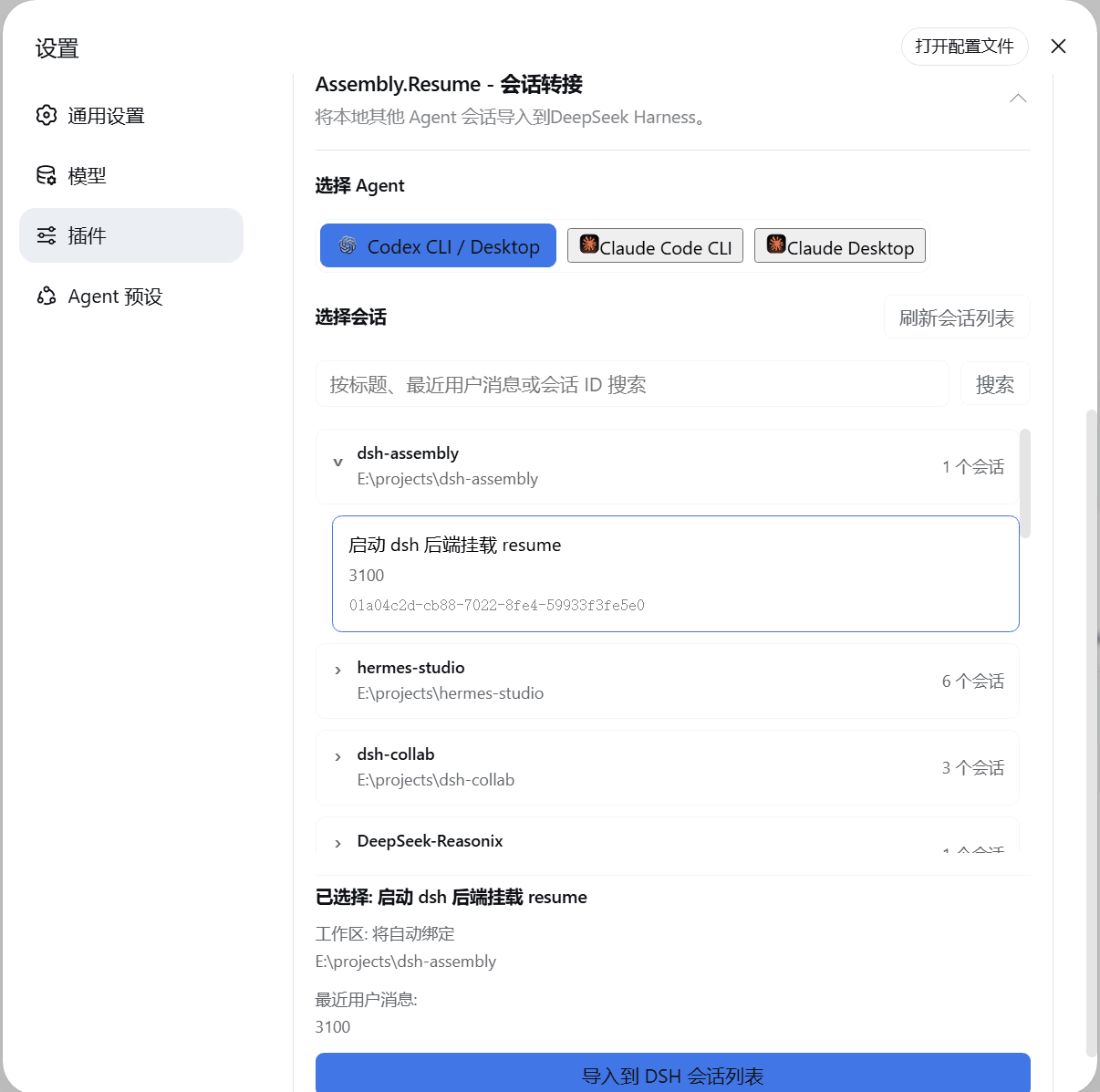
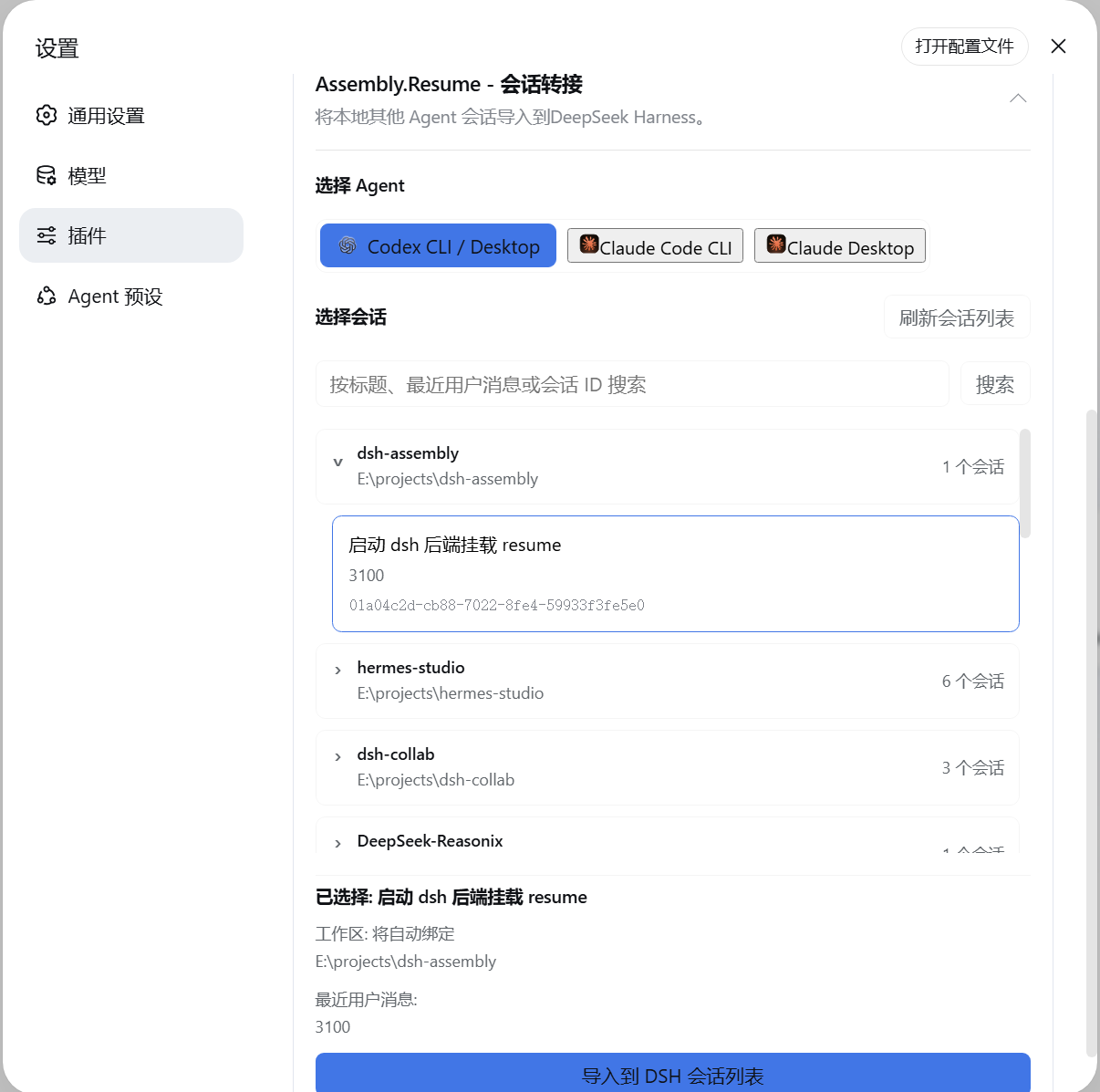
- Finds local conversations from Codex, Claude Code CLI, and Claude Code Desktop.
- Groups conversations by their original project so they are easier to find.
- Imports the selected conversation into DSH, including its visible messages and tool activity.
- Automatically registers and binds an existing source directory as a DSH Workspace.
- If the historical path no longer exists or the original conversation had no workspace, a new workspace can be specified during handoff. Otherwise, the conversation imports unbound and the old directory is never recreated.
- Continue the conversation in DSH after transfer.
Installation
Install the package from npm:
npm install dsh-assembly.resume
Add it to a DSH profile:
dsh plugin --profile web add dsh-assembly.resume
Start DSH:
dsh web
Open Settings > Plugins and select Session Resume to choose a provider and conversation.
Related相关推荐
-
 liangmianya/dsh-synapse
A visual, non-linear conversation workspace plugin for DeepSeek Harness ; A canvas-based session explorer and branching …
liangmianya/dsh-synapse
A visual, non-linear conversation workspace plugin for DeepSeek Harness ; A canvas-based session explorer and branching …
-
 alaliqing/claude-paper
📖 Cross-agent research paper toolkit for Claude Code, Codex, OpenCode, and DeepSeek Harness—quick summaries, deep study…
alaliqing/claude-paper
📖 Cross-agent research paper toolkit for Claude Code, Codex, OpenCode, and DeepSeek Harness—quick summaries, deep study…
-
 omdsh-dev/dsh-annotation
DSH Web 选中批注插件:选文字→批注→回车随消息发送;气泡隐藏批注块(零闪烁);回复按 Annotation N 逐条对照(可悬浮芯片)。官方 bundle,零核心改动
omdsh-dev/dsh-annotation
DSH Web 选中批注插件:选文字→批注→回车随消息发送;气泡隐藏批注块(零闪烁);回复按 Annotation N 逐条对照(可悬浮芯片)。官方 bundle,零核心改动
-
 Anionex/dsh-turn-rewind
deepseek harness对话和代码状态回退插件 | DSH — rewind conversation and workspace state, powered by a persistent Change Ledger
Anionex/dsh-turn-rewind
deepseek harness对话和代码状态回退插件 | DSH — rewind conversation and workspace state, powered by a persistent Change Ledger
-
 hanshenmesen/dsh-turn-delete
Delete one complete turn from a DeepSeek Harness session without deleting the session
hanshenmesen/dsh-turn-delete
Delete one complete turn from a DeepSeek Harness session without deleting the session
-
 qkycir-123/dsh-run2skill
Automatically turn successful DeepSeek Harness sessions into reusable, reviewable Agent Skills.
qkycir-123/dsh-run2skill
Automatically turn successful DeepSeek Harness sessions into reusable, reviewable Agent Skills.
-
 Tyan66666/billion-context-dsh
Model-driven context management (Active Context Pruning / ACP) for the DeepSeek Harness — the model decides when and wha…
Tyan66666/billion-context-dsh
Model-driven context management (Active Context Pruning / ACP) for the DeepSeek Harness — the model decides when and wha…
-
 PKUfudawei/dsh-capability-menu
Unified capability menu for DeepSeek Harness: manage exposure level (context footprint) and execution mode of MCP tools …
PKUfudawei/dsh-capability-menu
Unified capability menu for DeepSeek Harness: manage exposure level (context footprint) and execution mode of MCP tools …