kbzhao7/QQ.dsh-qqbot
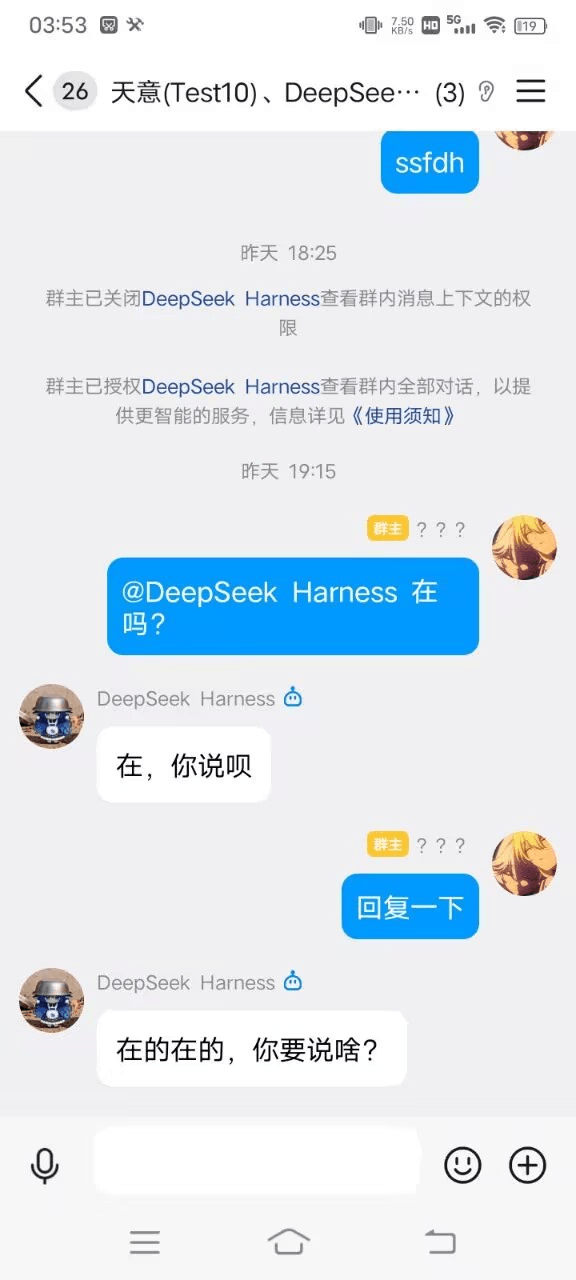
QQ机器人官方dsh-qqbot优化版本 基于dsh-qqbot(https://github.com/tencent-connect/dsh-qqbot?utmsource=chatgpt.com )项目,主要为UI,网络搜索,识图,自动判断是否对话(全量)等工具,详细效果展示
catalog descriptioncatalog 简介 / catalog description:基于DSH-QQBOT项目的dsh-qqbotGPT优化版本
Project Overview项目介绍
This is an optimized QQ bot plugin for DeepSeek Harness (DSH), built based on the official dsh-qqbot project. It provides optimized UI, web search, image recognition and automatic conversation judgment. Use it when you need an extended QQ bot on DSH, and it requires multiple pre-installed dependencies and manual step-by-step setup.
这是DeepSeek Harness(DSH)平台QQ机器人的优化版本,基于官方dsh-qqbot项目开发。核心能力包括优化UI、网络搜索、识图、全量自动对话判断。适用于需要在DSH上搭建带扩展工具的QQ机器人场景,需要预先搭建多个依赖环境,手动分步安装。
请帮我了解并安装插件:【QQ.dsh-qqbot】【https://github.com/kbzhao7/QQ.dsh-qqbot】Send this message to DSH in your current session. CLI install commands may not be accurate across systems — DSH will figure it out for you.把上面这条消息直接发给当前会话里的 DSH,让它帮你了解并安装。安装命令不一定准确,发给 DSH 更稳。
Or use CLI install (for developers)或使用命令行安装(适合开发者)
CLI Install命令行安装
dsh plugin --profile web add github:kbzhao7/QQ.dsh-qqbot把 kbzhao7/QQ.dsh-qqbot 加入你的 DSH 配置(web profile)即可启用。
READMEREADME
QQ.dsh-qqbot
QQ机器人官方dsh-qqbot优化版本
基于dsh-qqbot(https://github.com/tencent-connect/dsh-qqbot?utm_source=chatgpt.com )项目,主要为UI,网络搜索,识图,自动判断是否对话(全量)等工具,详细效果展示
#UI视频展示:
https://github.com/user-attachments/assets/eaaffb08-37a2-442f-a31f-e3eba252700b
#使用方法: 1.安装环境:
https://git-scm.com/install/windows
https://www.python.org/downloads/release/python-31311/
https://nodejs.org/zh-cn
https://pnpm.io/zh/installation
2.安装deepseek-harness
git clone https://github.com/deepseek-ai/deepseek-harness.git
cd deepseek-harness
pnpm install
pnpm run build
pnpm dsh web
3.安装插件
pnpm dsh plugin --profile qqbot add "目录\插件名称"
示例:pnpm dsh plugin --profile qqbot add "D:\d\dsh-qqbot-user-reference-1.0.32.tgz.tar"
注意:需要在deepseek-harness目录下使用
示例:
4.运行
pnpm dsh --profile qqbot
其他:
Related相关推荐
-
 xmanrui/dsh-im
通过扫码或机器人凭据把IM机器人接入DeepSeek Harness(支持飞书、微信、钉钉、企业微信、QQ、Slack、Telegram、Discord和WhatsApp)。 Connect IM bots to DeepSeek Harn…
xmanrui/dsh-im
通过扫码或机器人凭据把IM机器人接入DeepSeek Harness(支持飞书、微信、钉钉、企业微信、QQ、Slack、Telegram、Discord和WhatsApp)。 Connect IM bots to DeepSeek Harn…
- cpj-dev/dsh-plugin-cc Bridge Deepseek-harness into Claude Code for review, critique, delegation, and session import.
-
 tencent-connect/dsh-qqbot
让 QQ Bot 接入 DeepSeek Harness(dsh)的官方插件
tencent-connect/dsh-qqbot
让 QQ Bot 接入 DeepSeek Harness(dsh)的官方插件
-
 flymysql/dsh-remote
Remote-work assistant for DeepSeek Harness (DSH): connect SSH (key or password), pick a remote workspace, operate with r…
flymysql/dsh-remote
Remote-work assistant for DeepSeek Harness (DSH): connect SSH (key or password), pick a remote workspace, operate with r…
-
 whiteguo233/dsh-openbiliclaw
OpenBiliClaw 是本地运行的跨平台个性化内容推荐 Agent,持续理解你的兴趣并主动找内容。本仓库是它的 DeepSeek Harness 插件:DSH 界面常驻第四栏(推荐/内容库/对话/画像/设置),注册 22 个 Agent…
whiteguo233/dsh-openbiliclaw
OpenBiliClaw 是本地运行的跨平台个性化内容推荐 Agent,持续理解你的兴趣并主动找内容。本仓库是它的 DeepSeek Harness 插件:DSH 界面常驻第四栏(推荐/内容库/对话/画像/设置),注册 22 个 Agent…
-
 hanshanyike/dsh-yolo
把对话里说过的重要事情,变成持续可跟进的计划。 为 deepseek-harness 打造的个人助手:从对话中整理事项、跟踪变化,并在需要时提醒你。
hanshanyike/dsh-yolo
把对话里说过的重要事情,变成持续可跟进的计划。 为 deepseek-harness 打造的个人助手:从对话中整理事项、跟踪变化,并在需要时提醒你。
-
 omdsh-dev/dsh-lark
Lark/Feishu IM bot channel for DeepSeek Harness | 飞书 DeepSeek Harness (DSH)插件
omdsh-dev/dsh-lark
Lark/Feishu IM bot channel for DeepSeek Harness | 飞书 DeepSeek Harness (DSH)插件
-
 AX1202/ax-feishu-bridge
飞书/Lark 机器人桥接,同时支持 Pi 和 DeepSeek Harness(DSH)双平台,随时随地远程与你的编程助手对话
AX1202/ax-feishu-bridge
飞书/Lark 机器人桥接,同时支持 Pi 和 DeepSeek Harness(DSH)双平台,随时随地远程与你的编程助手对话