kingOfSoySauce/dsh-liang-skin
DeepSeek Harness 滑动变阻器皮肤
项目介绍Project Overview
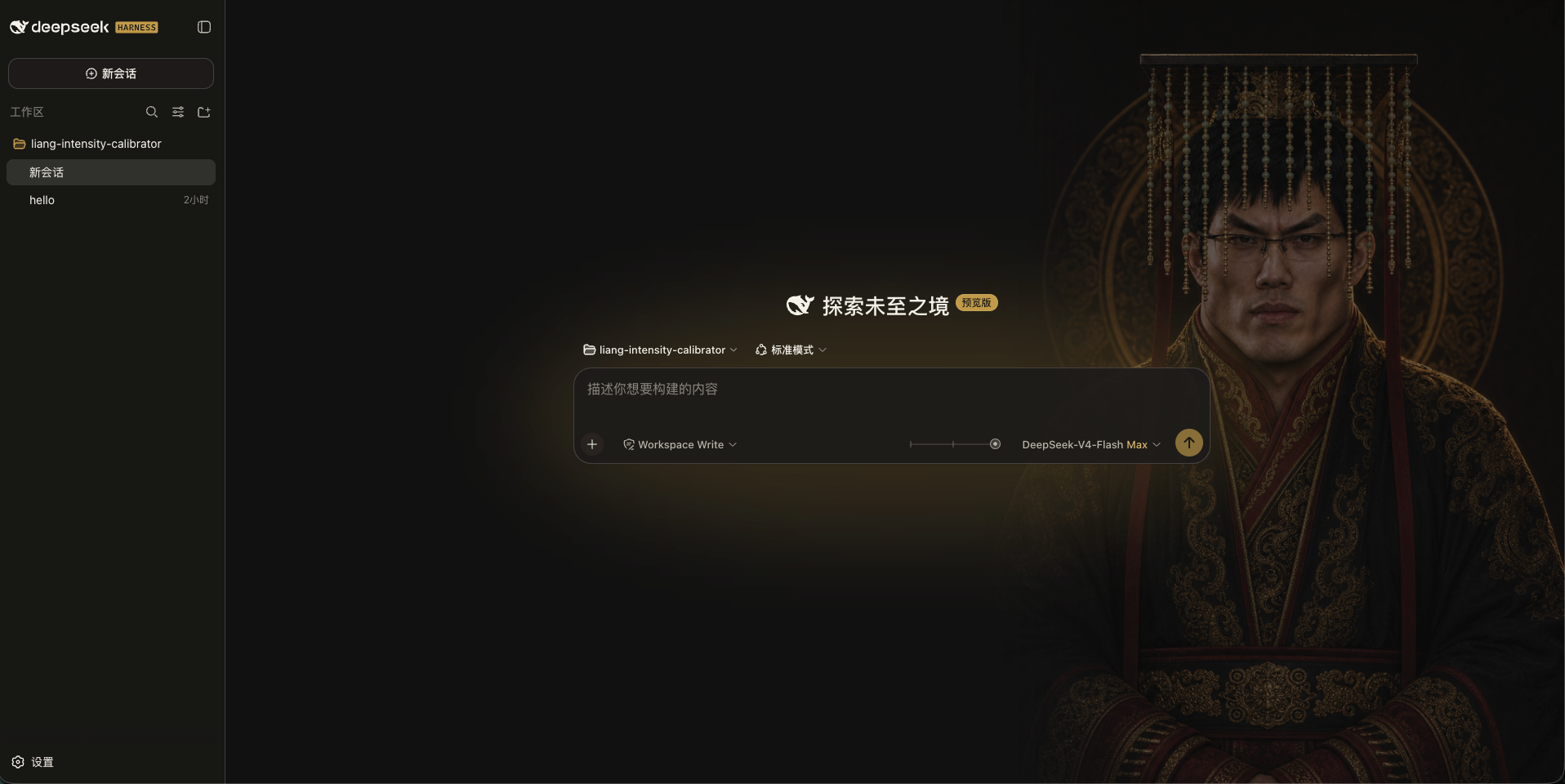
「滑动变祖」是一款 DSH 客户端皮肤,把模型的 reasoning.efforts 档位映射到 0–30 滑块并显示人物、背景与自适应配色。档位由模型自动读取后均匀分布,拖动过程仅做连续视觉预览,松手时吸附最近档位并经 ModelDirectory 提交。适用于需要直观切换推理强度的 Web 用户;不支持推理的模型与子代理不显示滑块,且会与其他皮肤插件冲突,安装前需先停用。
The Liang Intensity skin is a DSH web client plugin that maps a model's reasoning.efforts levels to a 0–30 slider, adding a character portrait, background, and adaptive theming. Levels are read dynamically from the model and evenly distributed; dragging previews smoothly and snaps to the nearest level on release, submitting the original ID via ModelDirectory. Use it for quick visual switching of reasoning intensity. It conflicts with other skin plugins—disable them first—and hides the slider for non-reasoning models or subagents.
请帮我了解并安装插件:【dsh-liang-skin】【https://github.com/kingOfSoySauce/dsh-liang-skin】把上面这条消息直接发给当前会话里的 DSH,让它帮你了解并安装。安装命令不一定准确,发给 DSH 更稳。Send this message to DSH in your current session. CLI install commands may not be accurate across systems — DSH will figure it out for you.
或使用命令行安装(适合开发者)Or use CLI install (for developers)
命令行安装CLI Install
dsh plugin --profile web add 'github:kingOfSoySauce/dsh-liang-skin'把 kingOfSoySauce/dsh-liang-skin 加入你的 DSH 配置(web profile)即可启用。
READMEREADME
滑动变祖 · DeepSeek Harness 皮肤
安装
方法一, 提示词安装:
点击展开提示词
复制以下提示词给 DSH;会先排查冲突再安装,所以较长:
请把“滑动变祖”皮肤安装到 DSH 的 web profile。必须先检查冲突,确认可以继续后再安装。

1. 安装前只读检查 web profile 的 package.json(dependencies 与 dsh.profile.bundles)、profile 的 cordis.patch.yml 和 $DSH_HOME/cordis.patch.yml(如有)。
2. 从当前启用的 bundles 中识别其他皮肤、主题或外观插件:排除 @deepseek-ai/dsh-base、@deepseek-ai/dsh-web-app、dsh-skin-market 和本次目标 dsh-client-liang-intensity-skin;读取候选 package.json 的名称、描述、dsh.client/dsh.bundle 声明,必要时再读 README。
3. 如果发现其他已启用的皮肤插件,列出它们并停在安装前,提醒我先停用;未经我确认不得修改任何 profile 文件,也不得执行安装。
4. 如果没有冲突,明确说“未检测到其他已启用的皮肤插件”,然后执行:

dsh plugin --profile web add 'github:kingOfSoySauce/dsh-liang-skin'

5. 安装后读取 web profile 的 package.json,确认 dependencies 和 dsh.profile.bundles 中都有 dsh-client-liang-intensity-skin;再检查目标 package.json 的 dsh.client/dsh.bundle 声明和 liang-intensity-skin loader 注册项。任一缺失都要报告安装或注册失败。
6. 告诉我如何重启 DSH Web。不要替我安装、停用或卸载其他皮肤。
更多 DSH 皮肤
更多社区皮肤,点击在线浏览皮肤市场
效果展示
|
交互规则
- 档位直接读取当前模型的
reasoning.efforts,不写死数量或名称。 - 任意 N 个档位均匀落在 0–30:两档为
0 / 30,三档为0 / 15 / 30,五档为0 / 7.5 / 15 / 22.5 / 30。 - 拖动期间只做连续视觉预览;指针松开、键盘操作完成或控件失焦时,才吸附到最近档位并通过官方 ModelDirectory 提交该档位原始 ID。
- 不支持推理或只有一个可选档位的模型不显示滑块。
- addressed subagent 不显示也不提交滑块。
外观开关
入口位于 设置 → 通用设置 → 外观皮肤:
滑动变祖:显示滑块并启用人物、背景和自适应配色。原生:移除背景层、皮肤变量和滑块,恢复 Harness 原生界面。
选择保存在当前浏览器本地,不会改动模型配置。
命令安装
需要先安装 DeepSeek Harness;当前版本已在 0.1.0-rc.6 上验证。安装本身可以在 DSH 运行时执行(只改动磁盘配置),重启后生效。三种方式任选其一:
安装前请确保已关闭其他皮肤插件,避免冲突。
方式一:从 GitHub 安装最新版(推荐)
dsh plugin --profile web add 'github:kingOfSoySauce/dsh-liang-skin'
dsh --profile web --dump-config | grep -B1 -A2 liang-intensity
方式二:从 GitHub Release tarball 安装
从本仓库 Releases 页面下载 dsh-client-liang-intensity-skin-0.1.7.tgz(包内已包含构建好的 lib/client.js,安装时不需要执行任何 prepare 脚本),然后:
dsh plugin --profile web add ./dsh-client-liang-intensity-skin-0.1.7.tgz
适合不方便走 git 的环境;相对路径按你运行命令的目录解析。
方式三:克隆后从本地路径安装(开发迭代)
git clone https://github.com/kingOfSoySauce/dsh-liang-skin.git
cd dsh-liang-skin
dsh plugin --profile web add .
dsh plugin 会把相对路径锚定到你运行命令的目录(而不是 profile 目录),所以在克隆目录里执行 add . 装的是指向克隆目录的 link 依赖:改完源码运行 npm run build,重启 DSH 即生效,无需重新安装。
验证与重启
安装成功后 dsh plugin 会自动把插件注册进 profile 的 dsh.profile.bundles(见 ~/.dsh/profiles/web/package.json),无需手动改配置;--dump-config 的输出中应出现 dsh-client-liang-intensity-skin 配置层(上面命令里的 grep 就是为此准备的)。
如果正式 DSH 正在运行,让执行安装的 agent 给用户两个选择:
- a. agent 自行重启:agent 终止旧进程后重新运行
dsh web; - b. 用户手动重启(推荐):在运行 DSH 的终端按 Ctrl+C,再运行
dsh web。
重启后浏览器会自动加载新的客户端插件,无需强制刷新。当前会话会中断,但 DSH 会话有磁盘持久化,重启后可以恢复。
卸载
dsh plugin --profile web remove dsh-client-liang-intensity-skin
remove 会自动把插件从 dsh.profile.bundles 中摘除;重启后设置入口完全移除。
常见问题
- pnpm 阻止构建脚本:pnpm ≥ 10 默认不执行第三方依赖的 build/prepare 脚本。当前皮肤没有 prepare 脚本,正常不会触发;若 pnpm 安装失败并给出提示,按 dsh 打印的说明在
~/.dsh/profiles/web/pnpm-workspace.yaml的allowBuilds下加入对应 key 后重试。 - 网络:方式一需要能访问 github.com(pnpm 经 codeload 拉取);方式二只需能下载 GitHub Release 附件。
- pnpm 缺失:
dsh plugin依赖 PATH 里的 pnpm,缺失时会明确提示。 - 端口占用:
dsh web默认监听 3080(可用--port修改),重启前确认旧进程已退出。
本地开发
npm install
npm test
npm run build
修改 client 源码后需要运行 npm run build,并一起提交更新后的 lib/client.js 和 source map。
灵感与素材来源
本插件的“滑动变祖”视觉概念与人物图片素材源自 Lichtspektrum/liang-intensity-calibrator。插件在原项目 0–30 强度轴的基础上,将视觉变化接入 DeepSeek Harness 的推理等级选择。
运行时素材已包含在插件中,安装后不需要额外下载。当前接入 24 张经过审核的人像锚点,滑动时直接切换最近锚点,不做图片交叉渐变。
相关推荐Related
-
 nexu-io/open-design
🎨 Best DeepSeek Harness Design Plugin. The open-source Claude Design alternative. 🖥️ Local-first desktop app. 🖼️ Your…
nexu-io/open-design
🎨 Best DeepSeek Harness Design Plugin. The open-source Claude Design alternative. 🖥️ Local-first desktop app. 🖼️ Your…
-
 ruvnet/ruflo
🌊 The original agent meta-harness. Deploy intelligent multi-player swarms, coordinate autonomous workflows, and build c…
ruvnet/ruflo
🌊 The original agent meta-harness. Deploy intelligent multi-player swarms, coordinate autonomous workflows, and build c…
-
 amruthpillai/reactive-resume
A one-of-a-kind resume builder that keeps your privacy in mind. Completely secure, customizable, portable, open-source a…
amruthpillai/reactive-resume
A one-of-a-kind resume builder that keeps your privacy in mind. Completely secure, customizable, portable, open-source a…
-
 esengine/DeepSeek-Reasonix
DeepSeek-native AI coding agent for your terminal. Engineered around prefix-cache stability — leave it running.
esengine/DeepSeek-Reasonix
DeepSeek-native AI coding agent for your terminal. Engineered around prefix-cache stability — leave it running.
-
 volcengine/OpenViking
Self-evolving Context Database for AI Agents. Unify Agent Memory, Knowledge RAG and Skills.
volcengine/OpenViking
Self-evolving Context Database for AI Agents. Unify Agent Memory, Knowledge RAG and Skills.
-
 Molunerfinn/PicGo
:rocket: The Ultimate Image Uploader for Efficient Creators. Supports Obsidian, Typora, VS Code etc. and 60+ image hosti…
Molunerfinn/PicGo
:rocket: The Ultimate Image Uploader for Efficient Creators. Supports Obsidian, Typora, VS Code etc. and 60+ image hosti…
-
 titanwings/distilly
Distilly — Distill how they think into reusable Skills for any Agent or Bot. Formerly Colleague Skill(原同事 Skill).
titanwings/distilly
Distilly — Distill how they think into reusable Skills for any Agent or Bot. Formerly Colleague Skill(原同事 Skill).
-
 titanwings/colleague-skill