kw78/dsh-office-tools
面向DeepSeek Harness的模型端Office工具:支持Word(.docx)、Excel(.xlsx)和PowerPoint(.pptx)的创建/读取/更新,使用工作区安全路径,并支持PPT图片嵌入。
Project Overview项目介绍
This is a native plugin built exclusively for DeepSeek Harness (DSH), offering eight model-facing Office file utilities for .docx, .xlsx, and .pptx formats. It supports core operations including creating new files, extracting content from existing files, and updating existing files. All tools run directly within the DSH plugin host environment, and have carried zero runtime dependencies since version 1.0.0. To install the plugin, you can use the official DSH plugin CLI command, which works for npm packages, GitHub sources, or local checkouts. After installation, you need to restart the DSH server for the tools to load.
The plugin is designed for DSH agents that need to generate and manipulate standard Office documents as part of their workflow. When a user asks the DSH agent to create reports, spreadsheets, or presentations, the agent can call the corresponding creation tool to output a valid Office file. It can also read the generated file back to confirm its content, and update the existing file with new content if required. All generated files use an ASCII-safe construction that works seamlessly with all mainstream Office suites. Users can also disable the PowerPoint tools via plugin configuration if needed.
The plugin follows the official DSH host-plugin contract, and only depends on the built-in tool registry and file system services provided by DSH. It is released under the open source MIT license, and includes multiple safety guardrails to prevent misuse. All file operations are confined to the agent's current session workspace, and input files are checked for size limits and zip bomb protections. It never spawns local Office processes, and all format parsing and generation is handled by the plugin's built-in OOXML engine. Overwrites are disabled by default to avoid accidental data loss.
这是一款专为 DeepSeek Harness(DSH)打造的原生插件,提供了八个面向模型的 Office 文件处理工具,覆盖 docx、xlsx、pptx 三类格式的创建、读取、更新操作。所有工具都运行在 DSH 插件宿主环境内,自 1.0.0 版本起就无额外运行依赖,所有文件操作都通过 DSH 官方的文件系统服务完成,不直接访问本地原始文件系统。可以通过 DSH 官方插件命令行工具快速安装。
这款插件面向需要处理 Office 文档的 DSH 智能代理,能够让大模型直接生成符合官方规范、可被所有主流办公软件打开的标准 Office 文件。在典型使用流程中,当用户向 DSH 代理提出生成报告、整理数据、制作演示文稿的需求时,代理会调用对应格式的创建工具生成文件,再读取文件内容进行验证,还可以根据需求向已有文件追加内容。
插件遵循 DSH 宿主插件标准契约,仅依赖 DSH 提供的工具注册和文件系统服务,本身无额外运行依赖,采用 MIT 许可证开源。所有文件操作都限制在代理会话工作区内,对输入文件设置了大小限制和 zip 炸弹防护,默认不覆盖已有文件,不会调用本地 Office 进程,所有格式解析生成都由插件自带的 OOXML 引擎完成。
请帮我安装这个 DSH 插件。安装前先完成【兼容性检查 + 安全性检查】,检查通过再动手。

插件:dsh-office-tools(kw78/dsh-office-tools)
仓库:https://github.com/kw78/dsh-office-tools
本站详情页:https://www.yhbd.top/plugins/kw78-dsh-office-tools/
本站登记:类型 plugin · 归类 原生 DSH 插件 · 许可证 MIT · ⭐ 26 · 最近提交 2026-10-01 · 主语言 TypeScript

按下面顺序执行,每步先把结论告诉我,再进入下一步:

【1 兼容性检查】
① 我这边:DSH 版本、Node 版本、操作系统、当前 profile(web / desktop)。
② 读它的 README、package.json、插件 manifest,列出它要求的 DSH 版本 / Node 版本 / 操作系统 / 外部依赖 / 需要另外先装的运行时。
③ 逐条比对,结论只写「满足 / 不满足 / 未知」三种;不满足的给出可行替代方案。
④ 检查是否和我已装的插件冲突:命令名重复、skill / tool 重名、端口占用、重复注册的 MCP server。

【2 安全性检查】
① 仓库可信度:和上面「本站登记」是否一致;star / fork 数、创建时间、最近提交,是否归档或长期停更。
② 安装脚本:逐行看 package.json 的 preinstall / install / postinstall,以及 install.sh、setup.ps1 之类脚本。出现 curl|bash、下载后直接执行、混淆代码、访问与插件功能无关的域名,立刻停下来告诉我,不要继续装。
③ 依赖:列出新增依赖,标出无人维护、或与知名包拼写近似的可疑包(typosquatting)。
④ 权限与副作用:它会读写哪些目录、访问哪些域名、需要哪些 DSH 权限(filesystem / network / shell / clipboard 等),以及怎么卸载和回滚。
⑤ 如果它要求 sudo / 管理员权限,或权限明显超出功能所需,先停下来问我。

【3 安装】
上面两步没有「不满足」和「高危项」时才执行;用官方推荐方式安装,不要自行提权。

【4 汇报】
用表格输出:检查项 / 结论 / 依据 / 是否需要我决策。拿不准的一律写「未知」并说明要我怎么确认——不要猜,也不要替我决定。
Send this message to DSH in your current session: it verifies compatibility and security first (answering met / not met / unknown item by item) and only installs once everything checks out — it will stop and ask you if it finds a high-risk item. The box scrolls; the copy is the full prompt. CLI install commands may not be accurate across systems, so DSH is the safer route.把上面这条消息直接发给当前会话里的 DSH:它会先核对兼容性与安全性(逐条给「满足 / 不满足 / 未知」),确认没问题再安装,有高危项会停下来问你。框内可滚动,复制到的是完整提示词;安装命令不一定准确,发给 DSH 更稳。
- 26 stars - an early-stage project星标 26,属于早期项目
DSH walks through these 9 checksDSH 会逐条核对这 9 项
Compatibility兼容性
- DSH, Node, OS and profile requirementsDSH 版本 / Node 版本 / 操作系统 / profile 是否满足要求
- External dependencies and runtimes (Electron / Python / Docker, ...)外部依赖与运行时(Electron / Python / Docker 等)是否齐备
- Conflicts with installed plugins: command names, skill / tool names, ports, duplicate MCP registration与已装插件是否冲突:命令名、skill / tool 重名、端口占用、重复 MCP 注册
Security安全性
- Repo matches the facts registered here; archived or abandoned?仓库是否与页面登记一致,是否归档或长期停更
- Safety of preinstall / install / postinstall and install.sh / setup.ps1preinstall / install / postinstall 与 install.sh、setup.ps1 是否安全
- curl|bash, download-then-execute, obfuscation, unrelated domains → stop immediatelycurl|bash、下载即执行、混淆代码、无关域名 → 立刻停止
- Typosquatting or unmaintained packages among the new dependencies新增依赖里有没有 typosquatting 或无人维护的包
- Requested permissions vs. what the feature actually needs申请了哪些权限、是否超出功能所需(filesystem / network / shell / clipboard)
- Any sudo / admin requirement, plus uninstall and rollback是否要求 sudo / 管理员权限,以及卸载与回滚方式
Anything uncertain must be marked unknown with a note on how to confirm it. This site's signal screen is a static snapshot, not a security audit.拿不准的必须标「未知」并说明要我怎么确认。本站的信号筛查是静态快照,不能替代安全审计。
Or use CLI install (for developers)或使用命令行安装(适合开发者)
CLI Install命令行安装
dsh plugin --profile web add dsh-office-tools把 kw78/dsh-office-tools 加入你的 DSH 配置(web profile)即可启用。
READMEREADME
dsh-office-tools



If you find this project useful, please give it a ⭐ Star — it helps others find it.
Eight model-facing Office file tools for DeepSeek Harness: create, read, and update Word (.docx), Excel (.xlsx), and PowerPoint (.pptx) files inside the session workspace. Zero runtime dependencies — every package is generated and parsed by the plugin's own OOXML engine, and every byte crosses the official ctx.fs service.
Tools
| Tool | Purpose |
|---|---|
word_create |
Create .docx (title, paragraphs, bullets, one table) |
word_read |
Extract text; format: "markdown" renders structure |
word_update |
Append paragraphs, bullets, and/or a table |
excel_create |
Create multi-sheet .xlsx from cell grids |
excel_read |
Read sheets as rows; formulas return cached values or '=…' |
excel_update |
Replace/create sheets, or write cells by A1 address |
ppt_create |
Create 16:9 .pptx (slides, bullets, notes, linked images) |
ppt_read |
Extract text, notes, tables, and per-shape geometry |
Strings starting with = become real Excel formulas.
Demo
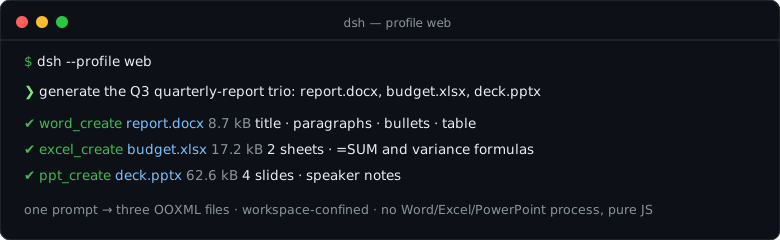
One prompt, a quarterly-report trio:
Install
dsh plugin --profile web add dsh-office-tools              # npm (recommended)
dsh plugin --profile web add github:kw78/dsh-office-tools  # from source
Restart DSH after installing. Requires a profile that provides the fs service (every profile with built-in read/write tools does).
Notes
- All paths are confined to the session workspace;
overwritedefaults tofalse. - Reads accept any real package (STORE/DEFLATE) with zip-bomb guards; updates refuse packages with binary parts instead of corrupting them.
- PPT images are linked, not embedded: the sanctioned
ctx.fswrite channel is UTF-8 text only, so a package cannot carry binary image parts. Keep image files next to the deck when moving it, and note that PowerPoint blocks external content by default — a linked picture renders as a "blocked automatic download" placeholder until you enable external content (File → Info → Enable Content, or add the folder under Trust Center → Trusted Locations). This is a PowerPoint security policy, not a package defect. ppt_createechoes every element's landing position;ppt_readreturns the same geometry for any deck.
Showing the opening section of the README — the full document lives in the repository以上为 README 开头摘要,完整文档在仓库内 · View the full README on GitHub →在 GitHub 查看完整 README →
Related相关推荐
-
 nexu-io/open-design
🎨 Best DeepSeek Harness Design Plugin. The open-source Claude Design alternative. 🖥️ Local-first desktop app. 🖼️ Your…
nexu-io/open-design
🎨 Best DeepSeek Harness Design Plugin. The open-source Claude Design alternative. 🖥️ Local-first desktop app. 🖼️ Your…
-
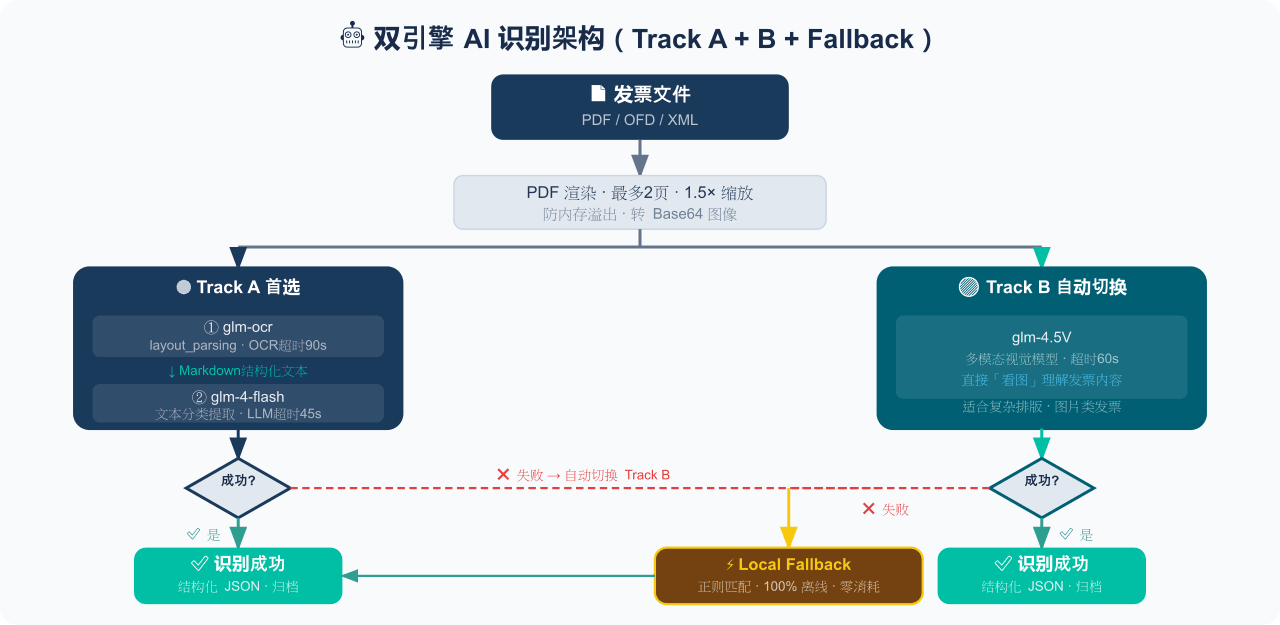 EthanYoQ/Invoice-Downloader
电子发票整理与报销准备工具:从邮箱批量收集 PDF/OFD/XML 发票,OCR 识别、分类归档并生成 Excel 汇总;提供 Windows/macOS 桌面版与 DSH 插件。
EthanYoQ/Invoice-Downloader
电子发票整理与报销准备工具:从邮箱批量收集 PDF/OFD/XML 发票,OCR 识别、分类归档并生成 Excel 汇总;提供 Windows/macOS 桌面版与 DSH 插件。
-
 sunchaokun/PPT-Design-Skill
Precision PPT design skill for OpenCode/Claude Code/Codex, with 40,000+ styles, pixel-perfect Build Mode control, AI ima…
sunchaokun/PPT-Design-Skill
Precision PPT design skill for OpenCode/Claude Code/Codex, with 40,000+ styles, pixel-perfect Build Mode control, AI ima…
-
 THU-MAIC/dsh-openmaic
OpenMAIC for DeepSeek Harness: classrooms, slides, interactive widgets, and Socratic teaching
THU-MAIC/dsh-openmaic
OpenMAIC for DeepSeek Harness: classrooms, slides, interactive widgets, and Socratic teaching
-
 HuanLinOTO/dsh-plugin-mineru
向模型暴露 MinerU 文档解析工具,将 PDF/图片/DOCX/PPTX/XLSX 转为结构化 Markdown/JSON | Exposes MinerU document-parsing tools to the model, co…
HuanLinOTO/dsh-plugin-mineru
向模型暴露 MinerU 文档解析工具,将 PDF/图片/DOCX/PPTX/XLSX 转为结构化 Markdown/JSON | Exposes MinerU document-parsing tools to the model, co…
-
 jing-hy/picturereader
DSH plugin: pixel-to-text image reading for text-only models. image_scan/image_ocr/image_sample tools + image-reading sk…
jing-hy/picturereader
DSH plugin: pixel-to-text image reading for text-only models. image_scan/image_ocr/image_sample tools + image-reading sk…
-
 hellodigua/dsh-share
DSH 对话分享插件,分享单轮或多轮对话,可导出为图片或 Markdown。Share DSH Q&As or selected conversation groups as PNG or Markdown.
hellodigua/dsh-share
DSH 对话分享插件,分享单轮或多轮对话,可导出为图片或 Markdown。Share DSH Q&As or selected conversation groups as PNG or Markdown.
-
 DIAG5/dsh-better-input
BetterInput是一套输入增强套件:语音识别、提示词优化、输入更多文件类型,各类文件转Md,交互体验优化等——把每一种喂给智能体的输入都变得更好。BetterInput is an input-enhancement suite — …
DIAG5/dsh-better-input
BetterInput是一套输入增强套件:语音识别、提示词优化、输入更多文件类型,各类文件转Md,交互体验优化等——把每一种喂给智能体的输入都变得更好。BetterInput is an input-enhancement suite — …