LaoYueHanNi/dsh-git-worktree
—
项目介绍Project Overview
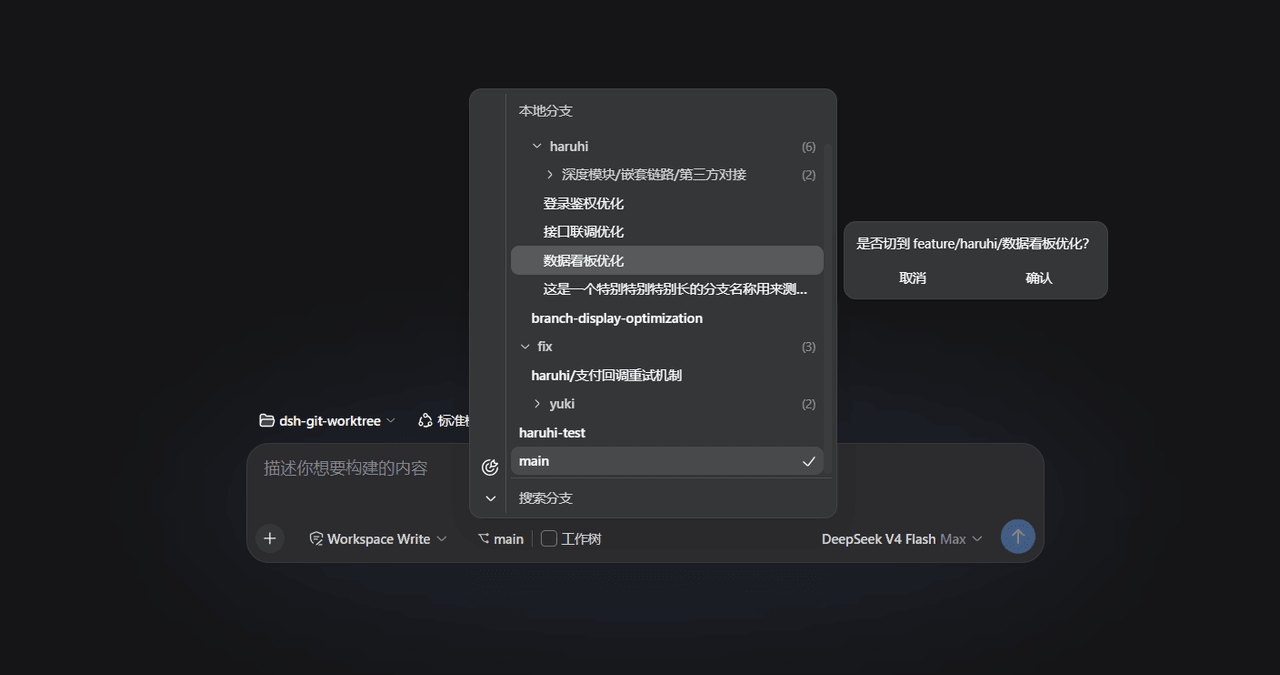
dsh-git-worktree 是一款 dsh 插件,提供 Web 界面下的分支与 Worktree 管理。核心能力:在工具栏以 IDEA 风格分支选择器列出当前分支,支持单击切换(git switch),或开启 Worktree 开关创建独立 worktree 作为真实工作区(默认存于 ~/.dsh/gitworktree/),可配置存储路径并自动迁移旧设置。适用于多分支并行开发或需要隔离实验环境的场景。注意:仅支持 web profile,且修改 src 后须重新构建并提交 lib/,否则通过 github: 安装的用户会获取过时产物。
dsh-git-worktree is a dsh plugin that manages Git branches and worktrees from the Web UI. It exposes a composer tool-row branch picker styled after IDEA: pick a branch to run git switch, or toggle the Worktree switch to run git worktree add under ~/.dsh/gitworktree/<repo>-<branch>/ as a real workspace. The storage root is configurable under Settings → Plugins, with automatic migration of legacy settings. Use it for parallel branch work or isolated experiment workspaces. It only works with the web profile, and any change under src/ requires rebuilding and committing lib/, otherwise github: installs ship stale output.
请帮我了解并安装插件:【dsh-git-worktree】【https://github.com/LaoYueHanNi/dsh-git-worktree】把上面这条消息直接发给当前会话里的 DSH,让它帮你了解并安装。安装命令不一定准确,发给 DSH 更稳。Send this message to DSH in your current session. CLI install commands may not be accurate across systems — DSH will figure it out for you.
或使用命令行安装(适合开发者)Or use CLI install (for developers)
命令行安装CLI Install
dsh plugin --profile web add github:LaoYueHanNi/dsh-git-worktree把 LaoYueHanNi/dsh-git-worktree 加入你的 DSH 配置(web profile)即可启用。
READMEREADME
dsh-git-worktree
简体中文 | English
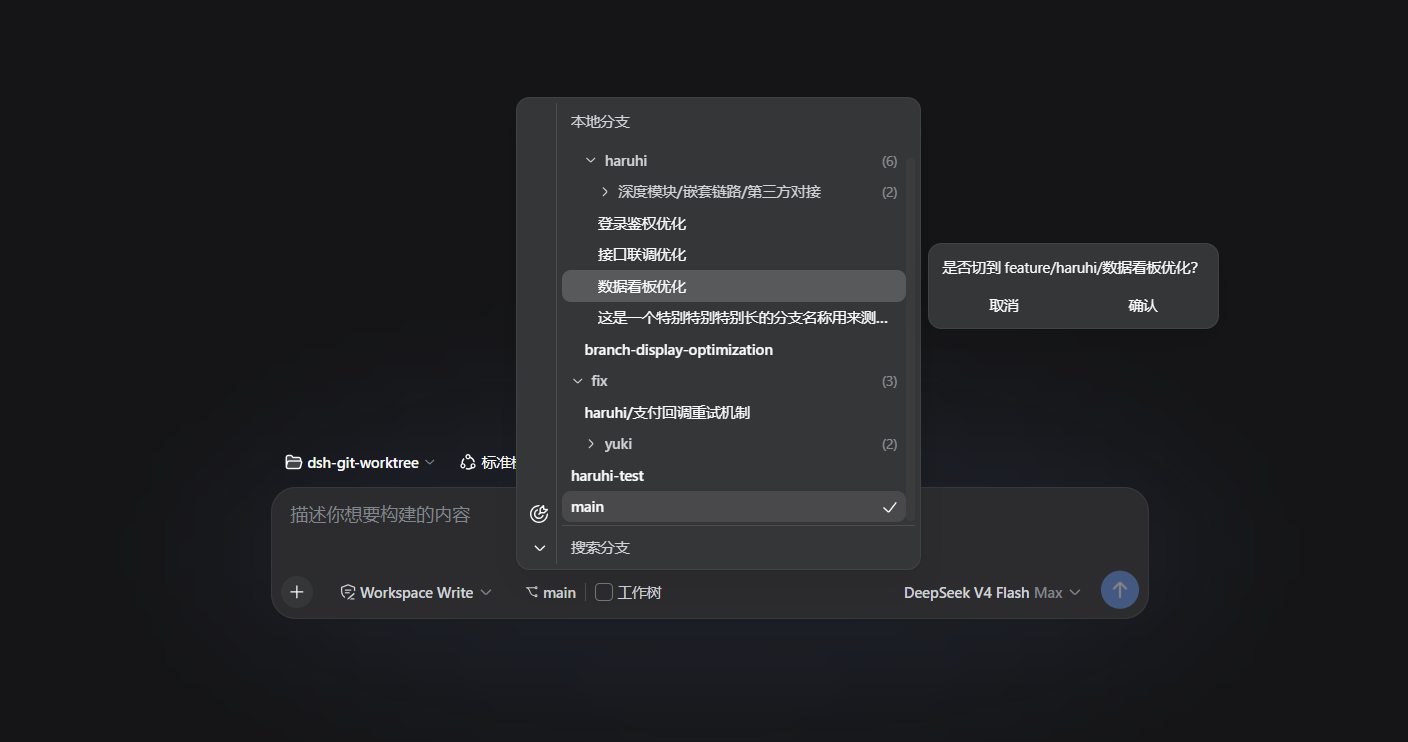
A dsh plugin for simple branch & worktree management in the Web UI. The composer tool row shows the current branch: pick another to switch in place, or flip the Worktree toggle to get an isolated worktree as a real workspace — as shown in the screenshot above.
Repo: https://github.com/LaoYueHanNi/dsh-git-worktree
Features
- IDEA-style branch picker: the branch menu treats
/as a folder hierarchy — collapsible folders, last-segment labels, the checked-out branch's chain opens by default and is centered on open. Single click selects a row; double-click or Enter opens the right-side confirm flyout. The left tool strip offers locate current branch and expand/collapse all; the bottom search keeps the matching branches' ancestor folders and highlights the hit substring. Clipped labels expose the full name on hover. - Branch switching: pick a branch from the chip's menu and confirm — an in-place
git switch. Inside a linked worktree it switches within that worktree only. - Worktree isolation: on a blank session, the Worktree toggle turns the pick into
git worktree addunder~/.dsh/gitworktree/<repo>-<branch>/, registered as a real workspace with a fresh blank session. Same branch re-picks reuse the existing worktree; stale registrations recover viagit worktree prune. - Storage root configurable: the Git Worktree card under Settings → Plugins — a native folder picker or a typed absolute path, effective on save (new worktrees land in the new location; existing ones stay put and remain listable/reusable by git). Empty selects the default
$DSH_HOME/gitworktree(~/.dsh/gitworktree). The value lives in the shared dsh settings document; a legacy~/.dsh/git-worktree/settings.jsonvalue migrates into it automatically on upgrade (the old file is renamed.migratedand kept).
Install
From GitHub (recommended)
dsh plugin --profile web add github:LaoYueHanNi/dsh-git-worktree
The package declares
dsh.bundle, soaddwires the plugin into the profile's layer stack automatically — no config editing needed. The builtlib/ships in the repo (there is nopreparescript), so git installs work out of the box without any build allowlist. Requires thewebprofile (dsh web).
From a local directory (development)
dsh plugin --profile web add link:D:/Code/dsh-worktree
link: installs a symlink: rebuild the plugin and restart dsh web to apply changes.
Update
dsh plugin --profile web update dsh-git-worktree
Remove
dsh plugin --profile web remove dsh-git-worktree
The plugin is removed from the profile and stops loading. Worktree folders under ~/.dsh/gitworktree/ are kept; the migrated legacy settings file (settings.json.migrated) can be deleted manually if unwanted — the plugin's own settings live in the dsh settings document.
Development
Build the plugin once:
npm install
npm run build && npm run build:client
npm test                # vitest (60 tests)
node scripts/smoke.mjs  # real-git smoke over the built lib
No
preparescript — by design. The compiledlib/output is committed to the repo. pnpm ≥ 10 refuses to run build scripts of git-hosted dependencies unless they are allowlisted (ERR_PNPM_GIT_DEP_PREPARE_NOT_ALLOWED), so apreparescript would break the zero-configgithub:install for every user. Shipping prebuilt output instead keepsdsh plugin add github:LaoYueHanNi/dsh-git-worktreeworking out of the box. After changing anything undersrc/, always rebuild and commit the updatedlib/, or installs will get stale output:
npm run build && npm run build:client
git add lib/
Temporary mount — effective for this launch only, no profile changes. Create a cordis.yml next to the repo pointing at the built host half (Windows needs the file:/// form):
- insert:
    - id: git-worktree
      name: 'file:///D:/Code/dsh-worktree/lib/index.js'
dsh web --patch <plugin-dir>/cordis.yml
This mode only mounts the host half (the three /plugin/git-worktree/* routes keep working); the chip needs the client bundle resolved by package name, so for UI development use the link: install above instead: run npm run build && npm run build:client (or npx tsdown --watch in the plugin directory), restart dsh web, and the browser plugin hot-reloads automatically.
相关推荐Related
-
 nexu-io/open-design
🎨 Best DeepSeek Harness Design Plugin. The open-source Claude Design alternative. 🖥️ Local-first desktop app. 🖼️ Your…
nexu-io/open-design
🎨 Best DeepSeek Harness Design Plugin. The open-source Claude Design alternative. 🖥️ Local-first desktop app. 🖼️ Your…
-
 ruvnet/ruflo
🌊 The original agent meta-harness. Deploy intelligent multi-player swarms, coordinate autonomous workflows, and build c…
ruvnet/ruflo
🌊 The original agent meta-harness. Deploy intelligent multi-player swarms, coordinate autonomous workflows, and build c…
-
 amruthpillai/reactive-resume
A one-of-a-kind resume builder that keeps your privacy in mind. Completely secure, customizable, portable, open-source a…
amruthpillai/reactive-resume
A one-of-a-kind resume builder that keeps your privacy in mind. Completely secure, customizable, portable, open-source a…
-
 esengine/DeepSeek-Reasonix
DeepSeek-native AI coding agent for your terminal. Engineered around prefix-cache stability — leave it running.
esengine/DeepSeek-Reasonix
DeepSeek-native AI coding agent for your terminal. Engineered around prefix-cache stability — leave it running.
-
 volcengine/OpenViking
Self-evolving Context Database for AI Agents. Unify Agent Memory, Knowledge RAG and Skills.
volcengine/OpenViking
Self-evolving Context Database for AI Agents. Unify Agent Memory, Knowledge RAG and Skills.
-
 Molunerfinn/PicGo
:rocket: The Ultimate Image Uploader for Efficient Creators. Supports Obsidian, Typora, VS Code etc. and 60+ image hosti…
Molunerfinn/PicGo
:rocket: The Ultimate Image Uploader for Efficient Creators. Supports Obsidian, Typora, VS Code etc. and 60+ image hosti…
-
 titanwings/colleague-skill
将冰冷的离别化为温暖的 Skill,欢迎加入数字生命1.0!Transforming cold farewells into warm skills? It's giving rebirth era. Welcome to Digital …
titanwings/colleague-skill
将冰冷的离别化为温暖的 Skill,欢迎加入数字生命1.0!Transforming cold farewells into warm skills? It's giving rebirth era. Welcome to Digital …
-
 nocobase/nocobase
NocoBase is an open-source AI + no-code platform for building business systems fast. Instead of generating everything fr…
nocobase/nocobase
NocoBase is an open-source AI + no-code platform for building business systems fast. Instead of generating everything fr…