Laplace-bit/dsh-smooth-stream
DeepSeek Harness (dsh) 插件:丝滑流式呈现,无闪烁。
项目介绍Project Overview
dsh-smooth-stream 是一款为 DeepSeek Harness Web UI 提供流式渲染与滚动跟进的插件。它在文字、Markdown、代码块、表格及工具结果逐段输出时保持连贯呈现,并通过自适应节奏调整渲染速度。当回复内容较长、需要顺滑阅读节奏时即可启用。注意:系统启用减少动态效果时会跳过接管,且 frame rate 低于 30 fps 时揭示会暂停。
dsh-smooth-stream is a plugin that adds fluid streaming rendering and smooth scroll following to the DeepSeek Harness Web UI. It keeps text, Markdown, code blocks, tables, and tool results coherent as they arrive, and adapts rendering pace to output speed. Use it when long replies need a steady, readable rhythm. Note: when prefers-reduced-motion is active, takeover is skipped, and reveal pauses if frame rate drops below 30 fps.
请帮我了解并安装插件:【dsh-smooth-stream】【https://github.com/Laplace-bit/dsh-smooth-stream】把上面这条消息直接发给当前会话里的 DSH,让它帮你了解并安装。安装命令不一定准确,发给 DSH 更稳。Send this message to DSH in your current session. CLI install commands may not be accurate across systems — DSH will figure it out for you.
或使用命令行安装(适合开发者)Or use CLI install (for developers)
命令行安装CLI Install
dsh plugin --profile web add dsh-smooth-stream把 Laplace-bit/dsh-smooth-stream 加入你的 DSH 配置(web profile)即可启用。
READMEREADME
dsh-smooth-stream
English | 中文
dsh-smooth-stream 为 DeepSeek Harness(dsh)Web UI 带来流畅的流式渲染和丝滑滚动。文字、Markdown、代码块、表格以及工具结果会随着输出自然呈现;内容逐步增长时,页面平稳跟随,整轮回复保持连贯的视觉节奏。
项目主页:https://laplace-bit.github.io/dsh-smooth-stream/
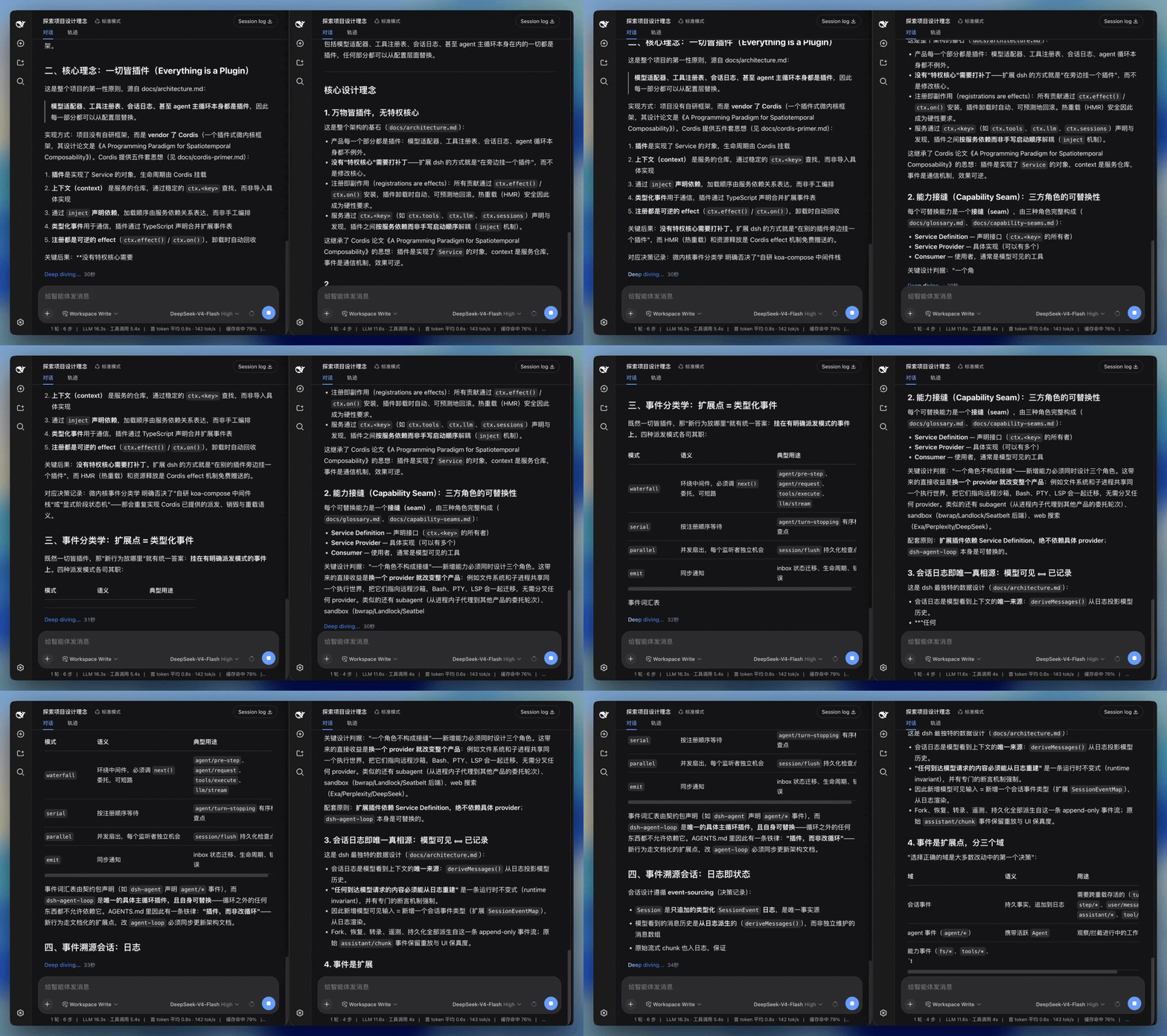
效果
左:默认 Web UI。右:dsh-smooth-stream。
核心体验
- 流畅渲染。 文字边到边呈现,Markdown 结构持续更新,标题、列表、代码块和表格在流式过程中保持自然的阅读状态。
- 丝滑滚动。 内容逐步变高时,页面沿连续的滚动轨迹平稳跟随,视线始终贴着正在生成的内容。
- 统一过渡。 换行、代码块、表格和工具结果使用一致的过渡方式,正文、思考过程与工具输出衔接自然。
- 自适应节奏。 渲染速度会根据输出速度和待显示内容调整,让慢速输出从容呈现,快速输出及时跟上。
安装
在 DeepSeek Harness 源码仓库里:
pnpm dsh plugin --profile web add dsh-smooth-stream
如果 PATH 上已经有 dsh:
dsh plugin --profile web add dsh-smooth-stream
npm 包带预构建的 lib/,无需 pnpm ≥10 的构建脚本授权,直接可装。
启动界面:
pnpm dsh web
Host 日志里应出现 [dsh-smooth-stream] plugin loaded!。
卸载:pnpm dsh plugin --profile web remove dsh-smooth-stream(或 dsh plugin --profile web remove dsh-smooth-stream)。
配置
组合包默认 preset: balanced。要换节拍,在 profile 的 cordis.patch.yml 里改:
preset |
手感 |
|---|---|
realtime |
更贴模型到达 |
balanced |
默认 |
silky |
缓冲更大,追上更慢 |
旧版的 mode、revealCharsPerSec、scrollSpeedPxPerSec 和 maxScrollSpeedPxPerSec 字段仍可被加载,以兼容已有 profile;当前自适应引擎仅使用 preset 调整节拍。
用户设置
在 Web 界面打开 设置 → 插件 → 插件配置,会看到一张 丝滑流式(Smooth stream) 卡片,其中包含:
- 启用丝滑流式渲染(默认开启):开启时由本插件接管回复和工具行的渲染与跟随;关闭后会撤销接管,完整使用 Harness 内置渲染。
- 自动展开思考:控制思考块在流式期间是否自动展开。主开关关闭时此选项不会生效。
- 显示渲染调试面板(默认关闭):在聊天页右侧显示实时渲染、帧率和滚动跟随数据,并开放流式揭示与滚动弹簧参数。
“自动展开思考”开启时,思考块会在流式时自动展开、思考结束后收起;关闭后思考块保持折叠,仍可手动点开,且不会被流式状态抢回控制。
这些设置是用户级的持久化偏好,改完即生效,无需重启;会写进 DeepSeek Harness 的用户设置文档,而不是插件的组合配置。
调试面板中的参数在拖动时实时生效,包括揭示倍率、队列压力、最大揭示速度、弹簧刚度/阻尼/质量、预测 runway、runway 响应时间和最低背压倍率。面板同时显示 FPS、帧耗时、积压字符、实际揭示速度、渲染进度、视觉滞后、滚动速度和可用跟随空间;可随时保存当前组合、放弃未保存修改、恢复默认,或复制当前参数与指标。关闭调试开关后,渲染引擎立即恢复正式默认参数。
关于与更新
- 版本 / 主页 / 许可证:见本页顶部与 package.json 的
version、homepage、repository、license字段;安装的插件列表可在 设置 → 插件 → 全部 里查看。 - 更新:卡片会显示 Host 当前加载的版本。只有当前 profile 明确把
dsh-smooth-stream声明为 npm 依赖时,更新按钮才会对该 profile 执行固定的包更新,并提示重启 Harness。link:或file:本地开发安装会显示为开发版本,更新按钮会保持禁用,避免覆盖你的源码目录。
也可以通过命令行更新 npm 安装的 profile:
dsh plugin --profile web update dsh-smooth-stream
(也可用 dsh plugin --profile web outdated 查看是否有新版本。)
常见问题
这是 DeepSeek 官方插件吗?
不是。它是面向 DeepSeek Harness(dsh)Web UI 的独立维护项目,采用 MIT 许可证,和 DeepSeek 没有从属关系。
dsh 插件怎么安装?
用内置插件命令:在 dsh 源码目录运行 dsh plugin --profile web add dsh-smooth-stream(见安装)。
能用 npm 安装吗?
能。dsh-smooth-stream 已发布到 npm,dsh plugin --profile web add dsh-smooth-stream 安装的就是预构建的 npm 包。
支持 prefers-reduced-motion 吗?
支持。系统开启减少动态效果时直接显示完整文本、不接管跟随;帧率低于 30 fps 且回复在屏外时,揭示自动暂停、恢复后再补上。

许可证
相关推荐Related
-
 ruvnet/ruflo
🌊 The original agent meta-harness. Deploy intelligent multi-player swarms, coordinate autonomous workflows, and build c…
ruvnet/ruflo
🌊 The original agent meta-harness. Deploy intelligent multi-player swarms, coordinate autonomous workflows, and build c…
-
 amruthpillai/reactive-resume
A one-of-a-kind resume builder that keeps your privacy in mind. Completely secure, customizable, portable, open-source a…
amruthpillai/reactive-resume
A one-of-a-kind resume builder that keeps your privacy in mind. Completely secure, customizable, portable, open-source a…
-
 esengine/DeepSeek-Reasonix
DeepSeek-native AI coding agent for your terminal. Engineered around prefix-cache stability — leave it running.
esengine/DeepSeek-Reasonix
DeepSeek-native AI coding agent for your terminal. Engineered around prefix-cache stability — leave it running.
-
 volcengine/OpenViking
Self-evolving Context Database for AI Agents. Unify Agent Memory, Knowledge RAG and Skills.
volcengine/OpenViking
Self-evolving Context Database for AI Agents. Unify Agent Memory, Knowledge RAG and Skills.
-
 Molunerfinn/PicGo
:rocket: The Ultimate Image Uploader for Efficient Creators. Supports Obsidian, Typora, VS Code etc. and 60+ image hosti…
Molunerfinn/PicGo
:rocket: The Ultimate Image Uploader for Efficient Creators. Supports Obsidian, Typora, VS Code etc. and 60+ image hosti…
-
 titanwings/colleague-skill
将冰冷的离别化为温暖的 Skill,欢迎加入数字生命1.0!Transforming cold farewells into warm skills? It's giving rebirth era. Welcome to Digital …
titanwings/colleague-skill
将冰冷的离别化为温暖的 Skill,欢迎加入数字生命1.0!Transforming cold farewells into warm skills? It's giving rebirth era. Welcome to Digital …
-
 nocobase/nocobase
NocoBase is an open-source AI + no-code platform for building business systems fast. Instead of generating everything fr…
nocobase/nocobase
NocoBase is an open-source AI + no-code platform for building business systems fast. Instead of generating everything fr…
-
 Tencent/WeKnora
Open-source LLM knowledge platform: turn raw documents into a queryable RAG, an autonomous reasoning agent, and a self-m…
Tencent/WeKnora
Open-source LLM knowledge platform: turn raw documents into a queryable RAG, an autonomous reasoning agent, and a self-m…