lcthe/dsh-timeline-rail
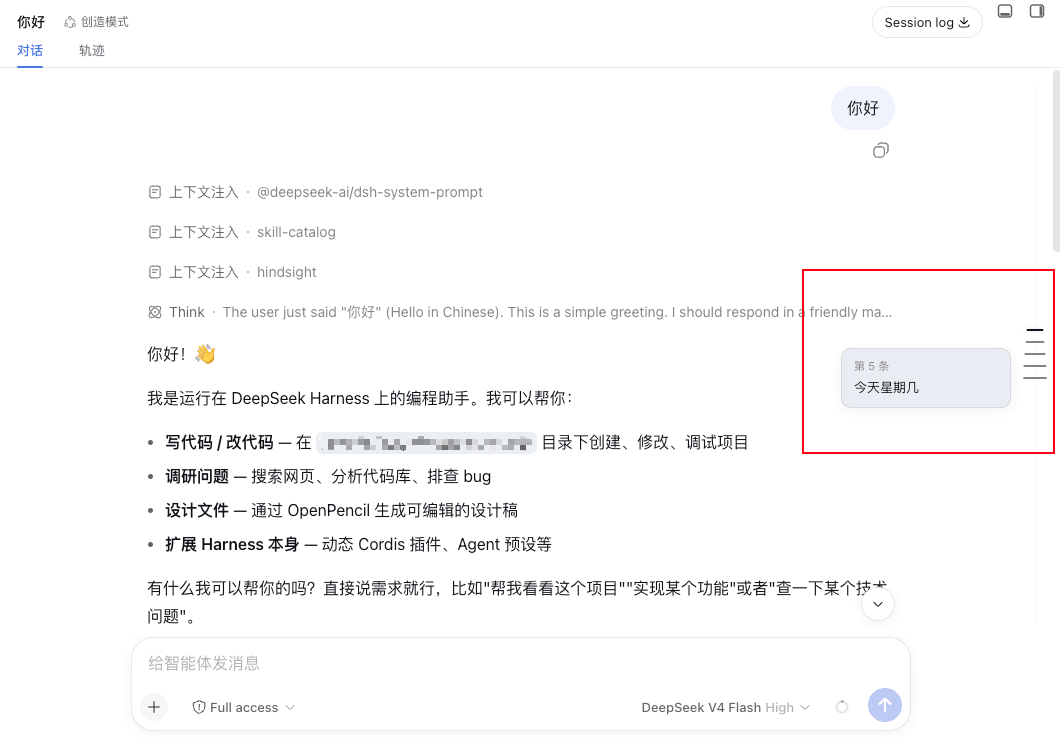
DeepSeek Harness 网页会话消息时间轴导航条 / Message timeline rail for DeepSeek Harness web chat — 消息区右侧等间距刻度,点击跳转,悬浮预览 / evenly spaced ticks, click to jump, hover to preview.
Project Overview项目介绍
A DSH client plugin that renders a low-contrast column of tick marks along the right edge of a conversation, one per durable user message, sitting above the composer in the conversation.input.dock slot. It previews a message on hover and jumps the scrollport to it on click, and on mount it chains loadOlder() to backfill earlier pages until history is complete. Colors follow --dsw-* tokens for theme parity, and pointer-transparent gutters never block the underlying conversation. It targets the browser client used by both Desktop and Web, so it renders identically there; headless/TUI profiles have no composer slot and show nothing. Caveat: ticks are evenly spaced at 12px rather than mapped to true scroll positions, and previews clamp user/assistant text to 2 and 3 lines without inline expansion.
DSH 客户端插件,在对话右沿绘制低对比度时间轴刻度线,每个用户消息对应一个。悬停显示消息预览,点击跳转对齐至目标消息;首次挂载自动串联 loadOlder() 拉取全部历史,补齐对应刻度。使用 dsw-* 主题 token 自适应深浅色,固定 12px 间距、不可点击区域不阻挡消息滚动。需含浏览器客户端的 DSH 部署,桌面/Web 一致;仅在无 composer 槽位的 headless/TUI 配置下不渲染。注意:刻度按消息数等距分布,不代表真实滚动位置,长历史需在轨道内独立滚动。
请帮我了解并安装插件:【dsh-timeline-rail】【https://github.com/lcthe/dsh-timeline-rail】Send this message to DSH in your current session. CLI install commands may not be accurate across systems — DSH will figure it out for you.把上面这条消息直接发给当前会话里的 DSH,让它帮你了解并安装。安装命令不一定准确,发给 DSH 更稳。
Or use CLI install (for developers)或使用命令行安装(适合开发者)
CLI Install命令行安装
dsh plugin --profile web add github:lcthe/dsh-timeline-rail把 lcthe/dsh-timeline-rail 加入你的 DSH 配置(web profile)即可启用。
READMEREADME
@lcthe/dsh-timeline-rail
A message timeline rail for the DeepSeek Harness web chat.
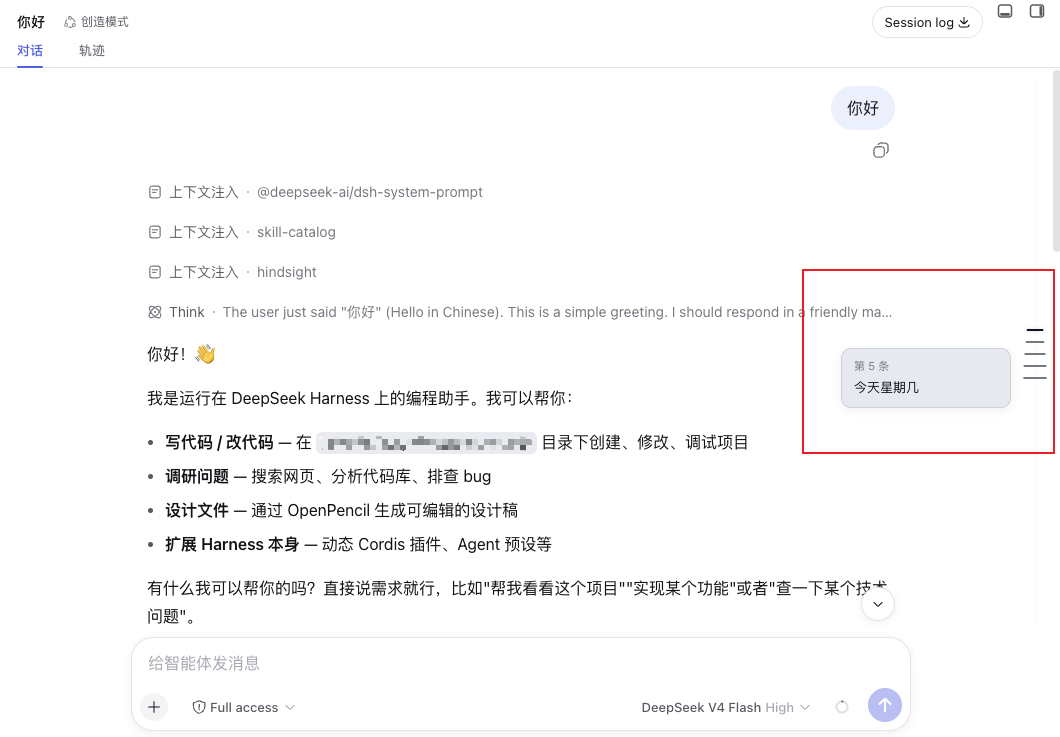
Along the left edge of the conversation, above the composer, it draws a low-contrast, evenly spaced column of thin tick marks — one tick per durable user message, styled after a meeting-notes / editor timeline. Hover a tick to preview that message; click it to jump the conversation straight to it.
Desktop & Web both supported. The DeepSeek Harness desktop app is an Electron shell that embeds the same browser client served over a localhost web server, so a "web" plugin renders identically on both. This package targets the browser-side conversation slot and works wherever that client runs — Desktop and Web. Only headless / TUI profiles have no composer slot and render nothing.
Features
- Evenly spaced ticks — one short horizontal line per user message along a 1px track, with a fixed 12px gap; long histories scroll inside the rail instead of compressing the marks.
- Centered marks — each horizontal tick is centered on the vertical rail, keeping the timeline axis visually balanced.
- Complete-history loading — after the session opens, the rail automatically loads earlier history pages in series until no pages remain, and adds ticks as each page arrives.
- Click to jump — aligns the selected user message to the top of the visible message area.
- Hover to preview — a compact wide card shows the user message (
#N) in bold, clamped to 2 lines, followed by the assistant reply clamped to 3 lines; image/attachment-only messages get a labelled placeholder. - Theme aware — colors come from
--dsw-*tokens, so it follows the light/dark theme with no extra config. - Slim and out of the way — pointer-events are none except on the ticks themselves; the rail never blocks clicks on the messages.
How it works
DSH's web GUI is a Cordis composition. This package is a client plugin that registers a single entry into the conversation.input.dock slot (the additive band above the composer card). It reads the live ConversationSnapshot through the slot's useSession hook, maps each durable kind: 'user' node to a tick, and measures the scrollport ([data-conversation-scroll], [data-composer-seat]) to lay the rail out on the left edge. On mount it uses the scoped conversation service's loadOlder() action to fetch earlier pages automatically until the session history is complete; each returned page adds ticks immediately. It defines no new service.
Positioning is computed against the same stable data attributes the product itself uses ([data-conversation-scroll], [data-chat-flow], [data-chat-anchor-key], [data-composer-seat]). The rail is constrained to the visible conversation area, and its empty gutter is pointer-transparent so it does not block conversation or Session Log scrolling. Long histories use an independent rail scrollport; scrolling the rail does not scroll the conversation.
Install
Requires a DeepSeek Harness deployment with the browser client — that is the desktop app (Web UI embedded) or the web version alike. The rail is pure presentation; it renders only where the conversation composer exists.
pnpm add @lcthe/dsh-timeline-rail
Then add the plugin row to your cordis.yml at the same include level as the bundle rows:
- insert:
    - id: dsh-timeline-rail
      name: '@lcthe/dsh-timeline-rail'
Full wiring details live in INSTALL.cordis.yml.md.
Alternative: load in-session as a dynamic plugin
DSH web also ships a first-class dynamic-Cordis tool. If you are in a session and just want to try it, ask the agent to load the plugin (it can cordis_define + cordis_run this package). This is the recommendable route for quick evaluation; the npm package is the stable, shareable form.
Peer dependencies
| package | range |
|---|---|
@deepseek-ai/cordis |
>=4.0.1-rc.1 |
@deepseek-ai/dsh-client-locale |
^0.0.1-rc.1 |
@deepseek-ai/dsh-client-runtime |
^0.0.1-rc.1 |
@deepseek-ai/dsh-client-ui-conversation |
^0.0.1-rc.1 |
@deepseek-ai/dsh-client-ui-slots |
^0.0.1-rc.1 |
react / react-dom |
^18.2.0 |
Development
pnpm install
pnpm run build     # typecheck (tsc) + bundle (tsdown) -> lib/
lib/index.js,lib/invariant.js— node-half ESM for the Host Loader.lib/client.js— the browser bundle in DSH's__ModuleLoader__.load({ id, factory })closure format, with CSS modules inlined and auto-injecting a<style data-plugin>.lib/types/**— emitted TypeScript declarations.
Known limitations and deferred work
- The rail renders only in the web client; headless/TUI profiles have no composer slot, so nothing shows there.
- Ticks are evenly spaced (one per user message) at a fixed 12px gap. Long histories make the rail content independently scrollable rather than compressing the gap; the ticks still do not represent each message's true scroll position. A real-position "minimap" mode is a natural follow-up.
- Message previews clamp the user message to 2 lines and the assistant reply to 3 lines; longer text is truncated without an affordance to expand in the rail itself (clicking the tick already jumps you to the full message).
- The plugin targets the slot contract as of the
0.0.1-rc.1release line of the Harness client packages. If theconversation.input.dockcontract changes in a later RC, this package may need a bump.
License
Related相关推荐
-
 liangmianya/dsh-synapse
A visual, non-linear conversation workspace plugin for DeepSeek Harness ; A canvas-based session explorer and branching …
liangmianya/dsh-synapse
A visual, non-linear conversation workspace plugin for DeepSeek Harness ; A canvas-based session explorer and branching …
-
 alaliqing/claude-paper
📖 Cross-agent research paper toolkit for Claude Code, Codex, OpenCode, and DeepSeek Harness—quick summaries, deep study…
alaliqing/claude-paper
📖 Cross-agent research paper toolkit for Claude Code, Codex, OpenCode, and DeepSeek Harness—quick summaries, deep study…
-
 omdsh-dev/dsh-annotation
DSH Web 选中批注插件:选文字→批注→回车随消息发送;气泡隐藏批注块(零闪烁);回复按 Annotation N 逐条对照(可悬浮芯片)。官方 bundle,零核心改动
omdsh-dev/dsh-annotation
DSH Web 选中批注插件:选文字→批注→回车随消息发送;气泡隐藏批注块(零闪烁);回复按 Annotation N 逐条对照(可悬浮芯片)。官方 bundle,零核心改动
-
 Anionex/dsh-turn-rewind
deepseek harness对话和代码状态回退插件 | DSH — rewind conversation and workspace state, powered by a persistent Change Ledger
Anionex/dsh-turn-rewind
deepseek harness对话和代码状态回退插件 | DSH — rewind conversation and workspace state, powered by a persistent Change Ledger
-
 hanshenmesen/dsh-turn-delete
Delete one complete turn from a DeepSeek Harness session without deleting the session
hanshenmesen/dsh-turn-delete
Delete one complete turn from a DeepSeek Harness session without deleting the session
-
 qkycir-123/dsh-run2skill
Automatically turn successful DeepSeek Harness sessions into reusable, reviewable Agent Skills.
qkycir-123/dsh-run2skill
Automatically turn successful DeepSeek Harness sessions into reusable, reviewable Agent Skills.
-
 Tyan66666/billion-context-dsh
Model-driven context management (Active Context Pruning / ACP) for the DeepSeek Harness — the model decides when and wha…
Tyan66666/billion-context-dsh
Model-driven context management (Active Context Pruning / ACP) for the DeepSeek Harness — the model decides when and wha…
-
 PKUfudawei/dsh-capability-menu
Unified capability menu for DeepSeek Harness: manage exposure level (context footprint) and execution mode of MCP tools …
PKUfudawei/dsh-capability-menu
Unified capability menu for DeepSeek Harness: manage exposure level (context footprint) and execution mode of MCP tools …