
lencx/Minke
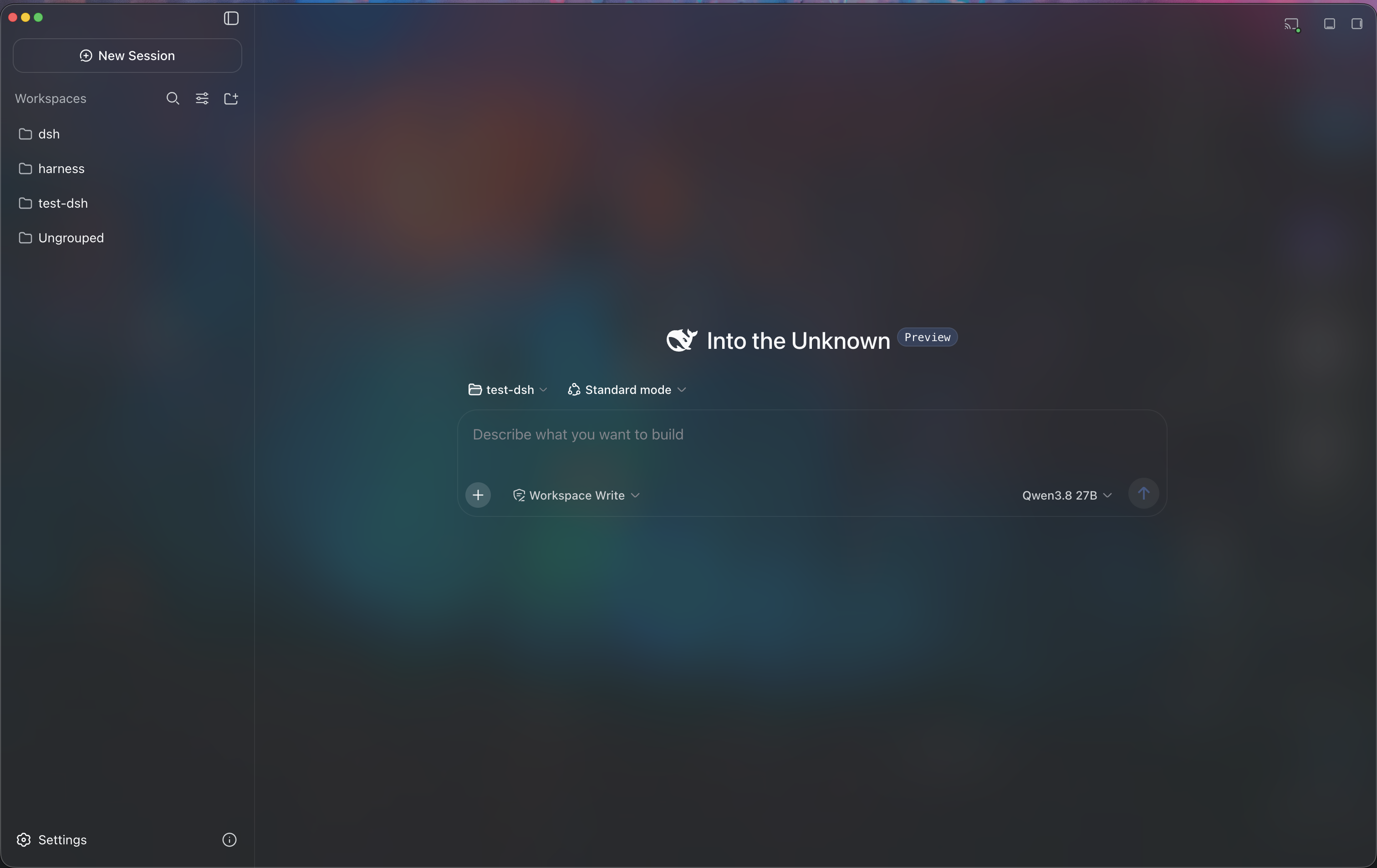
Minke brings DeepSeek Harness to the desktop as a focused, local-first workspace for agentic work. Conversations, project files, terminals, web tools, and native desktop actions stay within reach—without fragmenting your workflow across multiple apps.
catalog 简介 / catalog descriptioncatalog description:🐳 DeepSeek Harness Desktop
项目介绍Project Overview
Minke 是 DeepSeek Harness 的本地优先桌面工作区,集成对话、文件、终端、浏览器与插件管理,支持 PWA 与 Tailscale 远程访问,可连接 LM Studio、Ollama 等本地模型,跨 macOS、Windows、Linux 运行。适用于需要在一个桌面环境中完成多任务与远程协作的场景。注意:项目仍在积极开发,功能与本地数据结构可能变更,且非 DeepSeek 官方产品。
Minke is a local-first desktop workspace for DeepSeek Harness, combining conversations, project files, terminal, browser, and a plugin manager in one window. It supports PWA installation, Tailscale-based remote access, and local model integrations such as LM Studio and Ollama, with builds for macOS, Windows, and Linux. Use it when agentic work needs a unified, keyboard-driven desktop environment. Note that Minke is under active development, so features and the local data schema may change, and it is an independent community project.
请帮我了解并安装插件:【Minke】【https://github.com/lencx/Minke】把上面这条消息直接发给当前会话里的 DSH,让它帮你了解并安装。安装命令不一定准确,发给 DSH 更稳。Send this message to DSH in your current session. CLI install commands may not be accurate across systems — DSH will figure it out for you.
或使用命令行安装(适合开发者)Or use CLI install (for developers)
命令行安装CLI Install
dsh plugin --profile web add github:lencx/Minke把 lencx/Minke 加入你的 DSH 配置(web profile)即可启用。
READMEREADME

Minke
A native desktop workspace for DeepSeek Harness
English · 简体中文




Minke brings DeepSeek Harness to the desktop as a focused, local-first workspace for agentic work. Conversations, project files, terminals, web tools, and native desktop actions stay within reach—without fragmenting your workflow across multiple apps.
[!IMPORTANT] Minke is under active development. Features, packaging, and the local data schema may change as the project evolves. Minke is an independent community project, not an official DeepSeek product.
Highlights
Since v0.2.0, Minke has added Agent Browser and multi-channel remote control, regression-tested every remote-access route end to end, and continued to polish the desktop workflow.
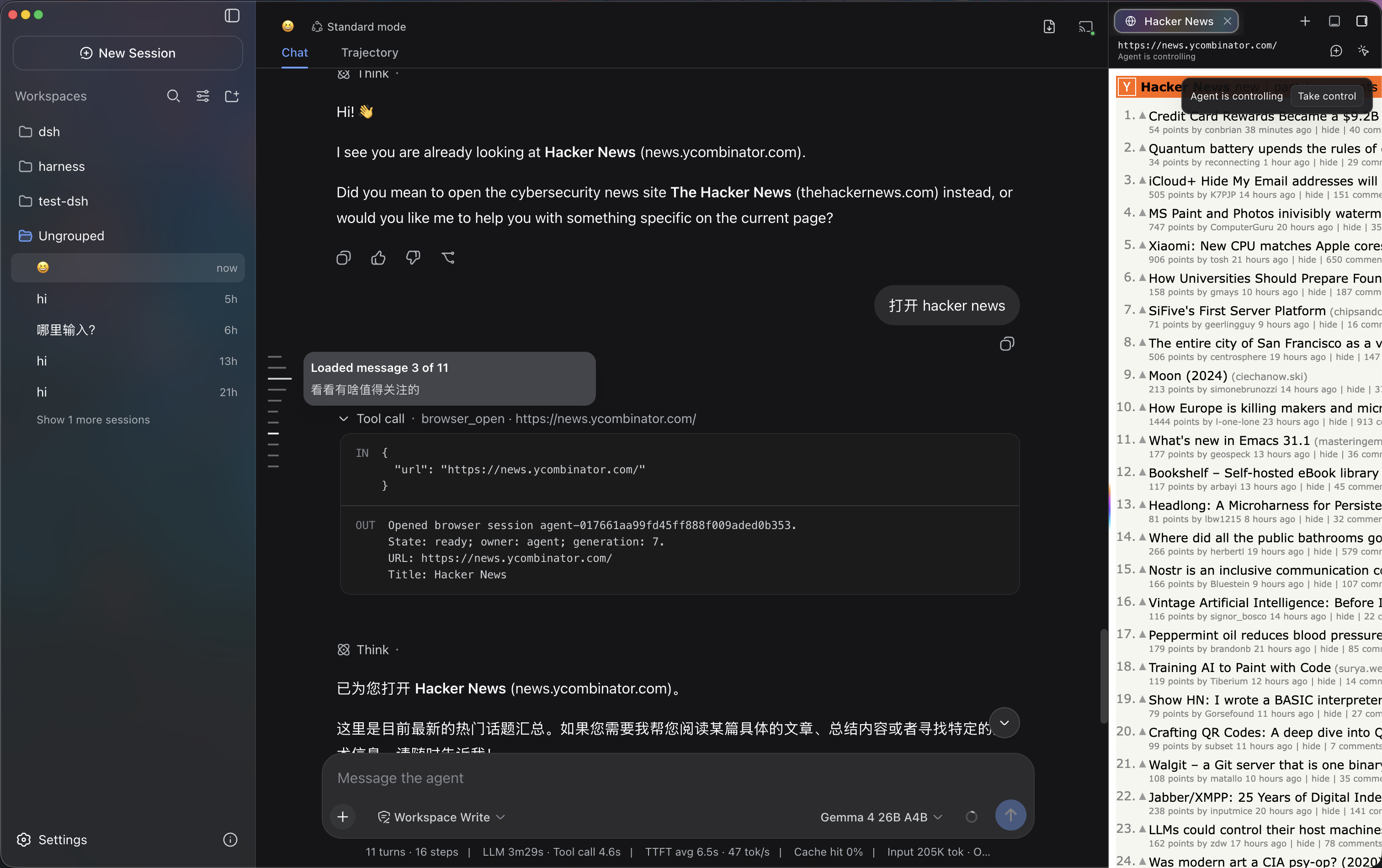
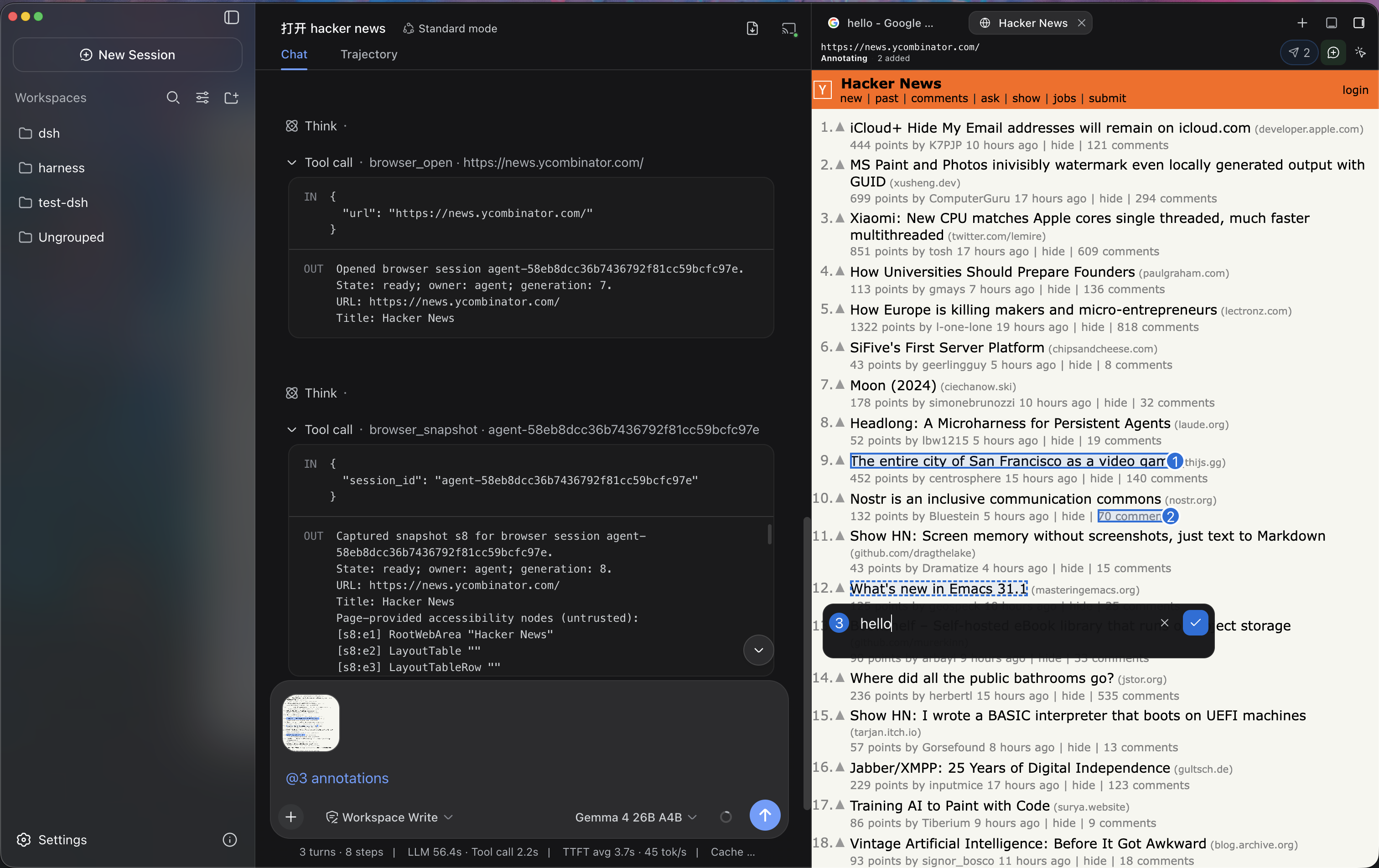
- Agent Browser with shared human control — Built-in, credential-free Web search helps agents find sources, while Agent Browser lets them open and navigate sites in dedicated tabs, inspect page structure, click, fill fields, press keys, wait for changes, and capture screenshots. Every action stays visible: take control at any time, return it to the agent, or annotate exact page elements and send screenshot-backed context into the current conversation.
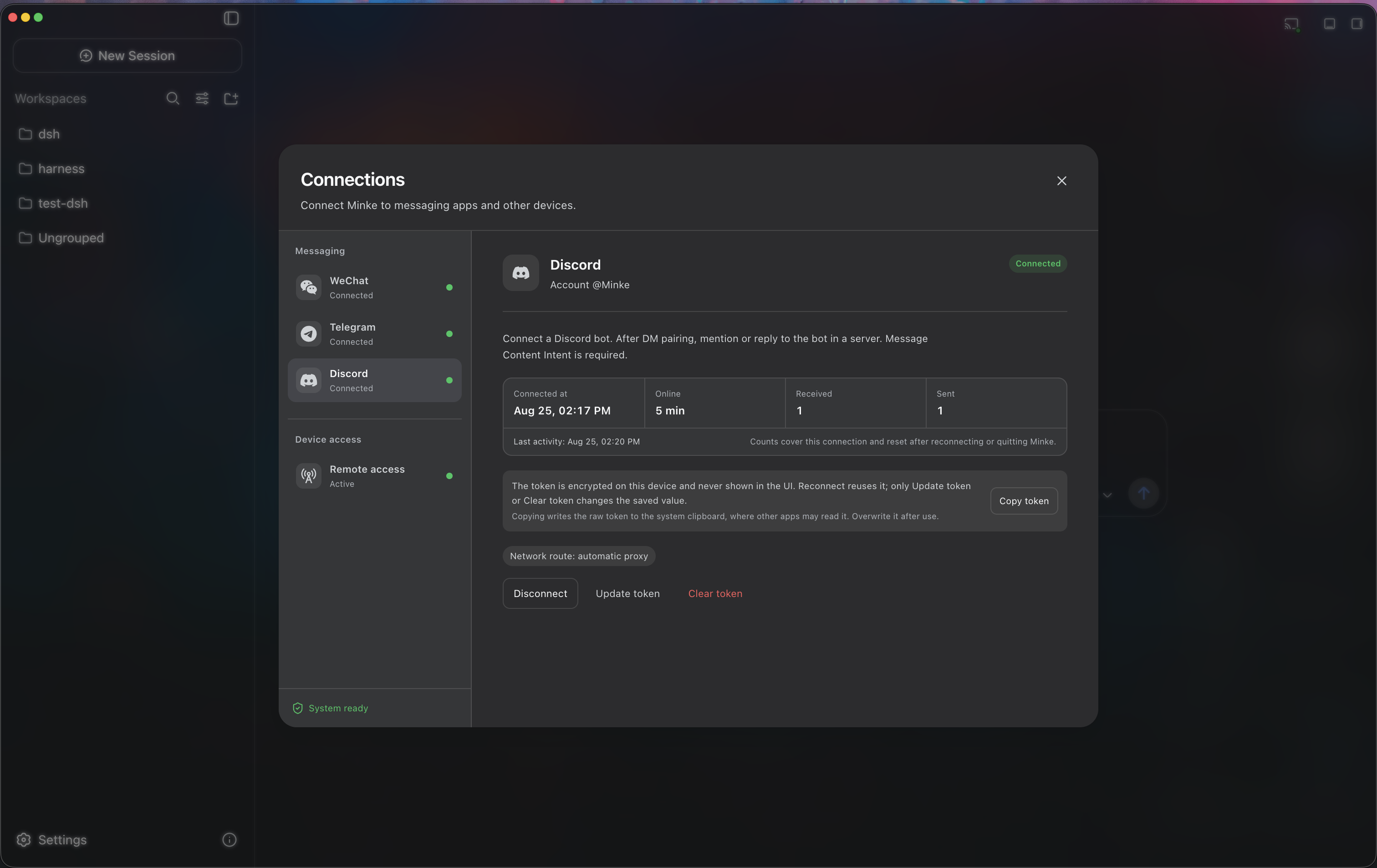
- Remote control through WeChat, Telegram, and Discord — Connect WeChat with a QR code or add Telegram and Discord through Bot tokens, then start Minke Agent tasks from the messaging apps you already use and receive results in the same conversation. WeChat accepts direct messages only from the account that scanned the code, while Telegram and Discord use direct-message pairing. Credentials are encrypted locally, and the durable Gateway retains pending work across temporary connection or Agent failures.
- All three Web remote-access routes are verified and available — Tailscale Serve over HTTPS, Tailscale Direct IP, and Cloudflare Access have all completed end-to-end regression testing and are ready to use; changing routes does not require restarting Minke. The remote side is a responsive Web workspace rather than a desktop projection, so a phone or tablet can continue conversations, start agents, manage project files, use the host terminal, and install the HTTPS experience as a PWA.
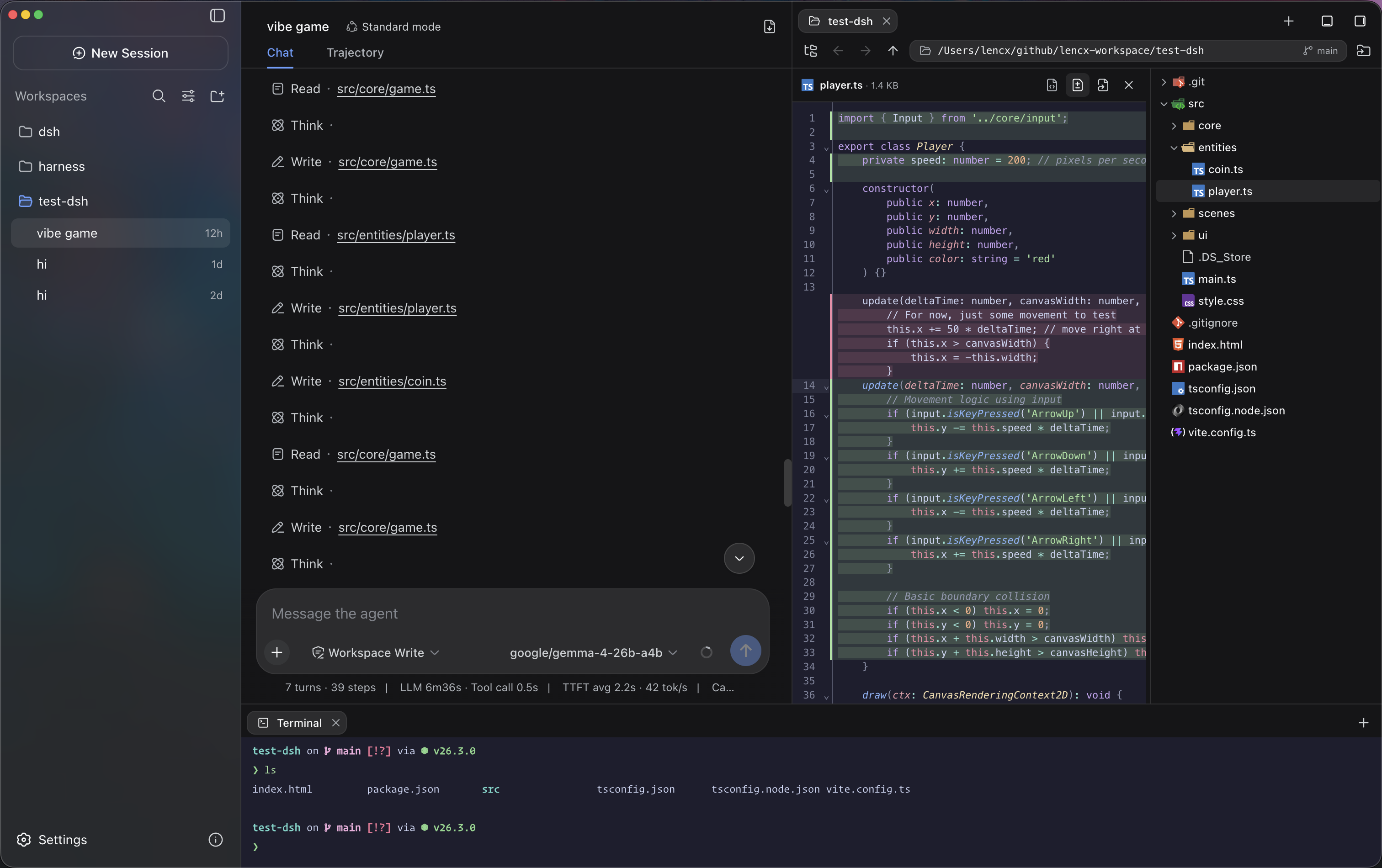
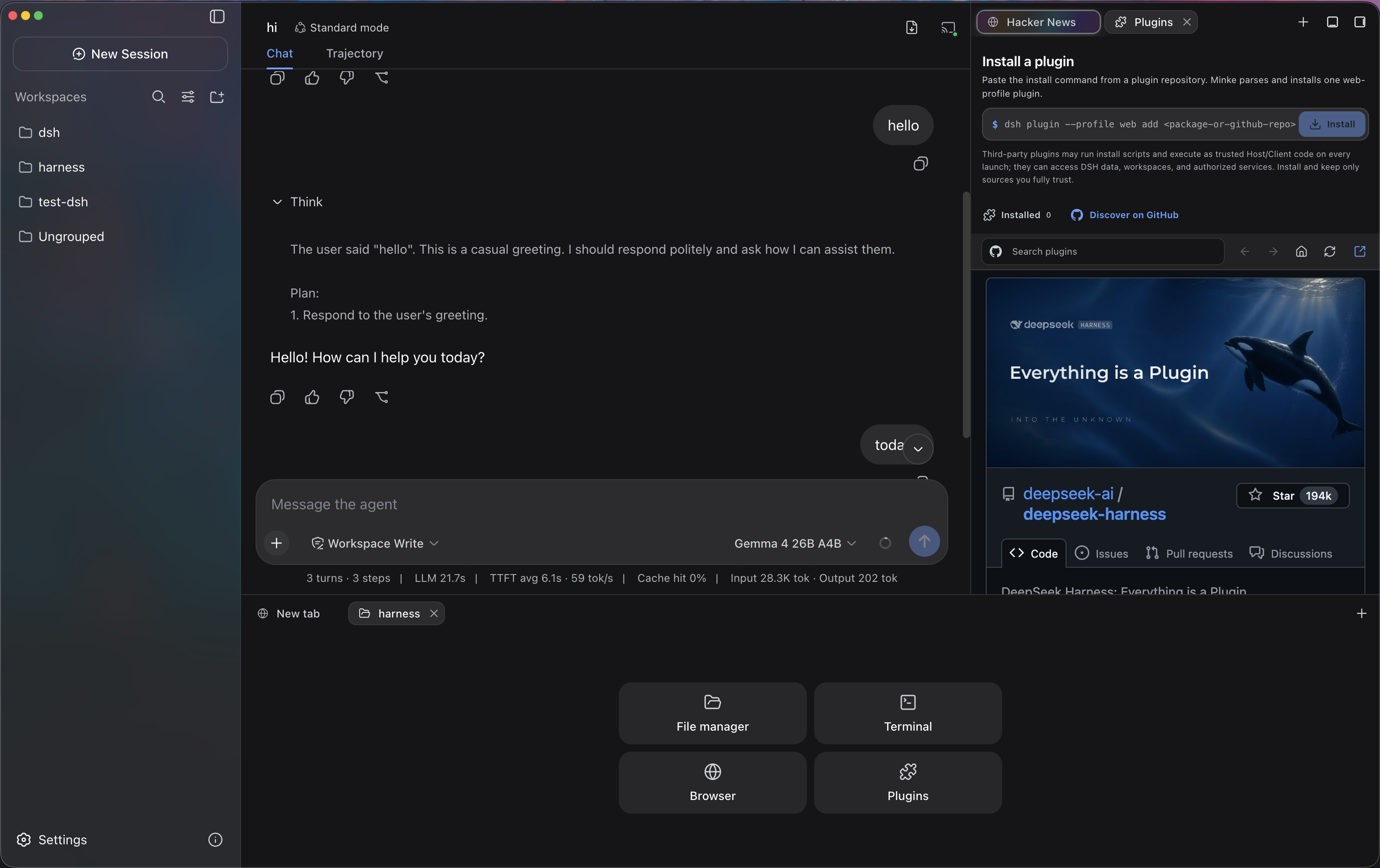
- More than a chat window — Independent right and bottom Tabs keep Files, Terminal, Browser, Plugins, and Session details beside the active conversation. The Plugins workspace supports GitHub discovery, installation, status checks, repair, and removal. Files supports navigation, syntax-highlighted previews, editing, and diffs, while Terminal connects to a real PTY on the Minke host.
- Local model integrations — Minke can discover and connect to LM Studio, Ollama, and other loopback OpenAI-compatible services. Optional lifecycle management can start supported local runtimes when needed without taking ownership of services that were already running.
- Continuous workflow polish — A message outline for long conversations, fast composer focus, element annotations in regular Web tabs, cross-volume file browsing, lossless long Telegram replies, and clearer browser and connection settings make frequent actions smoother. The global Command Palette (
Mod+K), configurable shortcuts, native menus, Session history navigation, log export, synchronized themes, and English and Chinese UI remain close at hand. - Safe, recoverable data migration — Choose where Minke stores its data, then preview and merge existing Sessions, plugins, and settings. Minke deduplicates identical files, preserves conflicts and source directories, and switches only after the restart-time migration succeeds; starting with a clean data home remains an option.
- Local-first and cross-platform — Application state and browser session data stay on your machine under the Minke data boundary. Automated releases target macOS, Windows, and Linux, including a portable AppImage; the built-in updater verifies the Release, exact file size, and SHA-256 before asking you to install.
 |
 |
 |
 |
 |
 |
Remote access from another device
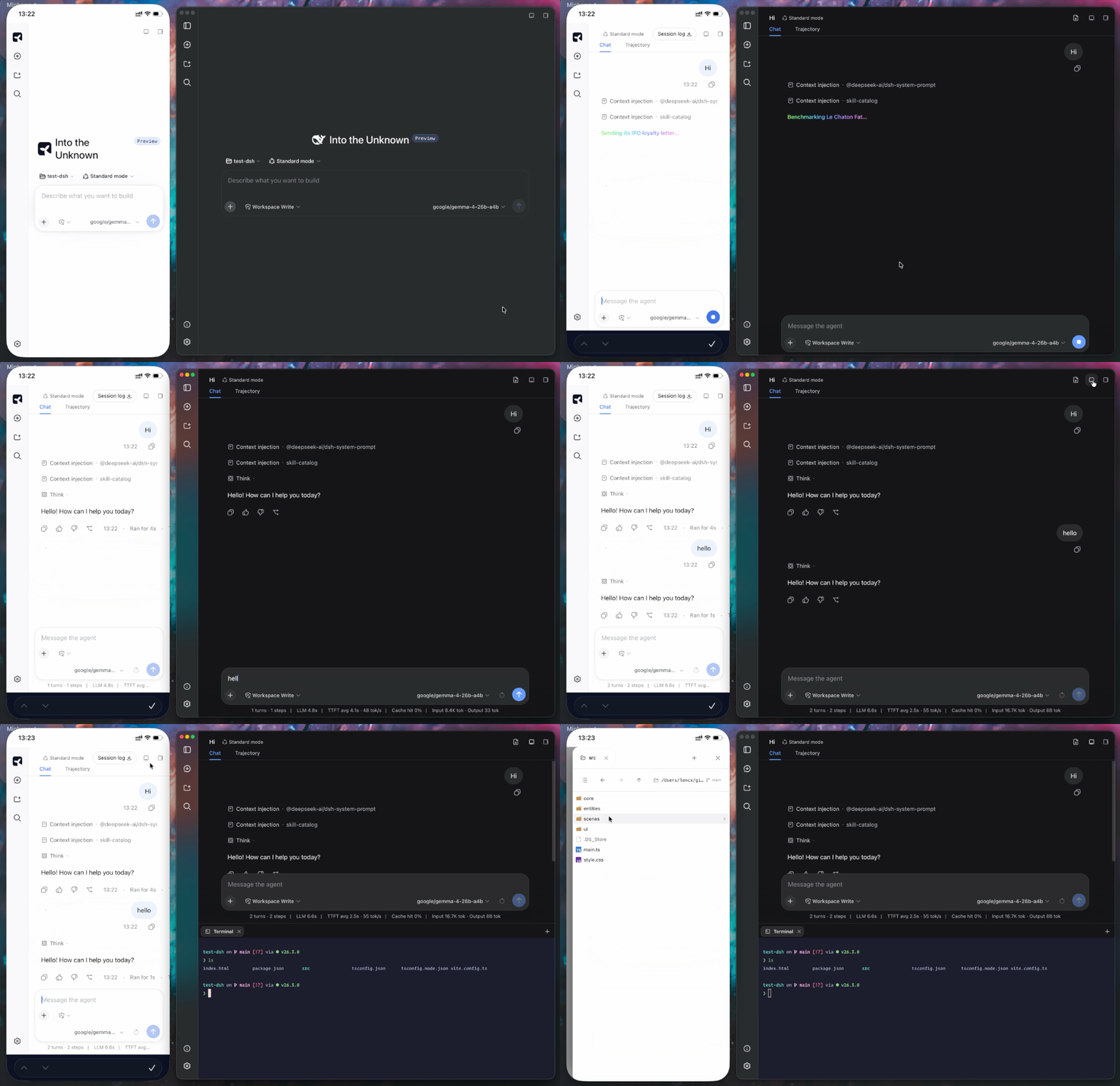
Minke remote access is a responsive Web client backed by Minke Host—not a video stream or touch-controlled projection of the Electron window. From a phone you can continue conversations, start agent tasks, manage project files, and use a terminal that runs on the Minke computer.
[!NOTE] Tailscale Serve over HTTPS, Tailscale Direct IP, and Cloudflare Access have all completed end-to-end regression testing and are currently available.
- Tailscale Serve over HTTPS (recommended) — Best for devices already joined to the same tailnet. It provides a secure HTTPS address and supports PWA installation.
- Tailscale Direct IP (advanced) — Binds only to the current device's Tailscale IPv4. Traffic remains end-to-end encrypted by Tailscale, but the address uses HTTP and is not a browser secure context.
- Cloudflare Access — Exposes a named tunnel protected by an identity policy, without requiring Tailscale on the phone. It requires a configured Cloudflare Tunnel, Access application, and an explicit allow policy.
Recommended setup: Tailscale Serve
Minke can expose its Web UI privately through Tailscale Serve. It keeps Harness on the local loopback address, does not bind it to the LAN, and does not enable the public Tailscale Funnel.
- Install Tailscale on the Minke computer and the phone, sign both into the same tailnet, and confirm the computer is connected.
- In Minke, open Connections → Device access → Remote access, select HTTPS Serve, and enable remote access. Minke connects in the background; no restart is required.
- Copy or open the displayed
https://…ts.netaddress on the phone.
Install as a PWA
Open a Tailscale Serve or Cloudflare Access HTTPS address, choose Install Minke in the sidebar, and accept the browser install prompt. On iPhone or iPad, use Share → Add to Home Screen. The installed app launches in standalone mode; when connectivity is poor it shows connection or offline feedback instead of silently presenting cached workspace content.
Minke activates only one remote route at a time, owns its foreground proxy while the app is running, and stops it on exit. The remote page can start agent tasks and use local tools already authorized in Minke, so grant access only to trusted tailnet members or Cloudflare Access identities.
Installation
Download Minke only from the official GitHub Releases page. The links below always point to the latest stable release.
| Platform | Architecture | Package |
|---|---|---|
| macOS | Apple Silicon (arm64) |
Download .dmg |
| macOS | Intel (x64) |
Download .dmg |
| Windows | x64 |
Download .exe |
| Linux | Debian / Ubuntu (x64) |
Download .deb |
| Linux | Fedora / RHEL (x64) |
Download .rpm |
| Linux | Any distro (portable) | Download .AppImage |
Release checksums are available in SHA256SUMS.
Packaged macOS, Windows, and Linux builds check for stable updates automatically. Minke selects the fixed DMG, EXE, DEB, RPM, or AppImage asset for the running system, verifies the immutable GitHub Release, URL chain, exact size, SHA-256 digest, and available OS provenance marker, then asks before opening it. Disable background downloads under Settings → Minke → Preferences → Application updates to require a Download update confirmation first, or use About Minke → Check for updates at any time. Installation always remains explicit. See desktop application updates for the user flow and platform behavior.
macOS
Download the
.dmgfile and open it.Drag
Minke.appinto the Applications folder.Current pre-release builds are not notarized. First try Apple's Open Anyway flow under System Settings → Privacy & Security.
If you explicitly accept the risk and the system flow is unavailable, remove quarantine only from the exact installed app:
xattr -dr com.apple.quarantine "/Applications/Minke.app"Open Minke from the Applications folder.
[!CAUTION] Removing the quarantine attribute bypasses a macOS security check. Minke's updater never runs this command automatically. Use it only as a last resort for
Minke.appdownloaded from the official Releases page, and never replace the path with a broad directory.
WeChat, Telegram, or Discord reports unavailable credential storage
WeChat, Telegram, and Discord share one encrypted credential vault backed by
Electron safeStorage and the macOS Keychain. An unsigned or inconsistently
signed macOS build may prevent Keychain from recognizing Minke, so all three
channels stay disabled and report that protected credential storage is
unavailable.
Check the installed application first:
codesign --verify --deep --strict --verbose=2 "/Applications/Minke.app"
If verification reports an invalid bundle or modified Info.plist, quit
Minke, apply a local ad-hoc signature, verify it, and reopen the application
with this single command:
/usr/bin/osascript -e 'tell application "Minke" to quit' 2>/dev/null || true; while /usr/bin/pgrep -f '^/Applications/Minke\.app/Contents/MacOS/Minke( |$)' >/dev/null; do /bin/sleep 0.2; done; /usr/bin/codesign --force --deep --sign - --timestamp=none "/Applications/Minke.app" && /usr/bin/codesign --verify --deep --strict --verbose=2 "/Applications/Minke.app" && /usr/bin/open "/Applications/Minke.app"
When macOS asks for Keychain access, enter the Mac login password and choose
Always Allow. If codesign reports insufficient permissions, prefix only
the signing invocation (/usr/bin/codesign --force ...) with sudo.
[!WARNING] This command replaces the installed app's existing signature and is only a local workaround for an unsigned or already-invalid pre-release build. Do not run it on a valid Developer ID-signed and notarized release. The repair may need to be repeated after reinstalling or updating Minke. Do not delete
~/.minke/secretsor the Minke Safe Storage item from Keychain Access, because existing channel credentials depend on that encryption key.
Windows
- Download the Windows x64
.exeinstaller. - Run the installer and follow the on-screen instructions.
- Windows may show a reputation-based warning for a new pre-release build. Continue only after confirming that the installer came from the official Minke Releases page.
Linux
Download the package for your distribution, then open it with your graphical package manager or install it from a terminal.
Debian / Ubuntu:
sudo apt install "/path/to/minke-package.deb"
Fedora / RHEL:
sudo dnf install "/path/to/minke-package.rpm"
Replace the example path with the downloaded package path.
Build from source
Build Minke on the same operating system and CPU architecture as the package you need. The build produces distributables for the current host under out/make; this project does not support cross-platform packaging from a single host.
Prerequisites:
- Git with submodule support. The
vendor/deepseek-harnesssubmodule must be checked out. - Node.js 24 or newer.
- pnpm 11.7.0, with the repository dependencies installed before running the scripts.
- macOS: an Apple Silicon or Intel Mac with Xcode Command Line Tools. The
.dmgtarget can only be built on macOS. - Windows: a Windows x64 host. Visual Studio 2022 Build Tools with the Desktop development with C++ workload may be needed if a native dependency must be compiled locally.
- Linux: a Linux x64 host with a native build toolchain,
fakeroot,dpkg, and eitherrpmorrpm-build.
On a fresh checkout, first install the repository dependencies, then prepare the Harness runtime:
pnpm run harness:stage
This command installs and builds the pinned DeepSeek Harness source, then stages the reusable desktop runtime under runtime/host. Run it after a fresh checkout, or whenever the pinned Harness source or runtime contract changes.
Start Minke in development mode with:
pnpm start
pnpm start refreshes the Minke integration in the prepared runtime and launches the development app.
Create the distributable package for the current platform with:
pnpm make
pnpm make performs a full runtime stage again before writing the platform package to out/make.
中国用户
如在使用中遇到问题,或希望进一步交流 Minke,可关注公众号「浮之静」,发送 dsh 获取进群码。也欢迎大家贡献 PR 或分享给更多朋友,您的每一次 Star 都是对开源项目的巨大支持,感恩。

相关推荐Related
-
 nexu-io/open-design
🎨 Best DeepSeek Harness Design Plugin. The open-source Claude Design alternative. 🖥️ Local-first desktop app. 🖼️ Your…
nexu-io/open-design
🎨 Best DeepSeek Harness Design Plugin. The open-source Claude Design alternative. 🖥️ Local-first desktop app. 🖼️ Your…
-
 ruvnet/ruflo
🌊 The original agent meta-harness. Deploy intelligent multi-player swarms, coordinate autonomous workflows, and build c…
ruvnet/ruflo
🌊 The original agent meta-harness. Deploy intelligent multi-player swarms, coordinate autonomous workflows, and build c…
-
 amruthpillai/reactive-resume
A one-of-a-kind resume builder that keeps your privacy in mind. Completely secure, customizable, portable, open-source a…
amruthpillai/reactive-resume
A one-of-a-kind resume builder that keeps your privacy in mind. Completely secure, customizable, portable, open-source a…
-
 esengine/DeepSeek-Reasonix
DeepSeek-native AI coding agent for your terminal. Engineered around prefix-cache stability — leave it running.
esengine/DeepSeek-Reasonix
DeepSeek-native AI coding agent for your terminal. Engineered around prefix-cache stability — leave it running.
-
 volcengine/OpenViking
Self-evolving Context Database for AI Agents. Unify Agent Memory, Knowledge RAG and Skills.
volcengine/OpenViking
Self-evolving Context Database for AI Agents. Unify Agent Memory, Knowledge RAG and Skills.
-
 Molunerfinn/PicGo
:rocket: The Ultimate Image Uploader for Efficient Creators. Supports Obsidian, Typora, VS Code etc. and 60+ image hosti…
Molunerfinn/PicGo
:rocket: The Ultimate Image Uploader for Efficient Creators. Supports Obsidian, Typora, VS Code etc. and 60+ image hosti…
-
 titanwings/distilly
Distilly — Distill how they think into reusable Skills for any Agent or Bot. Formerly Colleague Skill(原同事 Skill).
titanwings/distilly
Distilly — Distill how they think into reusable Skills for any Agent or Bot. Formerly Colleague Skill(原同事 Skill).
-
 titanwings/colleague-skill