liceses/dsh-cosplay
DSH 角色扮演插件:角色卡(系统提示词注入 + 用户提示词改写)、可分享的单文件卡包、复刻原版 UI 的角色页签与首轮选角 chip
Project Overview项目介绍
dsh-cosplay is a DSH-native cordis plugin that lets models in DSH adopt a persona by injecting an identity, voice, and prompt style into the conversation context. It exposes two parallel pipelines that the card itself selects between: persona injection registers a dsh-cosplay:persona section via ctx.systemPrompt.section with interpolate:false so that {{...}} placeholders inside handwritten cards do not crash assembly, and prompt rewriting hooks agent/pre-step to rewrite the user message in place, after which dsh-agent-loop durably writes the rewritten text as user/message. Installation follows the documented sequence npm install && npm run build followed by dsh plugin --profile web add link:... for a local checkout or dsh plugin --profile web add github:<you>/dsh-cosplay for the bundled lib/; DSH Desktop users cannot use the CLI because the desktop profile is owned by Electron, so they must paste the repository path or local directory into Settings → Plugins, while the runtime targets both the web profile and the 0.2.0-rc.1 desktop build verified by the project itself.
A typical workflow begins on a brand-new session: the user clicks the 🎭 capsule on the input-row of the conversation view — placed there deliberately because DSH does not render the tab bar on blank conversations — picks a card from the popover, and immediately chats. Persona cards such as "赛博猫娘" make the model reply in-character; rewriter cards such as "硬邦邦" turn a terse user message into a 571-character structured prompt that the main model then obeys verbatim. Management happens in the "对话 / 轨迹 / 角色" tab strip on subsequent turns, with a grid view, a two-level detail screen, an editor that accepts portrait uploads, and import/export of single-file multi-card packs under the dsh-cosplay-pack format with {format, version, exportedAt, cards, art}. The slash command /cosplay plus its subcommands provide a zero-token fallback when the UI is unreachable, and a lastCardId-based default causes new sessions to inherit the previous card unless overridden in Settings → 角色扮演.
Dependencies are deliberately narrow: Node.js for tsc and tsdown, plus an offline mirror script (node scripts/link-sdk.mjs) that junctions node_modules/@deepseek-ai/* to a local SDK mirror so type checking and build still pass without network. Preset cards under presets/personas.json and presets/rewriters.json are treated as data and hot-reloaded at most once per second by directory fingerprint, while host-side changes require re-mounting the plugin and, on desktop, an application restart because of Node module caching; development is fastest under a separate profile such as dsh plugin --profile lab add link:... followed by dsh --profile lab --port 31999 --no-open. Limits include id constrained to [a-z0-9][a-z0-9-]{0,40}, name ≤24, title ≤40, description ≤120, ≤8 tags of ≤12 chars, persona and rewrite rules ≤20000 chars, ≤4 few-shot examples, and a rewriter skip-with-context guard that triggers host:rewrite-skip-unresolved when the original text contains unresolvable references like "这个" or "它". License is unspecified, the 80-test suite passes under both 0.1.7-rc.2 and 0.2.0-rc.1 SDKs with zero type errors, and first-run validation evidence lives under .dsh/showme/cosplay-m0/evidence.html.
dsh-cosplay 是一个 DSH 原生 cordis 插件,给 DSH 里的模型套上"角色卡",把身份、语气和提示词风格写进上下文。它同时实现两条链路,由卡片自带开关选择:人设注入走 ctx.systemPrompt.section 注册 dsh-cosplay:persona 段,参数 interpolate:false 以避开 {{...}} 报错;提示词改写挂在 agent/pre-step 钩子上,把用户消息替换后再让 dsh-agent-loop 落盘到 user/message。安装时运行 npm install && npm run build,然后用 dsh plugin --profile web add 接入本地或 GitHub 地址;DSH Desktop 用户需在设置 → 插件界面填仓库路径,因为 desktop profile 由 Electron 独占。
典型流程:在新会话输入框左下角点 🎭 chip 选一张卡(首轮即生效),再正常说话;猫娘类人设卡让模型以角色口吻作答,硬邦邦类改写卡把用户的短句重写成结构化 prompt 后再交给主模型。卡片库通过顶部"角色"页签管理,支持网格浏览、二级详情、编辑、立绘上传、导入导出 dsh-cosplay-pack 单文件多卡格式;命令 /cosplay 提供状态、列表、本会话切换等逃生通道,"默认角色"配置让新会话自动继承上次选择。
依赖 Node 16+ 与 typescript、tsdown(也可通过 node scripts/link-sdk.mjs 离线指向本机 SDK 镜像)。预设位于 presets/*.json,目录指纹变更每秒最多检测一次,无需重启;宿主代码变更需重挂插件,桌面端因 Node 模块缓存建议重启应用,并核对 /stats 中 client:client-apply 回执的 build= 字段。单测 80 条全过、两套 SDK 类型检查均为 0 错误,license 未声明。
请帮我安装这个 DSH 插件。安装前先完成【兼容性检查 + 安全性检查】,检查通过再动手。

插件:dsh-cosplay(liceses/dsh-cosplay)
仓库:https://github.com/liceses/dsh-cosplay
本站详情页:https://www.yhbd.top/plugins/liceses-dsh-cosplay/
本站登记:类型 plugin · 归类 原生 DSH 插件 · 许可证未声明 · ⭐ 3 · 最近提交 2026-10-03 · 主语言 TypeScript

按下面顺序执行,每步先把结论告诉我,再进入下一步:

【1 兼容性检查】
① 我这边:DSH 版本、Node 版本、操作系统、当前 profile(web / desktop)。
② 读它的 README、package.json、插件 manifest,列出它要求的 DSH 版本 / Node 版本 / 操作系统 / 外部依赖 / 需要另外先装的运行时。
③ 逐条比对,结论只写「满足 / 不满足 / 未知」三种;不满足的给出可行替代方案。
④ 检查是否和我已装的插件冲突:命令名重复、skill / tool 重名、端口占用、重复注册的 MCP server。

【2 安全性检查】
① 仓库可信度:和上面「本站登记」是否一致;star / fork 数、创建时间、最近提交,是否归档或长期停更。
② 安装脚本:逐行看 package.json 的 preinstall / install / postinstall,以及 install.sh、setup.ps1 之类脚本。出现 curl|bash、下载后直接执行、混淆代码、访问与插件功能无关的域名,立刻停下来告诉我,不要继续装。
③ 依赖:列出新增依赖,标出无人维护、或与知名包拼写近似的可疑包(typosquatting)。
④ 权限与副作用:它会读写哪些目录、访问哪些域名、需要哪些 DSH 权限(filesystem / network / shell / clipboard 等),以及怎么卸载和回滚。
⑤ 如果它要求 sudo / 管理员权限,或权限明显超出功能所需,先停下来问我。

【3 安装】
上面两步没有「不满足」和「高危项」时才执行;用官方推荐方式安装,不要自行提权。

【4 汇报】
用表格输出:检查项 / 结论 / 依据 / 是否需要我决策。拿不准的一律写「未知」并说明要我怎么确认——不要猜,也不要替我决定。
Send this message to DSH in your current session: it verifies compatibility and security first (answering met / not met / unknown item by item) and only installs once everything checks out — it will stop and ask you if it finds a high-risk item. The box scrolls; the copy is the full prompt. CLI install commands may not be accurate across systems, so DSH is the safer route.把上面这条消息直接发给当前会话里的 DSH:它会先核对兼容性与安全性(逐条给「满足 / 不满足 / 未知」),确认没问题再安装,有高危项会停下来问你。框内可滚动,复制到的是完整提示词;安装命令不一定准确,发给 DSH 更稳。
- No license declared - all rights reserved by default; ask the author before commercial use or redistribution未声明开源许可证 —— 默认「保留所有权利」,商用或再分发前先问作者
- Only 3 stars - very few users, little community feedback星标只有 3,几乎没人在用,遇到问题缺少社区反馈
DSH walks through these 9 checksDSH 会逐条核对这 9 项
Compatibility兼容性
- DSH, Node, OS and profile requirementsDSH 版本 / Node 版本 / 操作系统 / profile 是否满足要求
- External dependencies and runtimes (Electron / Python / Docker, ...)外部依赖与运行时(Electron / Python / Docker 等)是否齐备
- Conflicts with installed plugins: command names, skill / tool names, ports, duplicate MCP registration与已装插件是否冲突:命令名、skill / tool 重名、端口占用、重复 MCP 注册
Security安全性
- Repo matches the facts registered here; archived or abandoned?仓库是否与页面登记一致,是否归档或长期停更
- Safety of preinstall / install / postinstall and install.sh / setup.ps1preinstall / install / postinstall 与 install.sh、setup.ps1 是否安全
- curl|bash, download-then-execute, obfuscation, unrelated domains → stop immediatelycurl|bash、下载即执行、混淆代码、无关域名 → 立刻停止
- Typosquatting or unmaintained packages among the new dependencies新增依赖里有没有 typosquatting 或无人维护的包
- Requested permissions vs. what the feature actually needs申请了哪些权限、是否超出功能所需(filesystem / network / shell / clipboard)
- Any sudo / admin requirement, plus uninstall and rollback是否要求 sudo / 管理员权限,以及卸载与回滚方式
Anything uncertain must be marked unknown with a note on how to confirm it. This site's signal screen is a static snapshot, not a security audit.拿不准的必须标「未知」并说明要我怎么确认。本站的信号筛查是静态快照,不能替代安全审计。
Or use CLI install (for developers)或使用命令行安装(适合开发者)
CLI Install命令行安装
dsh plugin --profile web add github:liceses/dsh-cosplay把 liceses/dsh-cosplay 加入你的 DSH 配置(web profile)即可启用。
READMEREADME
dsh-cosplay
让 DSH 里的模型进入角色:用「角色卡」规定它的身份、语气与提示词风格。
两条链路都实现,卡里可选:
| 链路 | 落点 | 适合谁 |
|---|---|---|
| 人设注入 | 系统提示段 dsh-cosplay:persona |
猫娘这类"人设卡":你正常说话,模型以角色身份作答 |
| 提示词改写 | agent/pre-step 替换用户消息 |
硬邦邦这类"改写卡":你发一句,模型收到的是按规则重写后的 prompt |
入口是聊天区顶部的**「角色」页签**(就在「对话 / 轨迹」旁边):卡片网格 → 点一张进二级详情 → 在本会话使用。
两条链路的机制(都已实测,不是设计稿)
人设注入:ctx.systemPrompt.section({ name, order: 部署人设+1, interpolate: false, text })。
实测证据(真实运行环境):host:prompt-section section=dsh-cosplay:persona order=1 agentId=session-… typeof=string
—— 装配上下文里拿得到会话 id,所以"每个会话各自一张卡"成立。
interpolate: false 是必须的:卡片正文是你写的,出现 {{…}} 时默认的严格插值会抛错并让整次装配失败。
提示词改写:agent/pre-step 是官方唯一能在模型看到之前替换用户消息的通道,而替换后的消息会被
dsh-agent-loop 真实地 durable 写成 user/message(lib/index.js:1061)。实测证据:
host:pre-step-plan     按「硬邦邦」改写:原文 10 字(mode=rewrite strategy=card)
host:rewrite-ok        8327ms · deepseek-official/deepseek-flash · 10 字 → 571 字
host:durable-user-message seq=10 正文=571字 预览:老哥们,我时间金钱不多了,agent team 这次算了…
也就是说:「对话」里那条用户消息本身就是改写后的 prompt,模型收到的与日志逐字一致 —— 不需要另做一层"实际发送了什么"的黑箱展示。
改写调用必须带上下文(否则会把任务主体换掉)
改写调用是无状态的:它只拿到"这一轮原文"和"卡片规则"。于是(真实事故,
session-cf7b1365,2026-10-02 02:35):
用户原话(agent/inbox/spliced) |
兄弟 太夯了 ,看的我硬邦邦!!! 想让更多人硬邦邦,把这个提交到我的仓库吧!!直接新创一个! |
上一轮真实交付物(assistant/message) |
搞完了。## 东西在哪 - 页面本体:miku/index.html |
| 当时的改写结果 | 任务:把我这套硬邦邦的肌肉集团提示词转换器直接新创一个 GitHub 仓库… |
"这个"没有指代对象 —— 而改写调用上下文里唯一存在的名词就是卡片规则本身("硬邦邦提示词转换专家"), 模型于是合理地把它填了进去,主模型随后真的去建了一个错的仓库。
修法(src/context.ts):改写时从官方 surface(agent.session.surface.nodes → session.eventAt,
与 dsh-compaction-basic 取摘要输入的同一组 API)取最近 ≤6 条 / ≤2400 字的"人话 + 助手话"
(排除 skills / runtime-context / tool-jobs / agent-message 等框架注入与子代理播报),
组装成一条分区明确的 user 消息:【最近对话(只读)】… 【本轮要改写的原始需求(只改这一段)】原文。
另外加一条指代守卫:原文含"这个 / 它 / 上一轮"这类指代、又拿不到上下文时跳过改写、原样放行 ——
无法解析指代时改写必然瞎猜主体,保留原文至少不会把任务改错。
轨迹里会留下 host:rewrite-context 带上下文 N 条 / M 字(原文 … 字,组装后 … 字),
没有上下文而跳过时留 host:rewrite-skip-unresolved(真实数值见下节「验证记录」)。
安装
前提:装完要重挂插件(宿主半边);只改浏览器半边时刷新页面即可。
# 方式一:本地链接(开发用)
npm install && npm run build
dsh plugin --profile web add "link:D:\developing\DSH-plugin\dsh-cosplay"

# 方式二:GitHub(lib/ 已入库,免编译)
dsh plugin --profile web add github:<you>/dsh-cosplay
Showing the opening section of the README — the full document lives in the repository以上为 README 开头摘要,完整文档在仓库内 · View the full README on GitHub →在 GitHub 查看完整 README →
Related相关推荐
- xiaobright/dsh-anchored-standard Two-phase DeepSeek Harness preset: Minimal-aligned bootstrap, then full Standard tools (Project2 98/99)
-
 Unclecheng-li/DeepSec
DeepSec — AI Security Offense & Defense Platform. Shield audits AI-generated code for hallucinated packages, missing saf…
Unclecheng-li/DeepSec
DeepSec — AI Security Offense & Defense Platform. Shield audits AI-generated code for hallucinated packages, missing saf…
-
 magian1127/deepseek-harness-zh_pro
DeepSeek Harness (DSH) plugin: A comprehensive enhancement plugin with UI polish, layout tweaks, prompt injection, and …
magian1127/deepseek-harness-zh_pro
DeepSeek Harness (DSH) plugin: A comprehensive enhancement plugin with UI polish, layout tweaks, prompt injection, and …
-
 Jungod1121/dsh-anchored-standard
Two-phase DeepSeek Harness preset: Minimal-aligned bootstrap (bash+read), then full Standard tools after the first tool …
Jungod1121/dsh-anchored-standard
Two-phase DeepSeek Harness preset: Minimal-aligned bootstrap (bash+read), then full Standard tools after the first tool …
-
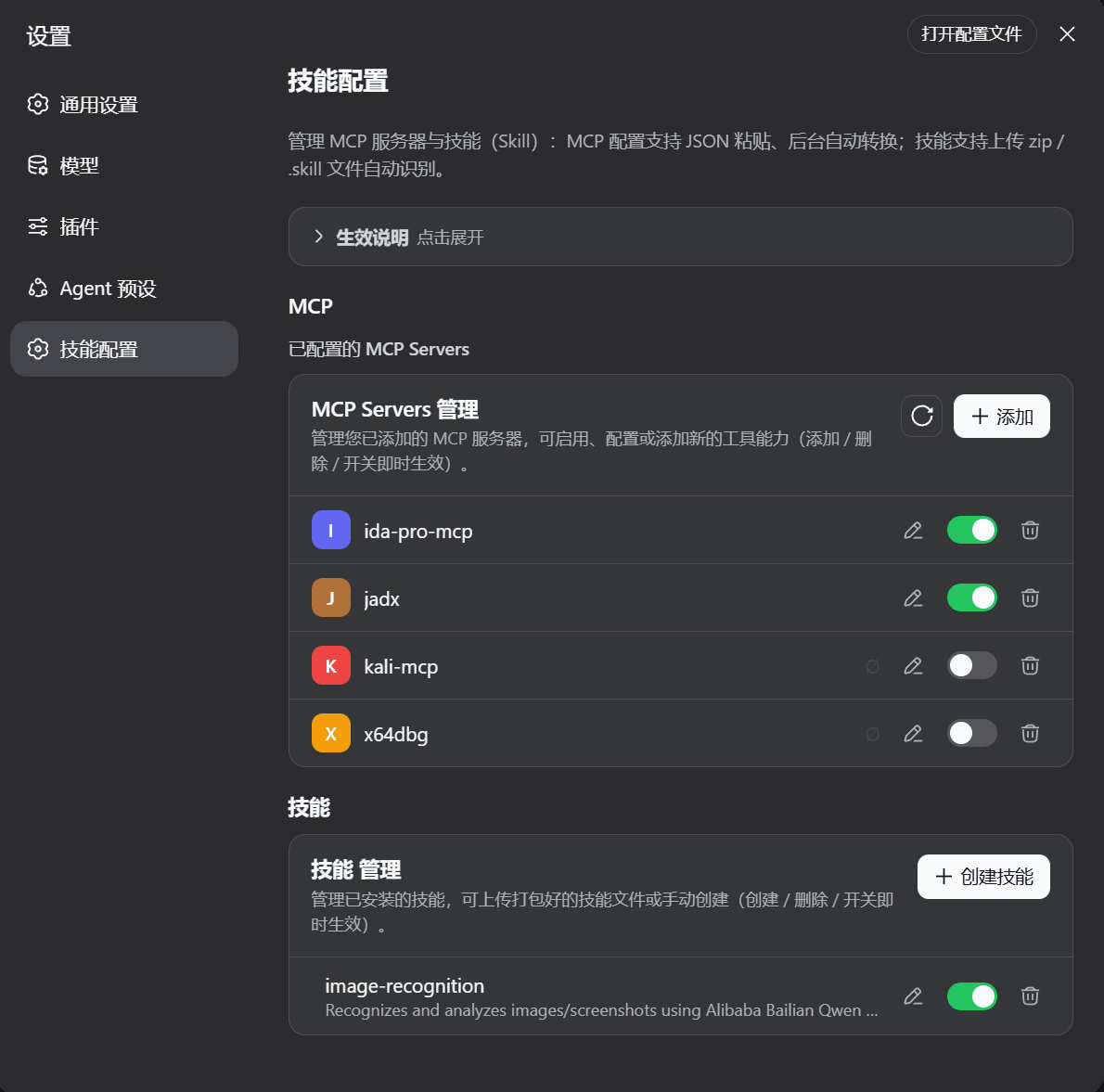 pazz11/Jnpz
改配置+重启才能加 MCP?DeepSeek Harness (DSH) 插件「技能配置」解决:设置页粘贴 JSON 即连 MCP 服务器、热加载免重启;上传 zip/.skill 自动识别 SKILL.md,创建/编辑/启停技能,即点即用
pazz11/Jnpz
改配置+重启才能加 MCP?DeepSeek Harness (DSH) 插件「技能配置」解决:设置页粘贴 JSON 即连 MCP 服务器、热加载免重启;上传 zip/.skill 自动识别 SKILL.md,创建/编辑/启停技能,即点即用
-
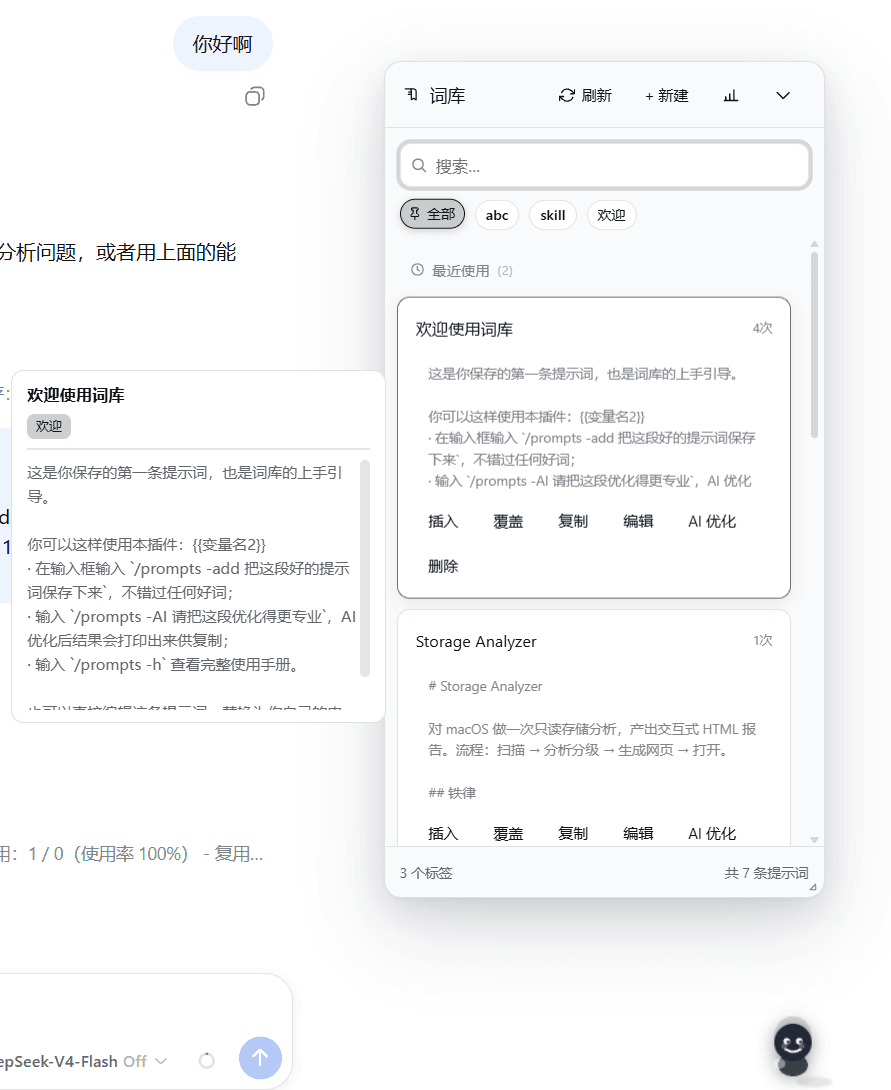 master1Sun/dsh-prompt-library
DSH(DeepSeek Harness)Web 插件:在 composer 工具栏注入一个「提示词库」按钮,管理可复用的 prompt 片段,点击即可插入当前输入框。支持自动学习:输入复杂 prompt 文案时,插件会自动识别并保存到提示…
master1Sun/dsh-prompt-library
DSH(DeepSeek Harness)Web 插件:在 composer 工具栏注入一个「提示词库」按钮,管理可复用的 prompt 片段,点击即可插入当前输入框。支持自动学习:输入复杂 prompt 文案时,插件会自动识别并保存到提示…
- Max-Null/dsh-chinese-thinking One-line fix: inject a fixed system-prompt section so the agent always thinks and replies in Chinese, whatever the user'…
-
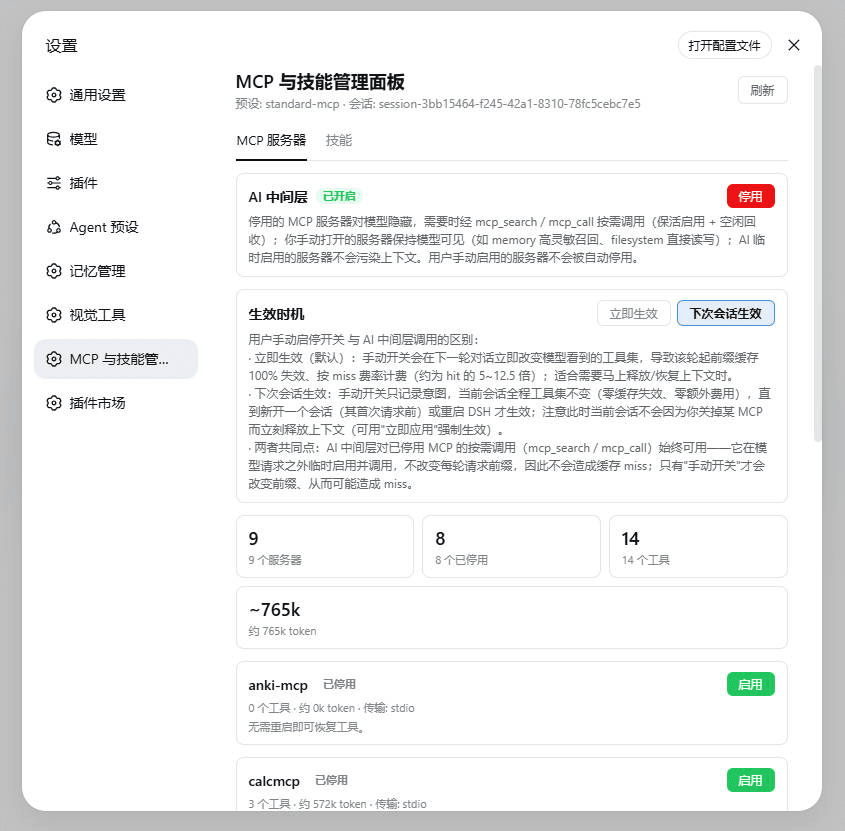 lilyblessing/dsh-mcp-skill-panel
MCP 与技能管理面板:设置页展示 MCP 服务器与 Skill 目录,随时启停释放上下文占用。
lilyblessing/dsh-mcp-skill-panel
MCP 与技能管理面板:设置页展示 MCP 服务器与 Skill 目录,随时启停释放上下文占用。