lifeopsgo/dsh-capability-toggle-plugin
Toggle individual agent capabilities (skills, MCP, tools, prompt, approval, guards) from the DSH WebUI composer — session / project / global. DSH 各种能力(mcp/skill/tool等)多层级开关灵活控制
项目介绍Project Overview
这是 DSH WebUI 插件,用于在会话、项目、全局三级开关技能、MCP、工具、提示注入、审批升级和安全守卫;关闭会在代理下一步移除、抑制、拒绝或拦截对应能力。适合需要按范围限制代理行为、临时只读或保护密钥时使用。注意需 Node.js ≥22.6,开关在代理运行时锁定,且不修改全局注册或系统权限设置。
This DSH WebUI plugin controls skills, MCP servers, tools, prompt injections, approval escalation, and safety guards at session, project, or global scope. Disabled capabilities are removed, suppressed, rejected, or intercepted on the agent’s next step. Use it when agent behavior must be scoped, temporarily restricted, or made read-only. It requires Node.js ≥22.6; switches lock while the agent runs, and global registrations or system permission settings are not mutated.
请帮我了解并安装插件:【dsh-capability-toggle-plugin】【https://github.com/lifeopsgo/dsh-capability-toggle-plugin】把上面这条消息直接发给当前会话里的 DSH,让它帮你了解并安装。安装命令不一定准确,发给 DSH 更稳。Send this message to DSH in your current session. CLI install commands may not be accurate across systems — DSH will figure it out for you.
或使用命令行安装(适合开发者)Or use CLI install (for developers)
命令行安装CLI Install
dsh plugin --profile web add github:lifeopsgo/dsh-capability-toggle-plugin#v1.0.2把 lifeopsgo/dsh-capability-toggle-plugin 加入你的 DSH 配置(web profile)即可启用。
READMEREADME
dsh-capability-toggle-plugin
Control agent capabilities from the DSH WebUI — with real runtime enforcement.




English · 简体中文

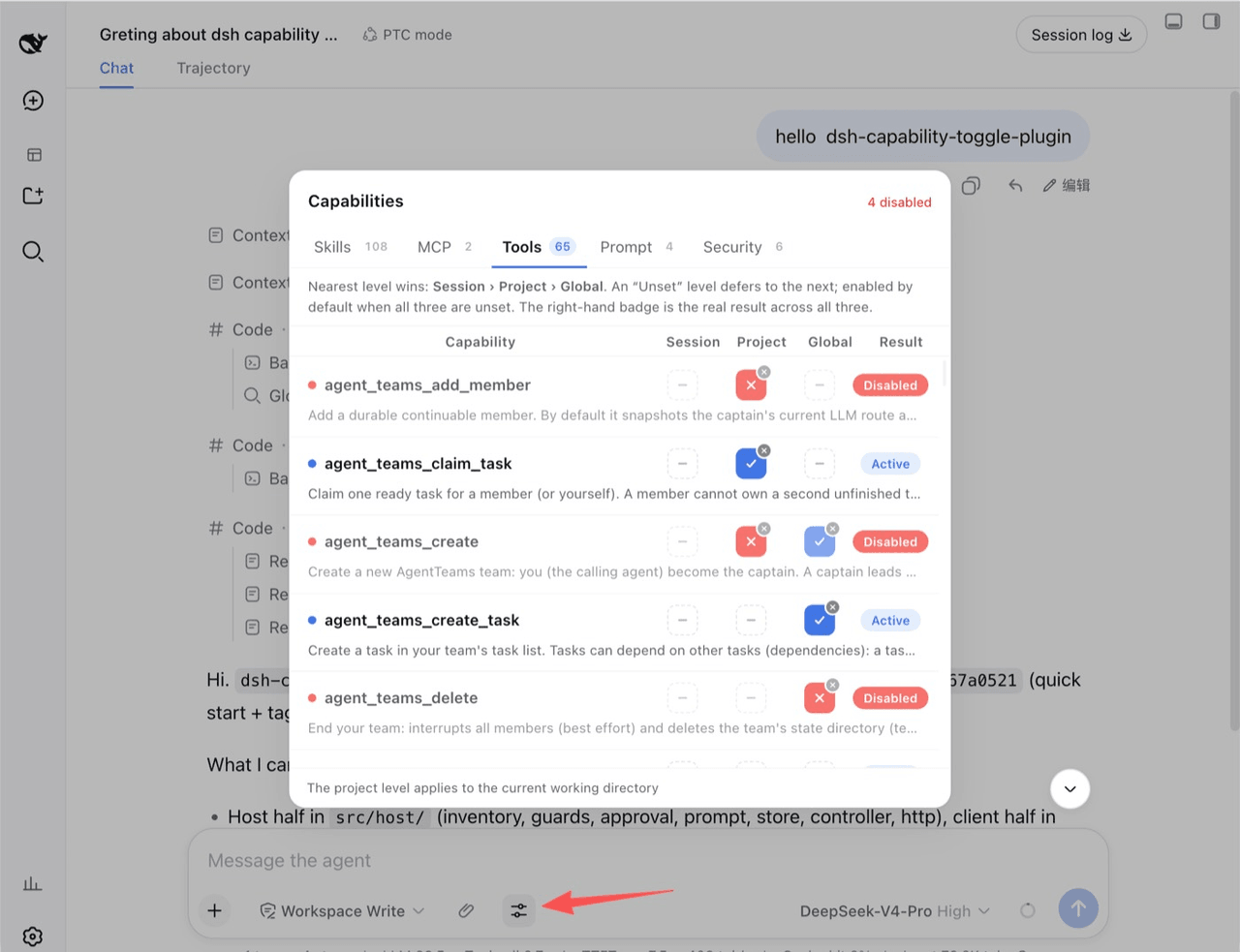
Session · Project · Global — blue check = on, red cross = off, dashed dash = unset.
What it is
A DeepSeek Harness (DSH) WebUI plugin for controlling skills, MCP servers, tools, prompt injections, approval escalation, and safety guards at session, project, or global scope. Depending on the family, disabling removes, suppresses, rejects, or intercepts the capability on the agent's next step.
Quick start
Requires Node.js ≥ 22.6.
dsh plugin --profile web add github:lifeopsgo/dsh-capability-toggle-plugin#v1.0.2
Restart the existing DSH Web GUI process, then refresh the page. Start it with the command below when it is stopped:
dsh --profile web web
Open the control beside the ➕ button while the agent is idle. Replace web with another profile name when needed.
Upgrade or remove
# Upgrade or downgrade: use any tag listed on the releases page
dsh plugin --profile web add github:lifeopsgo/dsh-capability-toggle-plugin#v1.0.2

# Remove
dsh plugin --profile web remove dsh-capability-toggle-plugin
Features
Three-level resolution
Each capability has three independent levels:
session › project › global › default (enabled)
The nearest explicit value wins. Unset defers to the next level; with every level unset, the capability remains enabled. The row badge always shows the resolved result.
The button displays only its current state: click to toggle on ↔ off, or use its small clear badge to return to unset.
Capability families
| Tab | Controls |
|---|---|
| Skills | Individual model-invocable skills |
| MCP | MCP servers; expand a row to inspect member tools |
| Tools | Individual model-visible tools and their guidance sections |
| Prompt | A safe, presence-checked allowlist of prompt injections |
| Security | Approval escalation and five opt-in safety guards |
Enforcement
Every mechanism is scoped to the current agent; global registrations are not mutated.
| Family | Enforcement |
|---|---|
tool / mcp |
Removed with ctx.tools.restrict({ deny }); forced calls are refused |
skill |
Shadowed by a same-named modelInvocable:false runtime skill |
prompt |
Shadowed with empty text, or suppressed with suppressRuntimeContext() |
approval |
Scoped approval requests resolve to rejected |
guard |
tools/pre-execute blocks or requests confirmation for matching calls |
Security controls
Turning off Approval escalation rejects every approval request from that agent without changing the system /permission setting.
Safety guards are opt-in:
| Guard | Action |
|---|---|
| Read-only mode | Block file writes, creates, and edits |
| Protect secrets | Block access to common secret files and credentials |
| Dangerous shell | Confirm high-risk shell commands |
| Destructive git | Confirm history- or work-losing git commands |
| Outbound network | Confirm network tools and outbound shell actions |
Additional behavior: switches lock while the agent runs, state survives popup close and turn boundaries, and the UI follows the WebUI language.
相关推荐Related
-
 nexu-io/open-design
🎨 Best DeepSeek Harness Design Plugin. The open-source Claude Design alternative. 🖥️ Local-first desktop app. 🖼️ Your…
nexu-io/open-design
🎨 Best DeepSeek Harness Design Plugin. The open-source Claude Design alternative. 🖥️ Local-first desktop app. 🖼️ Your…
-
 freestylefly/awesome-gpt-image-2
Prompt as Code | GPT-Image2 工业级提示词引擎与模板库,530+ 个案例逆向工程,20+ 套工业级模板,并提炼出Skills,持续更新中
freestylefly/awesome-gpt-image-2
Prompt as Code | GPT-Image2 工业级提示词引擎与模板库,530+ 个案例逆向工程,20+ 套工业级模板,并提炼出Skills,持续更新中
-
 anywhere-labs/dsh-desktop
为 DeepSeek Harness (DSH) 插件生态打造的现代化桌面端解决方案。万物皆「插件」,桌面本身也是「插件」。
anywhere-labs/dsh-desktop
为 DeepSeek Harness (DSH) 插件生态打造的现代化桌面端解决方案。万物皆「插件」,桌面本身也是「插件」。
- Nagi-ovo/voyager Enhancement suite for Gemini, AI Studio, Claude & ChatGPT — plus a prompt manager for any web UI, DeepSeek Harness inclu…
-
 walkinglabs/learn-harness-engineering
Harness engineering beginner tutorial, from 0 to 1
walkinglabs/learn-harness-engineering
Harness engineering beginner tutorial, from 0 to 1
-
 awesome-dsh-plugin/awesome-dsh-plugin
A curated list of plugins for DeepSeek Harness (dsh) · DeepSeek Harness 插件精选列表
awesome-dsh-plugin/awesome-dsh-plugin
A curated list of plugins for DeepSeek Harness (dsh) · DeepSeek Harness 插件精选列表
-
 MemTensor/MemOS
Self-evolving memory OS for LLM & AI Agents: ultra-persistent memory, hybrid-retrieval, and cross-task skill reuse, with…
MemTensor/MemOS
Self-evolving memory OS for LLM & AI Agents: ultra-persistent memory, hybrid-retrieval, and cross-task skill reuse, with…
- yjh051108/dsh-routing-suite dsh-routing-suite — injector + router-standard kit: install the runtime injector first, then the task-aware reasoning-mo…