liuup/dsh-latex-tools
♾️ 复制并导出 DeepSeek Harness 中的 LaTeX 悬停于任意 LaTeX 公式上即可复制 TeX 源码或导出为独立的 SVG 文件
项目介绍Project Overview
dsh-latex-tools 是 DeepSeek Harness 的 Web UI 插件,悬停 LaTeX 公式时显示工具栏,支持复制 TeX 源码或将公式导出为自包含 SVG 矢量图(字形内嵌为 path,无外部字体/样式依赖),可直用于论文、PPT、网页。行内与块级公式均支持,MathJax 由插件自带、首次按需加载并缓存,完全离线、无需 CDN。通过官方 npm 一行命令安装,无需本地构建或配置;Settings 中仅显示含配置项的插件,因此本插件不会出现。GitHub 源码安装需 pnpm 10 以上并在 pnpm-workspace.yaml 的 allowBuilds 段中放行 prepare 脚本。
dsh-latex-tools is a plugin for the DeepSeek Harness Web UI that adds a hover toolbar on LaTeX formulas, letting users copy TeX source or export a self-contained SVG (glyphs embedded as paths, with no external font or style dependencies) for use in papers, slides, and web pages. It supports both inline and display equations, ships its own MathJax that is loaded on demand and cached, and works fully offline with no CDN. Install via the official npm command; no build or configuration is required, and because Settings only lists configurable plugins, this one will not appear there. Installing from GitHub on pnpm 10+ requires allowing its prepare script in pnpm-workspace.yaml.
请帮我了解并安装插件:【dsh-latex-tools】【https://github.com/liuup/dsh-latex-tools】把上面这条消息直接发给当前会话里的 DSH,让它帮你了解并安装。安装命令不一定准确,发给 DSH 更稳。Send this message to DSH in your current session. CLI install commands may not be accurate across systems — DSH will figure it out for you.
或使用命令行安装(适合开发者)Or use CLI install (for developers)
命令行安装CLI Install
npx @deepseek-ai/dsh plugin --profile web add dsh-latex-tools把 liuup/dsh-latex-tools 加入你的 DSH 配置(web profile)即可启用。
READMEREADME
dsh-latex-tools
English | 中文
♾️ Copy and export the LaTeX in DeepSeek Harness 悬停任意 LaTeX 公式,即可复制 TeX 源码或导出为独立的 SVG 文件
🐳 All the code are proundly generated by DeepSeek V4 Flash 0731
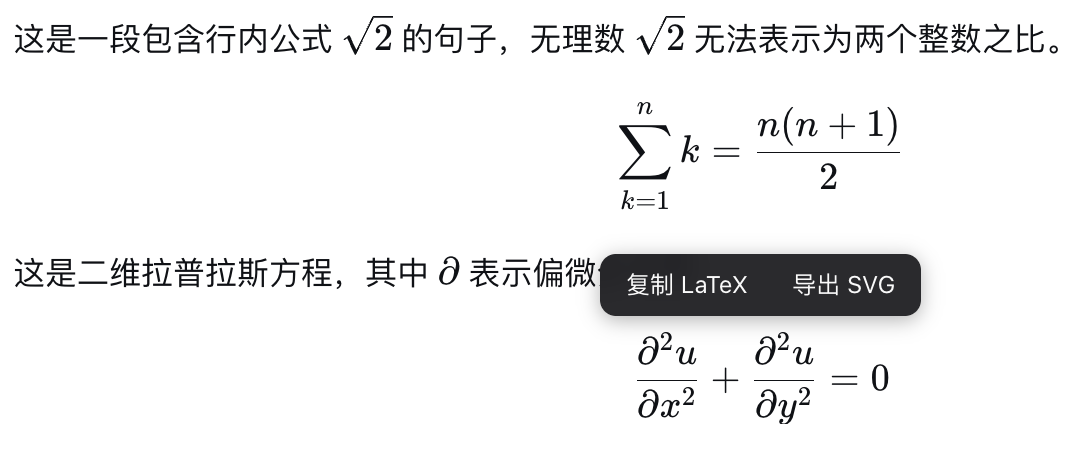
功能
- 复制 LaTeX:鼠标悬停公式(行内或块级),点击「复制 LaTeX」,TeX 源码即进入剪贴板。
- 导出 SVG:点击「导出 SVG」,公式经 MathJax 渲染为自包含的矢量图(字形轮廓内嵌为 path,无外部字体/样式依赖),下载为
formula-<slug>.svg,可用于论文、PPT、网页。 - 完全离线可用:MathJax 脚本由插件自身的 host half 提供,首次导出时才按需加载,之后浏览器缓存;不依赖任何 CDN。
- 支持行内与块级公式(块级按 display 模式导出)。
安装
要求:安装 Node.js,然后直接用官方 npm 方式运行(无需全局安装):
npx @deepseek-ai/dsh web
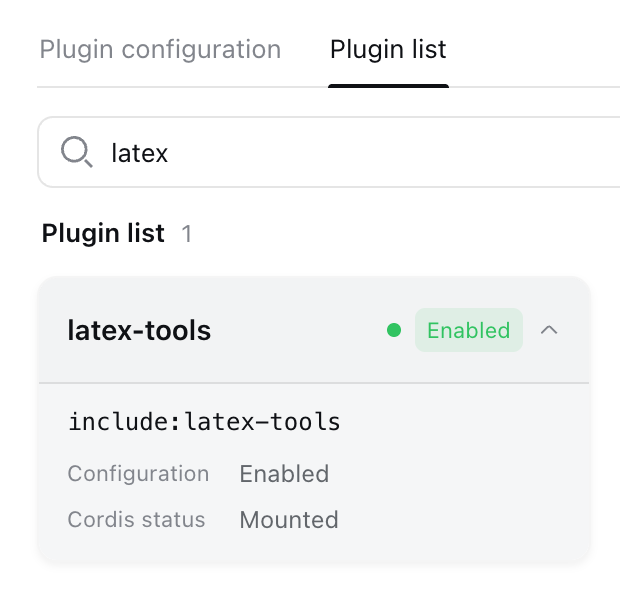
插件装进 profile 后随 Web UI 启动自动加载,无需手动启用;Settings → Plugins 列表只显示有配置项的插件,本插件没有配置项,不会出现在那里。
一键 npm 安装
npx @deepseek-ai/dsh plugin --profile web add dsh-latex-tools
安装的是预构建产物,无需本地构建、无需任何额外配置,装完重启 Web UI 即可。
验证安装
npx @deepseek-ai/dsh --profile web --dump-config   # 应看到 "# == dsh-latex-tools" 层
# 浏览器检查:
#   /plugins/dsh-latex-tools/client.js   —— browser half 的 bundle
#   /dsh-latex-tools/mathjax/es5/tex-svg.js  —— SVG 导出用的 MathJax(约 2.1 MB)
卸载
npx @deepseek-ai/dsh plugin --profile web remove dsh-latex-tools
从 web profile 移除插件依赖与配置层,重启 Web UI 后生效。
开发(构建、测试、GitHub/源码安装,点击展开)
pnpm install
pnpm typecheck   # tsc --noEmit
pnpm test        # vitest(jsdom:工具条显隐 / 复制 / SVG 导出)
pnpm build       # tsdown:lib/index.js(host half)+ lib/client.js(browser half)
从 GitHub 安装(无需本地构建)
npx @deepseek-ai/dsh plugin --profile web add github:liuup/dsh-latex-tools
git 安装拉取的是源码,pnpm 会自动执行包内的 prepare 脚本完成构建。pnpm ≥10 默认拒绝运行 git 依赖的 prepare,首次 add 会失败——dsh 会打印指引:按提示把对应条目加入 profile 的 pnpm-workspace.yaml(allowBuilds 段),然后重跑上面的命令。生产使用建议 pin 提交:github:liuup/dsh-latex-tools#<commit-sha>。
本地源码安装(开发/自用)
git clone https://github.com/liuup/dsh-latex-tools.git
cd dsh-latex-tools
pnpm install && pnpm build          # 构建出 lib/(产物已被 gitignore,必须本地构建)
npx @deepseek-ai/dsh plugin --profile web add link:/absolute/path/to/dsh-latex-tools
npx @deepseek-ai/dsh web            # 启动 Web UI
License
相关推荐Related
-
 ruvnet/ruflo
🌊 The original agent meta-harness. Deploy intelligent multi-player swarms, coordinate autonomous workflows, and build c…
ruvnet/ruflo
🌊 The original agent meta-harness. Deploy intelligent multi-player swarms, coordinate autonomous workflows, and build c…
-
 amruthpillai/reactive-resume
A one-of-a-kind resume builder that keeps your privacy in mind. Completely secure, customizable, portable, open-source a…
amruthpillai/reactive-resume
A one-of-a-kind resume builder that keeps your privacy in mind. Completely secure, customizable, portable, open-source a…
-
 volcengine/OpenViking
Self-evolving Context Database for AI Agents. Unify Agent Memory, Knowledge RAG and Skills.
volcengine/OpenViking
Self-evolving Context Database for AI Agents. Unify Agent Memory, Knowledge RAG and Skills.
-
 Molunerfinn/PicGo
:rocket: The Ultimate Image Uploader for Efficient Creators. Supports Obsidian, Typora, VS Code etc. and 60+ image hosti…
Molunerfinn/PicGo
:rocket: The Ultimate Image Uploader for Efficient Creators. Supports Obsidian, Typora, VS Code etc. and 60+ image hosti…
-
 titanwings/colleague-skill
将冰冷的离别化为温暖的 Skill,欢迎加入数字生命1.0!Transforming cold farewells into warm skills? It's giving rebirth era. Welcome to Digital …
titanwings/colleague-skill
将冰冷的离别化为温暖的 Skill,欢迎加入数字生命1.0!Transforming cold farewells into warm skills? It's giving rebirth era. Welcome to Digital …
-
 nocobase/nocobase
NocoBase is an open-source AI + no-code platform for building business systems fast. Instead of generating everything fr…
nocobase/nocobase
NocoBase is an open-source AI + no-code platform for building business systems fast. Instead of generating everything fr…
-
 Tencent/WeKnora
Open-source LLM knowledge platform: turn raw documents into a queryable RAG, an autonomous reasoning agent, and a self-m…
Tencent/WeKnora
Open-source LLM knowledge platform: turn raw documents into a queryable RAG, an autonomous reasoning agent, and a self-m…
- Nagi-ovo/voyager Enhancement suite for Gemini, AI Studio, Claude & ChatGPT — plus a prompt manager for any web UI, DeepSeek Harness inclu…