Lixxx1/dsh-vscode
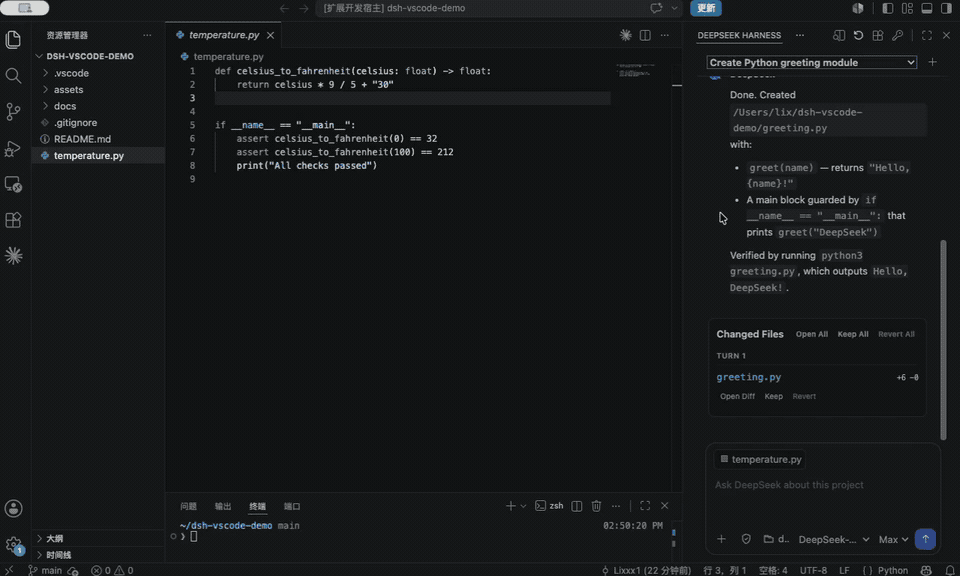
Bring DeepSeek Harness into the same place you write code. dsh-vscode gives DSH a Claude Code/Codex-style right sidebar that already understands your project, active file, and selected code.
catalog 简介 / catalog descriptioncatalog description:在 VS Code 中使用 DeepSeek Harness. Use DeepSeek Harness in VS Code
项目介绍Project Overview
dsh-vscode 是 DeepSeek Harness 的官方 VS Code 侧边栏插件。它将 DSH 会话、流式响应、工具调用与审批集成到编辑器中,自动感知项目、当前文件与选中代码。需要不离开编辑器即可让 DSH 检视、修改并验证代码时使用。可在差异编辑器中审阅改动并安全回滚,或停止 DSH 以避免覆盖未保存文件;状态为 Alpha,依赖 VS Code 1.100+ 与 Node.js 22.19+。
dsh-vscode is the official DeepSeek Harness sidebar extension for VS Code. It embeds DSH sessions, streaming responses, tool calls, and approvals into a right-side panel that automatically understands your project, active file, and selected code. Use it when you want DSH to inspect, edit, and verify code without leaving the editor. Changes can be reviewed in the Diff Editor and reverted, or DSH stopped before overwriting unsaved work. The extension is Alpha and requires VS Code 1.100+ and Node.js 22.19+.
请帮我了解并安装插件:【dsh-vscode】【https://github.com/Lixxx1/dsh-vscode】把上面这条消息直接发给当前会话里的 DSH,让它帮你了解并安装。安装命令不一定准确,发给 DSH 更稳。Send this message to DSH in your current session. CLI install commands may not be accurate across systems — DSH will figure it out for you.
或使用命令行安装(适合开发者)Or use CLI install (for developers)
命令行安装CLI Install
dsh plugin --profile web add github:Lixxx1/dsh-vscode把 Lixxx1/dsh-vscode 加入你的 DSH 配置(web profile)即可启用。
READMEREADME
DeepSeek Harness for VS Code 🐋
[!NOTE] ⭐ Like DSH Sidebar? Give it a Star on GitHub! It helps more people find the project.
Bring DeepSeek Harness into the same place you write code. dsh-vscode gives DSH a Claude Code/Codex-style right sidebar that already understands your project, active file, and selected code.
Ask DeepSeek to inspect, change, and verify code without switching between your editor, terminal, and a separate chat window.
👋 I built this because I wanted DSH right beside my editor. If that sounds useful to you too, give it a try! I'd love to hear how it fits into your workflow.




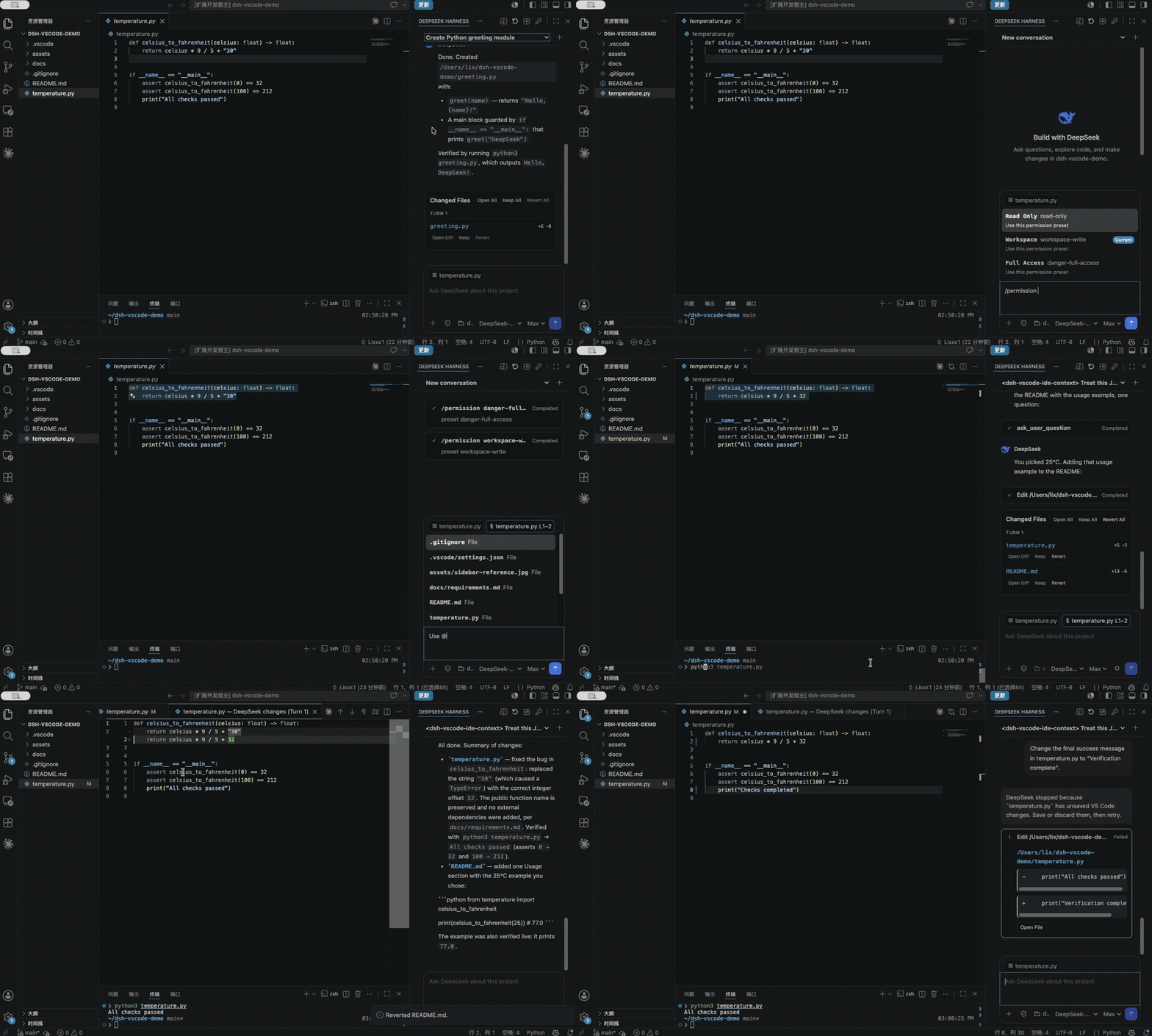
✨ Features
- Autonomous VS Code debugging. Let DeepSeek launch the current project from
.vscode/launch.json, manage breakpoints, step through execution, and inspect stack frames and local variables using VS Code's native debugger. - Official DSH inside VS Code. Sessions, streaming responses, tool calls, approvals, and follow-up questions run through the official DSH runtime.
- Project-aware editor context. The active file, selected code, and
@fileor@folderreferences travel with your prompt. - Session controls where you need them. Switch Permission and Plan modes, choose Model and Reasoning Effort, or steer an active task.
- Native review and safe revert. Review changes in VS Code's Diff Editor, Keep or Revert edits, and stop DSH before it overwrites a file with unsaved changes.
- Extend DSH from the sidebar. Discover and manage Tools, Skills, MCP integrations, Memory, and Agent Hooks loaded by DSH.
📦 Install
Install the official DeepSeek Harness CLI:
npm install -g @deepseek-ai/dsh
Then choose the extension channel that fits you:
Published release
Open Extensions in VS Code, search for DSH Sidebar, and select Install. You can also install it from the VS Code Marketplace.
Latest development build
To try features already available on main but not yet published to the Marketplace, build and install the latest VSIX:
git clone https://github.com/Lixxx1/dsh-vscode.git
cd dsh-vscode
pnpm install --frozen-lockfile
pnpm run package
In VS Code, run Extensions: Install from VSIX... from the Command Palette and select dsh-vscode.vsix. Development builds move faster and may be less stable; pull the latest changes and rebuild the VSIX to update.
Requires VS Code 1.100 or newer and Node.js ^22.19 or >=24.
Installing community runtime plugins also requires pnpm on your PATH.
🚀 Use
- Open a trusted project folder in VS Code.
- Select DeepSeek Harness in the right sidebar. If it is hidden, find it under Other Views.
- Use the key button to configure
DEEPSEEK_API_KEY. - Choose the Permission mode, Model, and Reasoning Effort, then start working. Use the Shield menu for Permission and Plan modes,
/for official DSH commands, and@to add files or folders. - Use the plugins button in the sidebar title to search, install, inspect, or remove community runtime plugins.
Autonomous debugging
Enable DeepSeek Harness: Autonomous Debugging in VS Code Settings and add a debug configuration to .vscode/launch.json.
DeepSeek can then start the debugger, set breakpoints, step through execution, inspect runtime values, fix the code, and verify the result directly from the sidebar.
Requires DeepSeek Harness 0.1.0-rc.8 or newer.
💬 Found a rough edge or have an idea for what should come next? Open an issue. I read every piece of feedback, and contributions are welcome too.
License
相关推荐Related
-
 nexu-io/open-design
🎨 Best DeepSeek Harness Design Plugin. The open-source Claude Design alternative. 🖥️ Local-first desktop app. 🖼️ Your…
nexu-io/open-design
🎨 Best DeepSeek Harness Design Plugin. The open-source Claude Design alternative. 🖥️ Local-first desktop app. 🖼️ Your…
-
 ruvnet/ruflo
🌊 The original agent meta-harness. Deploy intelligent multi-player swarms, coordinate autonomous workflows, and build c…
ruvnet/ruflo
🌊 The original agent meta-harness. Deploy intelligent multi-player swarms, coordinate autonomous workflows, and build c…
-
 amruthpillai/reactive-resume
A one-of-a-kind resume builder that keeps your privacy in mind. Completely secure, customizable, portable, open-source a…
amruthpillai/reactive-resume
A one-of-a-kind resume builder that keeps your privacy in mind. Completely secure, customizable, portable, open-source a…
-
 esengine/DeepSeek-Reasonix
DeepSeek-native AI coding agent for your terminal. Engineered around prefix-cache stability — leave it running.
esengine/DeepSeek-Reasonix
DeepSeek-native AI coding agent for your terminal. Engineered around prefix-cache stability — leave it running.
-
 volcengine/OpenViking
Self-evolving Context Database for AI Agents. Unify Agent Memory, Knowledge RAG and Skills.
volcengine/OpenViking
Self-evolving Context Database for AI Agents. Unify Agent Memory, Knowledge RAG and Skills.
-
 Molunerfinn/PicGo
:rocket: The Ultimate Image Uploader for Efficient Creators. Supports Obsidian, Typora, VS Code etc. and 60+ image hosti…
Molunerfinn/PicGo
:rocket: The Ultimate Image Uploader for Efficient Creators. Supports Obsidian, Typora, VS Code etc. and 60+ image hosti…
-
 titanwings/distilly
Distilly — Distill how they think into reusable Skills for any Agent or Bot. Formerly Colleague Skill(原同事 Skill).
titanwings/distilly
Distilly — Distill how they think into reusable Skills for any Agent or Bot. Formerly Colleague Skill(原同事 Skill).
-
 titanwings/colleague-skill