lk251066/dsh-tui-pro
DeepSeek Harness 固定式框架终端工作台插件,支持仅滚动转录和持久会话。
项目介绍Project Overview
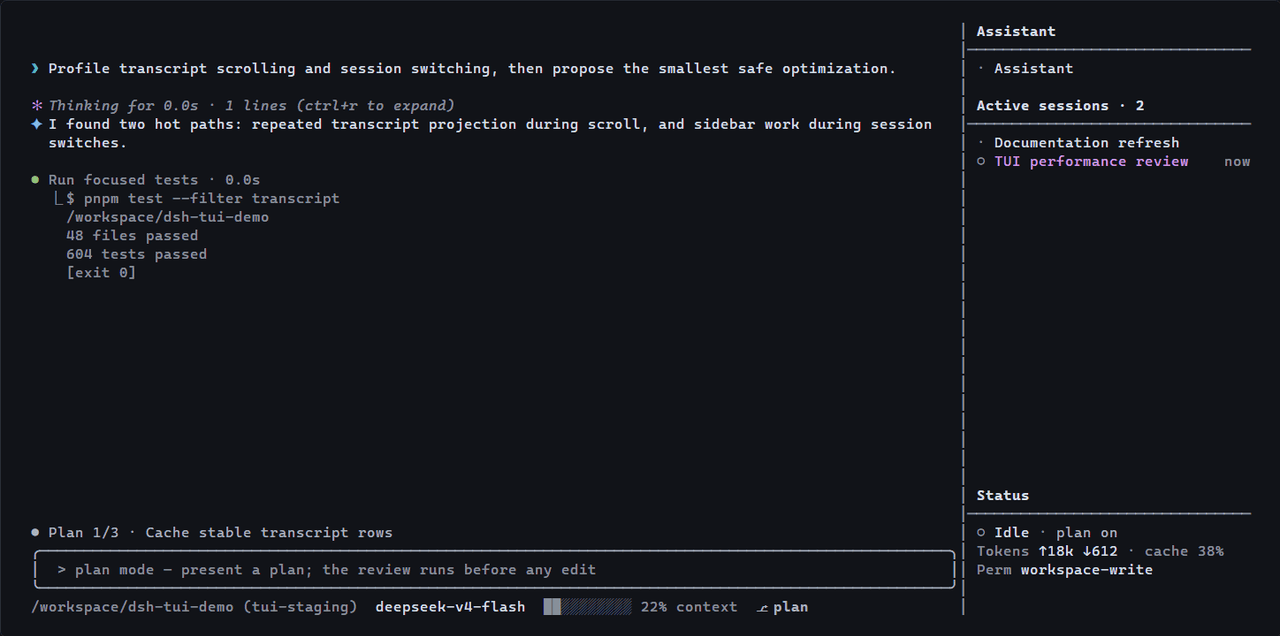
dsh-tui-pro 是 DeepSeek Harness 的多会话终端工作台插件。它在一个全屏 TUI 中整合持久的 Assistant 与按工作区分组的项目会话,支持 /new、/switch、/assistant 等命令切换,提供稳定画布、Markdown/工具/计划紧凑渲染、终端标题进度提示。适用于同时维护多个项目、需要在统一界面管理 Assistant 与子会话的开发者。注意:需 Node.js 22.19+ 或 24+,依赖 DEEPSEEK_API_KEY,终端宽度低于 65 列侧边栏会隐藏。
dsh-tui-pro is a multi-session terminal workbench plugin for DeepSeek Harness. It unifies a durable Assistant and workspace-grouped project sessions in one full-screen TUI, supporting commands like /new, /switch, and /assistant, with a stable canvas, compact rendering for Markdown, tools, and plans, and terminal-title progress indicators. Use it when juggling several projects that need a single interface for the Assistant and active sessions. Note: requires Node.js 22.19+ or 24+, DEEPSEEK_API_KEY, and a terminal wider than 65 columns for the sidebar.
请帮我了解并安装插件:【dsh-tui-pro】【https://github.com/lk251066/dsh-tui-pro】把上面这条消息直接发给当前会话里的 DSH,让它帮你了解并安装。安装命令不一定准确,发给 DSH 更稳。Send this message to DSH in your current session. CLI install commands may not be accurate across systems — DSH will figure it out for you.
或使用命令行安装(适合开发者)Or use CLI install (for developers)
命令行安装CLI Install
dsh plugin --profile tui add @lk251066/dsh-tui把 lk251066/dsh-tui-pro 加入你的 DSH 配置(web profile)即可启用。
READMEREADME
dsh-tui-pro
A multi-session terminal workbench for DeepSeek Harness. Keep a durable Assistant and the project sessions you actively maintain in one full-screen TUI.


Install · Latest release · dshfind · Report an issue
Quick start
You need Node.js ^22.19.0 || >=24.0.0 and DEEPSEEK_API_KEY configured outside this repository.
Already have the dsh CLI? Install the plugin and its profile layer once:
dsh plugin --profile tui add @lk251066/dsh-tui
Then launch it from any project directory:
dsh --profile tui
Without a global dsh installation, use the same profile through npx:
npx -y @deepseek-ai/dsh@latest plugin --profile tui add @lk251066/dsh-tui
npx -y @deepseek-ai/dsh@latest --profile tui
The package owns both the TUI plugin and its cordis.patch.yml profile layer. No second bundle package is required.
Why this TUI
One terminal, multiple projects
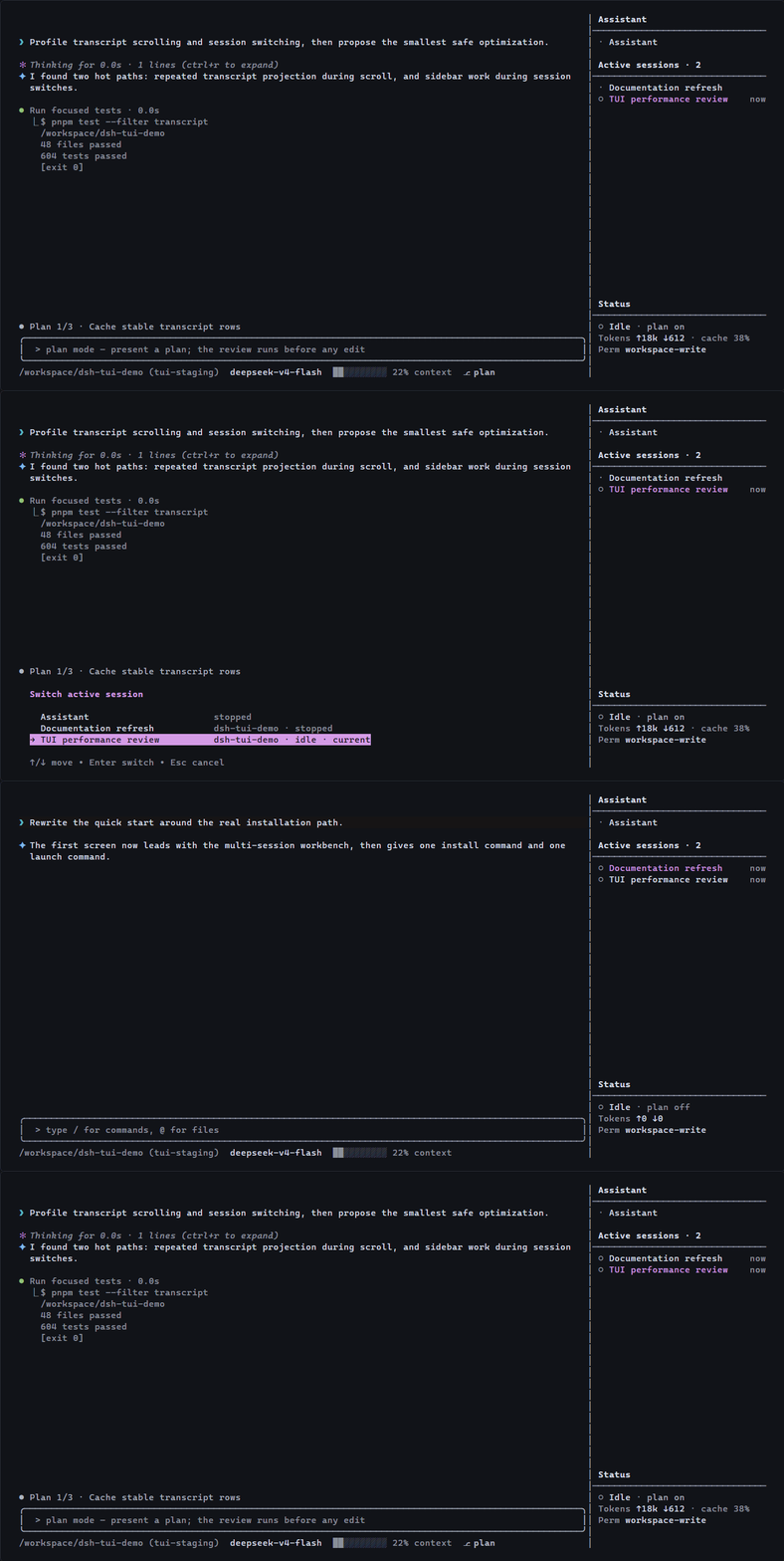
The Assistant is one durable session outside every project workspace. It keeps a permanent working directory and continues the same conversation across launches; bounded context is renewed through dsh compaction while the durable log and plugin-local long-term memory remain available. Active project sessions stay grouped by workspace in the fixed sidebar.
A stable full-screen canvas
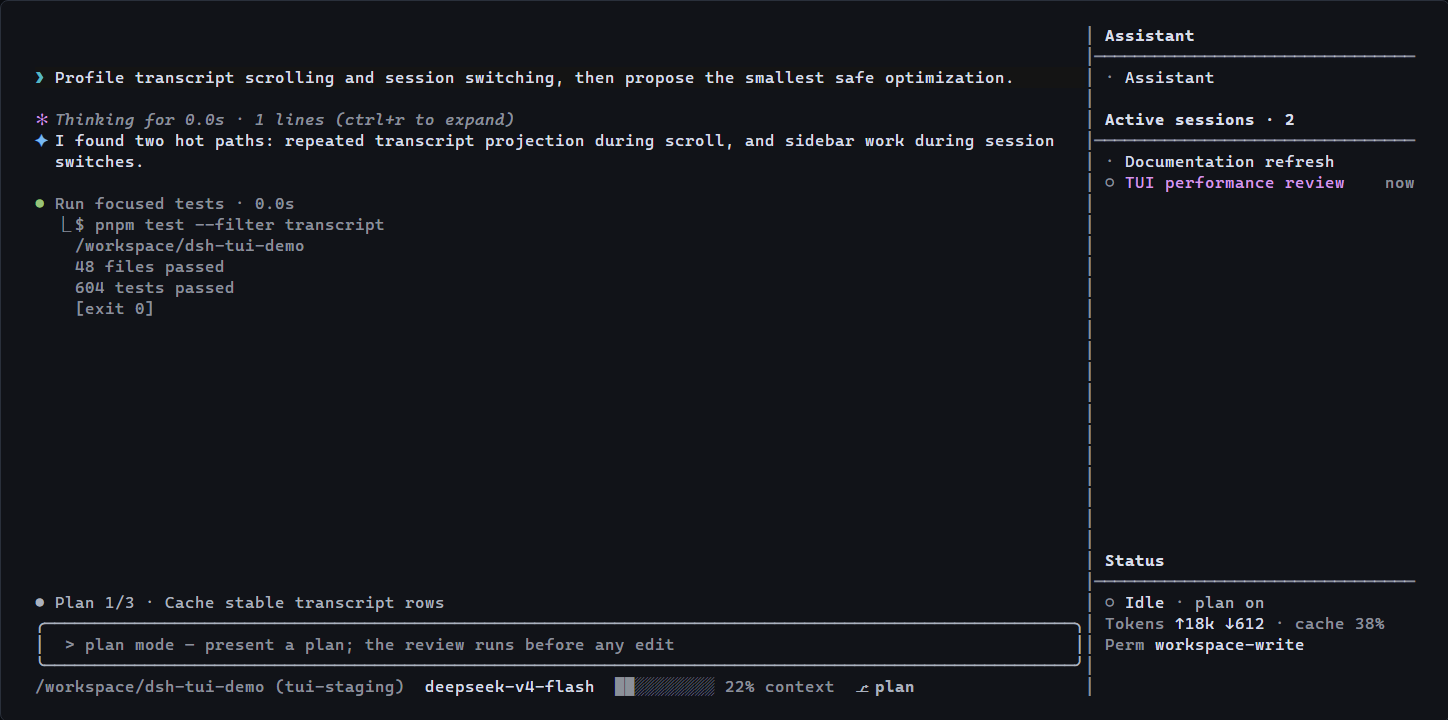
Only the transcript scrolls. The editor, current plan, live status, model, context usage, and active sessions remain in place while user messages, Markdown, thinking, tools, diffs, plans, todos, and subagents use distinct compact treatments.
The terminal title keeps the mounted session name visible. While work is active, a low-frequency spinner and the total number of running sessions appear in the title, and supported terminals also expose a taskbar progress state.
Native DeepSeek Harness composition
The package is an out-of-tree dsh plugin bundle, not a fork of the harness. Sessions, tools, skills, models, permissions, compaction, and subagents continue to use the services provided by the selected dsh profile.
Session workflow
Launching from a directory opens its first manually ordered active project session. If the directory has none, dsh creates one and adds it to that workspace.
/newcreates another session in the current project./new <path>creates a session for another project./assistantreturns to the fixed Assistant./switch,Alt+Left,Alt+Right, or a sidebar click changes the active project session./quitcloses the current project session, preserves its history, and returns to the Assistant./sessionsbrowses complete history;/exitcloses the TUI.
The Assistant can manage active project sessions and read their completed user/assistant dialogue. Hidden reasoning, tool traffic, and unfinished output are not exposed across sessions.
Assistant replies always remain fully rendered; transcript scrolling handles long answers. Thinking and tool bodies can collapse, but a tool's identity, status, and failure remain visible. Memory is enabled for the Assistant by default and persists durable user facts without silently evicting older records; /memory off removes memory from that session's model context without deleting it.
Interaction
| Action | Control |
|---|---|
| Send immediate steering | Enter while a turn is running |
| Queue the next turn | Tab |
| Recover the latest queued message | Esc before cancellation |
| Recall the latest submission | Empty-input Up |
| Browse current-conversation checkpoints | Double Esc |
| Toggle tool and context body detail | Ctrl+O |
| Expand settled reasoning | Ctrl+R |
| Select and copy transcript text | Drag with the left mouse button |
| Attach a clipboard image | Alt+V |
| Control session memory | /memory, /memory on, /memory off |
Run /help for the complete command list. Models, reasoning effort, skills, themes, settings, permissions, questions, and approvals use the fixed bottom area instead of centered popup windows.
Images and terminals
@ completes workspace files. Alt+V attaches a clipboard image when the selected model advertises image input. Windows uses PowerShell to read clipboard images, macOS requires pngpaste, and Linux requires wl-paste or xclip.
The TUI requires an ANSI-capable terminal. The sidebar hides below 65 inner columns, and a terminal height of at least 24 rows is recommended.
Configuration
- id: tui
  name: '@lk251066/dsh-tui'
  config:
    sidebarWidth: 32
    assistantCwd: '/absolute/path/to/assistant'
    showReasoning: false
    maxToolOutputLines: 6
See the package reference for the supported entry path and exported composition plugins.
Project links
- npm package
- GitHub releases
- Community discussions
- Development setup
- Verification guide
- Change history
- Contributing
This plugin follows the developer-preview dsh release line. Each release is checked from source, from its packed npm artifact, through a clean public dsh profile, and through a real Linux PTY before publication.
License
MIT. Based on the original TUI implementation from DeepSeek Harness.
相关推荐Related
-
 nexu-io/open-design
🎨 Best DeepSeek Harness Design Plugin. The open-source Claude Design alternative. 🖥️ Local-first desktop app. 🖼️ Your…
nexu-io/open-design
🎨 Best DeepSeek Harness Design Plugin. The open-source Claude Design alternative. 🖥️ Local-first desktop app. 🖼️ Your…
-
 ruvnet/ruflo
🌊 The original agent meta-harness. Deploy intelligent multi-player swarms, coordinate autonomous workflows, and build c…
ruvnet/ruflo
🌊 The original agent meta-harness. Deploy intelligent multi-player swarms, coordinate autonomous workflows, and build c…
-
 esengine/DeepSeek-Reasonix
DeepSeek-native AI coding agent for your terminal. Engineered around prefix-cache stability — leave it running.
esengine/DeepSeek-Reasonix
DeepSeek-native AI coding agent for your terminal. Engineered around prefix-cache stability — leave it running.
-
 Molunerfinn/PicGo
:rocket: The Ultimate Image Uploader for Efficient Creators. Supports Obsidian, Typora, VS Code etc. and 60+ image hosti…
Molunerfinn/PicGo
:rocket: The Ultimate Image Uploader for Efficient Creators. Supports Obsidian, Typora, VS Code etc. and 60+ image hosti…
-
 titanwings/colleague-skill
将冰冷的离别化为温暖的 Skill,欢迎加入数字生命1.0!Transforming cold farewells into warm skills? It's giving rebirth era. Welcome to Digital …
titanwings/colleague-skill
将冰冷的离别化为温暖的 Skill,欢迎加入数字生命1.0!Transforming cold farewells into warm skills? It's giving rebirth era. Welcome to Digital …
-
 nocobase/nocobase
NocoBase is an open-source AI + no-code platform for building business systems fast. Instead of generating everything fr…
nocobase/nocobase
NocoBase is an open-source AI + no-code platform for building business systems fast. Instead of generating everything fr…
-
 anywhere-labs/deepseek-harness-desktop
为 DeepSeek Harness (DSH) 插件生态打造的现代化桌面端解决方案。万物皆「插件」,桌面本身也是「插件」。
anywhere-labs/deepseek-harness-desktop
为 DeepSeek Harness (DSH) 插件生态打造的现代化桌面端解决方案。万物皆「插件」,桌面本身也是「插件」。
-
 freestylefly/awesome-gpt-image-2
Prompt as Code | GPT-Image2 工业级提示词引擎与模板库,470+ 个案例逆向工程,20+ 套工业级模板,并提炼出Skills,持续更新中
freestylefly/awesome-gpt-image-2
Prompt as Code | GPT-Image2 工业级提示词引擎与模板库,470+ 个案例逆向工程,20+ 套工业级模板,并提炼出Skills,持续更新中