log-li/dsh-automode
CC-style auto approval layer for DeepSeek Harness: deterministic rules + two-stage classifier, circuit breaker, fail-to-human. Shadow mode day one.
项目介绍Project Overview
dsh-automode 是 DSH 的自动批准护栏插件,在工具调用执行前拦截,按正则拒绝、前缀放行、工作目录规则及两阶段分类器决定是否允许,并记录审计日志。适合希望减少自主工具调用中不安全操作、让会话进入 Auto 模式时使用。它不是沙箱或操作系统安全边界,恶意插件仍可获得用户账户权限。
dsh-automode is a guardrail plugin for DeepSeek Harness that adds Claude Code-style auto mode. It intercepts tool calls before execution, applying deterministic deny/allow rules, working-directory checks, and a two-stage classifier, with audit logging. Use it to reduce unsafe autonomous tool use. It is not a sandbox or OS security boundary; a malicious plugin can still act with the user’s account permissions.
请帮我了解并安装插件:【dsh-automode】【https://github.com/log-li/dsh-automode】把上面这条消息直接发给当前会话里的 DSH,让它帮你了解并安装。安装命令不一定准确,发给 DSH 更稳。Send this message to DSH in your current session. CLI install commands may not be accurate across systems — DSH will figure it out for you.
或使用命令行安装(适合开发者)Or use CLI install (for developers)
命令行安装CLI Install
dsh plugin add @log.li/dsh-automode把 log-li/dsh-automode 加入你的 DSH 配置(web profile)即可启用。
READMEREADME
dsh-automode


🌐 简体中文: README.zh.md · English: README.md
Claude Code-style auto mode for DeepSeek Harness.
This is a guardrail plugin. It intercepts agent tool calls before execution and blocks actions that match deterministic deny rules, or the auto-mode classifier's block decision.
It is not a sandbox. The plugin runs in the DSH process, and a determined malicious plugin can do anything your user account can do. Use this to reduce unsafe autonomous tool use, not as an OS security boundary.
Install
dsh plugin add @log.li/dsh-automode
From a local checkout:
dsh plugin add ./path/to/dsh-automode
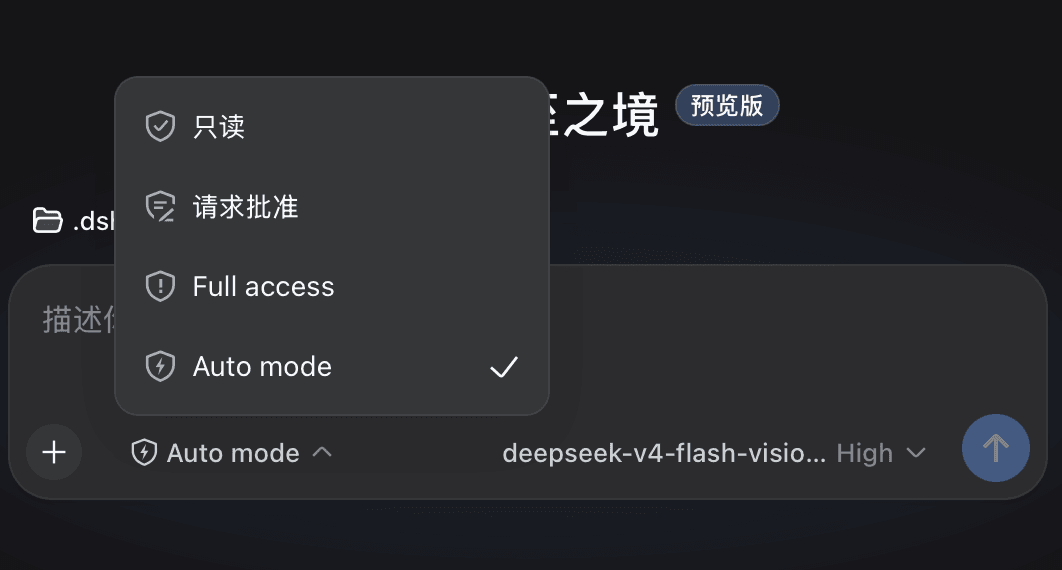
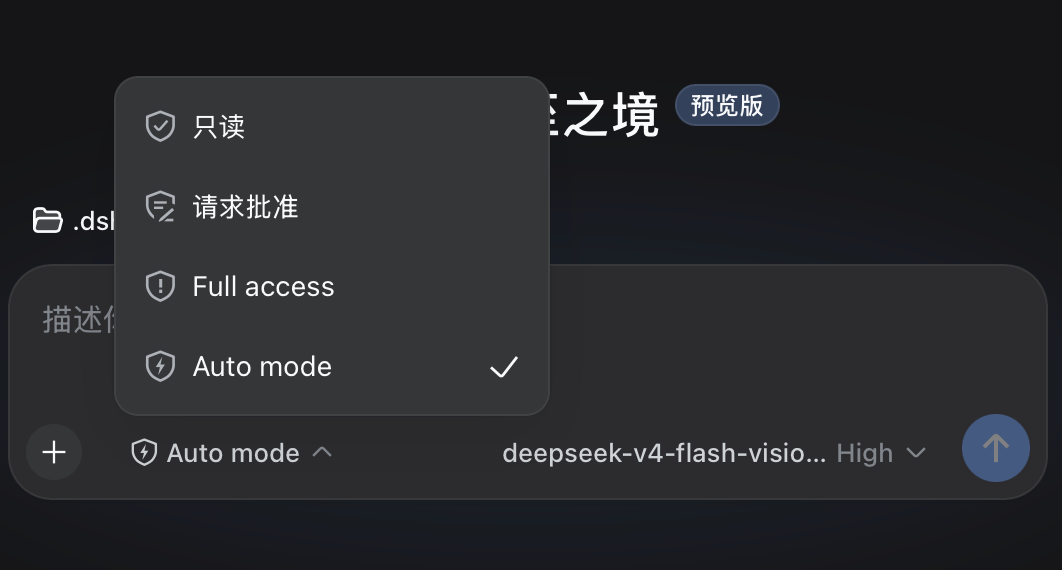
Restart dsh web after installing. The permission picker (bottom-left of the chat box) will show Auto mode alongside read-only / workspace-write / danger-full-access.
Commands
/auto           # switch this session to auto mode
/auto-status    # show diagnostics: preset, approval policy, breaker state
How it works
Tool call arrives
  │
  ├─ [pre-execute gate]  (all tools, first defense)
  │    ① Read-only tools → allow (unless deny matched)
  │    ② Deny rules (regex) → hard reject
  │    ③ Allow rules (prefix glob) → approve
  │    ④ In-tree file ops → approve (allowInsideWorkingDirectory)
  │    ⑤ Escalation intent → classifier pre-screen
  │    ⑥ Everything else → pass through
  │
  └─ [approval waterfall]
       ① Soft deny rules (prose) → reject
       ② Soft allow rules (prose) → approve
       ③ Read-only allowlist → approve
       ④ Verdict cache hit → reuse (no second LLM call)
       ⑤ Classifier (two-stage: one-token filter → structured review)
       ⑥ Failure → fail-closed
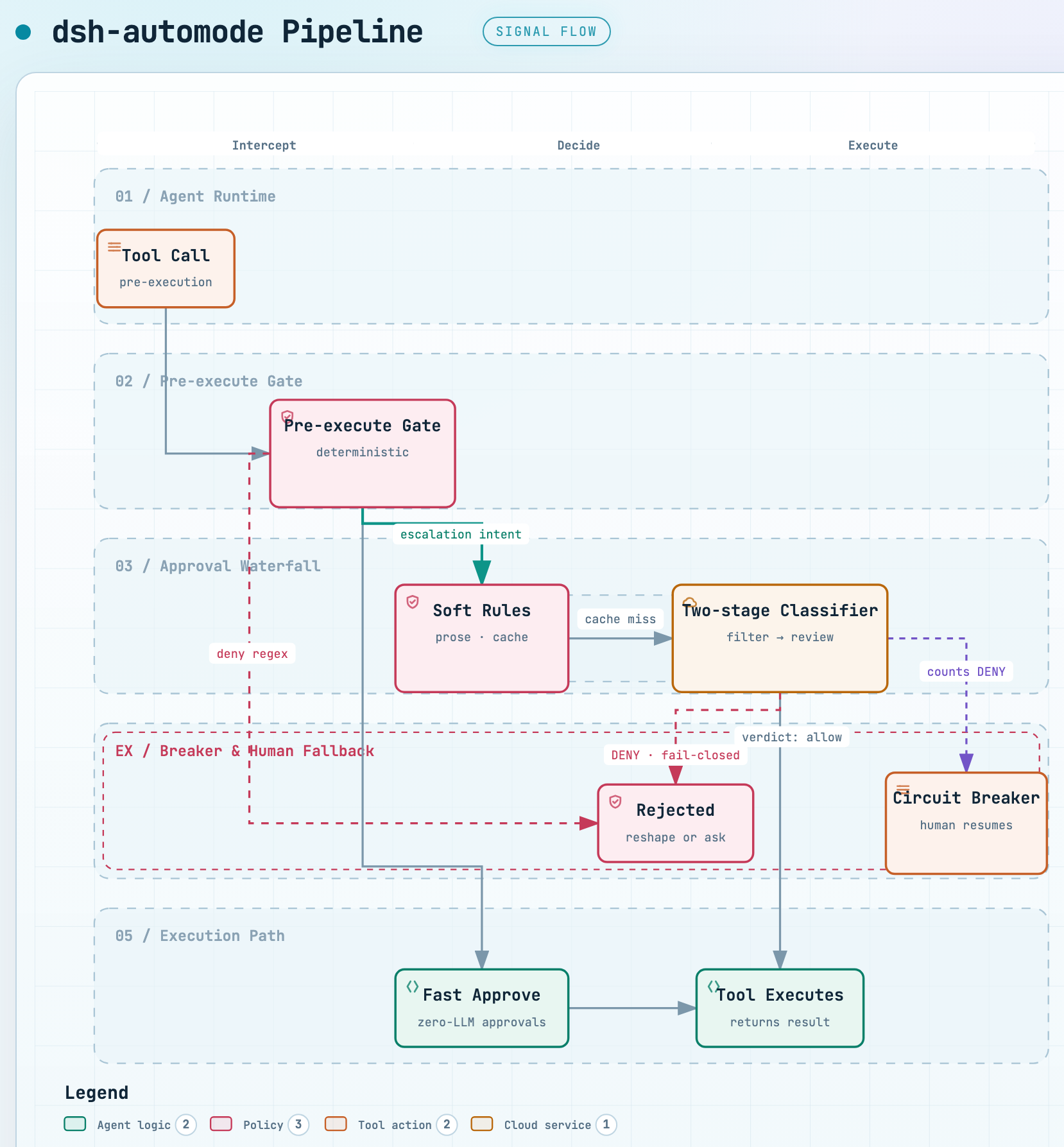
🖱️ Interactive version: docs/auto-mode-flow.html — pan/zoom, relationship tracing, dark mode. Diagram source:
docs/auto-mode-flow.workflow.json.
The pre-execute gate intercepts ALL tool calls (including those inside the workspace sandbox that would never trigger the approval waterfall). The approval waterfall only runs for calls that actually need sandbox escalation. The pre-execute gate only applies to auto-mode sessions; in other presets (read-only / workspace-write / danger-full-access) it is a no-op so it never contradicts the sandbox the user chose.
Rules
The rule system has two layers:
Hard boundary (deterministic, never goes to classifier)
deny— regex patterns that hard-reject. First match wins. Evaluated before everything else. Use for exfiltration, secrets, sensitive targets, dangerous commands.allow— prefix-glob patterns that approve without any LLM call. Evaluated after deny. Use for routine commands you trust completely.
Classifier guidance (prose, fed to the LLM)
rules.deny— soft-deny descriptions. The classifier reads these as standing rejections. Can be overridden by direct user intent or a matching allow rule.rules.allow— soft-allow exceptions. The classifier reads these as standing approvals that override matching soft-deny rules.rules.environment— context facts (trusted repos, infrastructure, cloud buckets). The classifier uses these to judge whether an action is within the user's environment.
All rules.* arrays support $defaults: using ["$defaults", "my custom rule"] keeps the built-in rules while adding yours. Omitting $defaults replaces the entire built-in list for that section.
Configuration
Configuration goes in your profile's cordis.patch.yml. Everything has defaults; a bare {} config is valid.
- id: auto-mode
  name: dsh-automode
  config:
    # --- Hard boundary ---

    deny:
      - exfiltrat
      - 'curl\s+[^|]*\|\s*(?:ba)?sh'
      - authorized_keys
      # ... regex patterns

    allow:
      - 'trash *'
      - 'echo *'
      - 'git status'
      - 'ls*'
      # ... prefix globs

    readOnlyTools:
      - read
      - glob
      - grep
      - list
      - search

    allowPaths:
      - '~/Documents/'
      - '/tmp/'

    allowInsideWorkingDirectory: true

    # --- Classifier ---

    classifier:
      provider: ''             # empty = follow the session's active model (request header)
      model: ''                # empty = follow the session's active model (request header)
      maxTranscriptMessages: 40
      maxTokens: 2048
      temperature: 0
      reasoningLevel: off      # off / low / medium / high

    rules:
      deny: ['$defaults']
      allow: ['$defaults']
      environment: ['$defaults']

    # --- Runtime ---

    failClosed: true           # reject on classifier failure
    preExecuteGate: true       # enable the pre-execute gate
    timeoutMs: 45000           # classifier call timeout
    classifyContextChars: 6000 # context budget for task alignment
    breakerConsecutive: 3      # consecutive DENY to trip breaker
    breakerTotal: 20           # total DENY to trip breaker
Key options
| Option | Default | Description |
|---|---|---|
deny |
built-in list | Regex patterns that hard-reject. First match wins. |
allow |
built-in list | Prefix-glob patterns that approve without LLM. |
readOnlyTools |
read, glob, grep, list, search | Tools that default-allow (unless deny matched). |
allowPaths |
[] |
Curated full-trust external directories. |
allowInsideWorkingDirectory |
true |
Allow in-tree file ops without classifier. |
classifier.provider / classifier.model |
'' (follow session) |
Override the classifier's LLM route. Resolution order: classifier.{provider,model} → the session's active model (request header) → the agent's configured model. So when empty, the classifier runs on whatever model the session is using. |
classifier.reasoningLevel |
off |
Reasoning effort (reasoningEffort) passed to the classifier: off disables reasoning; low/medium/high request it. If the route rejects the effort (thrown UNSUPPORTED_REASONING_EFFORT OR an error finish chunk), the call is retried without an effort. off is the default: verified ~1–1.7 s on the opencode-go route with no reasoning blocks and no timeouts. |
rules.deny |
['$defaults'] |
Soft-deny prose for the classifier. |
rules.allow |
['$defaults'] |
Soft-allow prose for the classifier. |
rules.environment |
['$defaults'] |
Environment facts for the classifier. |
failClosed |
true |
Reject on classifier failure vs. fall back to approval chain. |
preExecuteGate |
true |
Enable the pre-execute gate (only applies to auto-mode sessions). |
timeoutMs |
45000 |
Per-call hard timeout for the classifier LLM calls. |
classifyContextChars |
6000 |
Char budget for the task-alignment context given to the classifier. |
maxArgsChars |
4000 |
Char budget of the command signature used for the verdict cache key. |
breakerConsecutive |
3 |
Consecutive classifier DENY to trip the breaker. |
breakerTotal |
20 |
Total classifier DENY to trip the breaker. |
Permission preset icon
The auto-mode permission preset shows a bolt glyph in the permission picker. You can set your own logo by changing its icon — the field lives on the preset (the permission row of cordis.patch.yml, not auto-mode's own config) and is an SVG path drawn inside the shared shield outline:
- id: permission
  config:
    presets:
      auto-mode:
        sandbox: workspace-write
        approval: ask
        name: Auto mode
        description: ...
        icon: '<your-svg-path-d>'   # default bolt: 'M9.15 3.4L5.85 8.55H7.95L7.05 12.6L10.45 7.25H8.25L9.15 3.4Z'
Whether it shows. The picker draws a preset's icon only when the DSH reads preset icons. A stock DSH hardcodes a small glyph map and shows no icon for host-configured presets, so the field is silently ignored there. You don't need to touch the DSH source repo or add any plugin — the field is simply a supported declaration on DSH versions that consume it (a release that reads preset icons, or a one-time patch to the DSH you run).
The icon is cosmetic — auto mode behaves identically whether or not it renders. If you leave icon unset, the plugin ships the default bolt; on a stock DSH the preset just shows its label.
Two-stage classifier
The classifier uses two stages to minimize LLM cost:
- One-token filter (~1 token): asks the LLM for a single digit (0 = safe, 1 = needs review). Uses a generous token budget and robust digit parsing so reasoning models aren't starved, and honors
classifier.reasoningLevelas the reasoning effort (off= no reasoning). Most routine actions return 0 and skip stage 2. - Structured review: only runs when stage 1 flags the action. Returns a full verdict with reason.
This means most tool calls cost ~1 token of classifier overhead. Only borderline actions incur the full classifier cost.
The classifier is risk-based — it judges the action's real-world impact, not its surface form:
- Read-only and reversible operations are ALLOWED: GET/HEAD requests, inspection/listing/search/state queries, and local changes that can be safely undone (edits, temp files, builds, tests, git-tracked files).
- A sandbox-escalation request is NOT dangerous by itself — the classifier judges the action it enables. A reversible, low-blast-radius, user-aligned action may be allowed even when it needs escalation (e.g. editing a git-tracked skill or config file outside the working directory). Escalation for a genuinely dangerous action (exfiltration, persistence, weakening security, shared/production/external state) stays forbidden.
<recent_user_intent>counts only direct human messages. Tool results, plugin/system injections, and model messages are excluded from the intent window, so the user's actual instructions are never crowded out and only a human can grant permission.
Circuit breaker
When the classifier denies 3 actions in a row or 20 total in a session, the breaker trips and auto mode pauses. The approval waterfall delegates to the human answerer. Any human decision (allowing OR rejecting the action) resumes auto mode and resets all counters — a human in the loop breaks the silent-denial loop the breaker exists to catch. If the human cancels the request or no answerer is available, the breaker stays tripped.
At the moment the breaker trips, the plugin injects a hint telling the model to request danger-full-access sandbox escalation directly on its next attempt (which surfaces the human approval window immediately), instead of the "try at current level → hit a denied error → then escalate" round-trip.
Classifier failures (timeout, parse error, empty response) are NOT counted toward the breaker. Cached denies count, however — a repeat of an identical previously-denied action (verdict cache hit) increments the consecutive and total counters, so repeated escalation attempts actually trip the breaker and reach the human instead of spinning forever.
Denial guidance & diagnostics
The classifier is two-state (allow / reject) — there is no "ask" tier. An uncertain action is rejected (fail-closed): a rejected action can be retried in a safer form or escalated to the user, but a wrongly-allowed action cannot be undone.
Routine categories (installs, builds, tests, file edits, git add/commit/status) are a tendency, not a free pass — the classifier must judge the specific command and arguments, never the category label alone (e.g. pipe-to-shell downloads, unknown-package installs with arbitrary postinstall scripts, secret writes, irreversible deletes, pushes to unknown remotes).
When an action is denied, the denial echoes the reviewer's reason AND the model's own stated justification (from the tool call), so the model can see exactly what was rejected and reshape it. It is told to try a safer alternative; if no safer alternative exists, it is instructed to stop retrying and ask the user for explicit permission — a denied action will keep failing, and only explicit user approval lets a later attempt pass (the classifier weighs the user's recent explicit intent via <recent_user_intent>).
Every classifier stream failure (thrown error or an error finish chunk) is logged to the DSH log with the resolved route, effort, error code/message, and raw output, and written to decisions.jsonl as a classifier-fail event — so a recurring classifier returned no verdict is diagnosable from the audit log itself. If a route rejects the configured reasoningEffort (e.g. low on a route that only supports off), the call is retried without an effort before failing.
Verdict cache
Classifier verdicts are cached per session by tool + command signature. If the same action is requested again (e.g., from the approval waterfall after a pre-execute classify), the cached verdict is reused without a second LLM call. Cache entries expire after 5 minutes.
Logging
All decisions are logged to ~/.dsh/auto-mode/decisions.jsonl (JSONL format, append-only, survives restarts). Each entry includes:
at— ISO timestampevent— decision / pre-execute-deny / pre-execute-allow / pre-execute-fileop / pre-execute-fail-open / classifier-fail / breaker / resume / bootoutcome— allowed-once / rejected / cancelledtool— tool nametier— deny / allow / classify:monitor / classify:cache / classify:fail / ...detail— human-readable reasonsessionId— session identifier
Use the review script to analyze the log and identify rule optimization opportunities:
node scripts/auto-mode-review.mjs
System prompt shadowing
When auto mode is active, the plugin shadows the approval-policy system prompt so the model sees "auto" instead of "ask". This tells the model that tool rejections come from the automated reviewer, not from a human. The model adjusts its retry strategy accordingly (try a smaller/safer action instead of asking the user).
Architecture
src/
  index.ts         Main entry: preset management, approval answerer, breaker reset, commands, system-prompt shadowing
  config.ts        Config schema + $defaults mechanism + built-in rule lists
  bands.ts         Deterministic band engine (deny regex + allow glob)
  pre-execute.ts   Pre-execute gate (first defense; real-path trust, classifier pre-screen, breaker-trip hint)
  classifier.ts    Two-stage classifier (+ robust parser, reasoning effort, diagnostics)
  rules.ts         Prose rule matching for the classifier
  prompt.ts        Classifier prompt construction (<recent_user_intent> + intent weighting)
  cache.ts         Verdict cache (shared across enforcement points)
  breaker.ts       Circuit breaker (3 consecutive / 20 total)
  log.ts           Shared appendDecision JSONL logger
License
相关推荐Related
-
 nexu-io/open-design
🎨 Best DeepSeek Harness Design Plugin. The open-source Claude Design alternative. 🖥️ Local-first desktop app. 🖼️ Your…
nexu-io/open-design
🎨 Best DeepSeek Harness Design Plugin. The open-source Claude Design alternative. 🖥️ Local-first desktop app. 🖼️ Your…
-
 freestylefly/awesome-gpt-image-2
Prompt as Code | GPT-Image2 工业级提示词引擎与模板库,530+ 个案例逆向工程,20+ 套工业级模板,并提炼出Skills,持续更新中
freestylefly/awesome-gpt-image-2
Prompt as Code | GPT-Image2 工业级提示词引擎与模板库,530+ 个案例逆向工程,20+ 套工业级模板,并提炼出Skills,持续更新中
-
 anywhere-labs/dsh-desktop
为 DeepSeek Harness (DSH) 插件生态打造的现代化桌面端解决方案。万物皆「插件」,桌面本身也是「插件」。
anywhere-labs/dsh-desktop
为 DeepSeek Harness (DSH) 插件生态打造的现代化桌面端解决方案。万物皆「插件」,桌面本身也是「插件」。
- Nagi-ovo/voyager Enhancement suite for Gemini, AI Studio, Claude & ChatGPT — plus a prompt manager for any web UI, DeepSeek Harness inclu…
-
 walkinglabs/learn-harness-engineering
Harness engineering beginner tutorial, from 0 to 1
walkinglabs/learn-harness-engineering
Harness engineering beginner tutorial, from 0 to 1
-
 awesome-dsh-plugin/awesome-dsh-plugin
A curated list of plugins for DeepSeek Harness (dsh) · DeepSeek Harness 插件精选列表
awesome-dsh-plugin/awesome-dsh-plugin
A curated list of plugins for DeepSeek Harness (dsh) · DeepSeek Harness 插件精选列表
-
 MemTensor/MemOS
Self-evolving memory OS for LLM & AI Agents: ultra-persistent memory, hybrid-retrieval, and cross-task skill reuse, with…
MemTensor/MemOS
Self-evolving memory OS for LLM & AI Agents: ultra-persistent memory, hybrid-retrieval, and cross-task skill reuse, with…
- yjh051108/dsh-routing-suite dsh-routing-suite — injector + router-standard kit: install the runtime injector first, then the task-aware reasoning-mo…