LongSir0419/dsh-mcp-manager
An MCP server management plugin for DeepSeek Harness (DSH) — visually view, add, edit and remove MCP servers in the Web settings, with built-in connection testing.
catalog 简介 / catalog descriptioncatalog description:DeepSeek Harness (DSH) 的 MCP 服务器管理插件——在 Web 设置里可视化查看、新增、编辑、删除 MCP 服务器,并支持主动连接测试。
项目介绍Project Overview
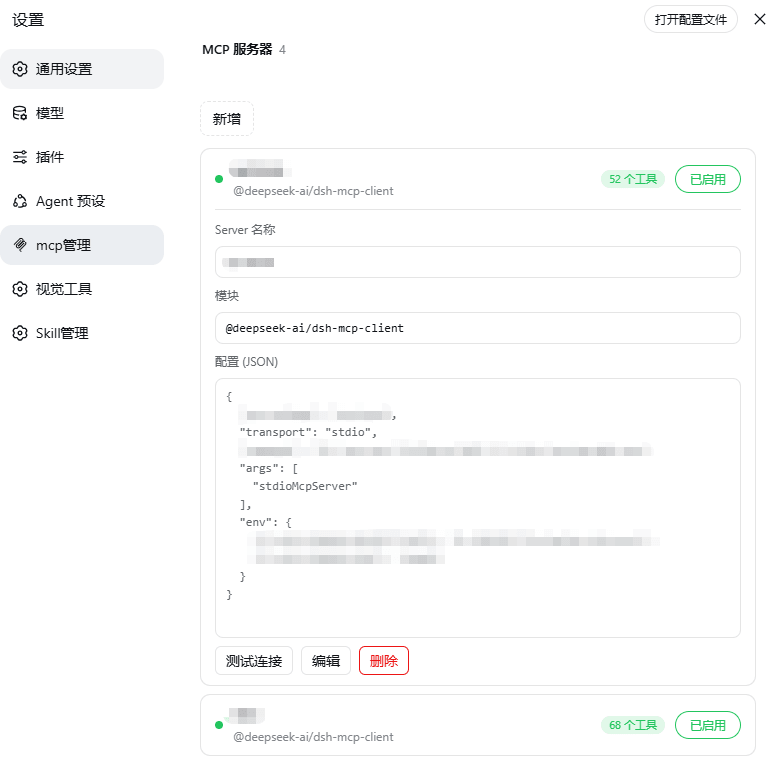
DSH 插件 dsh-mcp-manager 用于在 DeepSeek Harness Web 设置中可视化地查看、新增、编辑和删除 MCP 服务器,并内置连接测试功能。在「设置 → MCP Manager」中可看到每台服务器的状态指示灯与已注册工具数,点击行即可展开配置 JSON、测试握手、启停切换或删除;新增通过内联表单完成,配置写入 cordis.patch.yml。适用于需要集中管理多个 MCP 端点的开发者。注意:变更需重启 dsh web 后生效,stdio 模式测试 IDE 进程较慢。
dsh-mcp-manager is a DSH plugin that provides a visual interface in DeepSeek Harness Web settings for listing, adding, editing, and removing MCP servers, with a built-in connection test. From Settings → MCP Manager, each server row shows its status dot and registered tool count; click to expand the config JSON, run a handshake test, toggle enable/disable, or delete. Configurations are written to cordis.patch.yml. Use it when you need to centrally manage multiple MCP endpoints. Note: changes take effect only after restarting dsh web, and stdio-mode tests of IDE processes can be slow.
请帮我了解并安装插件:【dsh-mcp-manager】【https://github.com/LongSir0419/dsh-mcp-manager】把上面这条消息直接发给当前会话里的 DSH,让它帮你了解并安装。安装命令不一定准确,发给 DSH 更稳。Send this message to DSH in your current session. CLI install commands may not be accurate across systems — DSH will figure it out for you.
或使用命令行安装(适合开发者)Or use CLI install (for developers)
命令行安装CLI Install
dsh plugin --profile web add @wanghailong0419/dsh-mcp-manager把 LongSir0419/dsh-mcp-manager 加入你的 DSH 配置(web profile)即可启用。
READMEREADME
dsh-mcp-manager
An MCP server management plugin for DeepSeek Harness (DSH) — visually view, add, edit and remove MCP servers in the Web settings, with built-in connection testing.



Features
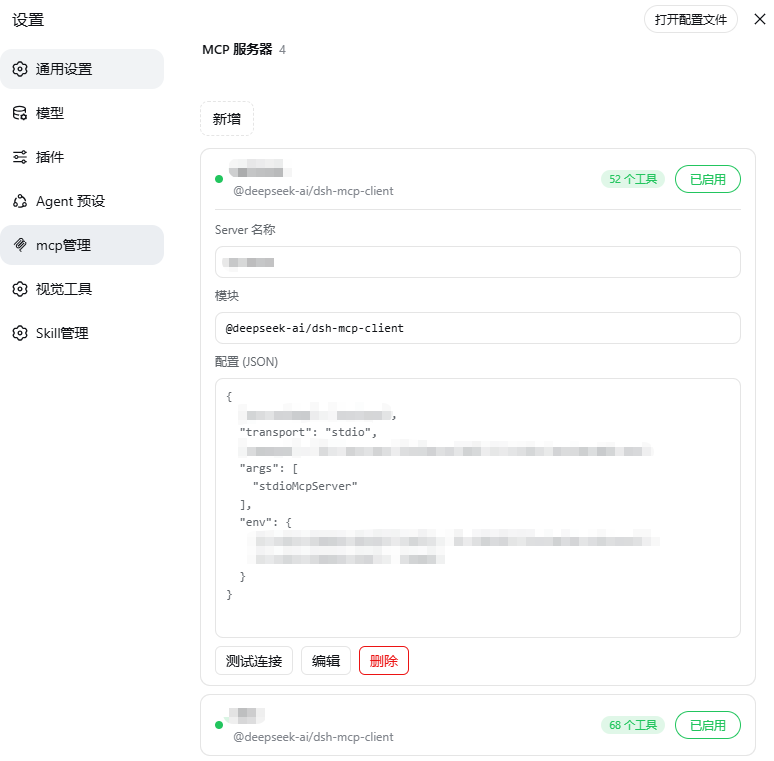
- List overview: go to Settings → "MCP Manager", each server shows connection status (green dot) + registered tool count
- Click to expand / collapse: click anywhere on a row to expand details (Server name / module / config JSON), click again to collapse (input fields and buttons excluded)
- Add / edit / delete / enable-disable: inline form to configure MCP servers (serverName, module, config JSON), enable/disable toggle, writes to
$DSH_HOME/profiles/web/cordis.patch.yml - Connection test: independent MCP handshake (initialize + tools/list) to verify reachability, tool count and latency
- Cache optimization: re-entering the page is instant (stale-while-revalidate); unconnected servers are verified in the background automatically; add/edit/delete updates state locally without flicker
Architecture
A single-package, two-half DSH bundle:
| Half | Entry | Role |
|---|---|---|
| Host | lib/index.js |
mcpInventory Remote service: list/add/update/removeServer/test, reads/writes cordis.patch.yml, counts tools |
| Client | lib/client.js |
"MCP Servers" section in the settings panel (dsh.client bundle, auto-discovered by client-modules) |
The package declares itself via dsh.bundle.patch (cordis.patch.yml) and is auto-mounted after dsh plugin installs it.
Installation
Prerequisites
- DeepSeek Harness (
dsh) installed - Web profile (
dsh web) available
Install (published on npm)
dsh plugin --profile web add @wanghailong0419/dsh-mcp-manager
dsh web   # restart to take effect
npm package: https://www.npmjs.com/package/@wanghailong0419/dsh-mcp-manager
Local development / unpublished version (file source)
dsh plugin --profile web add file:/path/to/dsh-mcp-manager/bundle
dsh web
Upgrade / Remove
dsh plugin --profile web update @wanghailong0419/dsh-mcp-manager
dsh plugin --profile web remove @wanghailong0419/dsh-mcp-manager
dsh plugin addautomatically adds the package to thedsh.profile.bundleslayer (it detects thedsh.bundledeclaration) — no manual config editing needed.
Usage
- Start
dsh web, open Settings → MCP Manager - Each server row shows: name, status dot (green/red), tool count
- Click a row to expand: view Server name / module / config JSON, test connection, edit, delete
- Add: click "Add", fill in serverName / module / config JSON inline
- Enable/disable: toggle the switch on the right side of the row
Changes are written to
cordis.patch.ymland take effect after restartingdsh web(HMR is disabled in web mode).
Configuration Example
- id: mcp-example
  name: '@deepseek-ai/dsh-mcp-client'
  config:
    serverName: example
    transport: stdio
    command: npx
    args: ['-y', '@modelcontextprotocol/server-xxx']
    env:
      TOKEN: !!js process.env.MY_TOKEN
Known Limitations
- Host service requires the
toolsservice:toolCountdepends on DSH's tool registry - Testing idea/pycharm:
stdioMcpServermode launches the IDE process once more, which takes longer
Icon Notes
The "MCP Servers" icon in the settings panel's left navigation is patched automatically when the plugin activates (injects an MCP logo branch into the official dsh-client-ui-settings-general navIcon; idempotent and fails silently). If DSH upgrades overwrite the official package, the patch is re-applied automatically on next startup — no manual action needed.
Upgrade note: if you're upgrading from an earlier manual installation, remove the manually added
mcp-inventory/ui-settings-mcpentries fromcordis.patch.ymlfirst (the bundle provides them automatically; duplicates cause service conflicts). Fresh installs can ignore this.
License
MIT
相关推荐Related
-
 ruvnet/ruflo
🌊 The original agent meta-harness. Deploy intelligent multi-player swarms, coordinate autonomous workflows, and build c…
ruvnet/ruflo
🌊 The original agent meta-harness. Deploy intelligent multi-player swarms, coordinate autonomous workflows, and build c…
-
 amruthpillai/reactive-resume
A one-of-a-kind resume builder that keeps your privacy in mind. Completely secure, customizable, portable, open-source a…
amruthpillai/reactive-resume
A one-of-a-kind resume builder that keeps your privacy in mind. Completely secure, customizable, portable, open-source a…
-
 volcengine/OpenViking
Self-evolving Context Database for AI Agents. Unify Agent Memory, Knowledge RAG and Skills.
volcengine/OpenViking
Self-evolving Context Database for AI Agents. Unify Agent Memory, Knowledge RAG and Skills.
-
 Molunerfinn/PicGo
:rocket: The Ultimate Image Uploader for Efficient Creators. Supports Obsidian, Typora, VS Code etc. and 60+ image hosti…
Molunerfinn/PicGo
:rocket: The Ultimate Image Uploader for Efficient Creators. Supports Obsidian, Typora, VS Code etc. and 60+ image hosti…
-
 titanwings/colleague-skill
将冰冷的离别化为温暖的 Skill,欢迎加入数字生命1.0!Transforming cold farewells into warm skills? It's giving rebirth era. Welcome to Digital …
titanwings/colleague-skill
将冰冷的离别化为温暖的 Skill,欢迎加入数字生命1.0!Transforming cold farewells into warm skills? It's giving rebirth era. Welcome to Digital …
-
 nocobase/nocobase
NocoBase is an open-source AI + no-code platform for building business systems fast. Instead of generating everything fr…
nocobase/nocobase
NocoBase is an open-source AI + no-code platform for building business systems fast. Instead of generating everything fr…
-
 Tencent/WeKnora
Open-source LLM knowledge platform: turn raw documents into a queryable RAG, an autonomous reasoning agent, and a self-m…
Tencent/WeKnora
Open-source LLM knowledge platform: turn raw documents into a queryable RAG, an autonomous reasoning agent, and a self-m…
- Nagi-ovo/voyager Enhancement suite for Gemini, AI Studio, Claude & ChatGPT — plus a prompt manager for any web UI, DeepSeek Harness inclu…