lywusichen/dsh-skill-panel
DeepSeek Harness plugin: a skill trigger in the sidebar foot that opens a dialog (same form and feel as the built-in Settings dialog) listing the current session's loaded skills, each with an "open local folder" jump to its directory on disk.
catalog 简介 / catalog descriptioncatalog description:DeepSeek Harness 技能悬浮窗插件:侧边栏技能按钮,一键查看当前会话已加载的技能并打开本地目录。
项目介绍Project Overview
DSH插件,在侧边栏底部添加技能触发按钮,打开与设置对话框同风格的技能列表对话框,展示当前会话已加载技能,并支持打开本地文件夹跳转。零配置安装,自动刷新,支持中英双语。适用于需要快速查看和管理技能目录的场景。注意:文件夹跳转依赖宿主支持directoryPath字段,不支持时仅隐藏按钮,不影响列表显示。
A DSH plugin that adds a skill trigger at the sidebar foot, opening a dialog styled like the built-in Settings to list loaded skills for the current session, each with an "open local folder" jump. Zero-config install, auto-refresh via host events, and bilingual UI. Use it to quickly inspect and access skill directories. Caveat: folder jumps require host support for the directoryPath field; otherwise, the button is hidden but the list still works.
请帮我了解并安装插件:【dsh-skill-panel】【https://github.com/lywusichen/dsh-skill-panel】把上面这条消息直接发给当前会话里的 DSH,让它帮你了解并安装。安装命令不一定准确,发给 DSH 更稳。Send this message to DSH in your current session. CLI install commands may not be accurate across systems — DSH will figure it out for you.
或使用命令行安装(适合开发者)Or use CLI install (for developers)
命令行安装CLI Install
dsh plugin --profile web add github:lywusichen/dsh-skill-panel把 lywusichen/dsh-skill-panel 加入你的 DSH 配置(web profile)即可启用。
READMEREADME
dsh-skill-panel
DeepSeek Harness plugin: a skill trigger in the sidebar foot that opens a dialog (same form and feel as the built-in Settings dialog) listing the current session's loaded skills, each with an "open local folder" jump to its directory on disk.
- Zero configuration —
dsh plugin addwires the plugin row automatically via the bundleddsh.bundle.patch; nocordis.patch.ymledits. - No custom RPC — the catalog rides the platform's
skill.listRPC and folder jumps ridehost.openPath. ThedirectoryPathfield is an optional host enhancement: on hosts that do not expose it, rows simply render without the folder button (the dialog still lists every skill). - Auto-refresh — the host's
skills/changeevent (plus a 30s poll fallback for older cores) keeps an open dialog in sync when skills are added, removed, or edited on disk — no reopening, no manual refresh. - Bilingual — simplified Chinese and English UI copy follows the web UI's locale.
Install
dsh plugin --profile web add github:<user>/dsh-skill-panel
Then restart dsh web. A skill icon appears at the bottom of the left
sidebar (beside Settings). Click it to open the skills dialog; hover a skill
row to reveal its folder button.
Usage
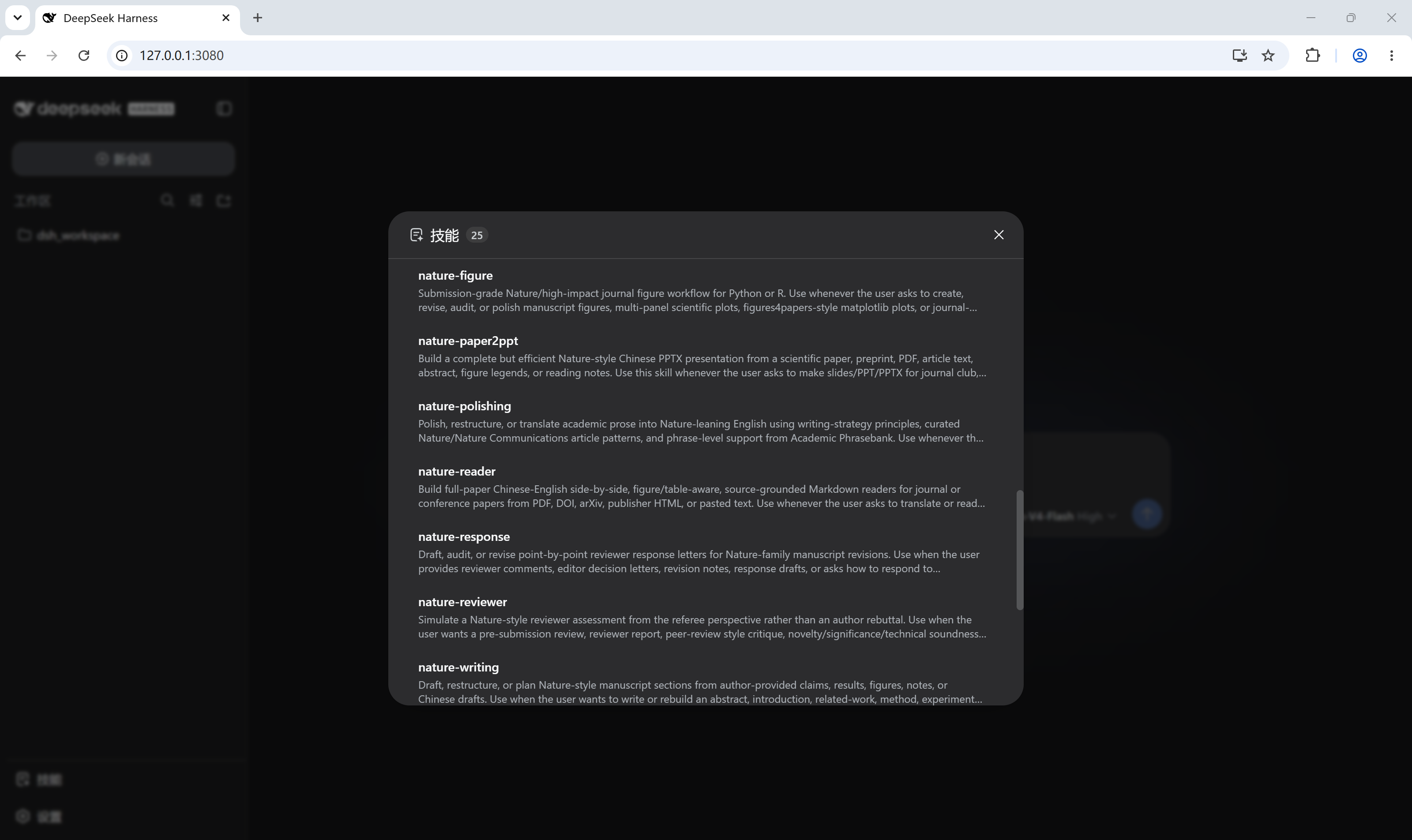
- The dialog shows the current session's skill catalog (name, routing
description, and a
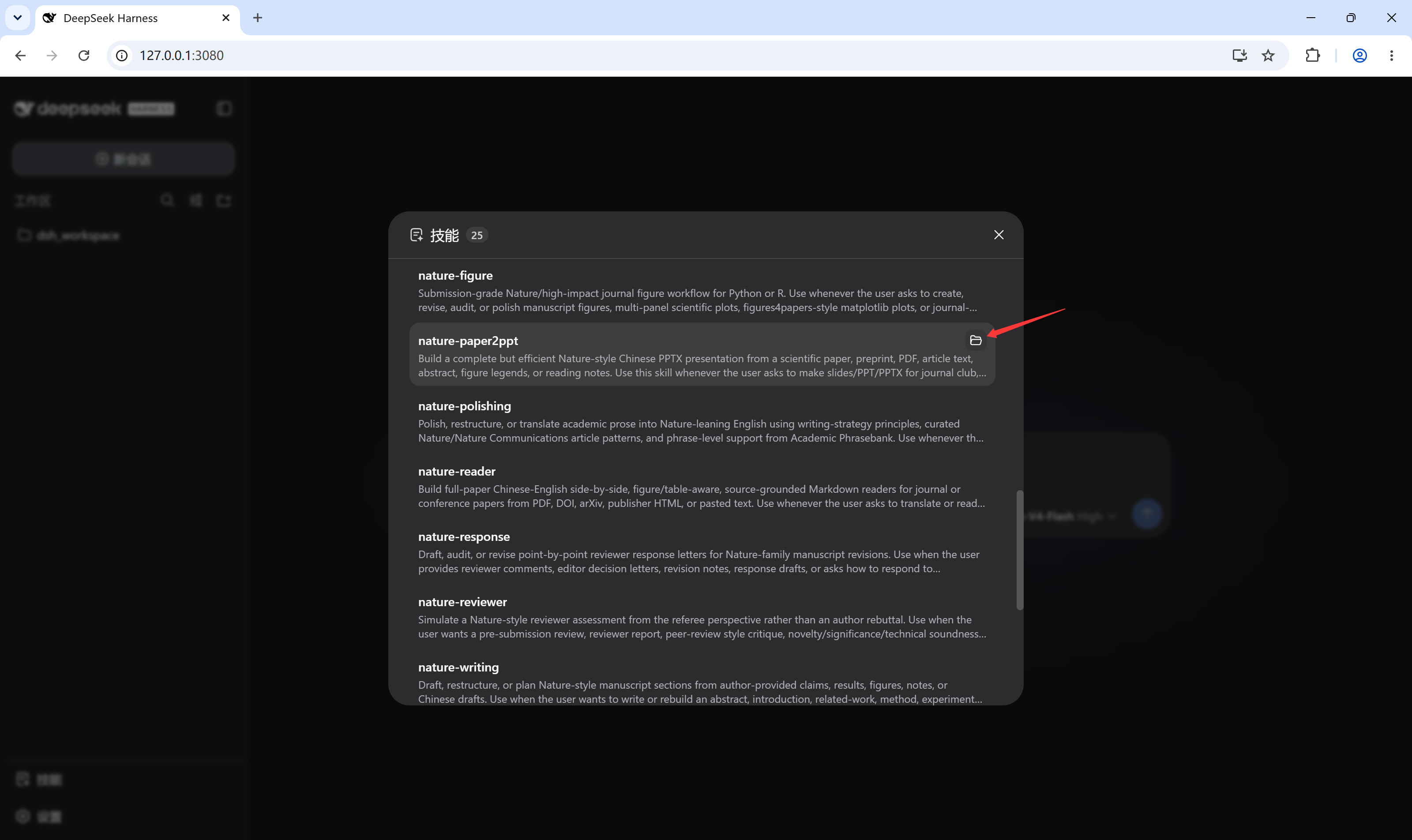
user-onlybadge where applicable), re-fetched per-session and cached alongside the composer's/skill menu. - Click the folder icon on a row to open that skill's local directory with the Host's default application (e.g. Explorer / Finder).
Screenshots
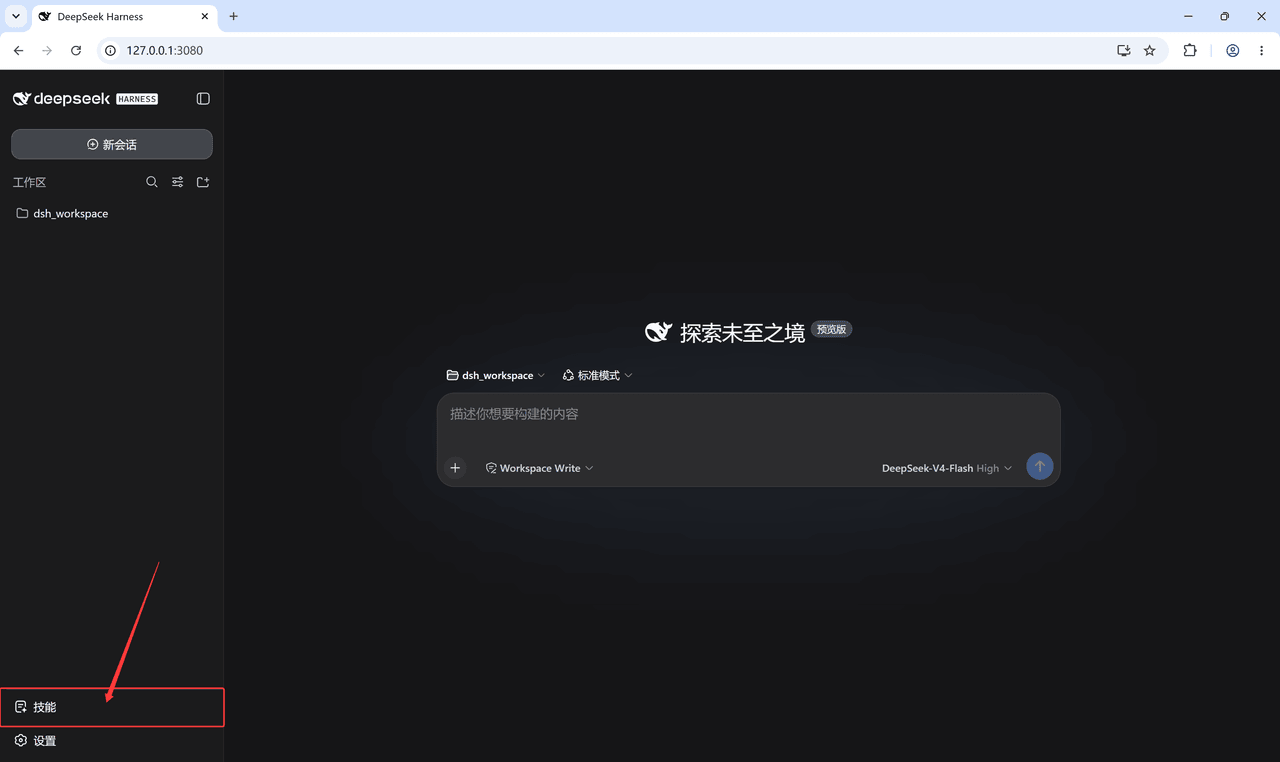
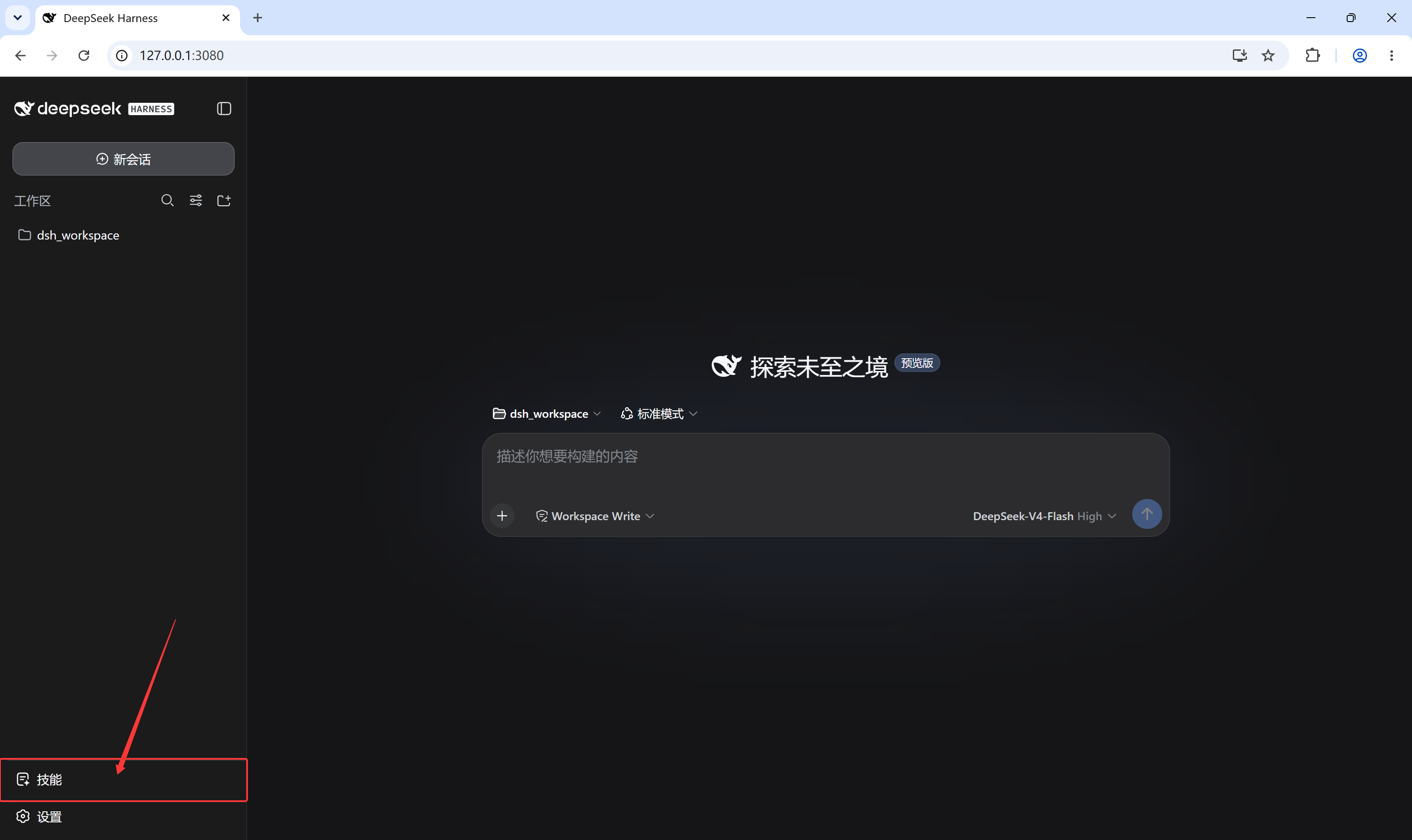
The skill trigger sits at the bottom of the left sidebar, beside Settings:
Clicking it opens the loaded-skills dialog:
Hovering a skill row reveals the folder button that opens that skill's local directory:
Development
npm install        # esbuild only
npm run build      # bundles src/client.jsx -> lib/client.js (also runs via prepare on install)
The client bundle is a single CJS file; @deepseek-ai/* and react-family
modules stay external because the dsh shell provides them as platform-static
modules. Commit lib/client.js — git-hosted installs consume the built
artifact directly.
License
相关推荐Related
-
 nexu-io/open-design
🎨 Best DeepSeek Harness Design Plugin. The open-source Claude Design alternative. 🖥️ Local-first desktop app. 🖼️ Your…
nexu-io/open-design
🎨 Best DeepSeek Harness Design Plugin. The open-source Claude Design alternative. 🖥️ Local-first desktop app. 🖼️ Your…
-
 freestylefly/awesome-gpt-image-2
Prompt as Code | GPT-Image2 工业级提示词引擎与模板库,530+ 个案例逆向工程,20+ 套工业级模板,并提炼出Skills,持续更新中
freestylefly/awesome-gpt-image-2
Prompt as Code | GPT-Image2 工业级提示词引擎与模板库,530+ 个案例逆向工程,20+ 套工业级模板,并提炼出Skills,持续更新中
-
 anywhere-labs/dsh-desktop
为 DeepSeek Harness (DSH) 插件生态打造的现代化桌面端解决方案。万物皆「插件」,桌面本身也是「插件」。
anywhere-labs/dsh-desktop
为 DeepSeek Harness (DSH) 插件生态打造的现代化桌面端解决方案。万物皆「插件」,桌面本身也是「插件」。
- Nagi-ovo/voyager Enhancement suite for Gemini, AI Studio, Claude & ChatGPT — plus a prompt manager for any web UI, DeepSeek Harness inclu…
-
 walkinglabs/learn-harness-engineering
Harness engineering beginner tutorial, from 0 to 1
walkinglabs/learn-harness-engineering
Harness engineering beginner tutorial, from 0 to 1
-
 awesome-dsh-plugin/awesome-dsh-plugin
A curated list of plugins for DeepSeek Harness (dsh) · DeepSeek Harness 插件精选列表
awesome-dsh-plugin/awesome-dsh-plugin
A curated list of plugins for DeepSeek Harness (dsh) · DeepSeek Harness 插件精选列表
-
 MemTensor/MemOS
Self-evolving memory OS for LLM & AI Agents: ultra-persistent memory, hybrid-retrieval, and cross-task skill reuse, with…
MemTensor/MemOS
Self-evolving memory OS for LLM & AI Agents: ultra-persistent memory, hybrid-retrieval, and cross-task skill reuse, with…
- yjh051108/dsh-routing-suite dsh-routing-suite — injector + router-standard kit: install the runtime injector first, then the task-aware reasoning-mo…