Mappedinfo/dsh-tool-vision-read
A lightweight DeepSeek Harness plugin that registers a visionread tool: it reads an image file through a dedicated vision model route and returns a text description — so a text-only agent (a model whose route does not declare image input, e.g. a chat model without vision) can still "see" images.
catalog 简介 / catalog descriptioncatalog description:DSH plugin: vision_read — route image reading to a dedicated vision model (e.g. Kimi K3) so text-only agents can see images
项目介绍Project Overview
这是一个非官方 DeepSeek Harness 社区插件,注册 vision_read 工具:把图片文件交给专用视觉模型路由,返回文字描述,让纯文本智能体也能“看图”。支持 direct 单次调用与 subagent 迭代两种模式。适用于文本模型需识别 PNG/JPEG/WebP/GIF 内容的场景。注意:必须配置声明 image 输入的视觉路由,否则调用失败。
An unofficial DeepSeek Harness community plugin that registers a vision_read tool. It sends an image file to a dedicated vision-model route and returns a text description, letting text-only agents "see" images. It offers a one-call direct mode and an iterating subagent mode. Use it when a non-vision agent must inspect PNG/JPEG/WebP/GIF files. Caveat: the configured route must declare image input, or calls fail with guidance.
请帮我了解并安装插件:【dsh-tool-vision-read】【https://github.com/Mappedinfo/dsh-tool-vision-read】把上面这条消息直接发给当前会话里的 DSH,让它帮你了解并安装。安装命令不一定准确,发给 DSH 更稳。Send this message to DSH in your current session. CLI install commands may not be accurate across systems — DSH will figure it out for you.
或使用命令行安装(适合开发者)Or use CLI install (for developers)
命令行安装CLI Install
dsh plugin --profile web add github:Mappedinfo/dsh-tool-vision-read把 Mappedinfo/dsh-tool-vision-read 加入你的 DSH 配置(web profile)即可启用。
READMEREADME
dsh-tool-vision-read
Unofficial community plugin. Independently developed and maintained; not part of the official DeepSeek Harness distribution.
A lightweight DeepSeek Harness plugin that registers a vision_read tool: it reads an image file through a dedicated vision model route and returns a text description — so a text-only agent (a model whose route does not declare image input, e.g. a chat model without vision) can still "see" images.
It is the same idea as routing different roles to different models (e.g. oh-my-pi's modelRoles), applied to one narrow capability: image description. No third-party CLI (modlens etc.), no manual delegation — the plugin does it in one call.
How it works
| Mode | Behavior | Cost |
|---|---|---|
direct (default) |
The plugin reads the file, commits it through the attachment service, and makes one llm.stream call to the configured vision provider/model with a text+image message. |
One round trip, no agent loop. |
subagent |
The plugin starts an in-process subagent pinned to the vision route (agentOptions), which calls read_image itself and can iterate (zoom, OCR, follow-ups). |
Full agent loop, more flexible. |
The tool always routes to the configured vision route, regardless of the calling model. Configuration parsing fails when either route id is omitted; a call resolves the route before image I/O and fails with guidance when the resolved route does not declare image input (declare it in the provider settings, e.g. defaultInput: [text, image] for pi-ai routes).
Requirements
- A DeepSeek Harness deployment (source checkout or out-of-tree profile install).
- A vision-capable model route. The plugin was verified against Kimi Coding API (
k3-256k, which accepts image input) — any provider that supports image content blocks works.
Install
Option A: inside the deepseek-harness monorepo (recommended for development)
Copy this package under packages/vision/tool-vision-read (or install from git), then:
pnpm install
Register the package in tsconfig.base.json (add ./packages/vision/*/src to the @deepseek-ai/dsh-* wildcard and the @deepseek-ai/dsh-*/invariant wildcard) and in tsconfig.host.json references, then mount it — see the official adding-a-package cookbook.
Option B: install the Profile Bundle (recommended)
Install the Git repository into a profile through the DSH plugin manager:
dsh plugin --profile web add github:Mappedinfo/dsh-tool-vision-read
For local development, link the checkout instead:
dsh plugin --profile web add link:/absolute/path/to/dsh-tool-vision-read
The package declares a DSH Profile Bundle, so a successful install adds it to dsh.profile.bundles. Restart dsh web; its bundled cordis.patch.yml mounts vision_read automatically. The default route is kimi-coding / k3-256k. Override it for one launch without editing the package:
DSH_VISION_PROVIDER=my-provider DSH_VISION_MODEL=my-vision-model dsh web
The profile's own cordis.patch.yml is applied after the Bundle. Use an id-targeted override when the route or other options must be durable:
- id: tool-vision-read
  config:
    provider: my-provider
    model: my-vision-model
    mode: direct
Do not insert a second tool-vision-read row in the profile. Remove the Bundle with dsh plugin --profile web remove @deepseek-ai/dsh-tool-vision-read. The @deepseek-ai/* peer packages are satisfied by the DSH installation's module closure ($DSH_HOME/profiles/node_modules flat fallback) — autoInstallPeers: false keeps pnpm from pulling older registry copies.
Configuration
| Key | Type | Default | Meaning |
|---|---|---|---|
provider |
string | — (required) | Registered provider route owning the vision model. |
model |
string | — (required) | Vision model id on that route. |
toolName |
string | vision_read |
Model-facing tool name. |
mode |
'direct' | 'subagent' |
'direct' |
Execution mode. |
maxImageBytes |
number | attachment limits | Cap on image bytes sent to the vision route. |
maxOutputTokens |
number | 1024 |
Cap on the vision route's output tokens. |
prompt |
string | see source | Instruction sent beside the image; {{path}} and {{focus}} placeholders. |
Tool contract
vision_read(file_path: string, focus?: string)
Returns { path, provider, model, description } — the vision model's text description of the image. Accepts PNG/JPEG/WebP/GIF paths only; paths resolve against the calling session's workspace cwd.
Example
A text-only agent (deepseek-v4-flash) calling vision_read on a campus-gate photo, with the description produced by Kimi K3-256K through the kimi-coding route:
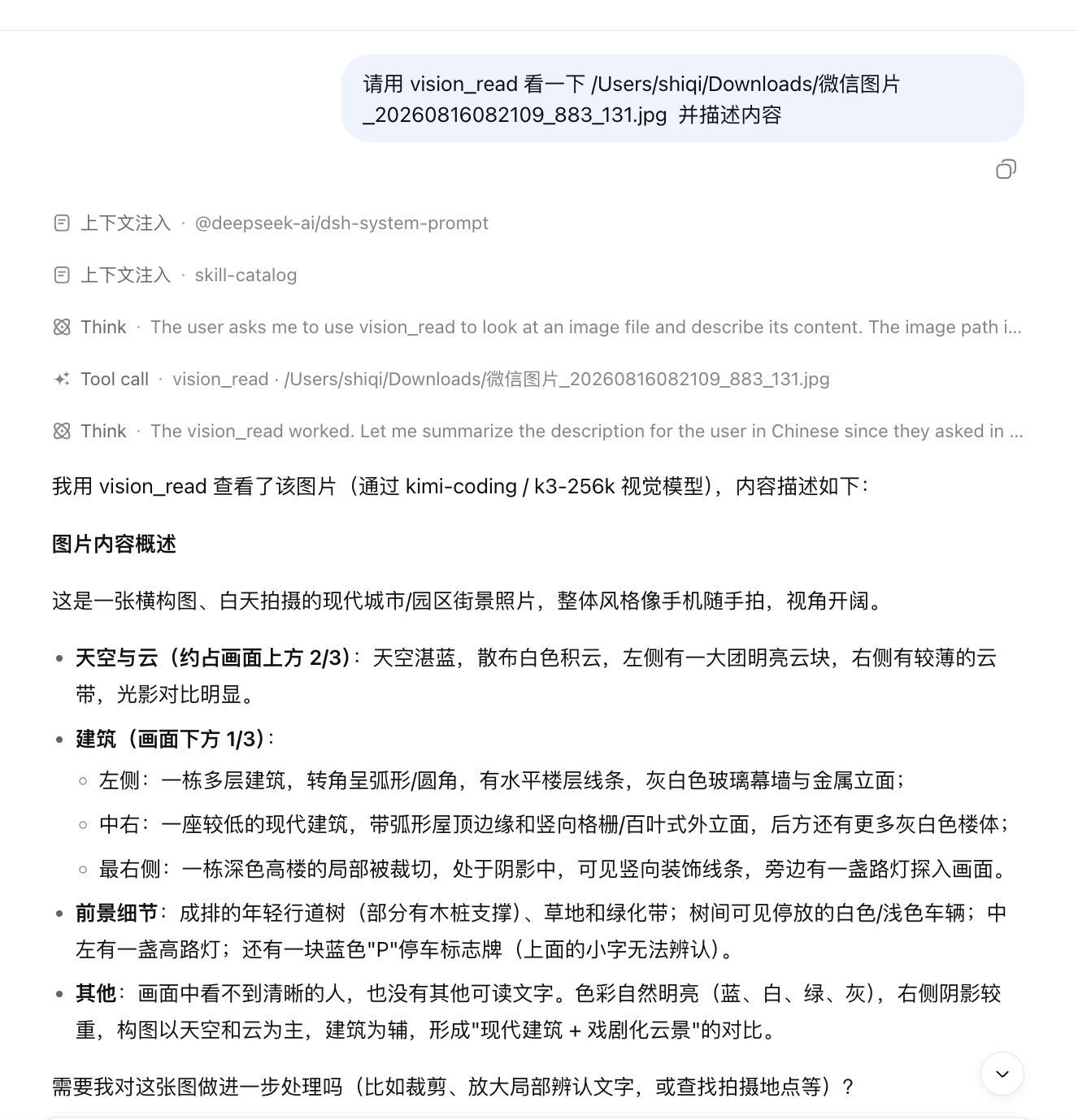
user: 请用 vision_read 看一下 /Users/shiqi/Downloads/微信图片_20260816082109_883_131.jpg 并描述内容
agent: (vision_read) → "这是一张横构图、白天拍摄的现代城市/园区街景照片……天空与云约占画面上方 2/3……
        左侧一栋多层建筑转角呈弧形……中右一座较低的建筑带弧形屋顶边缘和竖向格栅外立面……"
Layout
src/index.ts          # plugin (name/inject/apply/Config) + vision_read tool
src/invariant.ts      # package invariant companion (no runtime invariant)
cordis.patch.yml      # auto-mounted DSH Profile Bundle layer
lib/                  # reference build emitted from the deepseek-harness monorepo
tests/                # vitest spec (runs in the monorepo context)
docs/dsh-discussion-draft.md   # DeepSeek Harness "Show Your Plugins!" draft
Notes
lib/is the reference build generated from the package inside the deepseek-harness monorepo (packages/vision/tool-vision-read); the tests run against the monorepo toolchain. The git dependency installs the committedlib/directly.- Developed and verified end-to-end: a text-only agent (deepseek-v4-flash) calling
vision_readon a JPEG received a correct description from Kimi K3-256K.
License
MIT
相关推荐Related
-
 nexu-io/open-design
🎨 Best DeepSeek Harness Design Plugin. The open-source Claude Design alternative. 🖥️ Local-first desktop app. 🖼️ Your…
nexu-io/open-design
🎨 Best DeepSeek Harness Design Plugin. The open-source Claude Design alternative. 🖥️ Local-first desktop app. 🖼️ Your…
-
 freestylefly/awesome-gpt-image-2
Prompt as Code | GPT-Image2 工业级提示词引擎与模板库,530+ 个案例逆向工程,20+ 套工业级模板,并提炼出Skills,持续更新中
freestylefly/awesome-gpt-image-2
Prompt as Code | GPT-Image2 工业级提示词引擎与模板库,530+ 个案例逆向工程,20+ 套工业级模板,并提炼出Skills,持续更新中
-
 anywhere-labs/dsh-desktop
为 DeepSeek Harness (DSH) 插件生态打造的现代化桌面端解决方案。万物皆「插件」,桌面本身也是「插件」。
anywhere-labs/dsh-desktop
为 DeepSeek Harness (DSH) 插件生态打造的现代化桌面端解决方案。万物皆「插件」,桌面本身也是「插件」。
- Nagi-ovo/voyager Enhancement suite for Gemini, AI Studio, Claude & ChatGPT — plus a prompt manager for any web UI, DeepSeek Harness inclu…
-
 walkinglabs/learn-harness-engineering
Harness engineering beginner tutorial, from 0 to 1
walkinglabs/learn-harness-engineering
Harness engineering beginner tutorial, from 0 to 1
-
 awesome-dsh-plugin/awesome-dsh-plugin
A curated list of plugins for DeepSeek Harness (dsh) · DeepSeek Harness 插件精选列表
awesome-dsh-plugin/awesome-dsh-plugin
A curated list of plugins for DeepSeek Harness (dsh) · DeepSeek Harness 插件精选列表
-
 MemTensor/MemOS
Self-evolving memory OS for LLM & AI Agents: ultra-persistent memory, hybrid-retrieval, and cross-task skill reuse, with…
MemTensor/MemOS
Self-evolving memory OS for LLM & AI Agents: ultra-persistent memory, hybrid-retrieval, and cross-task skill reuse, with…
- yjh051108/dsh-routing-suite dsh-routing-suite — injector + router-standard kit: install the runtime injector first, then the task-aware reasoning-mo…