Mars-Sea/dsh-commandcode-provider
Unofficial DeepSeek Harness LLM 提供程序插件,用于 Command Code:实时模型目录、推理努力支持、模型页面卡片。从 pi-commandcode-provider (MIT) 移植而来。
项目介绍Project Overview
dsh-commandcode-provider 是 DeepSeek Harness 的非官方 Command Code 插件。它将 Command Code 注册为 commandcode 提供商,提供模型目录、计划感知选择器、视觉输入、用量仪表板及多账号自动轮换。适用于持有 Command Code API 密钥或多账户订阅的用户。需注意:图像输入仅限视觉模型,且不支持 stop 序列。
dsh-commandcode-provider is an unofficial DeepSeek Harness plugin for Command Code. It registers a commandcode provider with a live model catalog, plan-aware picker, vision input, usage dashboard, and automatic multi-account rotation on limit hits. Use it when integrating Command Code accounts or keys into dsh. Caveat: image input is model-gated, and stop sequences are not supported.
请帮我了解并安装插件:【dsh-commandcode-provider】【https://github.com/Mars-Sea/dsh-commandcode-provider】把上面这条消息直接发给当前会话里的 DSH,让它帮你了解并安装。安装命令不一定准确,发给 DSH 更稳。Send this message to DSH in your current session. CLI install commands may not be accurate across systems — DSH will figure it out for you.
或使用命令行安装(适合开发者)Or use CLI install (for developers)
命令行安装CLI Install
dsh plugin --profile web add @mars-sea/dsh-commandcode-provider@latest把 Mars-Sea/dsh-commandcode-provider 加入你的 DSH 配置(web profile)即可启用。
READMEREADME
dsh-commandcode-provider
English | 简体中文






Unofficial DeepSeek Harness LLM provider plugin for Command Code, ported from pi-commandcode-provider (MIT).
This is a community integration. You need your own Command Code account and API key or subscription, and Command Code's terms apply. This project is not affiliated with Command Code, Inc.
What you get
- Plugin bundle — install into any dsh profile with
dsh plugin add; registers acommandcodeprovider route with a live model catalog. - Dedicated settings page — API key, connection options, a live account-usage card, and a "Hide out-of-plan models" toggle.
- In-browser sign-in for keys — start the official authorization flow (the same one
cmd loginruns) from the settings page; the approved key lands in the local credential service automatically. Manual paste remains the fallback. - Multi-account rotation — when one account hits its usage limit, requests switch to the next account automatically. See Account rotation.
- Flexible API key setup — via the settings page, an environment variable, or the official CLI login file.
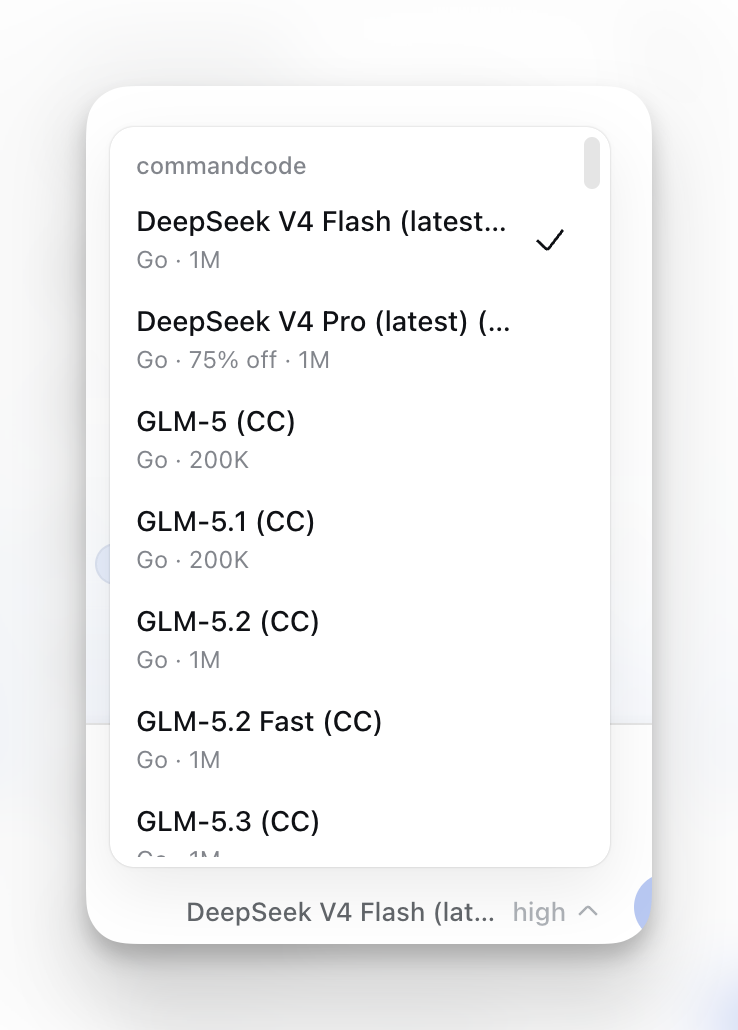
- Model-picker annotations — minimum plan, active deal or
FREEbadge, peak/off-peak state, image support, and context window; free models listed first. - Plan-aware picker — models above your subscription tier are hidden by default (toggleable).
- Reasoning-effort support — models with selectable reasoning effort levels expose them in the picker.
- Image input — Vision-capable models accept images.
See Screenshots below for what the UI looks like.
Install
dsh plugin --profile web add @mars-sea/dsh-commandcode-provider@latest
Updating
dsh plugin --profile web update @mars-sea/dsh-commandcode-provider@latest
Then restart the web app.
Getting an API key
The easiest path is the official CLI (Node.js 22+):
npm i -g command-code@latest
cmd login        # macOS/Linux; native Windows: cmdc login
Or skip the CLI: click Sign in to Command Code under Settings → Command Code — your browser opens the commandcode.ai authorization page (the same flow cmd login uses) and the key is stored in the local credential service when you approve. You can still create a key on the Keys settings page and paste it into Settings → Command Code, or export COMMANDCODE_API_KEY="user_...".
The sign-in flow needs the Host and your browser on the same machine (loopback callback). With a remote Host, paste the key manually; a literal composition-level
apiKey, if set, still takes precedence over a signed-in credential.
Verify it works
After restart, enter your API key in Settings → Command Code and save; Settings → Models shows a Command Code card, and the model picker lists the live catalog under commandcode. Send a message with a model your plan includes.
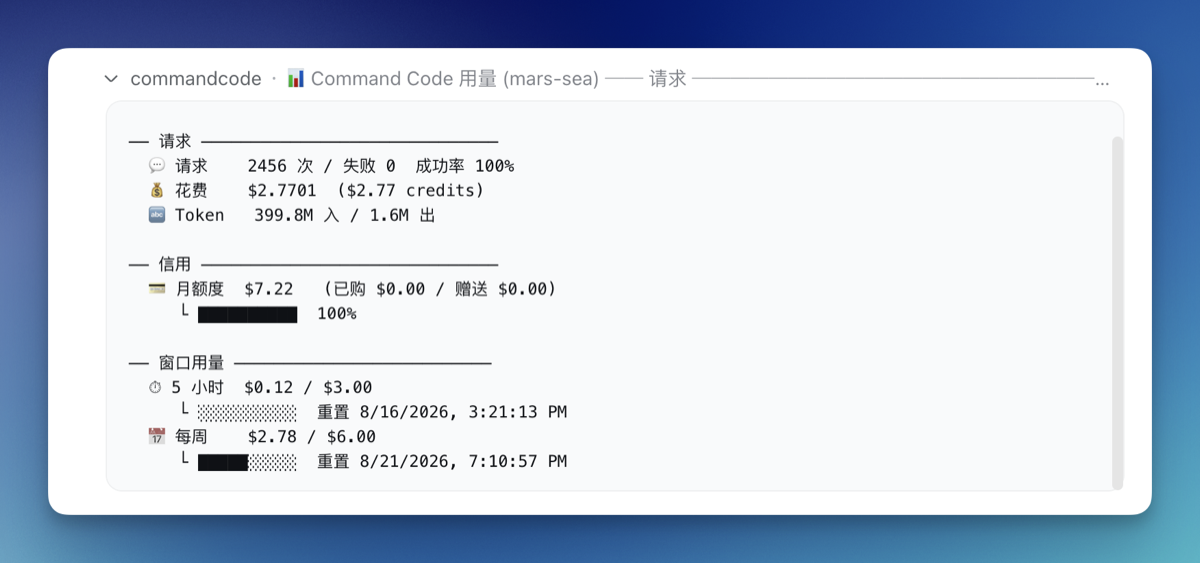
Usage dashboard
The plugin registers a /commandcode slash command showing per-account usage:
/commandcode (or /commandcode status)
Account rotation
With several Command Code subscriptions, the plugin switches to the next account automatically when one hits its usage limit:
- Setup — use the Account rotation card at Settings → Command Code to add accounts with a label and API key; the top-level key always serves first as the
defaultaccount. - Manual switching — the Active account dropdown pins a preferred account; if it is exhausted, requests fall back to other accounts and return once its window resets.
- Status — the Account usage card and
/commandcodereport per-account state.
The equivalent YAML ($DSH_HOME/settings.yaml or composition config):
llm-commandcode:
  apiKeyEnv: COMMANDCODE_API_KEY        # first (default) account
  activeAccount: COMMANDCODE_API_KEY_2   # optional: pin the active account (`default` or an account's credential ref)
  accounts:                              # rotation order after it
    - label: Go #2
      apiKeyEnv: COMMANDCODE_API_KEY_2
    - label: Go #3
      apiKeyEnv: COMMANDCODE_API_KEY_3
Configure
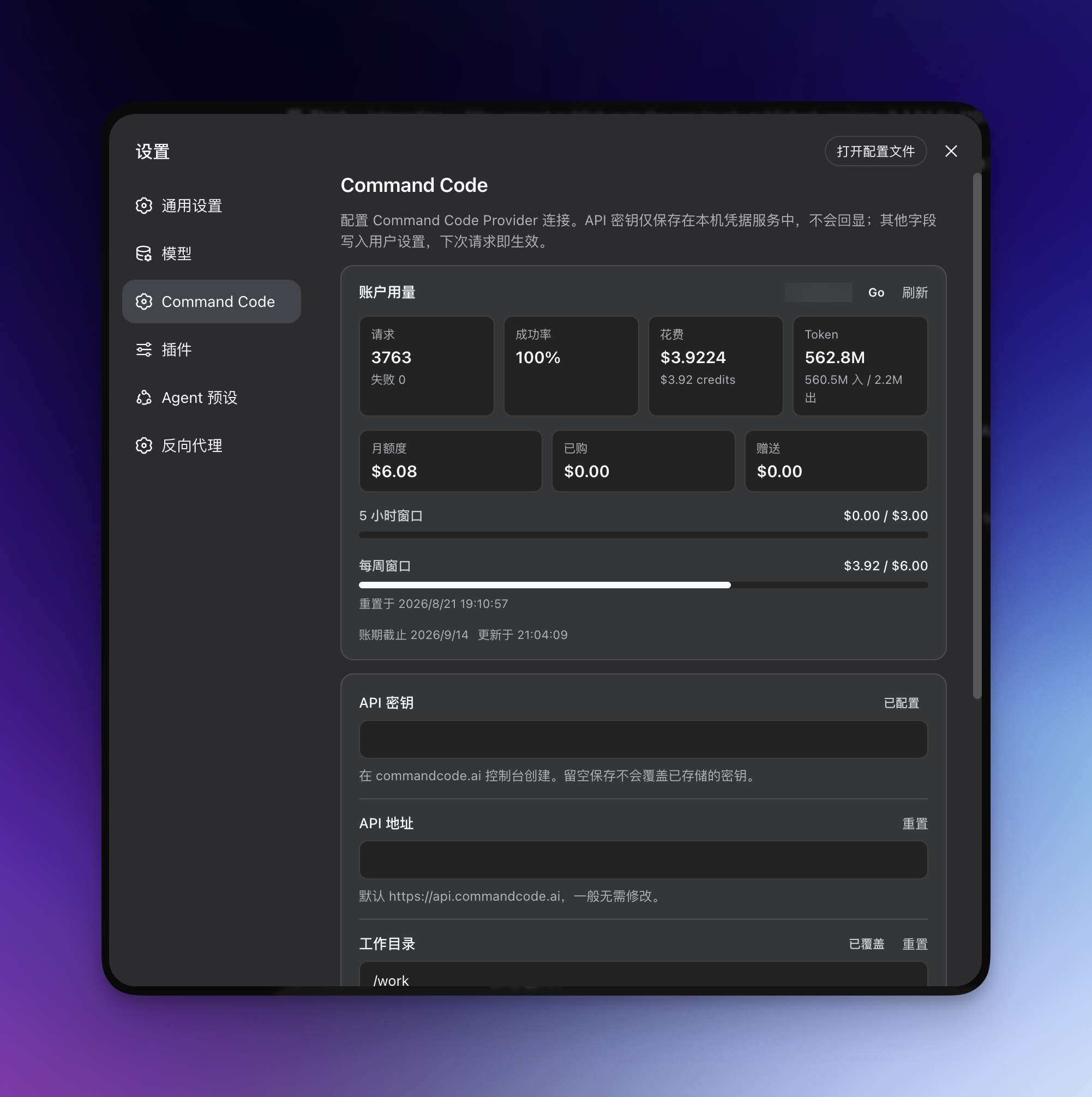
Settings → Command Code covers the API key, API base URL, working directory, and request/stream timeouts; once a key is saved, a live Account usage card appears at the top of the page.
The same options live in $DSH_HOME/settings.yaml (changes apply immediately, no restart):
llm-commandcode:
  apiKeyEnv: COMMANDCODE_API_KEY   # credential reference
  apiBase: https://api.commandcode.ai
  workingDir: /path/to/project     # optional
  modelsCachePath: ~/.commandcode/models-cache.json
  requestTimeoutMs: 60000          # default 60s
  streamIdleTimeoutMs: 300000      # default 300s
Notes & limitations
- Image input is model-gated — only Vision models accept images; text-only models refuse them.
- Switching to a text-only model in an image-bearing session is rejected by dsh — pick a model marked
Imageor remove the images first. - No
stopsequences — requests carrying one fail. - Reasoning blocks are not replayed into later turns; only tool calls with a paired tool result are replayed.
- The model catalog is browsable without a key; chat requests need one.
Permissions & privacy
The plugin only communicates between your local dsh profile and your Command Code account: locally it touches only the credential store and the models cache (plus ~/.commandcode/auth.json as a last-resort fallback); on the network it calls only the Command Code API. No telemetry.
Disabling / uninstalling
Disable without removing: edit your profile's
cordis.patch.ymland comment out (or remove) thellm-commandcoderow, or setdisabled: true, then restart.Uninstall completely:
dsh plugin --profile web remove @mars-sea/dsh-commandcode-providerYour API key in the dsh credential store and
~/.commandcode/auth.jsonare left untouched.
Development
npm install
npm run typecheck   # tsc --noEmit
npm run build       # tsdown -> lib/
To try a local build in a profile:
dsh plugin --profile web add /path/to/dsh-commandcode-provider
After changing src/, re-run npm run build and restart the app.
Community & feedback


License
MIT — see LICENSE. Portions ported from pi-commandcode-provider (MIT).
Screenshots
Model picker — plan tier, deal/FREE, peak/off-peak, Image and context annotations:
Usage dashboard — /commandcode per-account report:
Settings page — API key, connection knobs, account rotation and the live account-usage card:
相关推荐Related
-
 ruvnet/ruflo
🌊 The original agent meta-harness. Deploy intelligent multi-player swarms, coordinate autonomous workflows, and build c…
ruvnet/ruflo
🌊 The original agent meta-harness. Deploy intelligent multi-player swarms, coordinate autonomous workflows, and build c…
-
 amruthpillai/reactive-resume
A one-of-a-kind resume builder that keeps your privacy in mind. Completely secure, customizable, portable, open-source a…
amruthpillai/reactive-resume
A one-of-a-kind resume builder that keeps your privacy in mind. Completely secure, customizable, portable, open-source a…
-
 volcengine/OpenViking
Self-evolving Context Database for AI Agents. Unify Agent Memory, Knowledge RAG and Skills.
volcengine/OpenViking
Self-evolving Context Database for AI Agents. Unify Agent Memory, Knowledge RAG and Skills.
-
 Molunerfinn/PicGo
:rocket: The Ultimate Image Uploader for Efficient Creators. Supports Obsidian, Typora, VS Code etc. and 60+ image hosti…
Molunerfinn/PicGo
:rocket: The Ultimate Image Uploader for Efficient Creators. Supports Obsidian, Typora, VS Code etc. and 60+ image hosti…
-
 titanwings/colleague-skill
将冰冷的离别化为温暖的 Skill,欢迎加入数字生命1.0!Transforming cold farewells into warm skills? It's giving rebirth era. Welcome to Digital …
titanwings/colleague-skill
将冰冷的离别化为温暖的 Skill,欢迎加入数字生命1.0!Transforming cold farewells into warm skills? It's giving rebirth era. Welcome to Digital …
-
 nocobase/nocobase
NocoBase is an open-source AI + no-code platform for building business systems fast. Instead of generating everything fr…
nocobase/nocobase
NocoBase is an open-source AI + no-code platform for building business systems fast. Instead of generating everything fr…
-
 Tencent/WeKnora
Open-source LLM knowledge platform: turn raw documents into a queryable RAG, an autonomous reasoning agent, and a self-m…
Tencent/WeKnora
Open-source LLM knowledge platform: turn raw documents into a queryable RAG, an autonomous reasoning agent, and a self-m…
- Nagi-ovo/voyager Enhancement suite for Gemini, AI Studio, Claude & ChatGPT — plus a prompt manager for any web UI, DeepSeek Harness inclu…