mervyn-teo/dsh-plugin-qr-connect
DeepSeek Harness 动态插件:用于将移动设备连接到 Web UI 的二维码侧边栏按钮
项目介绍Project Overview
DSH Web 插件,在侧边栏页脚设置按钮上方新增 QR 码按钮,扫码即可让手机安全连接 DSH 网页界面。它内置鉴权反向代理子进程,生成局域网和公网两个二维码并每 30 秒轮换密钥,同时转发 WebSocket 流量。适合同网或远程临时访问。注意代理暴露整个 Agent 面板,密钥和会话 cookie 是唯一防线,应视为可信网络内的便捷工具。
DSH web plugin that adds a QR-code button above the Settings button in the sidebar, letting phones scan and securely open the DeepSeek Harness web UI. It runs an auth-gated reverse proxy child process that issues two QR codes (LAN and public), rotates the secret every 30 seconds, and forwards WebSocket traffic for live updates. Use it for quick same-network or remote access. Caveat: the proxy exposes the full agent shell behind only the rotating secret and session cookie, so keep sessions short and treat it as a trusted-network convenience, not hardened remote access.
请帮我了解并安装插件:【dsh-plugin-qr-connect】【https://github.com/mervyn-teo/dsh-plugin-qr-connect】把上面这条消息直接发给当前会话里的 DSH,让它帮你了解并安装。安装命令不一定准确,发给 DSH 更稳。Send this message to DSH in your current session. CLI install commands may not be accurate across systems — DSH will figure it out for you.
或使用命令行安装(适合开发者)Or use CLI install (for developers)
命令行安装CLI Install
dsh plugin --profile web add github:mervyn-teo/dsh-plugin-qr-connect把 mervyn-teo/dsh-plugin-qr-connect 加入你的 DSH 配置(web profile)即可启用。
READMEREADME
dsh-plugin-qr-connect
English | 中文
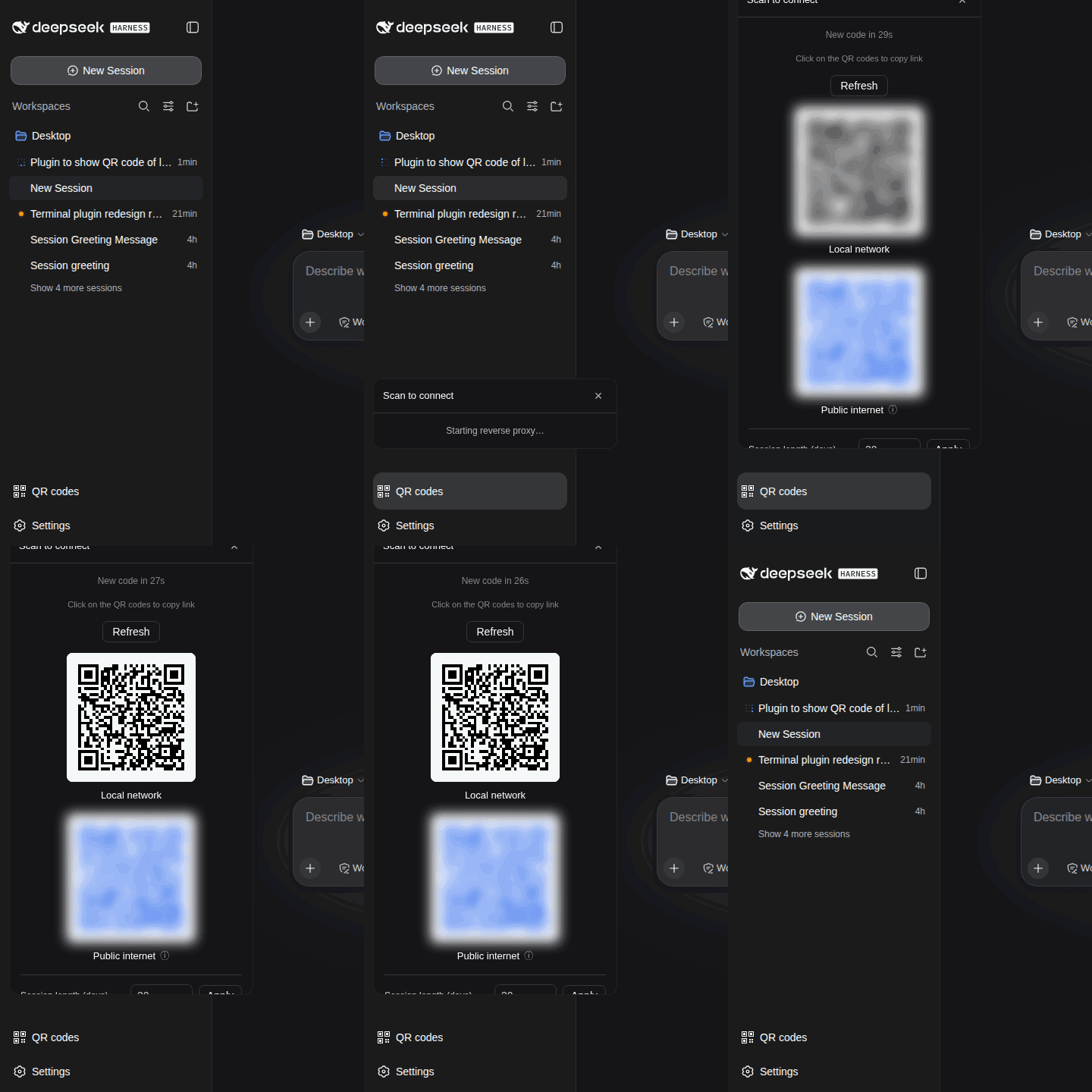
A DeepSeek Harness (DSH) Web plugin that adds a QR-code button above the Settings button in the sidebar footer. It runs a small auth-gated reverse proxy so a phone on the same network (or the internet) can scan a QR code and open the web UI securely. It is a persistent bundle plugin (a host half plus a browser half) that loads on every boot.
Demo
What it does
- Adds a full-width button (
sidebar.footer.action, idqr-connect) stacked above the shipped Plugins button. - Opens a fading panel with two QR codes:
- Local network —
http://<lan-ip>:<port>/?auth=<secret>. - Public internet —
http://<public-ip>:<port>/?auth=<secret>(blue).
- Local network —
- The reverse proxy (a child
nodeprocess on0.0.0.0:<port>) validates the secret, issues a session cookie (default 30 days), and forwards to the loopback web UI — including WebSocket upgrades so live updates reach the phone. - The secret rotates every 30s by default and the QR refreshes to match
(configurable;
0disables auto-refresh). - Click a QR to copy its link; the public QR has an info tooltip.
- A QR connect card under Settings → Plugins configures the proxy port, session length, and refresh interval.
- English and Chinese UI via DSH's locale service.
Files
| File | Purpose |
|---|---|
lib/index.js |
Host half — runs the reverse proxy and the /__qr/* state routes. |
lib/client.js |
Browser half — the QR button and the settings card. |
lib/proxy.cjs |
The auth-gated reverse proxy child process (HTTP + WebSocket). |
cordis.patch.yml |
Composition patch that inserts the plugin row. |
package.json |
Package metadata (dsh.bundle + dsh.client manifest). |
Install
dsh plugin --profile web add github:mervyn-teo/dsh-plugin-qr-connect
Then restart dsh web — host bundles load at boot.
Defaults live in cordis.patch.yml (port, sessionDays, refreshSeconds,
publicHost). Change them there (or in the profile's own cordis.patch.yml)
and restart, or adjust them from the settings card — edits are written to the
qr-connect settings namespace's user layer, so they survive restarts and
layer over the composition defaults. publicHost is a custom domain or IP
used for the public-internet QR code instead of the auto-detected public IP
(accepts host, host:port, or a full https:// origin; empty = auto-detect). The host half serves three same-origin routes the
browser half uses: GET /__qr/info, POST /__qr/rotate, and
GET|POST /__qr/config.
Requirements
- DSH with the
subprocess,fs, andwebServerservices mounted, plus thesettingsservice for the Settings → Plugins card (without it the card is hidden and edits stay runtime-only). - Internet access from the DSH host for the public-IP lookup
(
https://api.ipify.org). - The scanning device must be able to reach the proxy port (a host firewall may need an allow rule); the public QR also needs internet reachability (port-forwarding).
Local-IP and public-IP detection run in-process (no ip/curl/shell commands),
and manual secret rotation signals the proxy child over its stdin, so the host
half works on Windows, macOS, and Linux.
Security
The proxy exposes the full agent shell to anyone who can reach the port, gated only by the 30s secret and the session cookie. Use a short session length and treat this as a trusted-network convenience, not a hardened remote-access layer.
License
相关推荐Related
-
 nexu-io/open-design
🎨 Best DeepSeek Harness Design Plugin. The open-source Claude Design alternative. 🖥️ Local-first desktop app. 🖼️ Your…
nexu-io/open-design
🎨 Best DeepSeek Harness Design Plugin. The open-source Claude Design alternative. 🖥️ Local-first desktop app. 🖼️ Your…
-
 ruvnet/ruflo
🌊 The original agent meta-harness. Deploy intelligent multi-player swarms, coordinate autonomous workflows, and build c…
ruvnet/ruflo
🌊 The original agent meta-harness. Deploy intelligent multi-player swarms, coordinate autonomous workflows, and build c…
-
 amruthpillai/reactive-resume
A one-of-a-kind resume builder that keeps your privacy in mind. Completely secure, customizable, portable, open-source a…
amruthpillai/reactive-resume
A one-of-a-kind resume builder that keeps your privacy in mind. Completely secure, customizable, portable, open-source a…
-
 esengine/DeepSeek-Reasonix
DeepSeek-native AI coding agent for your terminal. Engineered around prefix-cache stability — leave it running.
esengine/DeepSeek-Reasonix
DeepSeek-native AI coding agent for your terminal. Engineered around prefix-cache stability — leave it running.
-
 volcengine/OpenViking
Self-evolving Context Database for AI Agents. Unify Agent Memory, Knowledge RAG and Skills.
volcengine/OpenViking
Self-evolving Context Database for AI Agents. Unify Agent Memory, Knowledge RAG and Skills.
-
 Molunerfinn/PicGo
:rocket: The Ultimate Image Uploader for Efficient Creators. Supports Obsidian, Typora, VS Code etc. and 60+ image hosti…
Molunerfinn/PicGo
:rocket: The Ultimate Image Uploader for Efficient Creators. Supports Obsidian, Typora, VS Code etc. and 60+ image hosti…
-
 titanwings/distilly
Distilly — Distill how they think into reusable Skills for any Agent or Bot. Formerly Colleague Skill(原同事 Skill).
titanwings/distilly
Distilly — Distill how they think into reusable Skills for any Agent or Bot. Formerly Colleague Skill(原同事 Skill).
-
 titanwings/colleague-skill