mervyn-teo/dsh-plugin-terminal
DeepSeek Harness Web 插件:一个真正的 PTY 终端,位于 VS Code 风格的可折叠底部面板中
Project Overview项目介绍
A DSH plugin that adds a real interactive PTY terminal panel docked to the Web footer. It uses node-pty to spawn the system shell, streams output over a WebSocket, and renders it with xterm.js, supporting ANSI colors, 256-color output, full-screen apps, live resize, and a Ctrl+` shortcut, with theme, font, height, opacity, shell, and working directory configurable in settings. Use it when you need direct shell access inside DSH; note that xterm.js loads from a CDN on first use, though a plain streaming fallback works offline.
DSH 插件,在 Web 界面底部提供一个真实的 PTY 交互式终端面板。基于 node-pty 启动系统 shell,通过 WebSocket 推送至 xterm.js 渲染,支持 ANSI 配色、256 色、全屏程序与 Ctrl+` 快捷键,并可在设置中调整主题、字体、高度、透明度、shell 与工作目录。适用于需在 DSH 内直接执行命令的场景;首次渲染需联网加载 xterm.js,离线时回退至纯文本流。
请帮我了解并安装插件:【dsh-plugin-terminal】【https://github.com/mervyn-teo/dsh-plugin-terminal】Send this message to DSH in your current session. CLI install commands may not be accurate across systems — DSH will figure it out for you.把上面这条消息直接发给当前会话里的 DSH,让它帮你了解并安装。安装命令不一定准确,发给 DSH 更稳。
Or use CLI install (for developers)或使用命令行安装(适合开发者)
CLI Install命令行安装
dsh plugin --profile web add github:mervyn-teo/dsh-plugin-terminal把 mervyn-teo/dsh-plugin-terminal 加入你的 DSH 配置(web profile)即可启用。
READMEREADME
dsh-plugin-terminal
English | 中文
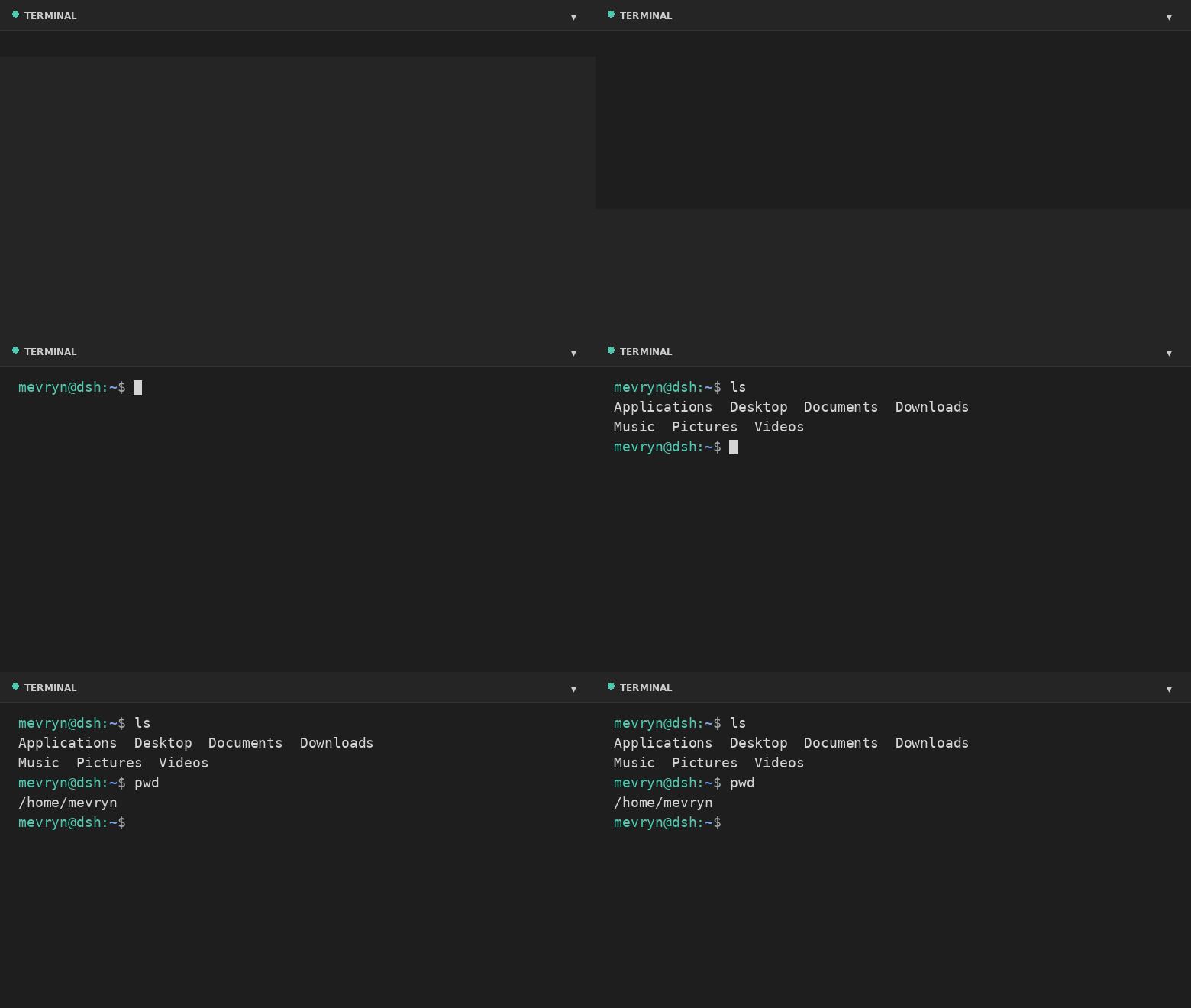
A DeepSeek Harness (DSH) Web plugin that adds a real interactive terminal — a VS Code-style collapsible panel docked to the footer. This plugin runs an actual shell in a PTY and streams the raw terminal bytes to the browser. It is a persistent bundle plugin (a host half plus a browser half) that loads on every boot.
Demo
What it does
- Actual terminal — a real interactive shell (PowerShell on Windows,
$SHELL//bin/bashelsewhere, by default) running in a PTY via the harness'ssubprocess.spawnTerminalprimitive (node-pty). - Full terminal rendering — xterm.js renders ANSI colors, cursor movement,
full-screen apps (
vim,htop,top, …), and 256-color output. - VS Code-style footer panel — a collapsible bottom panel with a header, drag-to-resize top edge, restart button, and collapse toggle.
- Keyboard shortcut — `Ctrl+
- Live resize — the PTY reflows when you resize the panel.
- A Terminal settings card under Settings → Plugins configures theme, font size, panel height, opacity, start-collapsed, shell, and working directory at runtime.
- Graceful fallback — if xterm.js cannot load (offline), a plain streaming view still exposes the real shell.
Files
| File | Purpose |
|---|---|
lib/index.js |
Host half — spawns the PTY and bridges it over the /api/terminal WebSocket. |
lib/client.js |
Browser half — the footer panel and the settings card. |
cordis.patch.yml |
Composition patch that inserts the plugin row. |
package.json |
Package metadata (dsh.bundle + dsh.client manifest). |
Install
dsh plugin --profile web add github:mervyn-teo/dsh-plugin-terminal
Then restart dsh web — host bundles load at boot.
Defaults live in cordis.patch.yml. Change them there (or in the profile's own
cordis.patch.yml) and restart, or adjust them at runtime from the settings
card. The host half serves two same-origin routes the browser half uses:
GET|POST /api/terminal/config and the /api/terminal WebSocket upgrade.
Requirements
- DSH with the
subprocessandwebServerservices mounted. - Network access to jsDelivr the first time the terminal renders xterm.js (the plain fallback works without it).
Settings
Settings → Plugins → Terminal exposes:
| Setting | Description |
|---|---|
| Theme | dark or light terminal theme (applied live). |
| Font size | Terminal font size in pixels (applied live). |
| Max height | Maximum panel height in pixels. |
| Opacity | Terminal background opacity 0–100% (100 = fully opaque). |
| Start collapsed | Whether the panel starts collapsed. |
| Shell | Shell executable for new sessions. |
| Working directory | Default directory for new sessions (empty = home directory). |
Shell and working directory apply the next time you open the terminal; theme, opacity, font size, and max height apply immediately.
Notes and limitations
- The terminal renders xterm.js from the jsDelivr CDN; the first expansion requires network access. The plain fallback still works offline.
- A session is process-local and does not survive a harness restart.
- The WebSocket route is loopback-bound like the rest of the Web GUI.
- Windows — on Windows the default shell is
powershell.exe(setshelltocmd.exefor Command Prompt, withshellArgs: []). It needs a Windows-builtnode-pty(conpty/winpty) from the DSH host.
License
Related相关推荐
-
 chuspeeism/dashi-taskboard
现代化可灵活嵌入的任务面板,支持 Codex、DeepSeek Harness
chuspeeism/dashi-taskboard
现代化可灵活嵌入的任务面板,支持 Codex、DeepSeek Harness
-
 ccch1mneyyy/working-activity
Lively Working-line extension for pi CLI and DSH
ccch1mneyyy/working-activity
Lively Working-line extension for pi CLI and DSH
-
 Aisland-SJL/dsh-worktable
🖥️ Agent-project workbench for DeepSeek Harness — sidebar app drawer + dockable split workspace + a live control room w…
Aisland-SJL/dsh-worktable
🖥️ Agent-project workbench for DeepSeek Harness — sidebar app drawer + dockable split workspace + a live control room w…
-
 zhoushoujianwork/easyeda-agent
嘉立创EDA专业版(EasyEDA Pro)自动化:给 AI harness 装上画板的「手」—— 一套 typed 原理图/PCB 动作,CLI / Agent Skill / stdio MCP 三形态融合接入。承接嘉立创「不以卖板赚钱…
zhoushoujianwork/easyeda-agent
嘉立创EDA专业版(EasyEDA Pro)自动化:给 AI harness 装上画板的「手」—— 一套 typed 原理图/PCB 动作,CLI / Agent Skill / stdio MCP 三形态融合接入。承接嘉立创「不以卖板赚钱…
-
 morluto/rea
Reverse engineer anything with agents, from app behavior down to native binaries.
morluto/rea
Reverse engineer anything with agents, from app behavior down to native binaries.
-
 linhay/harmony-next.skills
Offline HarmonyOS NEXT developer skill library for AI coding assistants. Covers API 12–26 declarations, ArkTS/ArkUI, NDK…
linhay/harmony-next.skills
Offline HarmonyOS NEXT developer skill library for AI coding assistants. Covers API 12–26 declarations, ArkTS/ArkUI, NDK…
- pax-beehive/dsh-hub-cli Open-source CLI, schemas, resolver, and DSH agent tools for DSH Plugin Hub
- ericshang98/Perfect-Web-Clone Pixel-perfect clones of any webpage. Paste a URL, get a measured Vite + React replica.