miaomiao636/dsh-message-navigator
DeepSeek Harness message navigator: a table of contents for long conversations — user-message outline, click-to-jump, scroll-synced highlight, search and Markdown outline export.
Project Overview项目介绍
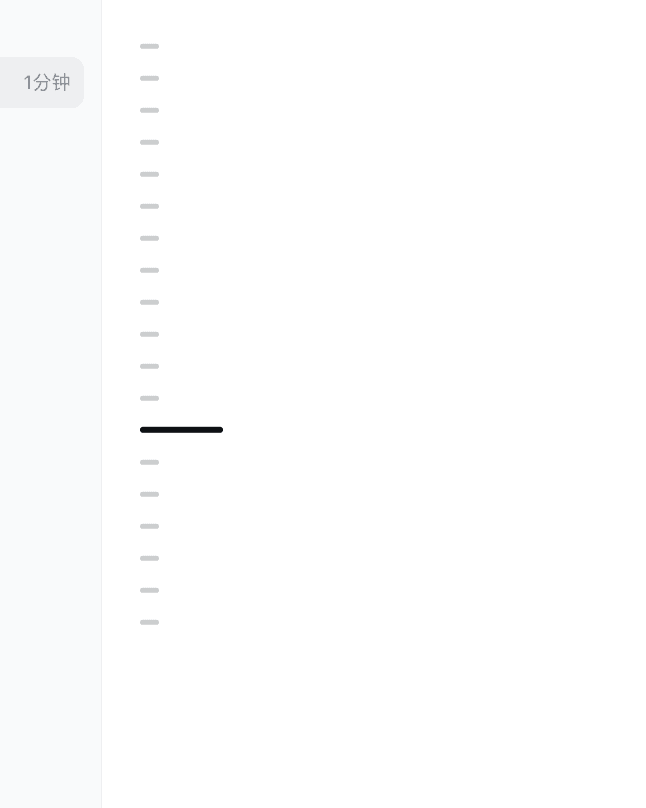
DSH Message Navigator is a Codex-style message navigator plugin for the DeepSeek Harness Web UI. It renders compact tick marks on the left side of the conversation only for user turns, supporting hover previews, keyboard navigation, and click-to-jump. It auto-loads the full history, tracks streaming output, and hides on narrow screens. All logic runs locally in the browser, sending or storing nothing. Because DSH is still in Developer Preview, plugin updates are required if upstream Web UI contracts change.
DSH 消息导航器是为 DeepSeek Harness Web UI 提供的 Codex 风格会话消息导航插件,仅在对话左侧为用户发言生成紧凑刻度,支持悬停预览、键盘方向键与点击跳转,并自动加载完整历史、流式跟踪与窄屏隐藏。全部逻辑在浏览器本地运行,不发送或持久化消息内容。由于 DSH 仍处于开发者预览,若上游修改 Web UI 合约需同步升级。
请帮我了解并安装插件:【dsh-message-navigator】【https://github.com/miaomiao636/dsh-message-navigator】Send this message to DSH in your current session. CLI install commands may not be accurate across systems — DSH will figure it out for you.把上面这条消息直接发给当前会话里的 DSH,让它帮你了解并安装。安装命令不一定准确,发给 DSH 更稳。
Or use CLI install (for developers)或使用命令行安装(适合开发者)
CLI Install命令行安装
dsh plugin --profile web add dsh-codex-message-navigator把 miaomiao636/dsh-message-navigator 加入你的 DSH 配置(web profile)即可启用。
READMEREADME
DeepSeek Harness 消息导航器




English | 中文
为 DeepSeek Harness Web UI 提供 Codex 风格的会话消息导航器。
效果预览

装上插件后的样子:对话左侧出现 Codex 式的消息导航器,悬停或点击即可浏览并跳转到任意一条用户消息。
功能
- 只为普通用户消息和用户插话生成刻度;AI 回答、思考、工具和状态内容不计入。
- 每次用户发言只对应一条刻度,所有普通刻度等长,并以约 20px 的紧凑间距集中排布。
- 自动加载完整历史记录,不受 DeepSeek Harness 默认只渲染最新历史页的限制。
- 深色长刻度跟随当前阅读位置。
- 悬停或键盘聚焦时显示消息预览。
- 点击刻度或问题预览卡片均可平滑跳转;支持方向键、Home、End 和 Enter。
- 自动处理流式生成、新消息、加载较早记录、内容重排和会话切换。
- 少量刻度使用 Codex 式紧凑固定间距;超长会话才统一压缩间距。
- 使用 DeepSeek Harness 的
--dsw-*主题变量,兼容深色模式和减少动画设置。 - 窄屏自动隐藏;全部逻辑在浏览器本地运行,不发送或持久化消息内容。
兼容范围
当前版本基于 npm 可安装的 DeepSeek Harness 0.1.0-rc.6,并使用官方仓库 rc.5 至 rc.6 保持的公开 Web UI 合约:
[data-conversation-scroll][data-chat-flow][data-chat-anchor-key][data-chat-flow-kind]shell.overlay插槽
DeepSeek Harness 仍处于 Developer Preview。如果上游修改这些合约,需要同步升级本插件。
rc.6 的客户端模块扫描器还不能从 profile 的独立依赖解析基点稳定发现第三方 dsh.client 包。本插件的 Host 入口通过官方 webServer.register() 和 tapIndex() 提供兼容桥;未来 Harness 原生发现外部客户端包时,启动图中的重复检测会自动让桥保持幂等。
桌面版兼容性
本插件是 DSH Web UI 扩展,已验证目标是 web profile。对于继续启动或嵌入官方 DSH Web UI,并保持同一套 profile、session runtime、plugin loader 和 client loader 的桌面版,预期可以使用。
已核对的社区桌面项目中,以下架构与本插件兼容方向一致:
anywhere-labs/deepseek-harness-desktop:项目文档说明 Desktop 不是重写 Harness,而是把同一个运行时放进桌面应用;用户仍使用官方 DSH 的 profile、plugins、sessions 和 Web UI。upstream.json标注sourceVersion为0.1.0-rc.5,runtimePackageVersion为0.1.0-rc.6,与本插件的目标版本一致。hairyf/deepseek-harness-desktop:README 描述为 Tauri WebView,启动dsh --profile web --host 127.0.0.1 --port 3080,再嵌入http://127.0.0.1:3080/。vibeinging/deepseek-harness-desktop-app:README 描述为启动 DSH Web Profile,并继续使用同一套 Session、Agent、Tool、Skill、MCP、Settings、Profile Bundle 和 Client Loader。dataelement/dsh-desktop:README 描述为打包本地 DeepSeek Harness Web experience,并持久化 profiles、plugins 和 sessions。
不保证兼容的情况:桌面版重写了消息渲染器、未使用 web profile、禁用前端插件注入,或绑定了与本插件依赖不兼容的 DSH Web UI 内部版本。
如果桌面版使用自己的 DSH_HOME,需要把插件安装到该桌面版实际使用的 profile 中,而不是系统默认的 ~/.dsh。多数桌面版仍使用 web profile,但数据目录可能是应用私有目录。
给安装 Agent 的提示
如果你是 AI Agent、脚本助手或正在替用户安装本插件,请遵守以下规则:
- 先确认用户使用的是 DSH Web 还是某个 DSH Desktop App。
- 先确认实际 profile 名称,默认优先检查
web,不要盲目安装到其他 profile。 - 如果用户使用桌面版,先确认该桌面版是否使用应用私有
DSH_HOME。如果是,请把插件安装到桌面版实际使用的数据目录/profile,而不是默认~/.dsh。 - 不要删除、重建或覆盖用户已有 profile。安装时保留其他插件、
pnpm-workspace.yaml、allowBuilds和现有配置。 - 不要在未获得用户同意时启动、退出或重启 DSH / DSH Desktop。安装后只报告验证结果,让用户自行重启。
- 安装后必须验证插件是否出现在目标 profile 的依赖树中。
推荐的验证命令:
dsh plugin --profile web add dsh-codex-message-navigator
cd ~/.dsh/profiles/web
pnpm ls dsh-codex-message-navigator --depth 0
如果桌面版使用自定义 DSH_HOME,请在对应 profile 目录执行最后一条验证命令。
从源码检查与打包
要求 Node.js 22+ 和 pnpm。
pnpm install
pnpm check
pnpm pack
pnpm check 会依次执行 TypeScript 检查、单元测试和客户端插件构建。构建生成:
lib/index.js   # Harness host 入口
lib/client.js  # 浏览器插件,包含 ModuleLoader 注册包装
安装
推荐直接从 npm 安装:
dsh plugin --profile web add dsh-codex-message-navigator
dsh --profile web --dump-config
dsh --profile web
也可以先打包为 tarball 安装,避免安装期构建授权:
pnpm pack
dsh plugin --profile web add ./dsh-codex-message-navigator-0.1.4.tgz
如果使用其他 profile,请把 web 替换成对应名称。卸载:
dsh plugin --profile web remove dsh-codex-message-navigator
如果此前只使用不带 profile 的 dsh web 快捷命令,需要先创建一个可扩展的 Web profile:
dsh plugin --profile web add @deepseek-ai/dsh-web-app@next
dsh plugin --profile web add dsh-codex-message-navigator
dsh --profile web
pnpm 首次安装 Web profile 时可能要求允许 koffi 的官方原生构建脚本。按照 dsh 输出,在该 profile 的 pnpm-workspace.yaml 中将对应 allowBuilds.koffi 设置为 true 后重试。
本地源码安装
dsh plugin --profile web add /absolute/path/to/deepseek-message-navigator
源码安装会执行 prepare。pnpm 10 可能要求在 profile 的 pnpm-workspace.yaml 中允许该包构建:
allowBuilds:
  dsh-message-navigator: true
允许后重新执行安装命令。
隐私与可访问性
预览只读取当前 DeepSeek Harness 页面已经渲染的文本,不读取模型请求、隐藏提示词或服务端日志。插件不包含网络请求、遥测或本地存储。所有刻度都是可聚焦按钮,并提供中文无障碍标签。
项目结构
src/core.ts                       位置、激活消息与文本纯函数
src/client/MessageNavigator.tsx   DOM 适配与完整交互
src/client/index.tsx              shell.overlay 注册入口
src/index.ts                      Host 入口
test/core.test.ts                 纯函数单元测试
cordis.patch.yml                  Profile 安装层
License
MIT
Related相关推荐
-
 ZSeven-W/dsh-openpencil
The DeepSeek Harness plugin for OpenPencil — preview, inspect, and edit real .op documents inside a conversation.
ZSeven-W/dsh-openpencil
The DeepSeek Harness plugin for OpenPencil — preview, inspect, and edit real .op documents inside a conversation.
-
 dingyi222666/dsh-focus-chat
为 Deepseek Harness 提供新的「聚焦会话」精简会话视图,更轻松易于阅读,只关注最终产出结果。
dingyi222666/dsh-focus-chat
为 Deepseek Harness 提供新的「聚焦会话」精简会话视图,更轻松易于阅读,只关注最终产出结果。
-
 penguin-oo/dsh-bookmarks
Bookmark assistant replies in DeepSeek Harness: per-message bookmarks with notes/tags, a cross-session center, and one-c…
penguin-oo/dsh-bookmarks
Bookmark assistant replies in DeepSeek Harness: per-message bookmarks with notes/tags, a cross-session center, and one-c…
-
 SherUnlocked-4869/dsh-plugin-msg-nav
DeepSeek Harness 对话节点导航条插件:在对话区右缘渲染一列短横线节点串(每条真实用户消息一个节点),跟随阅读位置;鼠标靠近节点串时,节点条「变形弹出」为单行消息预览面板(覆盖原位置,移开复原),点击任意预览平滑跳转 + 高亮…
SherUnlocked-4869/dsh-plugin-msg-nav
DeepSeek Harness 对话节点导航条插件:在对话区右缘渲染一列短横线节点串(每条真实用户消息一个节点),跟随阅读位置;鼠标靠近节点串时,节点条「变形弹出」为单行消息预览面板(覆盖原位置,移开复原),点击任意预览平滑跳转 + 高亮…
-
 chengzhi43/dsh-file
A VS Code-style file manager plugin for DeepSeek Harness Web / DeepSeek Harness 的 VS Code 风格文件管理器插件
chengzhi43/dsh-file
A VS Code-style file manager plugin for DeepSeek Harness Web / DeepSeek Harness 的 VS Code 风格文件管理器插件
- lutrodev/dsh-roleplay Roleplay plugin suite for DeepSeek Harness: character cards, lorebooks, personas, presets, state, and conversation tools…
- zjl1989-li/dsh-harness-zh-cn DeepSeek Harness 中文汉化插件:运行时把所有系统提示词、工具描述与运行时上下文翻译成中文(system-prompt/assemble 瀑布钩子,零源码修改)
-
 13071301808/dsh-composer-expand
Composer expand/collapse toggle for DeepSeek Harness (dsh): a ⬆/⬇ button in the composer tool row grows the input to a t…
13071301808/dsh-composer-expand
Composer expand/collapse toggle for DeepSeek Harness (dsh): a ⬆/⬇ button in the composer tool row grows the input to a t…