MichengAI/dsh-codex-desktop
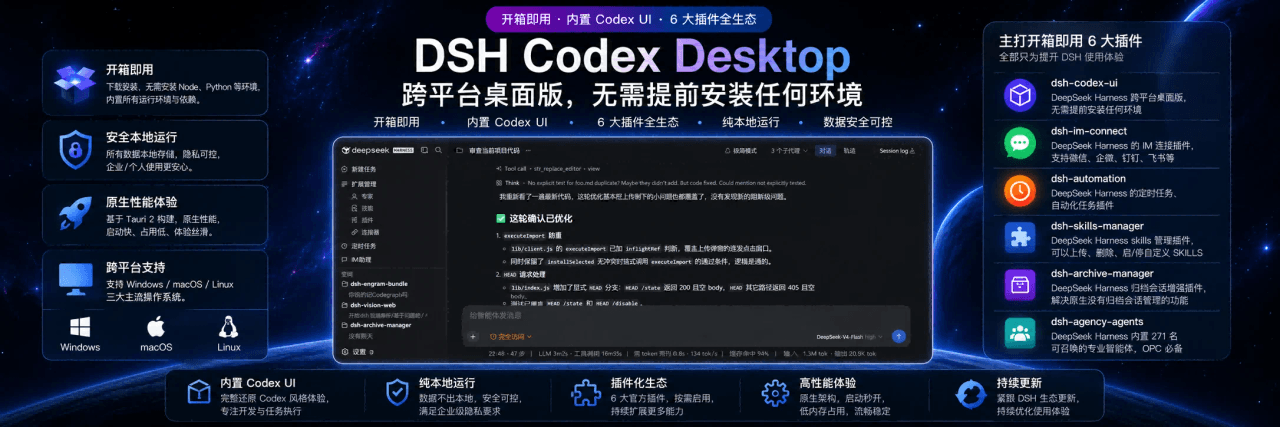
DeepSeek Harness Codex 跨平台桌面版,无需提前安装任何环境,开箱即用
项目介绍Project Overview
DSH Codex Desktop 是 DeepSeek Harness 的社区桌面客户端,把 Node.js 运行时和本地 DSH 服务打包进安装包,下载安装后即可打开即用的桌面工作台。提供会话管理、模型选择、专家预设、技能中心、归档管理、IM 助手与插件市场,覆盖 Windows x64、macOS 与 Linux x64。适用于不想配置环境、需要在桌面端直接调用 DeepSeek-V4 系列模型与本地插件的用户。注意:视觉模型为实验特性,且本产品为社区维护,并非 DeepSeek 官方产品。
DSH Codex Desktop is a community-maintained desktop client for DeepSeek Harness that bundles the Node.js runtime and a local DSH service into a single installer, delivering a ready-to-run desktop workbench. It provides session management, model selection, expert presets, a skill center, archive management, an IM assistant, and a plugin market, with builds for Windows x64, macOS, and Linux x64. Use it when a turnkey GUI is preferred over a manual DSH setup and DeepSeek-V4 models need to be reached from the desktop. Note that the bundled vision model is experimental and this is a community build, not an official DeepSeek product.
请帮我了解并安装插件:【dsh-codex-desktop】【https://github.com/MichengAI/dsh-codex-desktop】把上面这条消息直接发给当前会话里的 DSH,让它帮你了解并安装。安装命令不一定准确,发给 DSH 更稳。Send this message to DSH in your current session. CLI install commands may not be accurate across systems — DSH will figure it out for you.
或使用命令行安装(适合开发者)Or use CLI install (for developers)
命令行安装CLI Install
dsh plugin --profile web add github:MichengAI/dsh-codex-desktop把 MichengAI/dsh-codex-desktop 加入你的 DSH 配置(web profile)即可启用。
READMEREADME
DSH Codex Desktop
Download once. Open a ready-to-use local AI workspace.
简体中文 · Download · Changelog · Report an issue






DSH Codex Desktop is a community-maintained desktop distribution of DeepSeek Harness. It is not an official DeepSeek AI product.
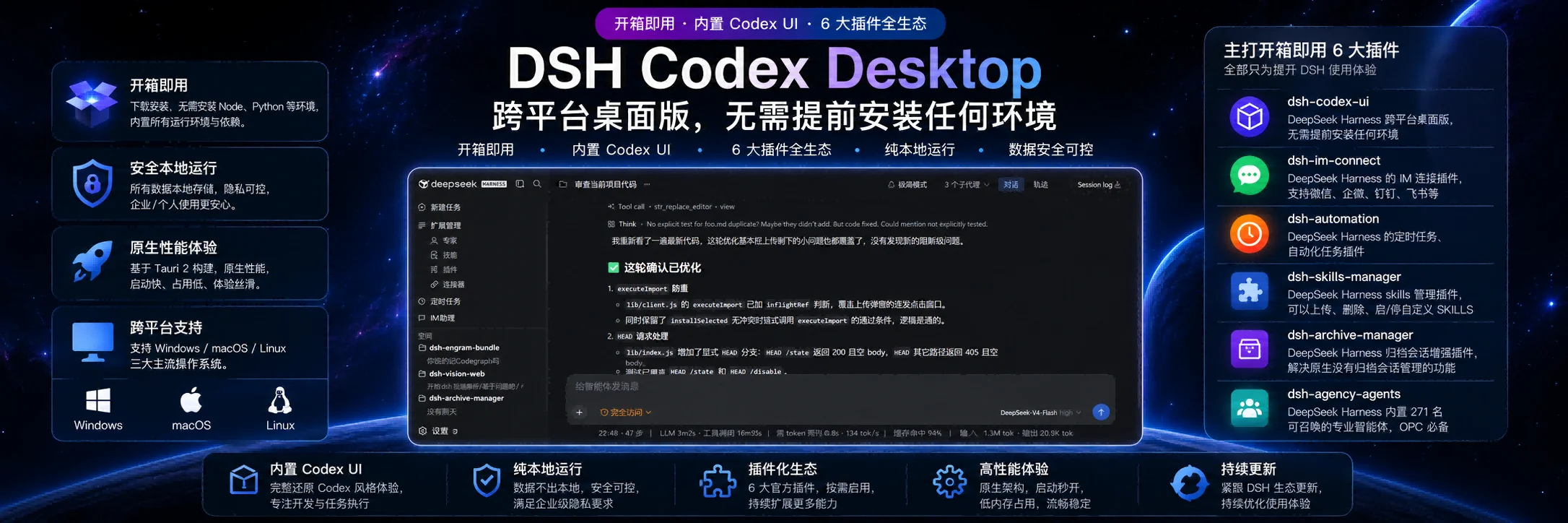
DSH Codex Desktop turns DeepSeek Harness into a native, ready-to-run desktop workbench. The installer includes the required Node.js runtime and local DSH runtime: install it, open it, then start working. You do not need to prepare a Node.js environment or launch DSH from a terminal.
Download and start
Get the current installer from GitHub Releases.
| Platform | Package | Start here |
|---|---|---|
| Windows x64 | .exe installer or .zip archive |
Run the installer, then open DSH Codex Desktop from the Start menu. |
| macOS Apple Silicon / Intel | .dmg installer |
Open the disk image, move the app to Applications, then launch it. |
| Linux x64 | .AppImage or Debian / Ubuntu .deb |
Run the AppImage or install the deb package, then launch the app. |
- Download the package for your platform.
- Install and open DSH Codex Desktop.
- Wait for the built-in local DSH service to finish starting.
- Create a task, select a model and permission mode, then work in your project.
The application keeps DSH data in your existing user profile (%USERPROFILE%\.dsh on Windows), so sessions and settings remain available after application upgrades.
A complete desktop workbench
| Capability | What you get |
|---|---|
| Desktop conversation workspace | Project and task navigation, conversation sessions, model selection, permissions, session logs, and a focused desktop window. |
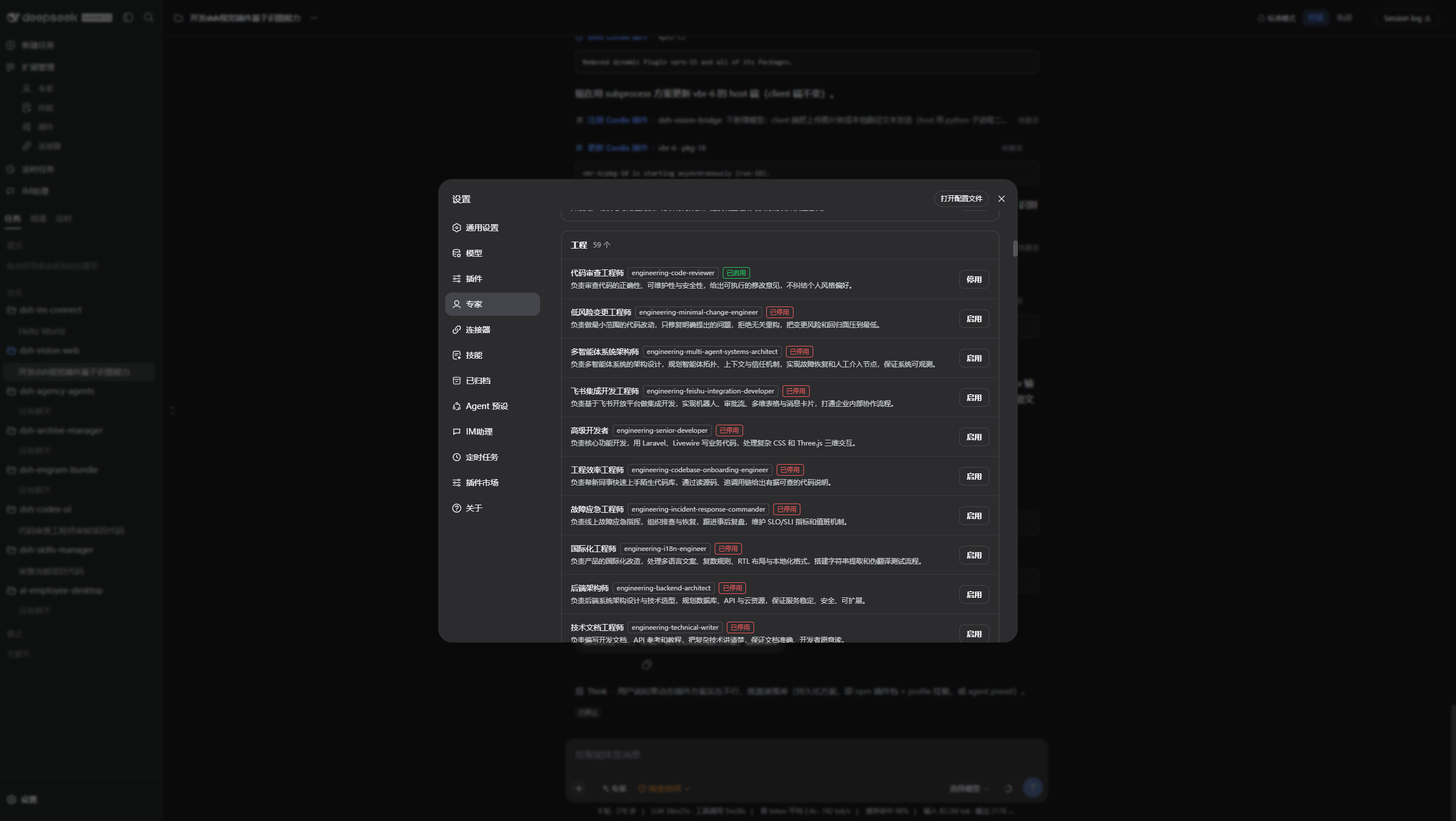
| Expert presets | Enable specialist roles for code review, architecture, frontend, backend, operations, and other workflows. |
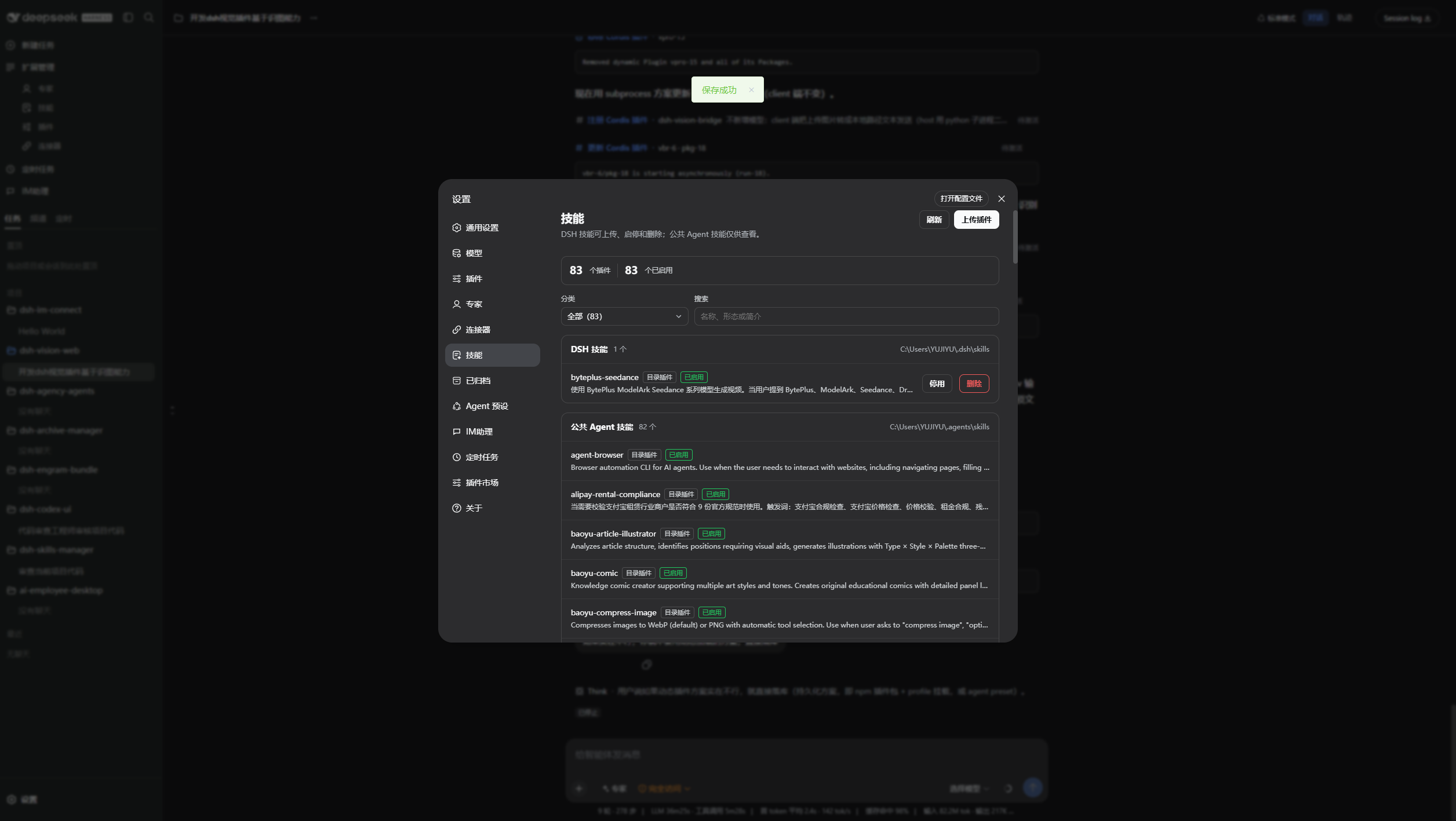
| Skill center | Inspect, enable, disable, upload, and manage local and shared Agent skills from Settings. |
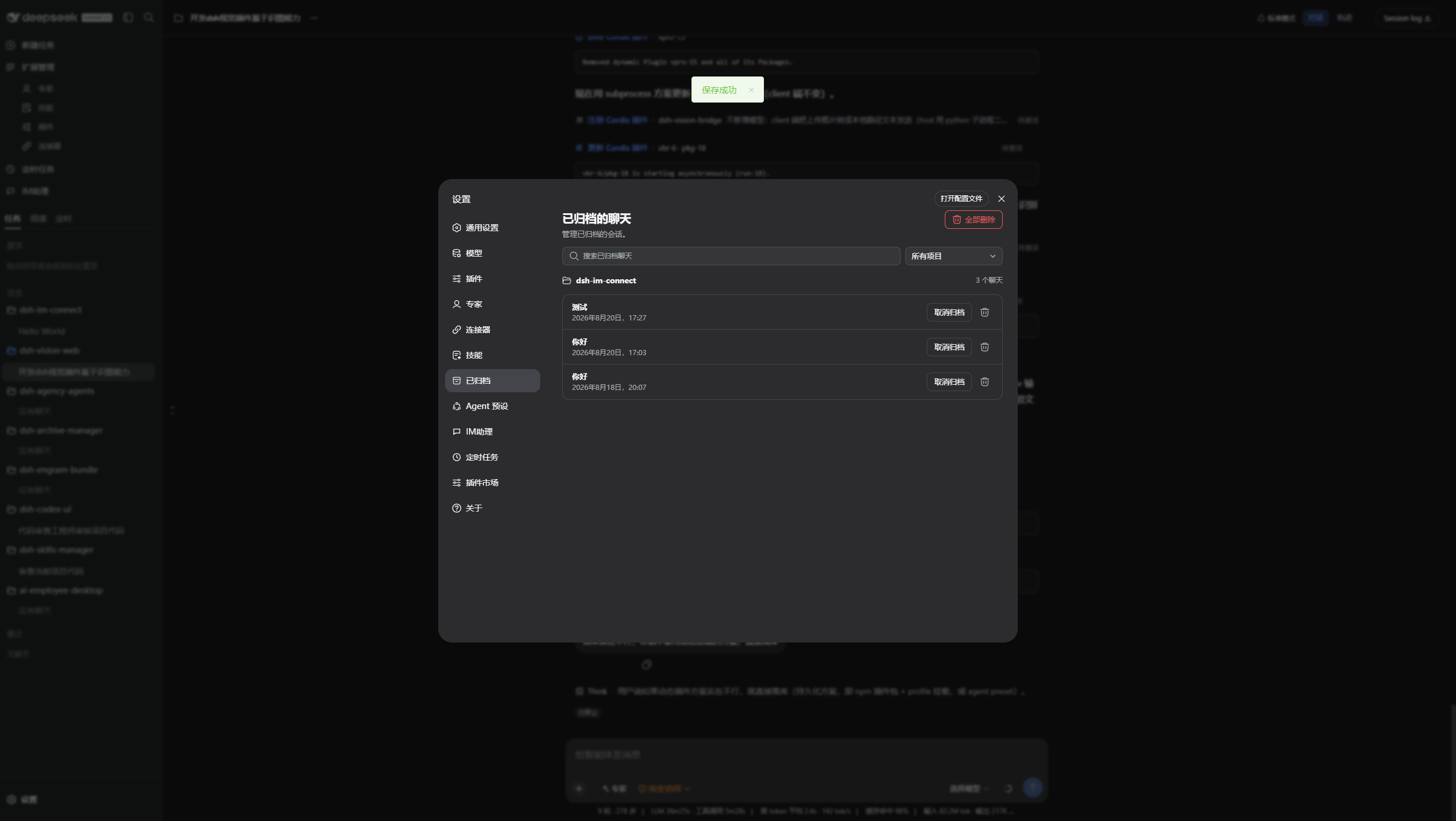
| Archive management | Search archived conversations, restore a session when needed, or permanently remove archived records. |
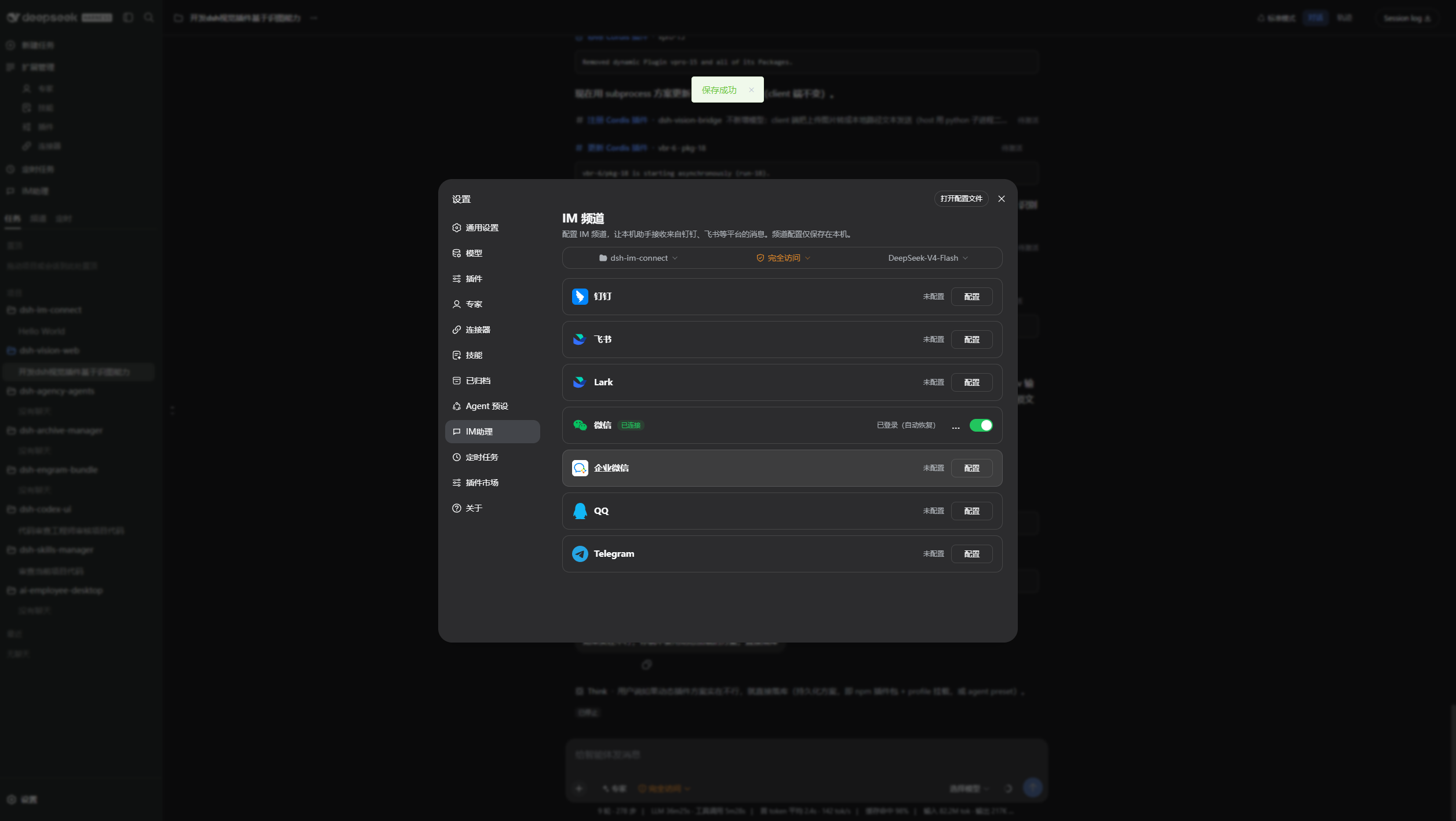
| IM assistant | Configure DingTalk, Feishu, Lark, WeChat, WeCom, QQ, Telegram, and other available channels in one place. |
| Plugin market | Discover, install, update, enable, and diagnose DSH plugins without leaving the desktop client. |
| MCP connector | Add and manage MCP services through OAuth, API keys, HTTP, stdio, or JSON configuration. |
| Scheduled automation | Use the built-in DSH scheduling capability to manage recurring tasks from the same workspace. |
| Safe local runtime | The app starts DSH on a validated loopback address and keeps the browser UI inside the desktop shell. |
Product preview
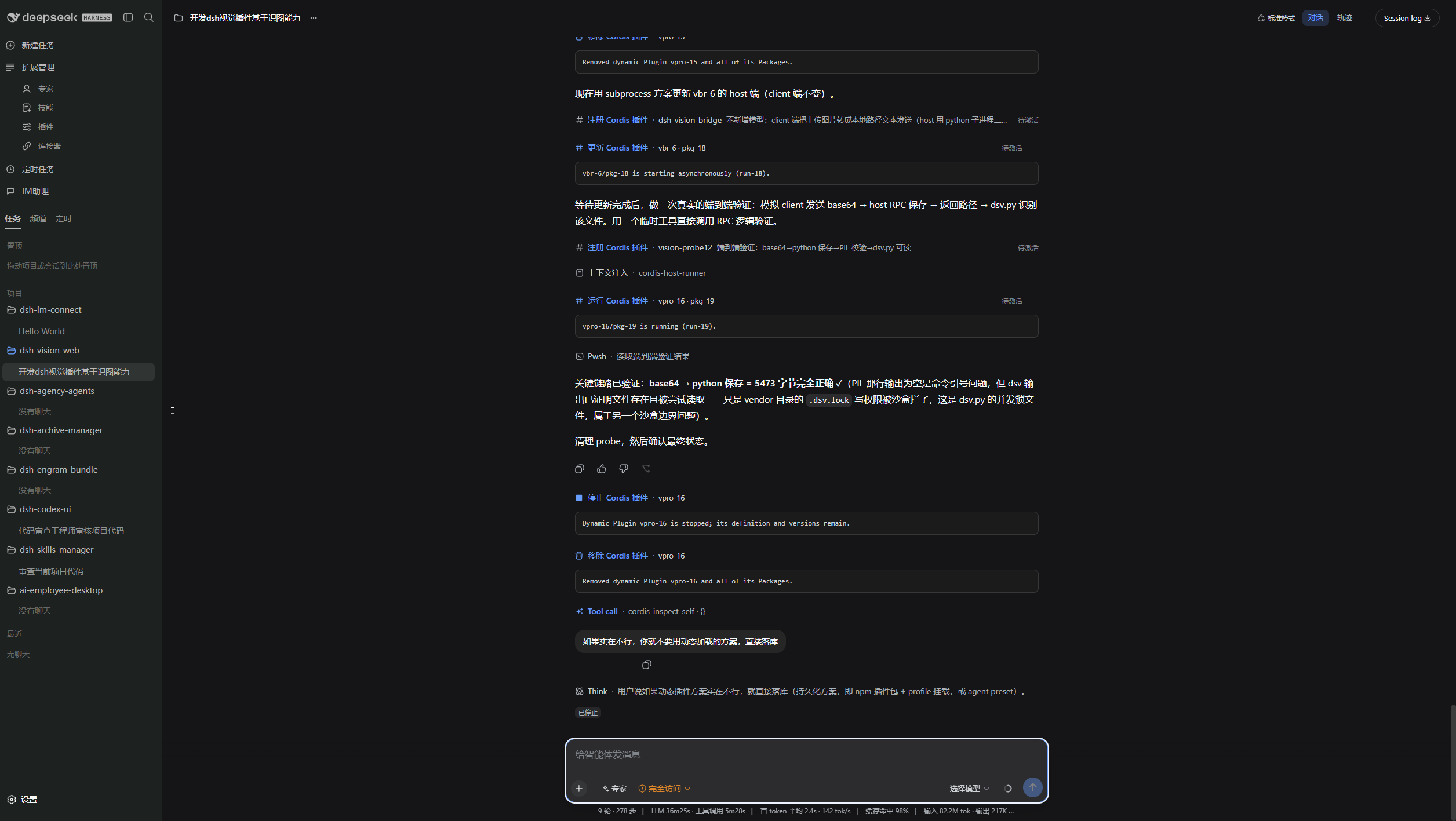
Dark workspace: project context, a long-running task, and the desktop conversation surface.
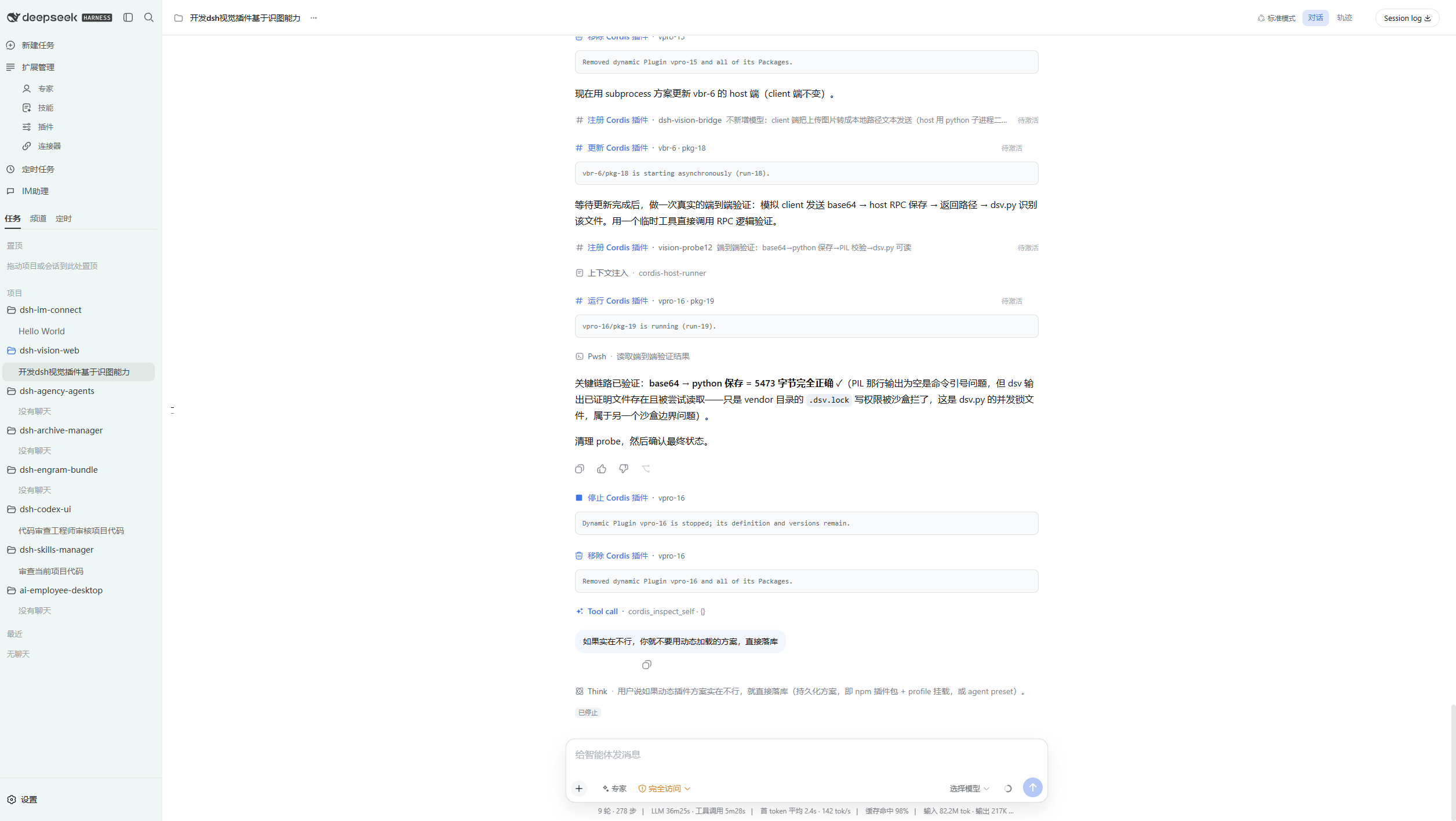
Light workspace: the same task surface in the light theme.
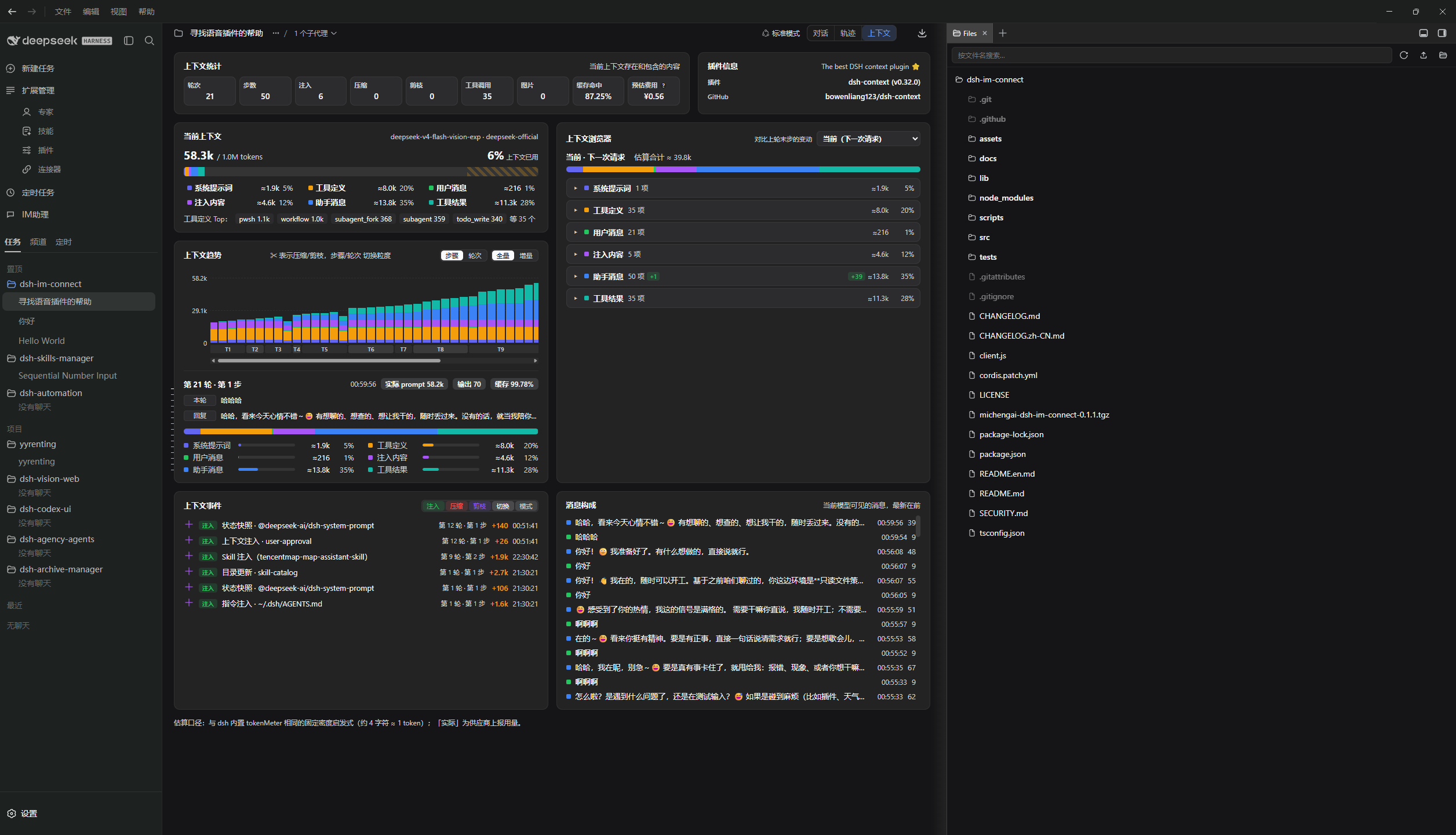
Inspect context composition while the extensible workspace sidebar keeps project files within reach.
Archived conversations stay searchable and can be restored from Settings.
Manage the skills available to DSH and your Agents.
Connect channels for IM-assisted workflows.
Enable only the expert presets that match the current task.
Included on first launch
The installer ships with the local runtime required to start DSH. On first launch, it prepares the desktop-facing community plugins in the Web profile:
| Included capability | Package |
|---|---|
| Codex-style workspace UI | @michengai/dsh-codex-ui |
| Expert preset management | @michengai/dsh-agency-agents |
| Skill management | @michengai/dsh-skills-manager |
| Archive management | @michengai/dsh-archive-manager |
| IM assistant | @michengai/dsh-im-connect |
| Scheduled automation | @michengai/dsh-automation |
| Context inspection and management | dsh-context |
| Extensible workspace sidebar | dsh-better-sidebar |
| MCP connection management | dsh-mcp-connector |
You can later manage additional plugins from the plugin market. The desktop application keeps its own runtime separate from profile-installed community plugins so plugin changes do not overwrite the application runtime.
DSH product ecosystem
DSH Codex Desktop combines the core runtime, feature products, and plugin market into a ready-to-install desktop product. The same products can also be used separately for other DSH setups:
| Product | Primary role | Relationship to the desktop app |
|---|---|---|
| DeepSeek Harness | Models, sessions, tools, and plugin runtime | The core runtime bundled and started by the desktop app |
| DSH Codex Desktop | Cross-platform workbench for end users | This product, responsible for ready-to-run installation, updates, and recovery |
| DSH Codex Suite | One-click feature suite for existing DSH Web environments | Installs the six MichengAI feature products without the desktop runtime |
| Six feature products | Codex UI · IM Connect · Automation · Skills Manager · Archive Manager · Agency Agents | Each can be installed independently; all six are bundled with the desktop app |
| Integrated ecosystem plugins | DSH Context · DSH Better Sidebar · DSH MCP Connector | Bundled with the desktop app for context insight, workspace navigation, and MCP connection management |
dshmarket |
Discover, install, and update more DSH plugins | Included as the plugin market |
Updates and recovery
- Desktop updates are checked after startup by default and notify you when a new release is available. Settings → Updates can instead download releases automatically or switch to manual-only checks. Installation and restart always require an explicit action.
- DSH reload is available from the tray menu after changing plugins or profile configuration; it restarts the local DSH service without reinstalling the desktop application.
- Plugin updates remain in the DSH settings and plugin market. A failed plugin installation is not activated as a running bundle.
- Startup recovery removes stale community-plugin registrations that no longer have an installed package, then retries the local DSH startup.
System requirements
| Item | Requirement |
|---|---|
| Operating system | Windows 10/11, macOS, or Linux |
| Architecture | Windows x64, macOS arm64/x64, or Linux x64 |
| Node.js | Not required for end users; bundled with the application |
| Network | Required only for the model providers, plugin downloads, and tools you choose to use |
Privacy and security
- DSH configuration, sessions, and credentials remain in the current user's DSH directory. Uninstalling the desktop app does not delete them.
- The launcher accepts only validated
127.0.0.1local HTTP addresses for its embedded window. - External HTTP(S) links open in the system browser. File, JavaScript, and data URLs are blocked.
- Electron uses context isolation and sandboxing, with Node.js integration disabled for the DSH page.
- Your configured model providers and DSH tools may make their own network requests. Review their settings and privacy policies before use.
Development
Development requires Windows, Node.js 24.19.0, and pnpm 11.22.0.
[Console]::OutputEncoding = [System.Text.Encoding]::UTF8
$OutputEncoding = [System.Text.Encoding]::UTF8
pnpm install --frozen-lockfile
pnpm test
pnpm run dist
Local build artifacts are written to release\ and are not committed. Pushing a vX.Y.Z tag starts the packaging workflow for Windows x64, macOS arm64/x64, and Linux x64 AppImage / deb artifacts.
Project documentation
For current status, architecture constraints, and iteration records, start at the documentation entry point.
License
This project is licensed under Apache License 2.0.
Changelog
See CHANGELOG.md for the five most recent releases.
相关推荐Related
-
 nexu-io/open-design
🎨 Best DeepSeek Harness Design Plugin. The open-source Claude Design alternative. 🖥️ Local-first desktop app. 🖼️ Your…
nexu-io/open-design
🎨 Best DeepSeek Harness Design Plugin. The open-source Claude Design alternative. 🖥️ Local-first desktop app. 🖼️ Your…
-
 ruvnet/ruflo
🌊 The original agent meta-harness. Deploy intelligent multi-player swarms, coordinate autonomous workflows, and build c…
ruvnet/ruflo
🌊 The original agent meta-harness. Deploy intelligent multi-player swarms, coordinate autonomous workflows, and build c…
-
 amruthpillai/reactive-resume
A one-of-a-kind resume builder that keeps your privacy in mind. Completely secure, customizable, portable, open-source a…
amruthpillai/reactive-resume
A one-of-a-kind resume builder that keeps your privacy in mind. Completely secure, customizable, portable, open-source a…
-
 esengine/DeepSeek-Reasonix
DeepSeek-native AI coding agent for your terminal. Engineered around prefix-cache stability — leave it running.
esengine/DeepSeek-Reasonix
DeepSeek-native AI coding agent for your terminal. Engineered around prefix-cache stability — leave it running.
-
 volcengine/OpenViking
Self-evolving Context Database for AI Agents. Unify Agent Memory, Knowledge RAG and Skills.
volcengine/OpenViking
Self-evolving Context Database for AI Agents. Unify Agent Memory, Knowledge RAG and Skills.
-
 Molunerfinn/PicGo
:rocket: The Ultimate Image Uploader for Efficient Creators. Supports Obsidian, Typora, VS Code etc. and 60+ image hosti…
Molunerfinn/PicGo
:rocket: The Ultimate Image Uploader for Efficient Creators. Supports Obsidian, Typora, VS Code etc. and 60+ image hosti…
-
 titanwings/distilly
Distilly — Distill how they think into reusable Skills for any Agent or Bot. Formerly Colleague Skill(原同事 Skill).
titanwings/distilly
Distilly — Distill how they think into reusable Skills for any Agent or Bot. Formerly Colleague Skill(原同事 Skill).
-
 titanwings/colleague-skill