Mlte0907/dsh-teams-x
TeamsX for DeepSeek Harness — turn one session into a coordinated multi-agent team: a captain spawns durable member subagents, breaks a goal into a dependency-aware task DAG, and coordinates through direct mailbox messages, with a live all-SVG activity panel.
catalog descriptioncatalog 简介 / catalog description:TeamsX for DeepSeek Harness - durable multi-agent teams (captain, members, dependency-aware tasks, mailboxes) with an all-SVG activity panel
Project Overview项目介绍
dsh-teams-x is a Cordis plugin built natively for DeepSeek Harness 0.2.0-rc.1, declared in peerDependencies and shipped with a synchronously built tgz in the repository root. It registers a teamsx_* tool namespace, isolates state inside a dedicated .teams-x directory, and turns one DSH session into a coordinated multi-agent team: a captain agent spawns durable member subagents, decomposes the goal into a dependency-aware task DAG, and routes coordination through a persistent mailbox between members. A live, fully SVG activity panel is mounted in the web sidebar, and all 13 teamsx_* tools are exposed to the host agent at runtime.
The product is installed into DSH through three documented paths: the in-repo tgz via dsh plugin --profile web add <path>/dsh-teams-x-<version>.tgz, the npm package via npm i dsh-teams-x followed by the same dsh plugin command, or a source build with pnpm install && pnpm typecheck && pnpm build and a sibling symlink to a local deepseek-harness checkout. The typical workflow starts with teamsx_create to bootstrap a team, optionally seeding it from a profiles template, then using teamsx_edit_plan and teamsx_approve to row-edit member roles/models and task subjects/assignees/dependencies inside the staged plan panel. Tasks flow through teamsx_claim_task, teamsx_update_task, and teamsx_resume, while teamsx_reassign_task atomically invalidates prior attempts and teamsx_send_message plus teamsx_status provide mailbox delivery and team snapshots. The target user is a DSH operator who wants captain/member collaboration, dependency-aware scheduling, and auto-repair loops on review failures without writing their own orchestration layer.
Runtime has zero dependencies beyond the host's peer packages; the only build-time prereqs are Node ≥ 24, pnpm ≥ 12, and a deepseek-harness source checkout on the same machine for the link: dependency, while the produced bundle lives in lib/. A hard limit is that dsh plugin add does not hot-reload new bundles, so the host must be restarted after install, after which verification is a three-step routine: journal log inspection for failed to apply loader entry teams-x, sidebar panel check, and a smoke teamsx_create call. Host API drift points are concentrated in src/compat.ts for capability probing across versions, the suite is gated by 173 functional cases runnable through pnpm verify, and the project is released under the MIT license with v0.2.1 adding cold-resume support for harness 0.1.5-rc.2.
dsh-teams-x 是面向 DeepSeek Harness 0.2.0-rc.1 的原生 Cordis 插件,工具命名空间统一为 teamsx_*,状态目录固定为 .teams-x,并随仓库同步发布 tgz。它把单次会话拆成由队长 agent 调度的多 agent 团队:成员以 durable subagent 形式存在,目标被拆为带依赖的有向无环图任务,成员之间通过持久信箱直接通信,Web 侧边栏以全 SVG 面板实时呈现活动。它以三条路径安装进 DSH 宿主——仓库 tgz、npm i dsh-teams-x、或从源码用 pnpm 构建,并通过 dsh plugin --profile web add <路径或产物> 挂载到 web profile。
典型流程是:在会话中调用 teamsx_create 建立团队,可用 profiles 模板预填成员与种子任务,或进入 staged 计划流用 teamsx_edit_plan 与 teamsx_approve 行内编辑成员角色、模型、任务主题、指派、依赖;任务可被认领、状态推进、原子重派或由 review/requirements 失败自动派生 repair 任务,会话内还会折叠出团队卡片。它面向需要在单宿主会话里跑多角色协作工作流、又不愿自建调度层的 DSH 用户与多 agent 实验者。
运行时零依赖,仅依赖宿主的 peer 包;构建需 Node ≥ 24、pnpm ≥ 12 与本机的 deepseek-harness 源码 checkout(link 直连)。限制包括:宿主 API 漂移点收敛在 src/compat.ts、构建产物在 lib/、装机后必须重启宿主才会重新应用 bundle,验证靠 teamsx_create 烟雾测试。许可证为 MIT,已验证覆盖 173 用例,由 pnpm verify 执行。
请帮我安装这个 DSH 插件。安装前先完成【兼容性检查 + 安全性检查】,检查通过再动手。

插件:dsh-teams-x(Mlte0907/dsh-teams-x)
仓库:https://github.com/Mlte0907/dsh-teams-x
本站详情页:https://www.yhbd.top/plugins/mlte0907-dsh-teams-x/
本站登记:类型 plugin · 归类 原生 DSH 插件 · 许可证 MIT · ⭐ 3 · 最近提交 2026-09-29 · 主语言 JavaScript

按下面顺序执行,每步先把结论告诉我,再进入下一步:

【1 兼容性检查】
① 我这边:DSH 版本、Node 版本、操作系统、当前 profile(web / desktop)。
② 读它的 README、package.json、插件 manifest,列出它要求的 DSH 版本 / Node 版本 / 操作系统 / 外部依赖 / 需要另外先装的运行时。
③ 逐条比对,结论只写「满足 / 不满足 / 未知」三种;不满足的给出可行替代方案。
④ 检查是否和我已装的插件冲突:命令名重复、skill / tool 重名、端口占用、重复注册的 MCP server。

【2 安全性检查】
① 仓库可信度:和上面「本站登记」是否一致;star / fork 数、创建时间、最近提交,是否归档或长期停更。
② 安装脚本:逐行看 package.json 的 preinstall / install / postinstall,以及 install.sh、setup.ps1 之类脚本。出现 curl|bash、下载后直接执行、混淆代码、访问与插件功能无关的域名,立刻停下来告诉我,不要继续装。
③ 依赖:列出新增依赖,标出无人维护、或与知名包拼写近似的可疑包(typosquatting)。
④ 权限与副作用:它会读写哪些目录、访问哪些域名、需要哪些 DSH 权限(filesystem / network / shell / clipboard 等),以及怎么卸载和回滚。
⑤ 如果它要求 sudo / 管理员权限,或权限明显超出功能所需,先停下来问我。

【3 安装】
上面两步没有「不满足」和「高危项」时才执行;用官方推荐方式安装,不要自行提权。

【4 汇报】
用表格输出:检查项 / 结论 / 依据 / 是否需要我决策。拿不准的一律写「未知」并说明要我怎么确认——不要猜,也不要替我决定。
Send this message to DSH in your current session: it verifies compatibility and security first (answering met / not met / unknown item by item) and only installs once everything checks out — it will stop and ask you if it finds a high-risk item. The box scrolls; the copy is the full prompt. CLI install commands may not be accurate across systems, so DSH is the safer route.把上面这条消息直接发给当前会话里的 DSH:它会先核对兼容性与安全性(逐条给「满足 / 不满足 / 未知」),确认没问题再安装,有高危项会停下来问你。框内可滚动,复制到的是完整提示词;安装命令不一定准确,发给 DSH 更稳。
- Only 3 stars - very few users, little community feedback星标只有 3,几乎没人在用,遇到问题缺少社区反馈
DSH walks through these 9 checksDSH 会逐条核对这 9 项
Compatibility兼容性
- DSH, Node, OS and profile requirementsDSH 版本 / Node 版本 / 操作系统 / profile 是否满足要求
- External dependencies and runtimes (Electron / Python / Docker, ...)外部依赖与运行时(Electron / Python / Docker 等)是否齐备
- Conflicts with installed plugins: command names, skill / tool names, ports, duplicate MCP registration与已装插件是否冲突:命令名、skill / tool 重名、端口占用、重复 MCP 注册
Security安全性
- Repo matches the facts registered here; archived or abandoned?仓库是否与页面登记一致,是否归档或长期停更
- Safety of preinstall / install / postinstall and install.sh / setup.ps1preinstall / install / postinstall 与 install.sh、setup.ps1 是否安全
- curl|bash, download-then-execute, obfuscation, unrelated domains → stop immediatelycurl|bash、下载即执行、混淆代码、无关域名 → 立刻停止
- Typosquatting or unmaintained packages among the new dependencies新增依赖里有没有 typosquatting 或无人维护的包
- Requested permissions vs. what the feature actually needs申请了哪些权限、是否超出功能所需(filesystem / network / shell / clipboard)
- Any sudo / admin requirement, plus uninstall and rollback是否要求 sudo / 管理员权限,以及卸载与回滚方式
Anything uncertain must be marked unknown with a note on how to confirm it. This site's signal screen is a static snapshot, not a security audit.拿不准的必须标「未知」并说明要我怎么确认。本站的信号筛查是静态快照,不能替代安全审计。
Or use CLI install (for developers)或使用命令行安装(适合开发者)
CLI Install命令行安装
dsh plugin --profile web add "$(pwd)"把 Mlte0907/dsh-teams-x 加入你的 DSH 配置(web profile)即可启用。
READMEREADME
dsh-teams-x

TeamsX for DeepSeek Harness — turn one session into a coordinated multi-agent team: a captain spawns durable member subagents, breaks a goal into a dependency-aware task DAG, and coordinates through direct mailbox messages, with a live all-SVG activity panel.
本插件原生面向 DeepSeek Harness 0.2.0-rc.1(
peerDependencies已声明>=0.2.0-rc.1),宿主 API 漂移点全部收敛在src/compat.ts能力探测层——宿主升级时通常只需改这一个文件。工具命名空间为teamsx_*、状态目录为.teams-x,与宿主内其他团队模式互不干扰。
安装
方式 A:仓库 tgz 一条命令(推荐,最快)
仓库根目录自带与源码同步构建的 dsh-teams-x-<version>.tgz(零运行时依赖,宿主包全部走 peerDependencies):
dsh plugin --profile web add <仓库路径>/dsh-teams-x-<version>.tgz
装完 重启宿主(dsh plugin add 不会热加载新 bundle),然后按下文「安装验证」确认。
方式 B:npm
npm i dsh-teams-x && dsh plugin --profile web add <node_modules 路径>/dsh-teams-x
方式 C:从源码构建
前置要求:Node ≥ 24、pnpm ≥ 12,且同一台机器上有一份 deepseek-harness 源码 checkout(构建期 link: 依赖直连它,运行期不需要)。
# 1) 布局二选一:
#    嵌套式:把本仓库 clone 到 <任意目录>/dsh-teams-x,再在其中放 harness:
git clone https://github.com/Mlte0907/dsh-teams-x.git && cd dsh-teams-x
ln -s <harness-checkout 绝对路径> deepseek-harness   # 兄弟目录时用内嵌 symlink 对齐 link:./deepseek-harness

# 2) 安装 + 类型检查 + 构建
pnpm install
pnpm typecheck
pnpm build          # 产物在 lib/

# 3) 安装进 profile(用仓库目录或 pnpm pack 产物均可)
dsh plugin --profile web add "$(pwd)"
常见报错:typecheck 报
Cannot find module '@deepseek-ai/dsh-client-ui-sidebar-right'——它是 peerDependency,宿主侧由 profiles 级 node_modules 供给。临时把它链入本仓库node_modules/@deepseek-ai/即可(指到<harness 机器> ~/.dsh/profiles/node_modules/@deepseek-ai/dsh-client-ui-sidebar-right)。
安装验证(三步)
重启宿主后查日志,确认 loader 成功应用本插件、无
failed to apply loader entry teams-x:journalctl -u dsh-web --since '5 minutes ago' | grep -iE 'teams-x|failed'打开 Web UI,侧边栏应出现 TeamsX 活动面板(全 SVG 渲染)。
新会话中让 agent 调
teamsx_create建一个测试团队(如{"name":"smoke-test","members":[{"name":"a1"}]}),确认工具返回团队快照。
pnpm build后重启宿主即可生效(profile 为patchReload: live)。真实实例验证(工具注册、成员生成、调度、面板轮询)由使用者执行。
v0.2.1 变更
- 兼容 DeepSeek Harness 0.1.5-rc.2:宿主移除了插件侧
ctx.subagents.registerContinuableSetup钩子,成员模型选择桥改为监听agent/session-start事件(freshstartup与冷恢复resume双路径),修复failed to apply loader entry teams-x启动崩溃。
Showing the opening section of the README — the full document lives in the repository以上为 README 开头摘要,完整文档在仓库内 · View the full README on GitHub →在 GitHub 查看完整 README →
Related相关推荐
-
 Devin-AXIS/iPolloWork
Enterprise-grade, local-first Agent Workbench for people and agent teams. A unified multi-engine workspace for Codex Har…
Devin-AXIS/iPolloWork
Enterprise-grade, local-first Agent Workbench for people and agent teams. A unified multi-engine workspace for Codex Har…
-
 EthanYoQ/AI-Novel-Writer
AI 小说创作软件:把灵感、角色、世界观、大纲、章节写作、审稿和修稿组织成可控流程;提供 Windows/macOS 桌面版,支持本地和在线模型。AI Novel Writing Software: Organizes inspiratio…
EthanYoQ/AI-Novel-Writer
AI 小说创作软件:把灵感、角色、世界观、大纲、章节写作、审稿和修稿组织成可控流程;提供 Windows/macOS 桌面版,支持本地和在线模型。AI Novel Writing Software: Organizes inspiratio…
-
 tong-io/tongflow
Modality-First GenAI Platform
tong-io/tongflow
Modality-First GenAI Platform
-
 shanliuling/dsh-image-gen
AI image studio for DeepSeek Harness — generate, edit & compare images in chat, with 500+ prompts, gallery, multi-model …
shanliuling/dsh-image-gen
AI image studio for DeepSeek Harness — generate, edit & compare images in chat, with 500+ prompts, gallery, multi-model …
- Fisfzy/dsh-ego-browser DSH(DeepSeek Harness)插件:把 ego-lite 浏览器(给 AI Agent 用的 Chromium)接入 HARNESS——13 个结构化 ego_* 工具(文本语义快照、语义定位点击、表单填充、截图、CDP 控制、…
-
 ZSeven-W/dsh-crew
DeepSeek Harness (DSH) plugin: dispatch work to DSH agents from Claude Code / Codex — native subagent progress, in-host …
ZSeven-W/dsh-crew
DeepSeek Harness (DSH) plugin: dispatch work to DSH agents from Claude Code / Codex — native subagent progress, in-host …
-
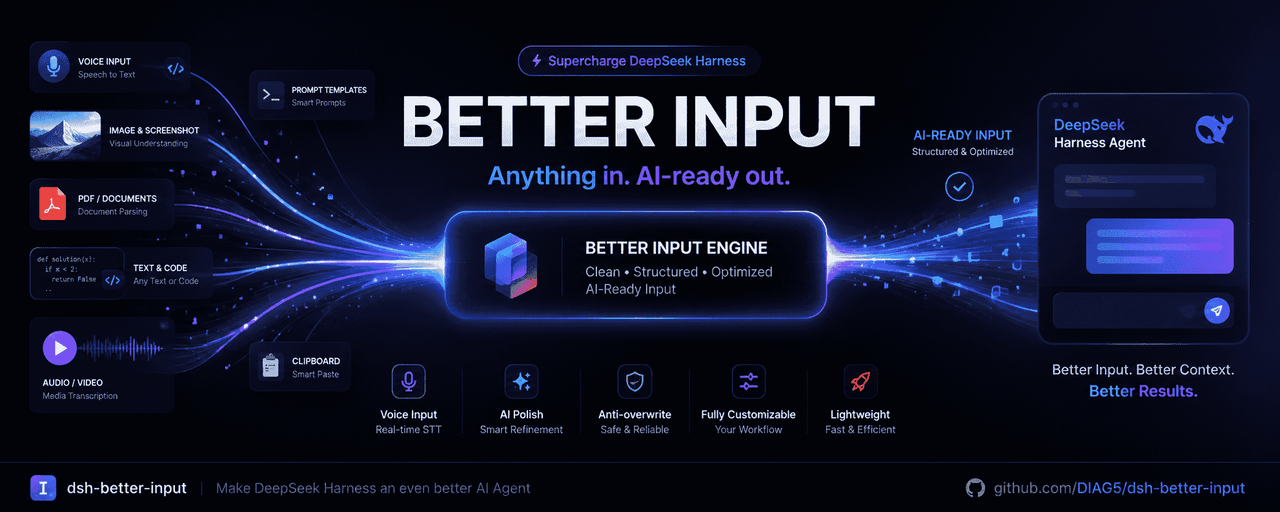 DIAG5/dsh-better-input
BetterInput是一套输入增强套件:语音识别、提示词优化、输入更多文件类型,各类文件转Md,交互体验优化等——把每一种喂给智能体的输入都变得更好。BetterInput is an input-enhancement suite — …
DIAG5/dsh-better-input
BetterInput是一套输入增强套件:语音识别、提示词优化、输入更多文件类型,各类文件转Md,交互体验优化等——把每一种喂给智能体的输入都变得更好。BetterInput is an input-enhancement suite — …
-
 PensiveFei/deep-read-summarize
Deep reading & summarization workflow for books/papers/videos/web — plugin parsers, MapReduce deep-read, JSON Schema out…
PensiveFei/deep-read-summarize
Deep reading & summarization workflow for books/papers/videos/web — plugin parsers, MapReduce deep-read, JSON Schema out…