MoFeng2223/dsh-claude-provider
DeepSeek Harness 的自定义 Claude 提供商支持
项目介绍Project Overview
DSH Claude Provider 是 DeepSeek Harness 插件,提供独立的 Claude 提供商类型。用户在前端保存 Claude 提供商时,插件自动将推理参数写入 settings.yaml;通过 Anthropic 原生 GET /v1/models 端点(含游标分页)发现模型,并自动填充已知 Claude 模型的上下文窗口、最大输出长度与推理模式。适用于需要在 DSH 中管理多个 Claude 接入点而不想手动编辑配置的场景。注意:插件仅作用于显式创建的 Claude Provider,其他提供商不受影响。
DSH Claude Provider is a DeepSeek Harness plugin that adds a dedicated Claude provider type. Saving a Claude provider through the UI writes native reasoning parameters to settings.yaml. It enables Anthropic-native model discovery via the GET /v1/models endpoint with cursor pagination, and auto-fills context window, max output, and reasoning-mode sets for known Claude models. Use it to manage multiple Claude entries in DSH without manual config edits. Note: scope is limited to providers explicitly created as Claude Providers; built-in and other custom providers remain untouched.
请帮我了解并安装插件:【dsh-claude-provider】【https://github.com/MoFeng2223/dsh-claude-provider】把上面这条消息直接发给当前会话里的 DSH,让它帮你了解并安装。安装命令不一定准确,发给 DSH 更稳。Send this message to DSH in your current session. CLI install commands may not be accurate across systems — DSH will figure it out for you.
或使用命令行安装(适合开发者)Or use CLI install (for developers)
命令行安装CLI Install
npx @deepseek-ai/dsh plugin --profile web add @mofeng2223/dsh-claude-provider把 MoFeng2223/dsh-claude-provider 加入你的 DSH 配置(web profile)即可启用。
READMEREADME
DSH Claude Provider
English | 简体中文
DeepSeek Harness's general-purpose reasoning controls did not fully match the request parameters required by newer Claude models. As a result, selecting a reasoning level could either produce an HTTP 400 error or be silently mapped by the adapter to a different effective level—for example, Max in the interface could actually be sent as High. @mofeng2223/dsh-claude-provider added an explicit Claude provider type and sent the correct reasoning parameters for each Claude model.
DeepSeek Harness 0.1.1-rc.1 now supports reasoning-effort parameters for Claude models, but they still need to be configured manually in settings.yaml. Therefore, this plugin no longer intercepts or rewrites model requests at runtime. Instead, it writes the corresponding native settings to settings.yaml when a Claude provider is saved through the front end.
The plugin retains its dedicated Claude provider configuration page, so users do not need to edit settings.yaml manually. Anthropic-native model discovery, automatic defaults for common Claude models, and other features not yet available in DeepSeek Harness are also retained.
What this plugin does
Adds a dedicated Claude provider type
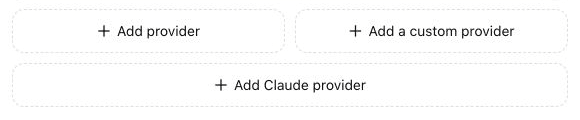
The Models settings page gains a separate Claude Provider form. You can create multiple Provider IDs under this type without mixing them with generic custom providers.
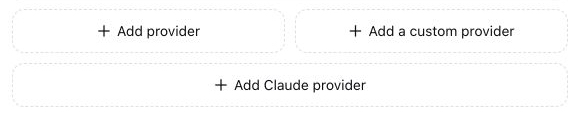
Selecting Add Claude Provider opens the dedicated Anthropic Messages form:
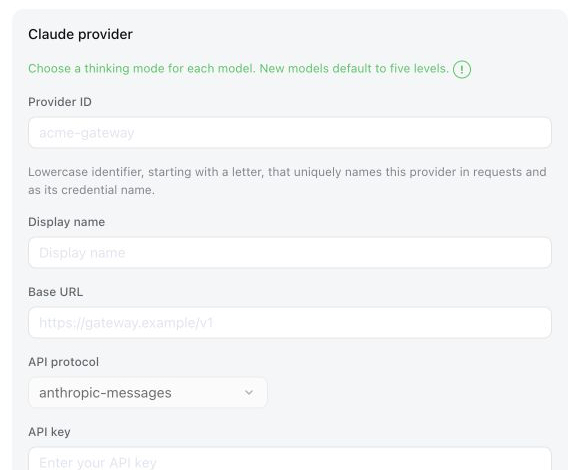
Adds model-specific reasoning modes
Each model can use one of three configurable mode sets:
- Five levels: Low, Medium, High, XHigh, and Max
- Four levels: Low, Medium, High, and Max
- Toggle: On or Off
New models default to five levels, and Claude providers default to High.
For adaptive thinking models, the plugin converted the selected level into Claude'sthinking.type: adaptiveandoutput_config.effortrequest format, preventing adapter rejections or silent downgrades.For adaptive thinking models, the plugin writes the selected level to DSH's native configuration when saved.
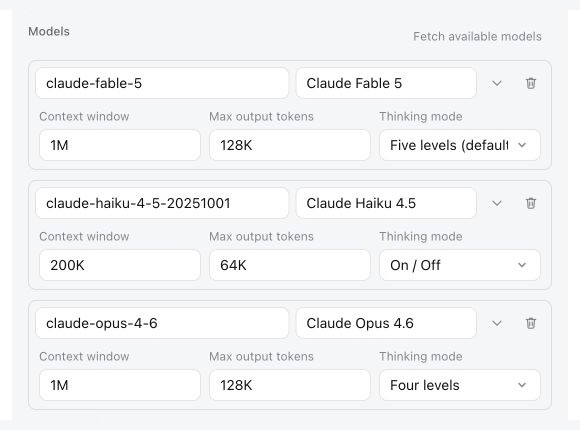
Adds native Anthropic model discovery
DeepSeek Harness's generic custom provider cannot list models for the
anthropic-messagesprotocol. This plugin adds model discovery for Claude providers through the provider's native Anthropic-compatibleGET /v1/modelsendpoint, including cursor pagination.Fills known Claude model defaults after discovery
When a discovered model matches a recorded Claude model ID, the plugin automatically fills its context window, maximum output length, and reasoning-mode set. Models entered manually remain fully editable and are not overwritten by this lookup.
Leaves every other provider unchanged
Discovery, defaults, and reasoning controls are limited to Provider IDs explicitly created as Claude Providers. DeepSeek Harness's built-in providers and ordinary custom providers keep their original behavior, even when they use
anthropic-messagesor expose aclaude-*model ID.
Install
Published package
Install the Web profile for the browser interface:
npx @deepseek-ai/dsh plugin --profile web add @mofeng2223/dsh-claude-provider
Install the Headless profile for command-line runs without the Web interface:
npx @deepseek-ai/dsh plugin --profile headless add @mofeng2223/dsh-claude-provider
Restart the corresponding DeepSeek Harness process after installation.
From source
Build and package the repository first:
git clone https://github.com/MoFeng2223/dsh-claude-provider.git
cd dsh-claude-provider
npm install
npm run build
mkdir -p dist
npm pack --pack-destination dist
Install the generated package into the Web profile:
npx @deepseek-ai/dsh plugin --profile web add ./dist/mofeng2223-dsh-claude-provider-*.tgz
Or install it into the Headless profile:
npx @deepseek-ai/dsh plugin --profile headless add ./dist/mofeng2223-dsh-claude-provider-*.tgz
Uninstall
Run the command for each profile where the plugin was installed:
npx @deepseek-ai/dsh plugin --profile web remove @mofeng2223/dsh-claude-provider
npx @deepseek-ai/dsh plugin --profile headless remove @mofeng2223/dsh-claude-provider
Uninstalling the plugin does not delete ~/.dsh/settings.yaml or stored credentials. Existing Claude providers remain ordinary custom anthropic-messages routes. Their reasoningEfforts, default reasoning, and compat.forceAdaptiveThinking fields are native RC8 settings, so adaptive thinking and the front-end reasoning-effort selector continue to work. Only the dedicated Claude add/edit UI, model discovery, and recorded defaults disappear.
License
相关推荐Related
-
 nexu-io/open-design
🎨 Best DeepSeek Harness Design Plugin. The open-source Claude Design alternative. 🖥️ Local-first desktop app. 🖼️ Your…
nexu-io/open-design
🎨 Best DeepSeek Harness Design Plugin. The open-source Claude Design alternative. 🖥️ Local-first desktop app. 🖼️ Your…
-
 ruvnet/ruflo
🌊 The original agent meta-harness. Deploy intelligent multi-player swarms, coordinate autonomous workflows, and build c…
ruvnet/ruflo
🌊 The original agent meta-harness. Deploy intelligent multi-player swarms, coordinate autonomous workflows, and build c…
-
 amruthpillai/reactive-resume
A one-of-a-kind resume builder that keeps your privacy in mind. Completely secure, customizable, portable, open-source a…
amruthpillai/reactive-resume
A one-of-a-kind resume builder that keeps your privacy in mind. Completely secure, customizable, portable, open-source a…
-
 esengine/DeepSeek-Reasonix
DeepSeek-native AI coding agent for your terminal. Engineered around prefix-cache stability — leave it running.
esengine/DeepSeek-Reasonix
DeepSeek-native AI coding agent for your terminal. Engineered around prefix-cache stability — leave it running.
-
 volcengine/OpenViking
Self-evolving Context Database for AI Agents. Unify Agent Memory, Knowledge RAG and Skills.
volcengine/OpenViking
Self-evolving Context Database for AI Agents. Unify Agent Memory, Knowledge RAG and Skills.
-
 Molunerfinn/PicGo
:rocket: The Ultimate Image Uploader for Efficient Creators. Supports Obsidian, Typora, VS Code etc. and 60+ image hosti…
Molunerfinn/PicGo
:rocket: The Ultimate Image Uploader for Efficient Creators. Supports Obsidian, Typora, VS Code etc. and 60+ image hosti…
-
 titanwings/distilly
Distilly — Distill how they think into reusable Skills for any Agent or Bot. Formerly Colleague Skill(原同事 Skill).
titanwings/distilly
Distilly — Distill how they think into reusable Skills for any Agent or Bot. Formerly Colleague Skill(原同事 Skill).
-
 titanwings/colleague-skill