
Molunerfinn/PicGo
:rocket: The Ultimate Image Uploader for Efficient Creators. Supports Obsidian, Typora, VS Code etc. and 60+ image hosting services (S3, GitHub, Cloudflare R2, Imgur, Aliyun OSS...). Paste, upload, done.
项目介绍Project Overview
PicGo 是一款开源的桌面图片上传工具,集成在创意工作流中,核心能力是上传图片后自动复制链接、支持 Markdown/HTML 等格式输出,适用于博客、笔记及开发文档中需要频繁插入图片的场景。系统支持拖拽、剪贴板、全局快捷键及插件扩展多图床。注意:仅在 macOS 和 Windows 完成测试,Linux 兼容性未充分验证。
PicGo is an open-source desktop image uploader built into creative workflows. Its core capability is uploading images and auto-copying the resulting link in Markdown, HTML, URL, or custom formats, ideal for blog posts, notes, and developer documentation that require frequent image insertion. It supports drag-and-drop, clipboard paste, global hotkeys, and plugin-extended image hosts. Note: only macOS and Windows are fully tested; Linux compatibility is not fully verified.
请帮我了解并安装插件:【PicGo】【https://github.com/Molunerfinn/PicGo】把上面这条消息直接发给当前会话里的 DSH,让它帮你了解并安装。安装命令不一定准确,发给 DSH 更稳。Send this message to DSH in your current session. CLI install commands may not be accurate across systems — DSH will figure it out for you.
或使用命令行安装(适合开发者)Or use CLI install (for developers)
命令行安装CLI Install
dsh plugin --profile web add @picgo/dsh-plugin把 Molunerfinn/PicGo 加入你的 DSH 配置(web profile)即可启用。
READMEREADME

中文 | English

PicGo
The Ultimate Image Uploader for Efficient Creators






📖 Overview
PicGo aims to make image uploading a seamless part of your creative workflow.
Whether you’re writing a blog post, taking notes, or authoring developer docs, PicGo helps you upload images in one step and automatically copies the resulting link—so you can stay focused on creating, not uploading.
Supported Image hosts
PicGo supports mainstream Image hosts out of the box, and can be extended indefinitely through its plugin system:
- China cloud vendors: Qiniu, Tencent Cloud COS, UPYUN, Alibaba Cloud OSS
- International / open platforms: GitHub, SM.MS(S.EE), Imgur
- More options via plugins: AWS S3, Cloudflare R2, MinIO, and more
Note: PicGo itself will no longer add new third-party Image hosts by default. You can build Image host plugins yourself—see PicGo-Core.
✨ Key Features
PicGo is built around a fast, low-friction image upload experience:
⚡ Smooth writing flow
- Auto-copy links: once an upload finishes, the link is copied to your clipboard automatically.
- Flexible formats: Markdown, HTML, URL, custom templates—paste directly into any editor.
- Zero-Context Switching: Don't switch windows. Just paste images directly into your favorite editor, and let PicGo handle the upload in the background.
🚀 Fast uploads
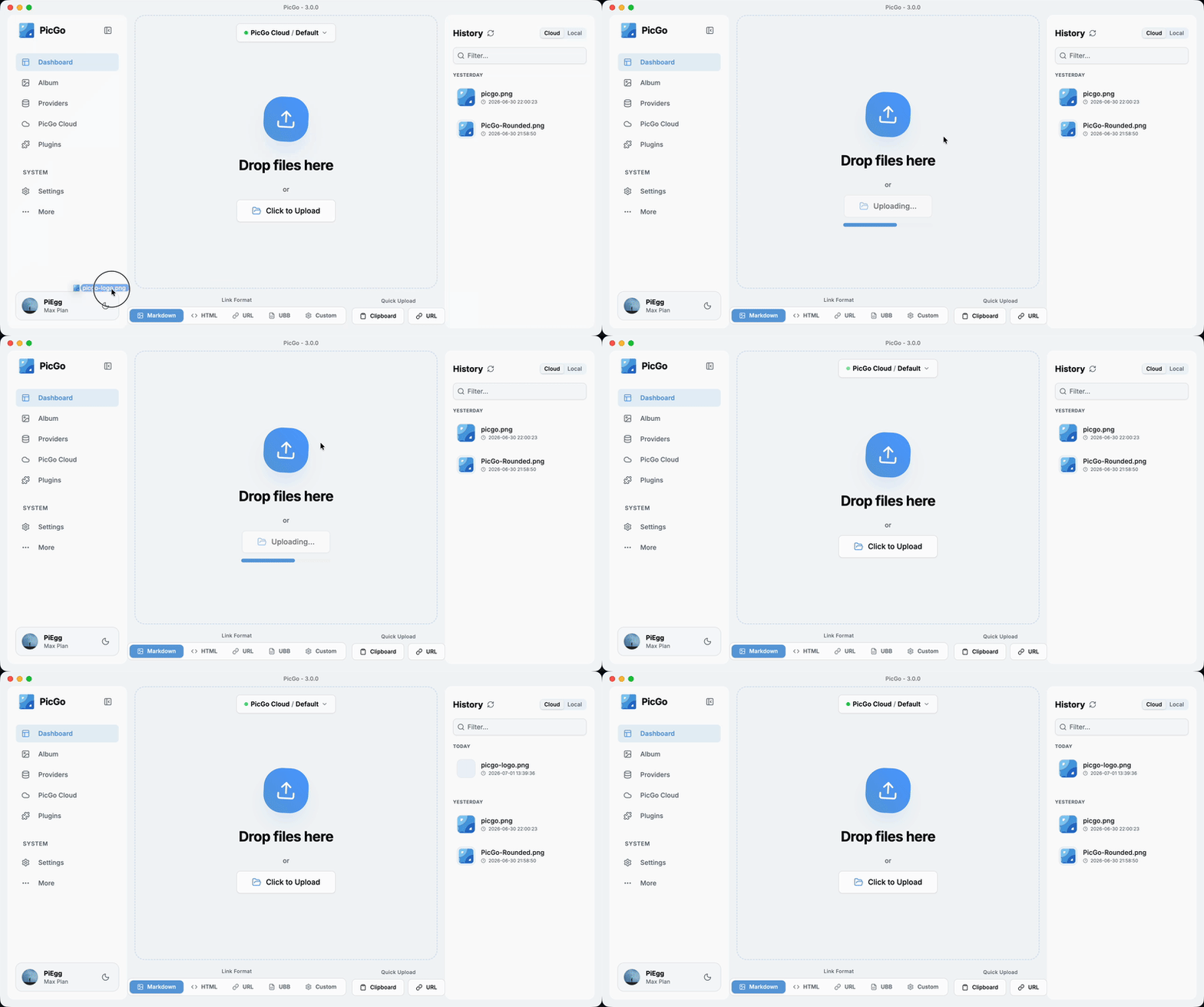
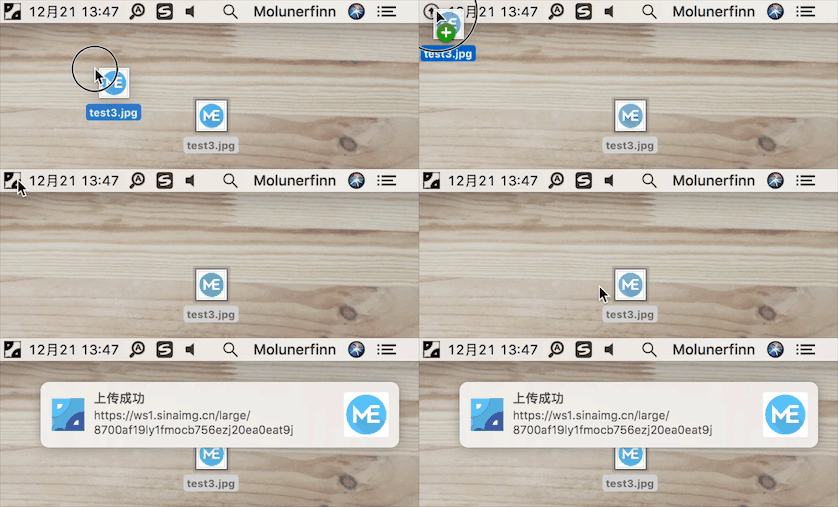
- Multiple ways to upload: drag & drop, paste from clipboard, hotkeys, and even right-click context menu upload on macOS/Windows.
- Global hotkey: press
Command+Shift+U(macOS) /Ctrl+Shift+U(Windows/Linux) to open the upload window without leaving your current app. The global key can be customized.
🧩 Powerful plugin ecosystem
- Highly extensible: plugins already exist for AWS S3, Cloudflare R2, MinIO, and many other Image hosts.
- Even more possibilities: image compression, watermarking, renaming, Markdown image migration, and more.
- Explore plugins: Awesome-PicGo
🤖 AI-friendly
More and more writing is handed off to AI. But the screenshots and charts it produces sit on your disk as , and they need to become real links before you publish. PicGo lets AI upload them too:
- PicGo Skills: official Agent Skills that teach AI when and how to upload. Works with any AI tool that supports the skills format.
npx skills@latest add PicGo/skills - DeepSeek Harness plugin: install it in dsh and your agent can upload to your image host on its own.
dsh plugin --profile web add @picgo/dsh-plugin
Both reuse the image hosts and plugins you already configured in PicGo—nothing to set up twice. Read more in this post.
🛠 Developer-friendly
- HTTP API: upload via HTTP requests (v2.2.0+), making it easy to integrate with other tools.
- Open source: fully open-source and transparent.
- Great documentation: detailed docs help you get started quickly. For plugin development, see the PicGo-Core docs.
There’s more to discover—development progress is tracked in Projects.
If you’re new to PicGo, start with the User Guide. If you run into issues, check the FAQ and closed issues.
Download & Install
| Source | Link / Installation | Platform | Notes |
|---|---|---|---|
| GitHub Releases | https://github.com/Molunerfinn/PicGo/releases | All | Downloads may be slow in mainland China |
| Shandong University mirror | https://mirrors.sdu.edu.cn/github-release/Molunerfinn_PicGo | All | Thanks to the mirror for hosting |
| Scoop | scoop bucket add extras & scoop install picgo |
Windows | Thanks to @huangnauh and @Gladtbam |
| Chocolatey | choco install picgo |
Windows | Thanks to @iYato |
| Homebrew | brew install picgo --cask |
macOS | Thanks to @womeimingzi11 |
| AUR | yay -S picgo-appimage |
Arch Linux | Thanks to @houbaron |
| Nix | nix-shell -p picgo |
Nix/NixOS | Thanks to @qrzbing |
Screenshots
Development
Currently tested on macOS and Windows only. Linux has not been fully tested.
If you want to learn, contribute, modify, or build PicGo yourself:
For an Electron-vue learning series, see: Electron-vue development
- Install Node.js and Git, and make sure you’re familiar with npm basics.
- Clone the repo:
git clone https://github.com/Molunerfinn/PicGo.gitand enter the directory. - Install dependencies with
pnpm. If you don’t have it yet, install it from the pnpm website first. - On macOS you’ll need Xcode; on Windows you’ll need Visual Studio.
- For contributing, see CONTRIBUTING.md.
Development mode
Run pnpm run dev to start the dev workflow with hot reload. Note: dev mode can be unstable and the process may crash—if that happens:
ctrl+c # stop dev mode
pnpm run dev # restart
On Windows, after dev mode starts, PicGo’s tray icon will appear in the bottom-right system tray area.
Production build
To build release artifacts locally, run pnpm run build. After a successful build, the installer files will be generated under dist.
Note: If your network is unstable, electron-builder may fail to download Electron binaries. You can set an alternative mirror before building:
export ELECTRON_MIRROR="https://npmmirror.com/mirrors/electron/"
# On Windows: set ELECTRON_MIRROR=https://npmmirror.com/mirrors/electron/ (no quotes)
pnpm run build
Electron binaries are stored under ~/.electron/. If you need to refresh them, delete that directory and rebuild.
Related Projects
- vs-picgo: PicGo for VS Code.
- flutter-picgo: mobile app (Android & iOS).
- PicHoro: another mobile app compatible with PicGo config (Android only for now).
- skills: official Agent Skills that teach AI to upload with PicGo.
- dsh-plugin: PicGo plugin for DeepSeek Harness.
Sponsorship
If you like PicGo and it helps your workflow, feel free to buy me a coffee.
Alipay:

WeChat Pay:

GitHub Sponsors:

License
Copyright (c) 2017 - Now Molunerfinn
相关推荐Related
-
 nexu-io/open-design
🎨 Best DeepSeek Harness Design Plugin. The open-source Claude Design alternative. 🖥️ Local-first desktop app. 🖼️ Your…
nexu-io/open-design
🎨 Best DeepSeek Harness Design Plugin. The open-source Claude Design alternative. 🖥️ Local-first desktop app. 🖼️ Your…
-
 ruvnet/ruflo
🌊 The original agent meta-harness. Deploy intelligent multi-player swarms, coordinate autonomous workflows, and build c…
ruvnet/ruflo
🌊 The original agent meta-harness. Deploy intelligent multi-player swarms, coordinate autonomous workflows, and build c…
-
 amruthpillai/reactive-resume
A one-of-a-kind resume builder that keeps your privacy in mind. Completely secure, customizable, portable, open-source a…
amruthpillai/reactive-resume
A one-of-a-kind resume builder that keeps your privacy in mind. Completely secure, customizable, portable, open-source a…
-
 esengine/DeepSeek-Reasonix
DeepSeek-native AI coding agent for your terminal. Engineered around prefix-cache stability — leave it running.
esengine/DeepSeek-Reasonix
DeepSeek-native AI coding agent for your terminal. Engineered around prefix-cache stability — leave it running.
-
 volcengine/OpenViking
Self-evolving Context Database for AI Agents. Unify Agent Memory, Knowledge RAG and Skills.
volcengine/OpenViking
Self-evolving Context Database for AI Agents. Unify Agent Memory, Knowledge RAG and Skills.
-
 titanwings/distilly
Distilly — Distill how they think into reusable Skills for any Agent or Bot. Formerly Colleague Skill(原同事 Skill).
titanwings/distilly
Distilly — Distill how they think into reusable Skills for any Agent or Bot. Formerly Colleague Skill(原同事 Skill).
-
 titanwings/colleague-skill
-
 nocobase/nocobase
NocoBase is an open-source AI + no-code platform for building business systems fast. Instead of generating everything fr…
nocobase/nocobase
NocoBase is an open-source AI + no-code platform for building business systems fast. Instead of generating everything fr…