NanmiCoder/dsh-agent-teams
DeepSeek Harness 的 AgentTeams 插件
项目介绍Project Overview
dsh-agent-teams 是 DeepSeek Harness 插件,把当前会话升级为队长,组建可持久化、可继续运行的子代理团队。它负责角色分配、按依赖拆解任务、共享调度器调度,并通过 10 个协调工具与 Web UI 展示活动。适合把复杂目标交给一次会话自动分解为多角色协作时使用。注意:状态为单进程文件持久化,并发进程编辑同一团队不被协调。
dsh-agent-teams is a DeepSeek Harness plugin that turns the current session into a captain that assembles durable sub-agents, splits goals into dependency-aware tasks, and coordinates work through ten protocol tools plus a live Web UI. Use it when a complex objective needs automatic multi-role decomposition and persistent member reuse within one session. State is file-backed and serialized inside a single DSH process, so concurrent processes editing the same team are not coordinated.
请帮我了解并安装插件:【dsh-agent-teams】【https://github.com/NanmiCoder/dsh-agent-teams】把上面这条消息直接发给当前会话里的 DSH,让它帮你了解并安装。安装命令不一定准确,发给 DSH 更稳。Send this message to DSH in your current session. CLI install commands may not be accurate across systems — DSH will figure it out for you.
或使用命令行安装(适合开发者)Or use CLI install (for developers)
命令行安装CLI Install
dsh plugin --profile web add @nanmicoder/dsh-agent-teams@latest把 NanmiCoder/dsh-agent-teams 加入你的 DSH 配置(web profile)即可启用。
READMEREADME
English · 简体中文
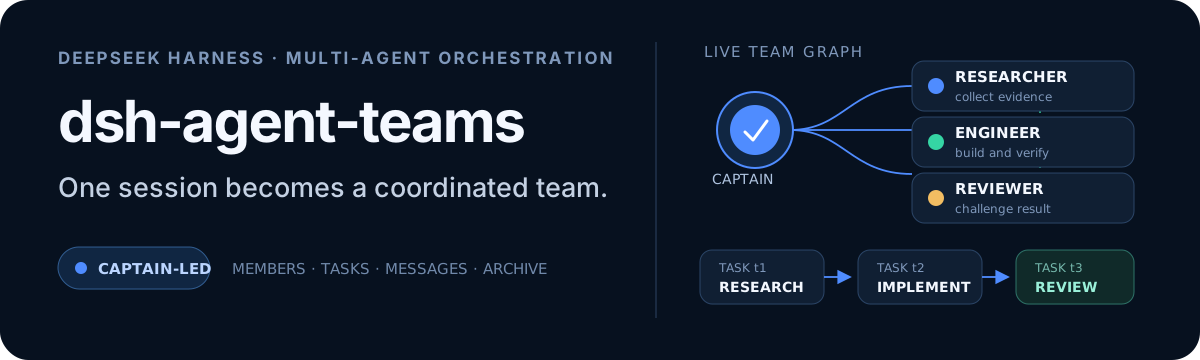




One prompt. A working team.
dsh-agent-teams turns the current DeepSeek Harness session into a captain that can assemble durable sub-agents, split a goal into dependency-aware tasks, and coordinate work through direct messages.
Ask in natural language. The plugin provides the team protocol, eleven coordination tools, persistent state, an automatic shared-task scheduler, and a live Web UI—without requiring a separate workflow engine.
Releases
Read the latest release notes or browse the complete release history. The same Markdown notes are included in the npm package under release-notes/.
Why AgentTeams?
| Capability | What it changes |
|---|---|
| Captain-led delegation | The current session creates the team, assigns roles, and consolidates the final result. |
| Durable members | Members are continuable DSH sub-agents that can be woken for focused follow-up turns. |
| Dependency-aware tasks | Tasks move through explicit states and cannot be claimed before their dependencies finish. |
| Automatic reuse and safe takeover | Idle members claim the next ready task; reassignment revokes stale attempts before new work starts, and cold recovery retries stranded open attempts. |
| Direct messaging | Members send durable mailbox messages directly to teammates or the captain—no relay required. |
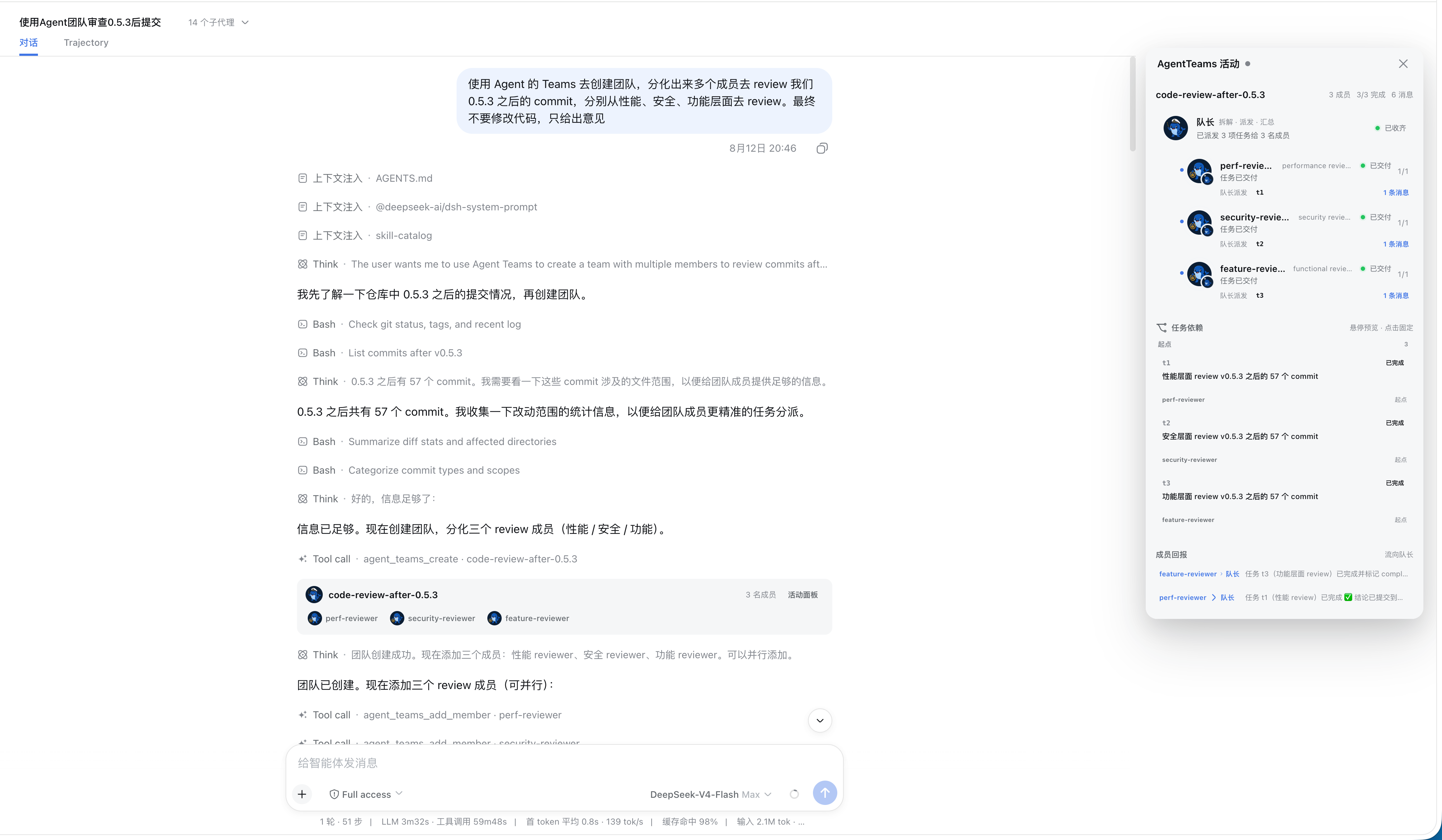
| Live activity panel | The Web UI combines segmented progress, a collapsible roster, and an interactive task DAG; running tasks show the member's model, and completed archives retain their full member and task history. |
| Plan before execution | Normal /agent-teams runs stage an unspawned roster and DAG first. The Web panel can edit member routes/prompts and task assignments/dependencies; only Approve & Run creates members and starts scheduling. |
| Quality gates | Opt-in quality tasks support requirements → implementation → verification → review → integration contracts, automatic repair/re-review, and explicit resume. Scope control is a completion-time audit, not host write interception. See docs/quality-gates.md. |
The conversation card and activity panel use Harness's official locale service. They follow live language changes between English and Simplified Chinese—including status labels, dynamic summaries, controls, archive markers, and accessibility text—without a page reload or a separate plugin setting.
Install
[!NOTE] Requires an existing DeepSeek Harness installation.
npm
dsh plugin --profile web add @nanmicoder/dsh-agent-teams@latest
Build from source
git clone https://github.com/NanmiCoder/dsh-agent-teams.git
cd dsh-agent-teams
pnpm install
pnpm build
dsh plugin --profile web add .
Run pnpm build again after changing the source. The local plugin install remains linked to this checkout.
Validate the composed profile, restart DSH, and refresh the Web UI:
dsh --profile web --dump-config
dsh web
Then ask for a team directly:
Use AgentTeams to review the commits after v0.5.3 from performance, security, and product perspectives. Return one consolidated report.
How it works
- The current session creates a team and becomes its captain.
- The captain adds role-specific members backed by continuable sub-agents.
- The goal becomes tasks with owners and explicit dependencies.
- The shared scheduler uses real
running / idle / readystate to atomically claim one ready task per idle member and wake it. An interrupted resident attempt stays parked and can resume through a direct message without losing its capability; after a cold process restart, the scheduler retries stranded open work with a fresh attempt. - Members update with the current
attempt_id; reassignment or captain takeover revokes the old attempt and waits for the old worker to quiesce before a new attempt starts. - The captain presents the combined result, then archives the complete team record.
Team state is stored under <workspace>/.agent-teams/; the Web panel reads that disk truth and combines it with live sub-agent activity.
Member creation is zero-interaction by default: a member on the captain's current LLM route snapshots that provider, model, and reasoning effort, while a member on a requested alternative route snapshots the target model's default effort; later continuations restore the resolved snapshot. Only an explicit heterogeneous-team request (for example, “backend on provider A/model X, frontend on provider B/model Y”) supplies a member-specific provider + model; there is no per-member model or reasoning prompt.
Slash command
No “use AgentTeams” phrasing required. The plugin registers the
closed-namespace /agent-teams host command, so the Web GUI slash menu shows
an agent-teams placeholder with an input hint: pick it (or type the
command), describe the goal, and press Enter.
/agent-teams research the pricing pages of three competitors
The command pipeline claims the line, then preserves that exact input as an
ordinary user follow-up so it remains visible in the main chat. The gesture
boundary adds the deterministic activation directive at pre-step, so the
captain protocol still starts immediately. The invocation is also durably
logged (command/run / command/done).
Surfaces without command adjudication (for example the headless CLI) get the
same deterministic activation through a gesture boundary: any genuine user
message starting with /agent-teams activates the protocol for the rest of
the text. Mid-sentence mentions stay ordinary prose.
Configuration
Defaults work without extra setup. A trusted profile can override member behavior:
- id: agent-teams
  config:
    stateDir: .agent-teams
    memberProvider: spawn
    memberModel: deepseek-v4
    memberMaxDepth: 1
    maxMembers: 8
memberProvider is the sub-agent runtime backend (spawn / fork), not an LLM provider. Cross-LLM-provider routing uses the optional provider + model fields of agent_teams_add_member; memberModel is only a model default for all members. A member on the captain's current provider/model inherits the captain's reasoning effort, while a changed provider or model automatically uses the target model's default. To request a particular effort, pass the optional reasoning_effort field — one of the target model's supported effort ids, or "default" to force the model's own default.
slashCommand: false disables the deterministic /agent-teams activation surfaces (slash command and gesture boundary), leaving the natural-language trigger as the only entry point.
Boundaries
- One captain leads one active team at a time.
- Idle members with no open task are automatically reused for ready work. An idle member that still owns an open attempt is parked until messaged or explicitly reassigned; messages that cannot be delivered live remain durable and are retried at a later status boundary.
- State is file-backed and serialized within one DSH process; concurrent processes editing the same team are not coordinated.
- The activity panel reports persisted state as-is. Models may occasionally finish work without performing the expected task-state update.
See docs/usage.md for the full tool reference, state model, Web UI behavior, configuration, and known limits.
Plugin development Skill
The repository also ships the open Agent Skills package dsh-plugin-development:
npx skills add NanmiCoder/dsh-agent-teams --skill dsh-plugin-development
Documentation
| Guide | Covers |
|---|---|
| Usage | Architecture, UI behavior, tools, configuration, limits, and validation |
| Verification | Offline, composition, real e2e, and GUI verification |
| Plugin development | Human-readable guide built from this plugin |
| README writing | Repository documentation conventions |
Development
pnpm install
pnpm build
pnpm verify
Named multi-role profiles
Configure one or more complete team profiles in cordis.patch.yml. A profile always supplies the roster (independent provider/model/role/reasoning effort). Set taskPlanning: captain when the Captain should derive the DAG from the user's goal; omit it or set taskPlanning: seed to keep a fixed template workflow:
profiles:
  demo-delivery:
    description: Ship a small feature
    protocol: Discuss requirements, review, test, then prepare release; do not deploy automatically.
    members:
      - name: analyst
        model: gpt-5.6-sol
        role: Analyze requirements
      - name: implementer
        model: gpt-5.6-terra
        role: Implement the approved solution
    tasks:
      - id: requirements
        subject: Requirements discussion
        assignee: analyst
      - id: implementation
        subject: Implement solution
        assignee: implementer
        dependencies: [requirements]
Use an explicit profile flag: /agent-teams --profile demo-delivery implement the feature. The first ordinary token is never treated as an implicit profile. Normal command runs call agent_teams_create({ profile, approval: "required" }): the roster and seed/Captain-designed DAG remain staged, no child session is created, and no task is claimed. Edit the plan in the activity panel, then click Approve & Run. Approval resolves the final provider/model/reasoning choices, atomically spawns the roster, and starts only ready tasks. Direct tool clients may pass approval: "automatic" for the legacy immediate path. Failed review/test tasks do not unlock downstream work; automatic repair/review tasks do not depend on the failed review.
License
相关推荐Related
-
 nexu-io/open-design
🎨 Best DeepSeek Harness Design Plugin. The open-source Claude Design alternative. 🖥️ Local-first desktop app. 🖼️ Your…
nexu-io/open-design
🎨 Best DeepSeek Harness Design Plugin. The open-source Claude Design alternative. 🖥️ Local-first desktop app. 🖼️ Your…
-
 ruvnet/ruflo
🌊 The original agent meta-harness. Deploy intelligent multi-player swarms, coordinate autonomous workflows, and build c…
ruvnet/ruflo
🌊 The original agent meta-harness. Deploy intelligent multi-player swarms, coordinate autonomous workflows, and build c…
-
 amruthpillai/reactive-resume
A one-of-a-kind resume builder that keeps your privacy in mind. Completely secure, customizable, portable, open-source a…
amruthpillai/reactive-resume
A one-of-a-kind resume builder that keeps your privacy in mind. Completely secure, customizable, portable, open-source a…
-
 esengine/DeepSeek-Reasonix
DeepSeek-native AI coding agent for your terminal. Engineered around prefix-cache stability — leave it running.
esengine/DeepSeek-Reasonix
DeepSeek-native AI coding agent for your terminal. Engineered around prefix-cache stability — leave it running.
-
 volcengine/OpenViking
Self-evolving Context Database for AI Agents. Unify Agent Memory, Knowledge RAG and Skills.
volcengine/OpenViking
Self-evolving Context Database for AI Agents. Unify Agent Memory, Knowledge RAG and Skills.
-
 Molunerfinn/PicGo
:rocket: The Ultimate Image Uploader for Efficient Creators. Supports Obsidian, Typora, VS Code etc. and 60+ image hosti…
Molunerfinn/PicGo
:rocket: The Ultimate Image Uploader for Efficient Creators. Supports Obsidian, Typora, VS Code etc. and 60+ image hosti…
-
 titanwings/distilly
Distilly — Distill how they think into reusable Skills for any Agent or Bot. Formerly Colleague Skill(原同事 Skill).
titanwings/distilly
Distilly — Distill how they think into reusable Skills for any Agent or Bot. Formerly Colleague Skill(原同事 Skill).
-
 titanwings/colleague-skill