NaNQiQ/deepseek-harness-remote-ssh
让 DeepSeek Harness(DSH) 使用原生工具直接操作远程 Linux 服务器,自由切换服务器
项目介绍Project Overview
DSH Remote SSH 是 DeepSeek Harness 插件,让官方 read/write/edit/glob/grep/bash/terminal 工具经 SFTP、SSH exec/PTY 在远程 Linux 服务器执行;可在 Web UI 添加、测试、选择服务器并切换本地/远程环境,支持 Agent、密钥或临时密码。适合远程开发与运维;默认工作目录不是沙箱,权限等同远程 SSH 账户。
DSH Remote SSH is a DeepSeek Harness plugin that runs the official DSH read/write/edit/glob/grep/bash/terminal tools on remote Linux servers through SFTP, SSH exec, and SSH PTY. Use it to add, test, select, and switch between local and saved SSH servers in the DSH Web UI, with Agent, key-file, or temporary-password authentication. The default working directory is not a sandbox; access equals the remote SSH account’s permissions.
请帮我了解并安装插件:【deepseek-harness-remote-ssh】【https://github.com/NaNQiQ/deepseek-harness-remote-ssh】把上面这条消息直接发给当前会话里的 DSH,让它帮你了解并安装。安装命令不一定准确,发给 DSH 更稳。Send this message to DSH in your current session. CLI install commands may not be accurate across systems — DSH will figure it out for you.
或使用命令行安装(适合开发者)Or use CLI install (for developers)
命令行安装CLI Install
dsh plugin --profile web add github:NaNQiQ/deepseek-harness-remote-ssh把 NaNQiQ/deepseek-harness-remote-ssh 加入你的 DSH 配置(web profile)即可启用。
READMEREADME
DSH Remote SSH





Use the native DeepSeek Harness (DSH) tools directly on remote Linux servers.
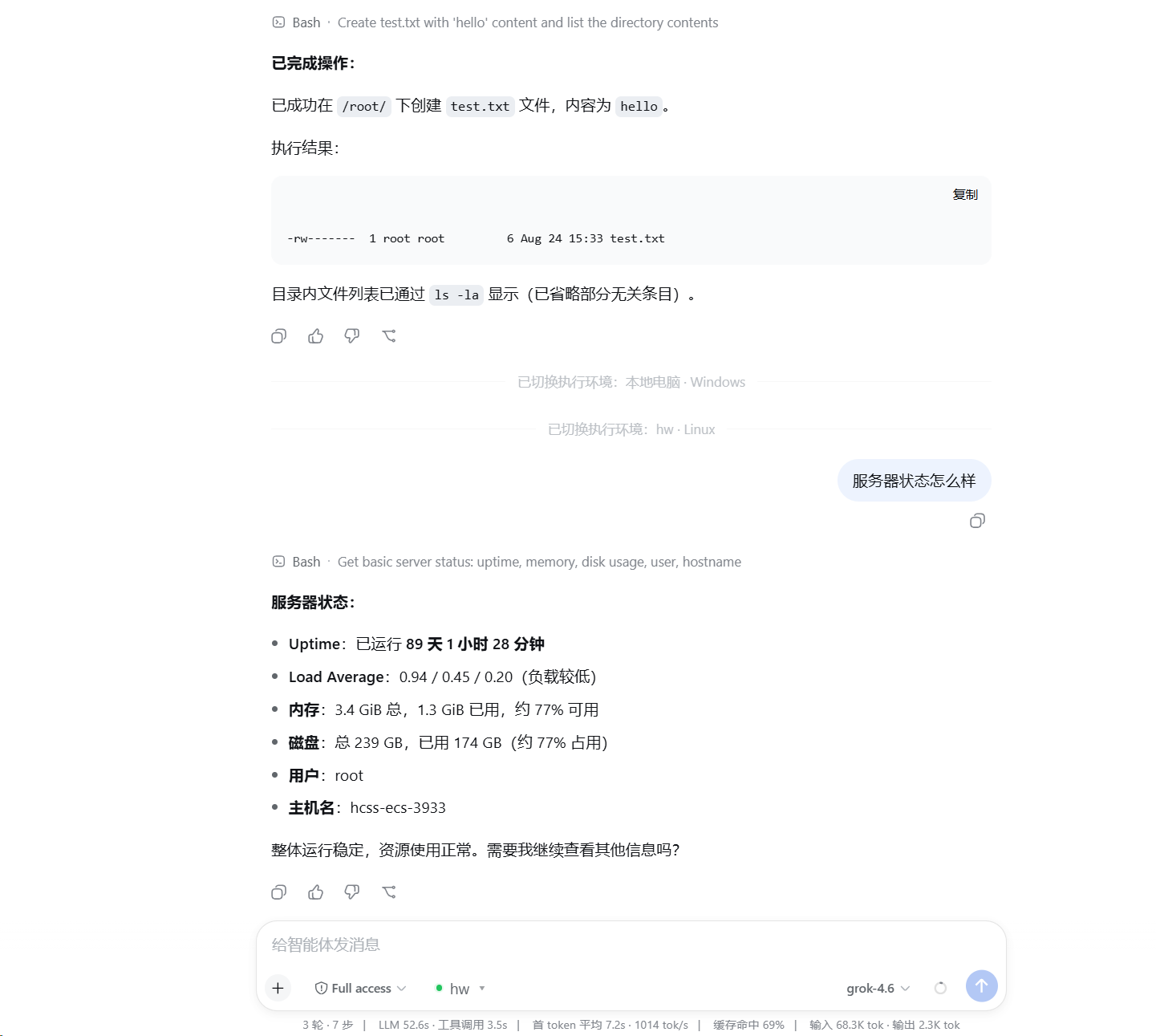
Select a saved server next to the conversation composer and DSH's existing read / write / edit / glob / grep / bash / terminal tools run remotely. The plugin does not modify DSH source code, and the server does not need DSH, this plugin, Node.js, or Python installed.
Features
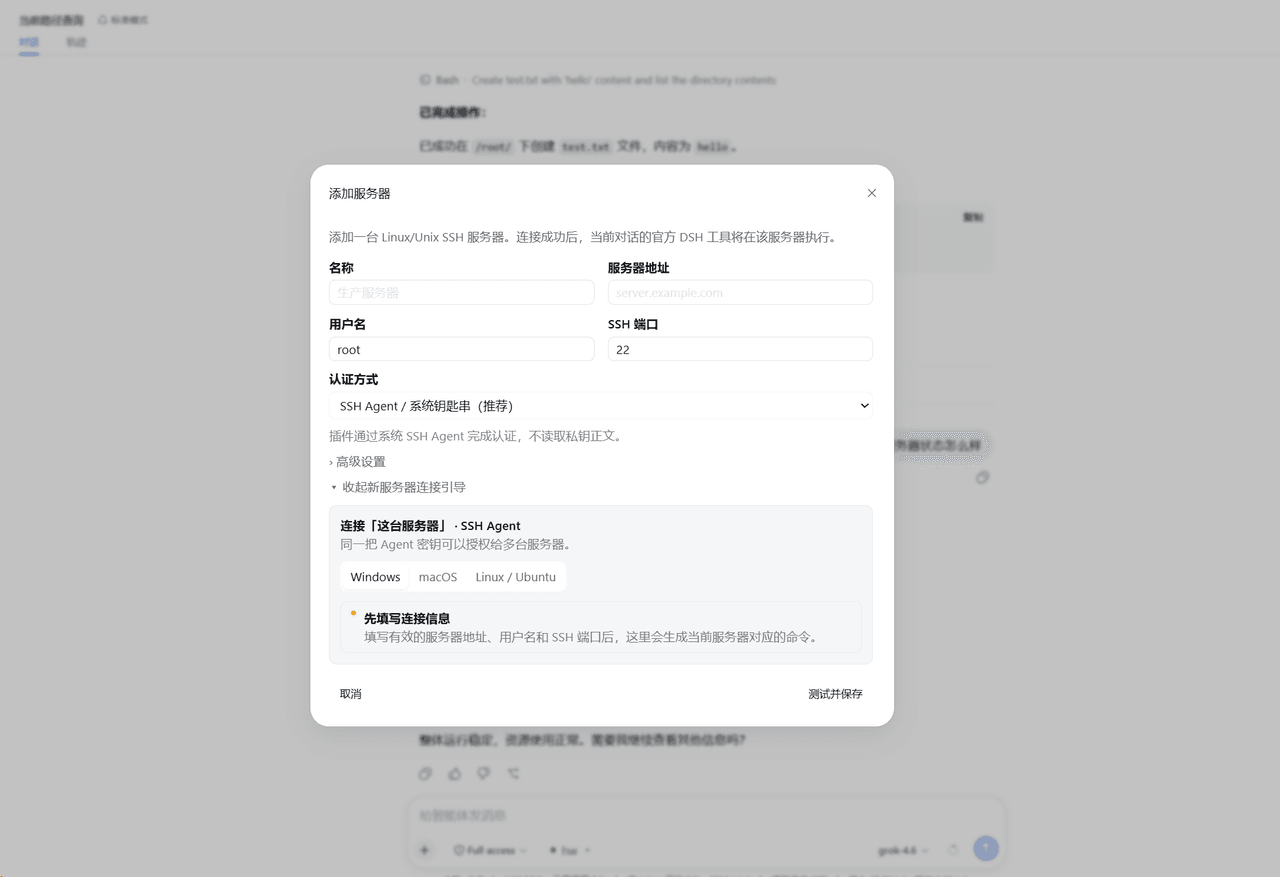
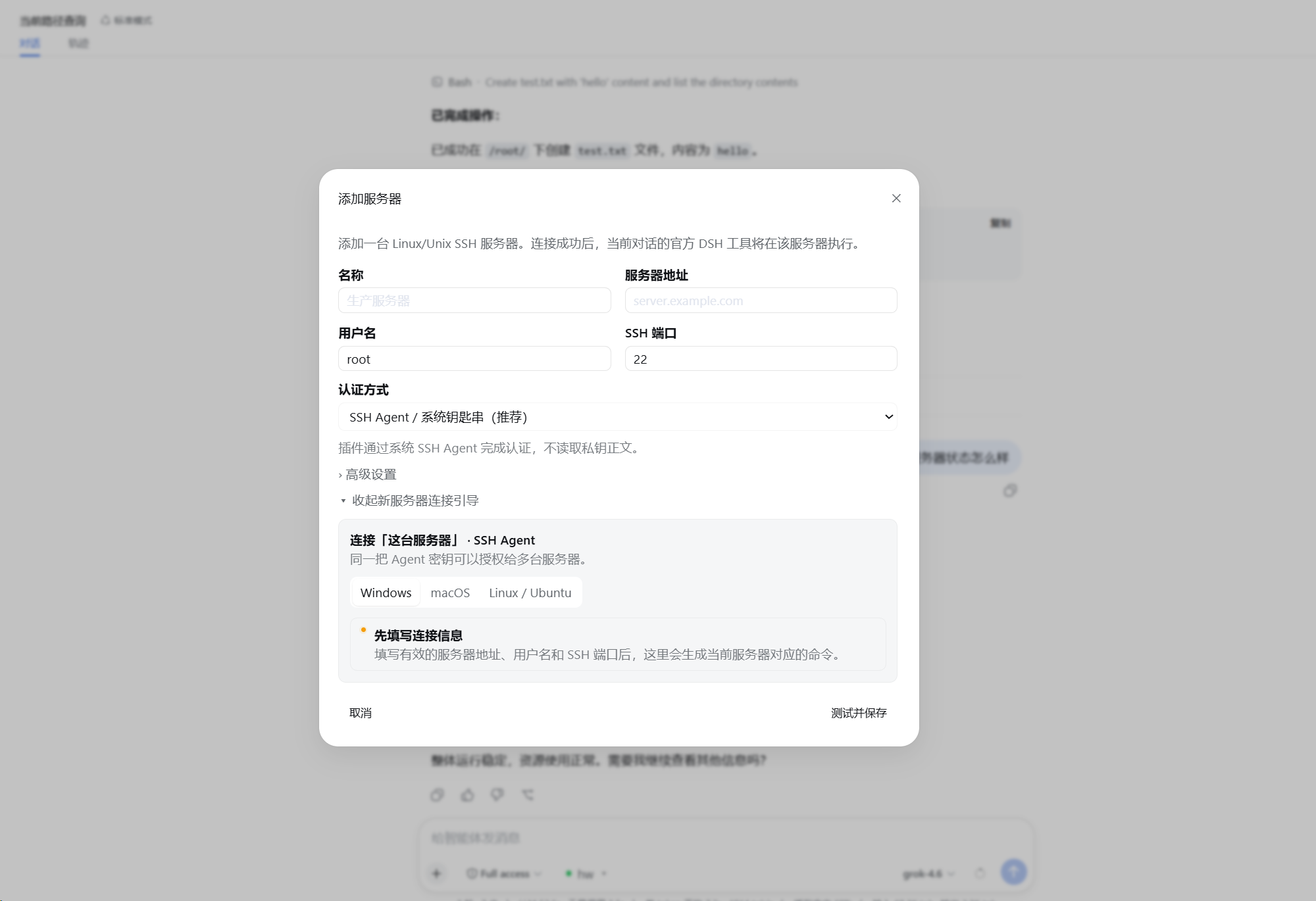
- Add, test, manage, and select SSH servers inside the DSH Web UI.
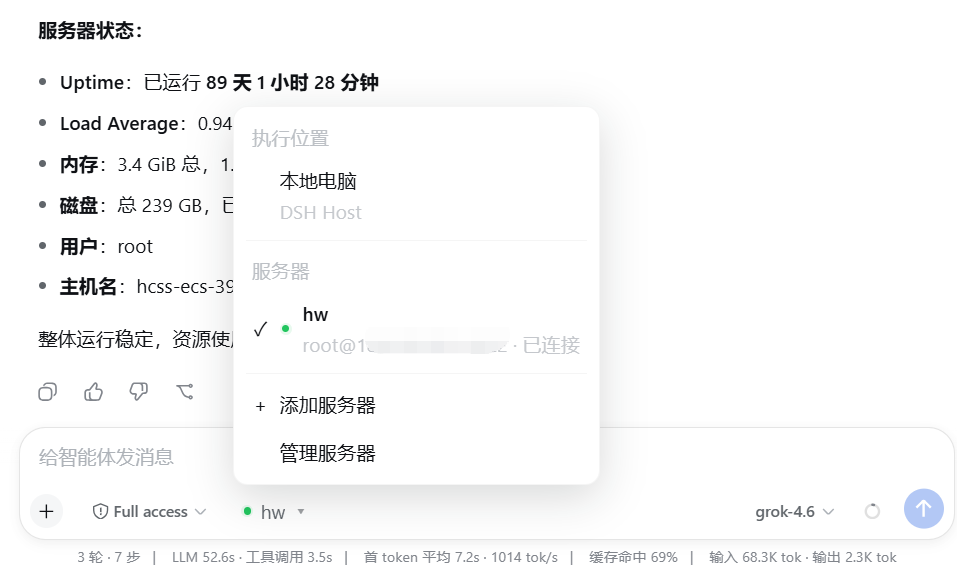
- Switch the execution environment between the local computer and saved servers.
- Keep the official DSH tools instead of adding reduced
ssh_*replacements. - Use SFTP for files, SSH exec / Shell for commands, and SSH PTY for interactive terminals.
- Preserve native
glob / grepbehavior while resolving and caching ripgrep for the remote Linux host. - Authenticate with SSH Agent, a private-key file, or a temporary password.
- Verify SSH Host Key fingerprints on first connection and reject unexpected changes.
- Reuse connections maintained by the DSH Host instead of logging in for every message.
Install
Requires Node.js 24 or newer, with dsh and pnpm available on PATH.
dsh plugin --profile web add github:NaNQiQ/deepseek-harness-remote-ssh
dsh web
If Windows cannot find pnpm, run npm install -g pnpm@11 in CMD and reopen CMD.
Use
- Start
dsh web. - Open the execution-environment selector next to the composer.
- Select Add server.
- Enter the connection, authentication, and default working-directory settings.
- Follow the built-in authentication guide and verify the server fingerprint.
- Select Test and save.
- Select the saved server next to the composer.
For later conversations, simply select the saved server. The model continues to use official DSH tools; only the location behind those tools changes.
Screenshots
Add and configure an SSH server
Switch between local and remote execution environments
Use native DSH tools on the remote server
Architecture
flowchart TB
    M[Model]
    T[Official DSH tools<br/>read · write · edit · glob · grep · bash · terminal]
    I[Official DSH execution interfaces<br/>ctx.fs · ctx.subprocess · ctx.shell · ctx.terminals]

    M --> T --> I

    subgraph W[Execution World]
        direction LR

        subgraph L[Local]
            LP[Native DSH providers]
            LOS[Local operating system]
            LP --> LOS
        end

        subgraph R[Remote SSH]
            RP[DSH Remote SSH providers]
            FS[SFTP<br/>remote filesystem]
            EX[SSH exec<br/>processes / shell]
            PTY[SSH PTY<br/>interactive terminal]
            RG[Official glob / grep arguments<br/>remote Linux ripgrep]

            RP --> FS
            RP --> EX
            RP --> PTY
            RP --> RG
        end
    end

    I --> LP
    I --> RP
Native DSH @ Linux
        ≈
DSH @ local computer + DSH Remote SSH → the same Linux host
The plugin changes where DSH executes, not how the model uses DSH tools. See ARCHITECTURE.md for implementation details.
Authentication
| Method | Behavior |
|---|---|
| SSH Agent | Requests signatures without reading private-key contents or enabling Agent Forwarding; suited to personal desktops |
| Private-key file | Persists only the path and reads the file when connecting; suited to dedicated accounts or server deployments |
| Temporary password | Kept only in current DSH Host process memory and must be entered again after restart |
Remote requirements and security boundary
- The target is a Linux / Unix host with SSH, SFTP, and a POSIX shell.
- Each server can define a default working directory; it is the initial
cwd, not a path sandbox. - Effective access equals the permissions of the remote SSH account.
- The Remote Provider does not expose the DSH Host's local filesystem to the remote execution world.
- Model API keys and Base URLs remain managed by DSH; this plugin does not read or store them.
See SECURITY.md for details.
Update and remove
dsh plugin --profile web update dsh-remote-ssh
dsh plugin --profile web remove dsh-remote-ssh
Restart DSH after updating or removing the plugin.
Documentation
- ARCHITECTURE.md — architecture and implementation
- SECURITY.md — security model and credential handling
- CHANGELOG.md — release history
- CONTRIBUTING.md — development and contributions
Related project
Friends

License
相关推荐Related
-
 nexu-io/open-design
🎨 Best DeepSeek Harness Design Plugin. The open-source Claude Design alternative. 🖥️ Local-first desktop app. 🖼️ Your…
nexu-io/open-design
🎨 Best DeepSeek Harness Design Plugin. The open-source Claude Design alternative. 🖥️ Local-first desktop app. 🖼️ Your…
-
 freestylefly/awesome-gpt-image-2
Prompt as Code | GPT-Image2 工业级提示词引擎与模板库,530+ 个案例逆向工程,20+ 套工业级模板,并提炼出Skills,持续更新中
freestylefly/awesome-gpt-image-2
Prompt as Code | GPT-Image2 工业级提示词引擎与模板库,530+ 个案例逆向工程,20+ 套工业级模板,并提炼出Skills,持续更新中
-
 anywhere-labs/dsh-desktop
为 DeepSeek Harness (DSH) 插件生态打造的现代化桌面端解决方案。万物皆「插件」,桌面本身也是「插件」。
anywhere-labs/dsh-desktop
为 DeepSeek Harness (DSH) 插件生态打造的现代化桌面端解决方案。万物皆「插件」,桌面本身也是「插件」。
- Nagi-ovo/voyager Enhancement suite for Gemini, AI Studio, Claude & ChatGPT — plus a prompt manager for any web UI, DeepSeek Harness inclu…
-
 walkinglabs/learn-harness-engineering
Harness engineering beginner tutorial, from 0 to 1
walkinglabs/learn-harness-engineering
Harness engineering beginner tutorial, from 0 to 1
-
 awesome-dsh-plugin/awesome-dsh-plugin
A curated list of plugins for DeepSeek Harness (dsh) · DeepSeek Harness 插件精选列表
awesome-dsh-plugin/awesome-dsh-plugin
A curated list of plugins for DeepSeek Harness (dsh) · DeepSeek Harness 插件精选列表
-
 MemTensor/MemOS
Self-evolving memory OS for LLM & AI Agents: ultra-persistent memory, hybrid-retrieval, and cross-task skill reuse, with…
MemTensor/MemOS
Self-evolving memory OS for LLM & AI Agents: ultra-persistent memory, hybrid-retrieval, and cross-task skill reuse, with…
- yjh051108/dsh-routing-suite dsh-routing-suite — injector + router-standard kit: install the runtime injector first, then the task-aware reasoning-mo…