newborne/dsh-adb-ultimate
Full-featured ADB device management plugin for DeepSeek Harness - control your Android device via AI
项目介绍Project Overview
dsh-adb-ultimate 是面向 DeepSeek Harness 的 ADB 安卓设备管理插件。它在 DSH 会话中嵌入设备面板,支持 WiFi 连接/配对、多设备管理、实时屏幕与性能监控、应用安装卸载、文件传输、点击滑动输入,以及 logcat、dumpsys、shell 等调试操作。适合让 AI 查看并控制安卓设备、自动化应用与文件管理、排查系统问题时使用。需先在设备上启用无线 ADB 调试,且操作具备系统权限,应谨慎执行。
dsh-adb-ultimate is an ADB-based Android device management plugin for DeepSeek Harness. It embeds a device panel with WiFi connect/pair, multi-device support, live screen and performance monitoring, app install/uninstall, file push/pull, tap/swipe/text input, plus logcat, dumpsys, getprop, and shell access. Use it when an AI agent needs to inspect, control, automate, or debug an Android device. Wireless ADB debugging must be enabled first, and commands can modify the system.
请帮我了解并安装插件:【dsh-adb-ultimate】【https://github.com/newborne/dsh-adb-ultimate】把上面这条消息直接发给当前会话里的 DSH,让它帮你了解并安装。安装命令不一定准确,发给 DSH 更稳。Send this message to DSH in your current session. CLI install commands may not be accurate across systems — DSH will figure it out for you.
或使用命令行安装(适合开发者)Or use CLI install (for developers)
命令行安装CLI Install
dsh plugin --profile web add github:newborne/dsh-adb-ultimate把 newborne/dsh-adb-ultimate 加入你的 DSH 配置(web profile)即可启用。
READMEREADME
dsh-adb-ultimate



Full-featured ADB device management plugin for DeepSeek Harness (DSH).
🚀 Project Motivation
I have a Linux environment called DROID running on my Android tablet, with DSH deployed in it.
As a tech enthusiast, I wanted to control my device with AI to achieve "self-control" — letting AI:
- See the device's real-time screen
- Execute any system operations
- Automatically manage apps and files on the device
- Monitor system performance and status
- ...
With this idea, dsh-adb-ultimate was born. It enables DSH to fully control Android devices through the ADB protocol, truly realizing "AI as your phone assistant".
Features
📱 Device Panel
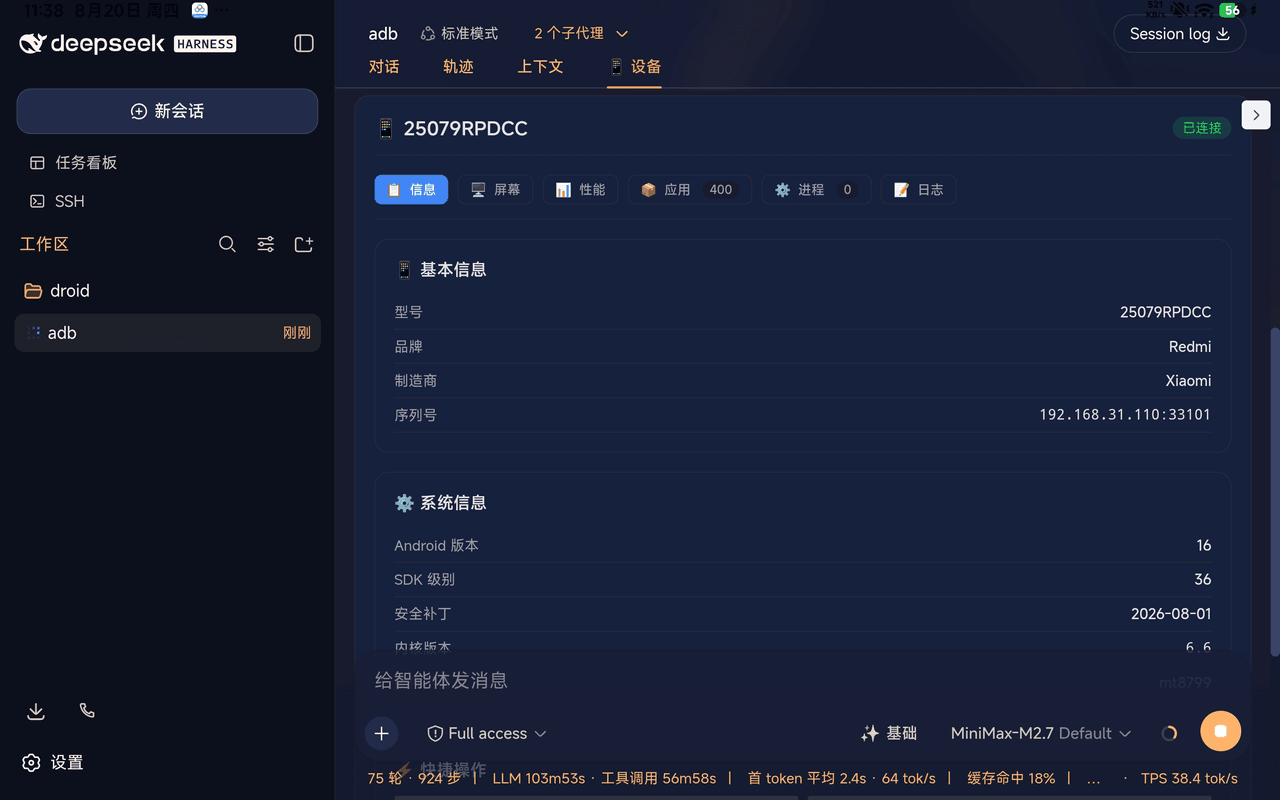
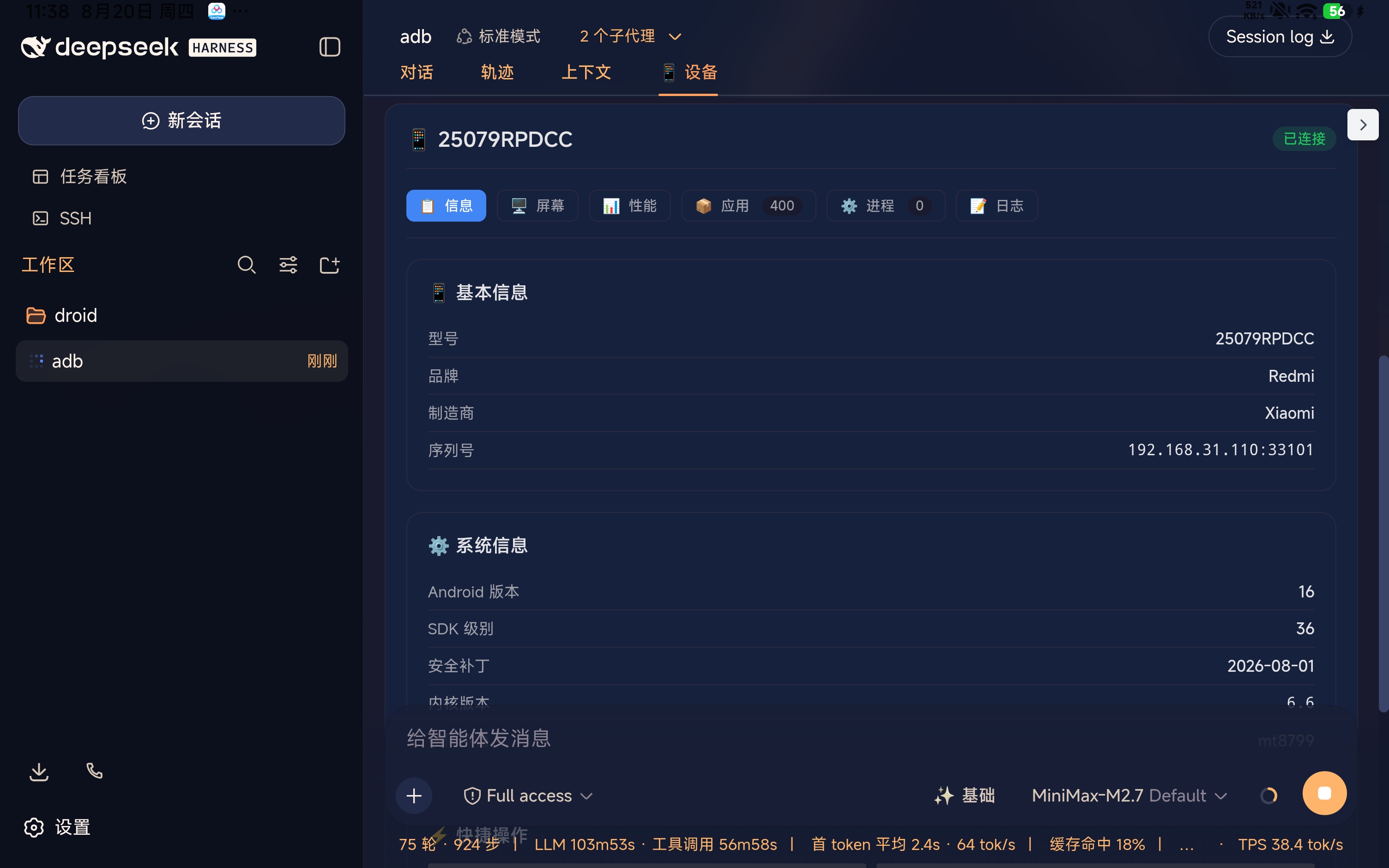
Embeds a complete device management panel in the DSH session with 5 tabs:
| Tab | Features |
|---|---|
| 🖥️ Screen | Real-time device screen monitoring with play/pause (1s interval) |
| 📊 Performance | Real-time memory, CPU, battery status (auto-refresh) |
| 📋 Info | Device model, Android version, serial number, etc. |
| 📦 Apps | Browse, search, view app details (version, permissions) |
| 📝 Logs | Real-time logcat output with V/D/I/W/E level filtering |
🔌 Device Connection
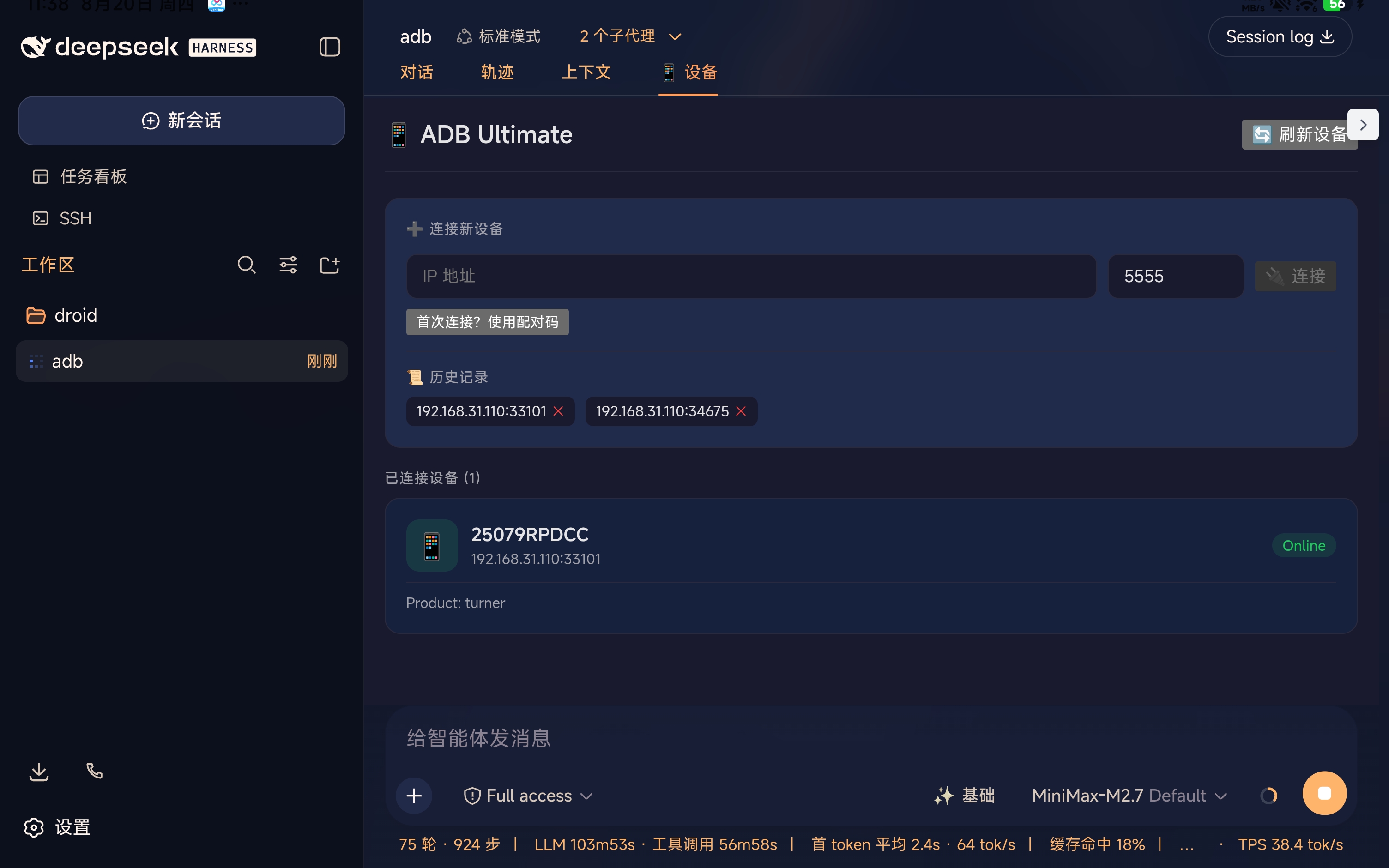
- WiFi Connect - Connect to Android device via IP address
- WiFi Pair - Support pairing verification for first-time connections
- Connection History - Auto-save history for quick reconnect
- Multi-device - Manage multiple devices simultaneously
🎮 Device Control
- Screen - Screenshot, screen on/off, real-time monitoring
- Input - Tap, swipe, text input, key events
- Apps - Install, uninstall, launch, force stop
- File - Push/pull files
📊 Performance Monitoring
- Memory - Real-time RAM usage
- Battery - Level, temperature, health status
- CPU - Cores, processor model
🔧 System Debug
- Logcat - Real-time log output with level filtering
- Dumpsys - Query system service info
- Getprop - Read system properties
- Shell - Execute shell commands directly
Install
💡 Copy any install command below and give it to Agent for automatic installation
Way 1: GitHub Install
dsh plugin --profile web add github:newborne/dsh-adb-ultimate
Way 2: Local Install
# Clone the repo
git clone https://github.com/newborne/dsh-adb-ultimate.git

# Install to DSH
dsh plugin --profile web add /path/to/dsh-adb-ultimate
Way 3: Natural Language Install
Just tell Agent:
"Help me install this plugin: https://github.com/newborne/dsh-adb-ultimate"
Interface Preview
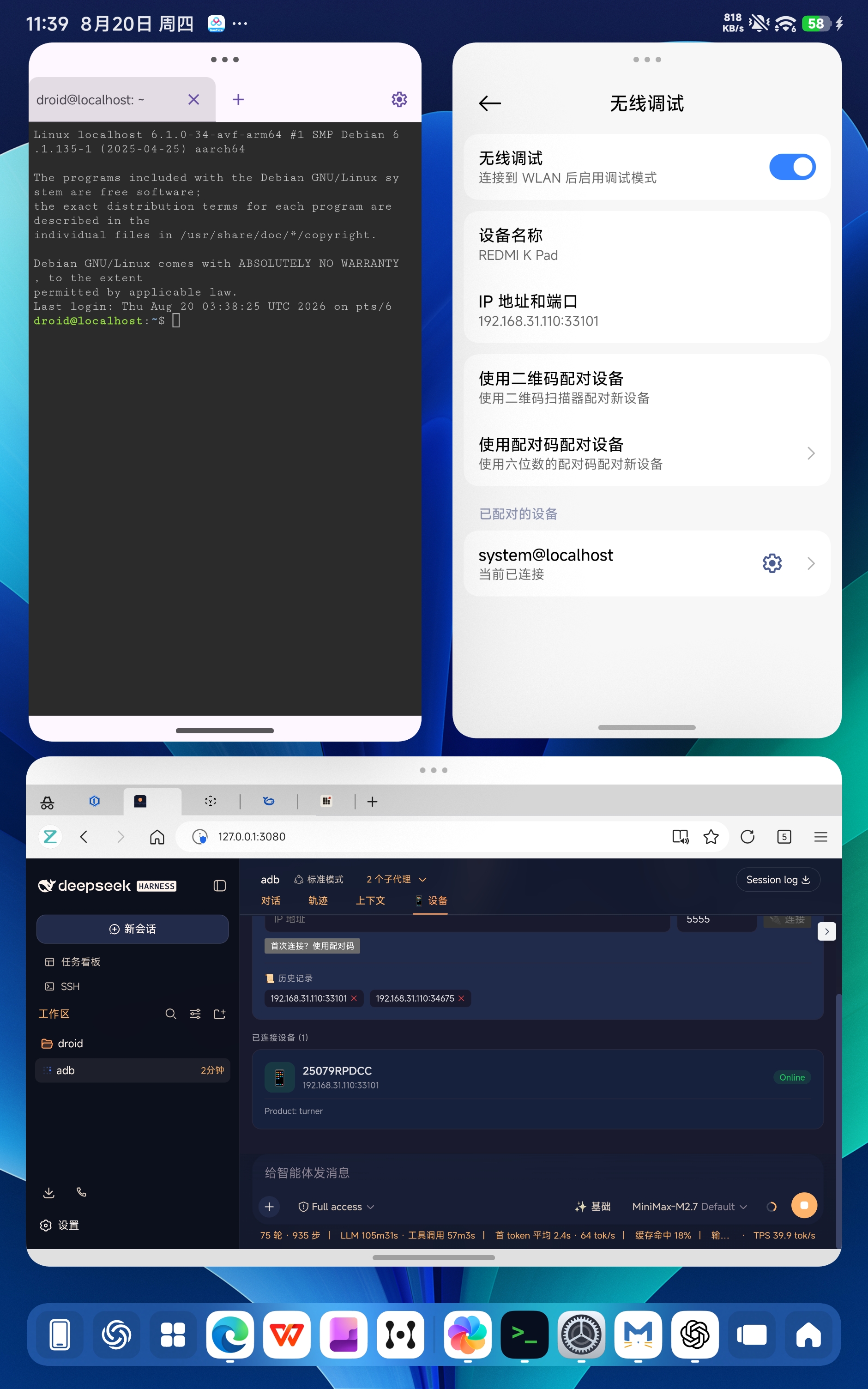
1. Tablet Configuration
Enable WiFi ADB debugging on your tablet:
2. Plugin Overview
DSH Web UI embeds a complete device management panel:
3. Device Connection
Connect new devices, view history, manage connected devices:
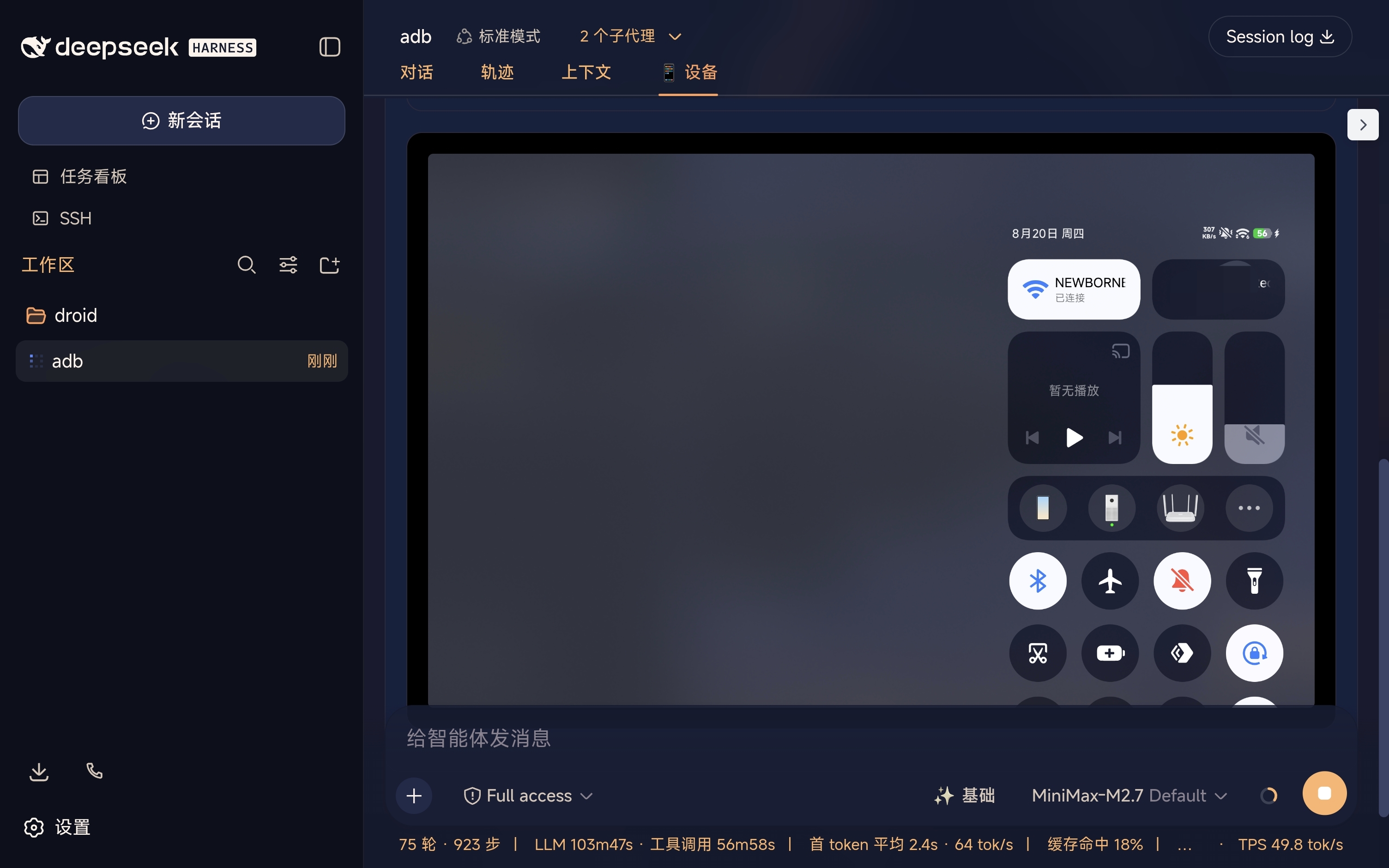
4. Real-time Screen Monitoring
Real-time device screen with 1-second auto-refresh:
License
MIT
相关推荐Related
-
 nexu-io/open-design
🎨 Best DeepSeek Harness Design Plugin. The open-source Claude Design alternative. 🖥️ Local-first desktop app. 🖼️ Your…
nexu-io/open-design
🎨 Best DeepSeek Harness Design Plugin. The open-source Claude Design alternative. 🖥️ Local-first desktop app. 🖼️ Your…
-
 ruvnet/ruflo
🌊 The original agent meta-harness. Deploy intelligent multi-player swarms, coordinate autonomous workflows, and build c…
ruvnet/ruflo
🌊 The original agent meta-harness. Deploy intelligent multi-player swarms, coordinate autonomous workflows, and build c…
-
 amruthpillai/reactive-resume
A one-of-a-kind resume builder that keeps your privacy in mind. Completely secure, customizable, portable, open-source a…
amruthpillai/reactive-resume
A one-of-a-kind resume builder that keeps your privacy in mind. Completely secure, customizable, portable, open-source a…
-
 esengine/DeepSeek-Reasonix
DeepSeek-native AI coding agent for your terminal. Engineered around prefix-cache stability — leave it running.
esengine/DeepSeek-Reasonix
DeepSeek-native AI coding agent for your terminal. Engineered around prefix-cache stability — leave it running.
-
 volcengine/OpenViking
Self-evolving Context Database for AI Agents. Unify Agent Memory, Knowledge RAG and Skills.
volcengine/OpenViking
Self-evolving Context Database for AI Agents. Unify Agent Memory, Knowledge RAG and Skills.
-
 Molunerfinn/PicGo
:rocket: The Ultimate Image Uploader for Efficient Creators. Supports Obsidian, Typora, VS Code etc. and 60+ image hosti…
Molunerfinn/PicGo
:rocket: The Ultimate Image Uploader for Efficient Creators. Supports Obsidian, Typora, VS Code etc. and 60+ image hosti…
-
 titanwings/distilly
Distilly — Distill how they think into reusable Skills for any Agent or Bot. Formerly Colleague Skill(原同事 Skill).
titanwings/distilly
Distilly — Distill how they think into reusable Skills for any Agent or Bot. Formerly Colleague Skill(原同事 Skill).
-
 titanwings/colleague-skill