Nexus-Aethra/DSHBox
Manage DeepSeek Harness locally: run multiple DSH versions in isolated containers, open the UI in an embedded WebView, import plugins/skills with one click, share extension bundles, and let a queued task system handle installs with live logs. Zero-dependency installer.
项目介绍Project Overview
DSH Box 是基于 Tauri 2 的桌面运行时,用于在本地安装、隔离并管理多个 DeepSeek Harness 容器,每个容器拥有独立版本、配置、插件与工作区。内置版本管理、Boxfile 模板、捆绑包导入导出及后台任务队列,代理可见运行时路径。需注意:仓库为专有许可,使用前请确认授权条款。
DSH Box is a Tauri 2 desktop runtime that installs, isolates, and manages multiple DeepSeek Harness containers on one machine, each with its own version, profile, plugins, skills, and workspace. It bundles Node, pnpm, and Git, renders the UI in a native WebView, and exposes a daemon over RPC plus an SSE event stream for CLI, UI, and external agents. Use it when you need parallel, reproducible DSH environments without browser tabs. Caveat: the repository is proprietary, so verify licensing before redistribution.
请帮我了解并安装插件:【DSHBox】【https://github.com/Nexus-Aethra/DSHBox】把上面这条消息直接发给当前会话里的 DSH,让它帮你了解并安装。安装命令不一定准确,发给 DSH 更稳。Send this message to DSH in your current session. CLI install commands may not be accurate across systems — DSH will figure it out for you.
或使用命令行安装(适合开发者)Or use CLI install (for developers)
命令行安装CLI Install
dsh plugin --profile web add github:Nexus-Aethra/DSHBox把 Nexus-Aethra/DSHBox 加入你的 DSH 配置(web profile)即可启用。
READMEREADME
DSH Box
Managed DeepSeek Harness desktop runtime — run, isolate, and extend multiple DeepSeek Harness environments on your own machine, no browser tab required.
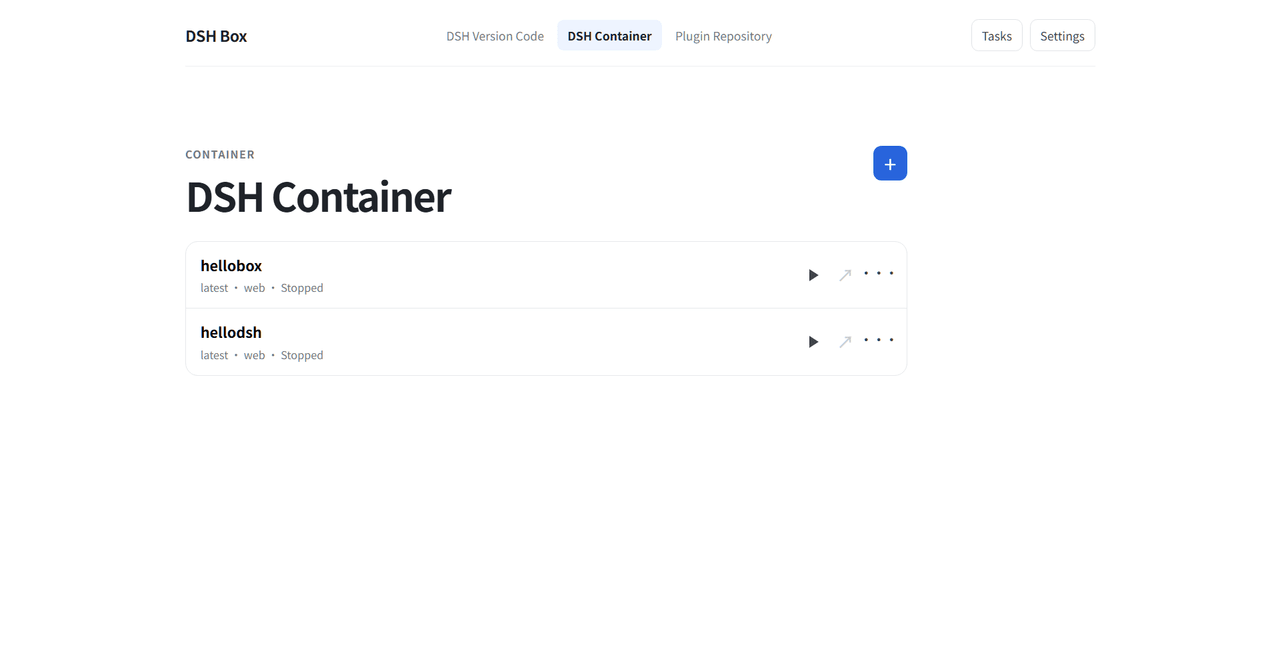
DSH Box is a lightweight desktop shell built with Tauri 2 that installs, launches, and manages independent DSH Containers — each with its own DSH version, profile, plugins, skills, workspace, and logs — and renders them in an embedded WebView.
Highlights
- Isolated DSH Containers — install multiple DSH versions side by side and create independent Containers per project. Every Container gets its own profile (
web/headless/ custom), workspace, plugin set, and host process, so experiments never cross-contaminate. - Embedded WebView, no browser needed — the DSH frontend opens in a native WebView window managed by DSH Box. No port-forwarding, no copy-pasting URLs, no tab clutter.
- Zero-dependency install — a private Node, npm, pnpm, and Git (Windows) runtime is bundled with every release. No system Node, no manual toolchain setup, no PATH hacking. Git-backed Boxfile sources (
github.com/owner/repo:tag) resolve through the managed binary in DSH Box's clean-room environment — host~/.gitconfignever leaks into builds. On Linux, DSH Box uses your system Git (apt install git) while still isolating its configuration under the runtime directory. - Version manager built in — browse DSH releases from
deepseek-ai/deepseek-harness, install or uninstall any tag with one click, and pin a version per Container. - Boxfile / sealed-template pipeline — describe a Container with a small declarative
.dshscript (FROM+PROFILE+ADD plugin|skill|data);dshbox buildproduces a reusable source recipe anddshbox run <template>prepares it once in the final Container directory. See Architecture → Boxfile. - Portable built templates — building a Boxfile materialises its plugin, skill, and data payloads into the template. Containers receive their own copied payloads, so they do not depend on workspace paths, pnpm links, or a mutable extension repository.
- Windows-first runtime recovery — on Windows, DSH Box recovers from a first-run pnpm junction-validation failure after dependencies were materialised, and allocates a fresh loopback port immediately before Host launch. Transient loopback bind failures are retried without rebuilding the frontend.
- In-container agent awareness — DSH Box injects a
dsh-box-contextplugin into every Container so the in-session agent seespaths.dshboxHomeandpaths.dshboxCliand can manage DSH Boxes (containers, templates, plugins) even when it does not inherit a sanePATH. - Extension & Skill repository — import plugins and skills from a GitHub URL, a local directory, or a tarball, then install them into any Container's profile with a single click. Skills are auto-sorted into the Container's skill root.
- Bundle (整合包) workflow — group any mix of plugins and skills into a named bundle, then export it two ways:
- Quick export: GitHub-sourced entries are kept as URLs, keeping the archive tiny.
- Full export: everything is packed into one portable
.tar.gz. - Bundles can be re-imported (with your choice of overwrite or keep on name clashes) and installed into any Container — plugins land in the profile, skills are sorted automatically.
- Smart background tasks — every long operation (install, start, rebuild, import, export) runs as a visible queued task with real-time scrolling logs, cancel/retry/delete, and history paging. Nothing feels like it "just froze".
- Dual-mode RPC + live event stream — the daemon owns all state changes and exposes them through a single
POST /rpc(sync or async — the daemon decides) and a long-livedGET /events?token=…SSE stream. CLI, UI, and external agents talk to the same endpoints; UI pages contain zero business logic. - Network-friendly — automatic proxy detection for GitHub clones, configurable GitHub mirror, and npm registry mirror for installs inside DSH.
- Background service & tray — a small
dshboxdsidecar keeps things tidy, and a system tray icon lets you control it without keeping the main window open. - Lightweight by design — Tauri-based, so the installer is small and the memory footprint stays far below Electron alternatives.
- Bilingual UI — English and 简体中文, switchable in Settings.
Install
Download the installer for your platform from the Releases page of this repository:
| Platform | Artifact | Notes |
|---|---|---|
| Windows (x64) | dshbox_<version>_x64_<locale>.msi |
MSI installer with bundled runtime and sidecar |
| Linux (x64) | dshbox-<version>-amd64.deb |
Debian/Ubuntu package |
| macOS (arm64) | dshbox-<version>-arm64.dmg |
Apple Silicon |
Grab the latest version from the Releases page — artifact names follow the
<product>-<version>-<arch>convention and may differ per release. Other formats (.msi,.rpm,.AppImage) are produced per release where supported.
No runtime prerequisites on Windows — the bundled Node/npm/pnpm/Git runtime travels inside the installer. Linux needs a system Git (apt install git or your distro equivalent); its configuration is isolated per-runtime-directory, so your host ~/.gitconfig is never read by DSH Box builds.
Quick start
- Launch DSH Box and pick a writable runtime directory when prompted (all DSH data lives there).
- Open Resources → DSH Versions → Load versions, then install the DSH tag you want.
- Open Resources → Templates, then pull an official DSH template or build a reusable template from a Boxfile.
- Open Container → create a Container from that template (name and profile).
- The first create prepares the Container in its final directory (offline dependency install, local plugins, frontend build). Press Start — DSH Box launches that prepared copy and opens the DSH UI in the embedded WebView.
- Use Resources to import plugins/skills, assemble bundles, or create Boxfiles for reusable plugin-enabled templates.
Tray
The app minimizes to the system tray on close. Use the tray menu to open the window or start/stop/restart the dshboxd background service.
Architecture
DSH Box separates a Tauri desktop shell, a framework-free Rust workspace, a background daemon (dshboxd), and a small React frontend. The split exists so all business logic — plugin fetching, container lifecycle, template resolution, background tasks — is testable without a UI, and so a CLI or external agent can drive the same flows the UI does.
Layered components
| Layer | What lives here | Why |
|---|---|---|
Frontend (React 18 + Vite, src/) |
Pages, components, useTaskQueue/useContainers/useResources/useSettings hooks. No business logic — pages fire RPC requests and react to daemon SSE events. |
Keeps the Box UI thin and lets any client (UI/CLI/agent) share the same code path. |
Desktop shell (Tauri 2, src-tauri/src/) |
Browser window, tray, Tauri IPC adapters. Listens on 127.0.0.1 to the daemon's loopback HTTP server. All real work is delegated to dshboxd over HTTP RPC. |
One source of truth for state changes — UI and CLI cannot drift. |
Daemon (src-tauri/crates/dshboxd) |
Long-lived background service. Owns the queue, the data store, the template index, container registry, and the SSE event bus. Single HTTP entry point (POST /rpc) plus GET /events?token=…. |
Background work (installs, rebuilds, uninstalls) survives the desktop window closing. |
Crate workspace (src-tauri/crates/) |
Framework-free Rust crates: box-foundation, box-runtime, box-scheduler, box-state, box-toolchains, box-dsh-versions, box-containers, box-extensions, box-image, box-template-core, box-data-scheduler, box-logger, box-dsh-context, box-server-core, box-api, box-client. |
Pure functions + unit tests; only the top-level dshbox binary and dshboxd link Tauri/HTTP. |
The dependency direction is one-way: foundation / runtime / scheduler / state → functional crates → Tauri/desktop adapters. Feature crates do not depend on Tauri or one another's mutable state.
Daemon — dual-mode RPC + SSE event stream
Every UI / CLI action lands on POST /rpc with a JSON body of {"method": "...", "params": {...}, "token": "..."}. The daemon's dispatch table decides for each handler whether to synchronously return JSON (List templates, Read settings, …) or asynchronously enqueue a worker (Install, Build, Start container, Rebuild, Uninstall, …). Async handlers return a TaskRecord immediately; the client subscribes to GET /events?token=… for task:stage / task:log / task:finished / resource:added|updated|removed events.
This means the same HTTP surface serves every consumer — the desktop app's Tauri IPC handlers, the CLI (dshbox rpc …), and external agents calling curl -d '…' http://127.0.0.1:7923/rpc. There is no "client fallback" or local-state divergence: the daemon's resource map and task queue are the only sources of truth.
Boxfile and the built-template pipeline
A boxfile (.dsh) is the declarative script that describes a Container you want to instantiate. dshbox build resolves it into a sealed template recipe: physical Harness source without node_modules, plus the profile, local plugin artifacts, skills, and data needed by its ADD directives. dshbox run <template> copies it to the final Container directory, performs offline install, adds local artifacts, and builds once; later starts do none of those steps.
The full grammar is in docs/template-system.md; the canonical reference example (every source shape) is in examples/boxfile-plugin-chains.dsh. Here is the minimal form:
FROM github.com/deepseek-ai/deepseek-harness:latest
PROFILE web
NAME my-team

ADD plugin github.com/owner/cordis-plugin-foo:1.2.3
ADD plugin npm:@linxin666/dsh-web-ui-all
ADD plugin ./plugins/secret
ADD skill team-conventions
| Directive | Required | Notes |
|---|---|---|
FROM <ref> |
yes (exactly once) | GitHub short form (`github.com/owner/repo[:tag |
PROFILE <name> |
yes (exactly once) | Target DSH profile (web, headless, …). |
NAME <image-name> |
no | Defaults to the script file's stem. |
VERSION <image-version> |
no | Defaults to latest. |
LABEL key=value |
repeatable | Free-form metadata attached to the built template. |
DEF <name> @<path> |
repeatable | Defines a path alias usable as @<name> in subsequent ADD lines. |
ADD plugin|skill|data <src> [@<dest>] |
one or more | Resource you want baked into every Container made from this template. |
CP <src> [@<dest>] |
alias for ADD plugin |
Kept for backward compatibility. |
<src> accepts four shapes:
- GitHub short form —
github.com/owner/repo[:tag|@ref]. The GitHub branch resolves throughpnpm packand the same fetching/import pipeline as npm; a tagged release becomes aref_onParsedSource::Github. - Tarball —
https://…/pkg.tgz,./relative.tgz,/abs/path.tgz. Anything fetched and unpacked as a tarball. - Local directory —
./plugins/foo//abs/path/foo. Imported directly (no archive round-trip) — useful for plugins in progress. - Bare name —
name[@version]or@scope/name[@version]for plugins already in the Repository. - Explicit prefixes —
git:…(clones via libgit2, no guessing) andnpm:…(registry spec forwarded to pnpm).
The :latest tag and the explicit latest keyword are interchangeable; both pin the harness repository's main branch.
How each ADD is stored matters:
ADD plugin— the source is imported into the shared Repository as an immutable localartifact.tgz, recorded by the sealed recipe, then added only while preparing a Container at its final path. No running Container has an absolute repository path or runs a plugin dependency install.ADD skillandADD data— snapshotted into the data store (<runtime>/data/<digest>/), materialised in the built template, and copied into the Container profile.- The bundled
dsh-box-contextplugin (@deepseek-ai/dsh-box-context) is copied automatically — you do not need toADDit.
dshbox build writes a digest-addressed sealed template. dshbox run <name> then:
- Resolves the template's
FROMchain (max depth 4), - Creates
<runtime>/instances/<id>/{profile,workspace,state,logs}, - Copies the template's materialised plugins/skills/data into the profile,
- Allocates a loopback port immediately before host spawn,
- Launches bundled
pnpm dsh webfrom the Container's Harness copy and waits for readiness, - Writes
paths.dshboxHome+paths.dshboxCliinto the snapshot so the in-container agent can find the CLI.
The full storage, transaction, and migration contract is in docs/specs/prepared-template-runtime.md. This is a schema break: legacy shared runtimes/<version>/source layouts are not used by new builds.
Data scheduler and reference counts
Containers, templates, plugins, and skill packs all share a single resource-map.json indexed by id. Deletion is soft-delete → fast queue → permanent delete; references between Container ↔ template ↔ plugin are kept in lockstep so an entity still in use is never garbage-collected. Full design in docs/specs/data-scheduler.md.
Logging
tracing + tracing-subscriber ship structured logs to <runtime>/logs/<component>.log (daily rolled) and mirror to stderr. Filter with RUST_LOG, e.g. RUST_LOG=info,dshboxd=debug,box_template_core=debug.
Technology
| Layer | Stack |
|---|---|
| Desktop shell | Tauri 2, Rust (Cargo workspace under src-tauri/) |
| UI | React 18, TypeScript, Vite |
| Background service | dshboxd sidecar (single HTTP entry: POST /rpc + GET /events) |
| Bundled runtime | Node / npm / pnpm / Git-Windows-only (per-platform archive, SHA-256-pinned in runtime-lock.json) |
| Targets | Windows x64/arm64, Linux x64/arm64, macOS x64/arm64 |
Building from source
Prerequisites: Node.js 20+ with pnpm, the Tauri 2 prerequisites for your platform, and 7-Zip (needed once by runtime:prepare to unpack the Windows PortableGit archive — install from 7-zip.org or apt install p7zip-full, and make sure 7z is on PATH). 7-Zip is a build-time-only tool; it never ships in the installer.
pnpm install
pnpm runtime:prepare    # fetch + verify + extract the bundled Node/pnpm/Git runtime
pnpm server:prepare     # build the dshboxd sidecar
pnpm tauri dev          # run in development
runtime:prepare verifies every archive against the SHA-256 pins in runtime-lock.json before extraction and aborts on mismatch. If 7-Zip is missing the Git step is skipped with a warning (Node/pnpm still prepare); re-run after installing it.
Release bundles (per platform):
pnpm bundle:windows     # Windows MSI installer
pnpm bundle:linux       # Linux .deb
pnpm bundle:macos       # macOS .dmg
Run the test suite:
cd src-tauri && cargo test --workspace
Repository layout
src/                       React/TypeScript management UI
src-tauri/                 Rust workspace + Tauri shell
  crates/                  focused, framework-free crates
    box-foundation         config, paths, JSON persistence
    box-runtime            absolute-path process exec
    box-scheduler          persisted task queue + locks
    box-state              ResourceStateManager (read model)
    box-toolchains         bundled Node/pnpm resolver
    box-dsh-versions       DSH GitHub catalogue (harness tag + installs)
    box-containers         Container metadata + active Host registry
    box-extensions         repository plugin/skill scan + transfer
    box-image              .dsh parser, manifest v6, gzip tar I/O
    box-template-core      root/common template install/uninstall core
    box-data-scheduler     soft-delete + dual-queue async hard-delete
    box-logger             tracing init + daily-rolled log files
    box-dsh-context        dsh-box-context plugin (paths.dshboxHome/dshboxCli)
  src/desktop/app/         domain modules (containers, extensions, tasks, …)
examples/                  boxfile.dsh + plugin-chains example
docs/                      HANDOFF.md, architecture.md, template-system.md,
                           specs/, design/, notes/
The canonical reference for the boxfile grammar is docs/template-system.md; image/built-template design lives in docs/specs/image-build.md; the full RPC + event-stream surface in docs/design/rpc-and-events.md.
License
Proprietary — see repository owner for licensing terms.
© Nexus-Aethra
相关推荐Related
-
 nexu-io/open-design
🎨 Best DeepSeek Harness Design Plugin. The open-source Claude Design alternative. 🖥️ Local-first desktop app. 🖼️ Your…
nexu-io/open-design
🎨 Best DeepSeek Harness Design Plugin. The open-source Claude Design alternative. 🖥️ Local-first desktop app. 🖼️ Your…
-
 ruvnet/ruflo
🌊 The original agent meta-harness. Deploy intelligent multi-player swarms, coordinate autonomous workflows, and build c…
ruvnet/ruflo
🌊 The original agent meta-harness. Deploy intelligent multi-player swarms, coordinate autonomous workflows, and build c…
-
 amruthpillai/reactive-resume
A one-of-a-kind resume builder that keeps your privacy in mind. Completely secure, customizable, portable, open-source a…
amruthpillai/reactive-resume
A one-of-a-kind resume builder that keeps your privacy in mind. Completely secure, customizable, portable, open-source a…
-
 esengine/DeepSeek-Reasonix
DeepSeek-native AI coding agent for your terminal. Engineered around prefix-cache stability — leave it running.
esengine/DeepSeek-Reasonix
DeepSeek-native AI coding agent for your terminal. Engineered around prefix-cache stability — leave it running.
-
 volcengine/OpenViking
Self-evolving Context Database for AI Agents. Unify Agent Memory, Knowledge RAG and Skills.
volcengine/OpenViking
Self-evolving Context Database for AI Agents. Unify Agent Memory, Knowledge RAG and Skills.
-
 Molunerfinn/PicGo
:rocket: The Ultimate Image Uploader for Efficient Creators. Supports Obsidian, Typora, VS Code etc. and 60+ image hosti…
Molunerfinn/PicGo
:rocket: The Ultimate Image Uploader for Efficient Creators. Supports Obsidian, Typora, VS Code etc. and 60+ image hosti…
-
 titanwings/distilly
Distilly — Distill how they think into reusable Skills for any Agent or Bot. Formerly Colleague Skill(原同事 Skill).
titanwings/distilly
Distilly — Distill how they think into reusable Skills for any Agent or Bot. Formerly Colleague Skill(原同事 Skill).
-
 titanwings/colleague-skill