nicearrack/dsh-translator
基于 DSH 的有道风格划词翻译:划选即现「译」按钮,harness 自带大模型,零 API key / Youdao-style word-selection translation for DSH: select text, click 「译」, powered by the harness's own LLM, no API keys
项目介绍Project Overview
dsh-translator 是 DSH 的划词翻译插件:在消息、侧栏或输入框选中文本,点击浮动「译」按钮,即由 harness 已配置的 LLM 给出翻译卡片,无需额外 API 密钥;支持自动方向、主语言设置、模型与推理强度配置、拖拽、置顶、复制、重试及流式内容。适合在 DSH 内随时翻译对话或界面文本。注意翻译仍走你配置的模型管线,会产生相应 token 消耗。
dsh-translator is a DSH plugin that adds Youdao-style word-selection translation. Select text in messages, the sidebar, or inputs, click the floating “译” button, and get a translation card powered by the harness’s configured LLM—no extra API keys. It supports automatic direction, primary-language and model settings, reasoning effort, dragging, pinning, copy, retry, and streaming-safe display. Use it for quick in-app translation. Caveat: requests still use your configured model pipeline and consume tokens.
请帮我了解并安装插件:【dsh-translator】【https://github.com/nicearrack/dsh-translator】把上面这条消息直接发给当前会话里的 DSH,让它帮你了解并安装。安装命令不一定准确,发给 DSH 更稳。Send this message to DSH in your current session. CLI install commands may not be accurate across systems — DSH will figure it out for you.
或使用命令行安装(适合开发者)Or use CLI install (for developers)
命令行安装CLI Install
dsh plugin --profile web add github:nicearrack/dsh-translator把 nicearrack/dsh-translator 加入你的 DSH 配置(web profile)即可启用。
READMEREADME
dsh-translator
Youdao-style word-selection translation for DeepSeek Harness (DSH).
Select any text — a conversation message, the sidebar, an input field — and a floating 「译」 button appears at the selection's top-right corner. Click it to get a translation card. Translations are produced by the harness's own LLM: no API keys, no third-party endpoints, your selected text never leaves the model pipeline you already configured.
| English | 中文 README |
|---|
Usage
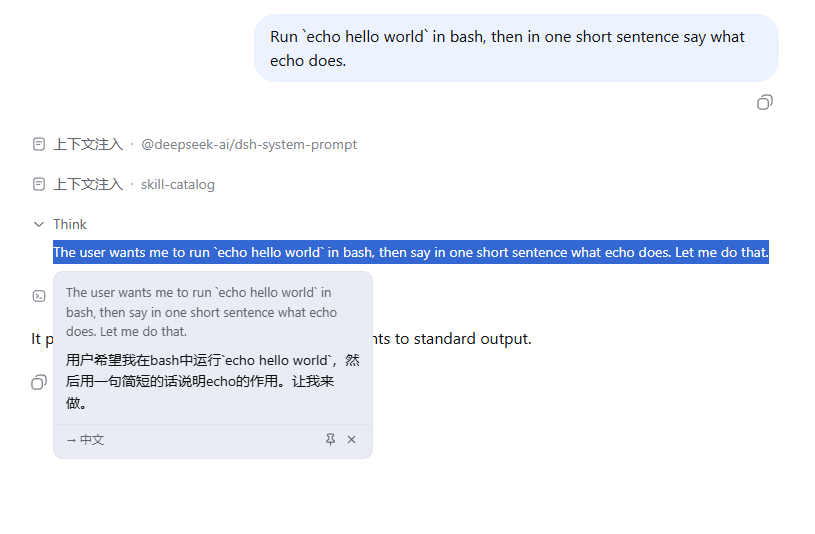
Select text → click the 「译」 button → the translation card appears. Drag the card by its header to move it, or pin it so it can't be dismissed by accident. Click the translation (or the source text, or an error message) to copy it. The card's footer shows the translation direction, the model, the reasoning effort, and the token consumption.
Features
- Word-selection trigger anywhere in the app; floating button follows the selection, theme-aware (light/dark)
- Automatic direction: text in your configured primary language → English; anything else → the primary language
- Primary language configurable: 简体中文 / 繁體中文 / 日本語 / 한국어 / Русский (default 简体中文)
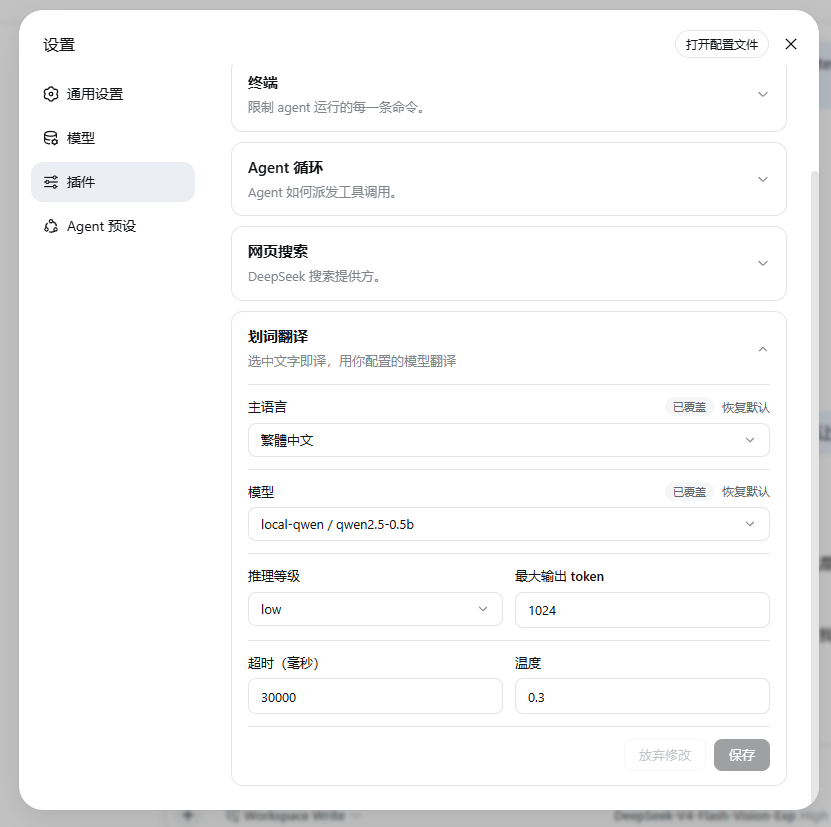
- Config card in DSH settings (Settings → Plugins → 划词翻译): primary language, model (pick one, or leave it empty to follow the session default), reasoning effort (off/low/high/max), timeout, max tokens, temperature — each field shows "overridden / restore default", with staged edits and save/discard
- Translation card: source, direction badge, result, retry on failure; the footer shows model · reasoning effort · tokens
- Click to copy: translation, source text, or error message — with a "已复制 / Copied" hint
- Draggable card: drag it by its header; it stays where you put it
- Pinnable card: locks drag, Esc and click-outside until you close it — one card at a time, no nesting
- Streaming-robust: works on live streaming output (no flicker), and the card stays put when the content scrolls
Screenshots
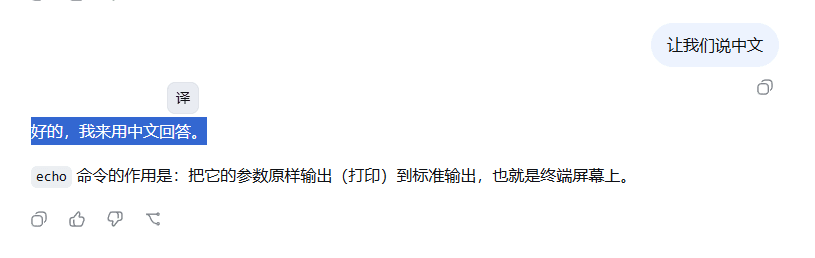
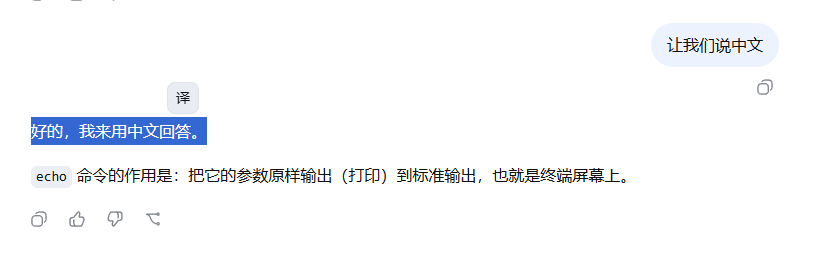
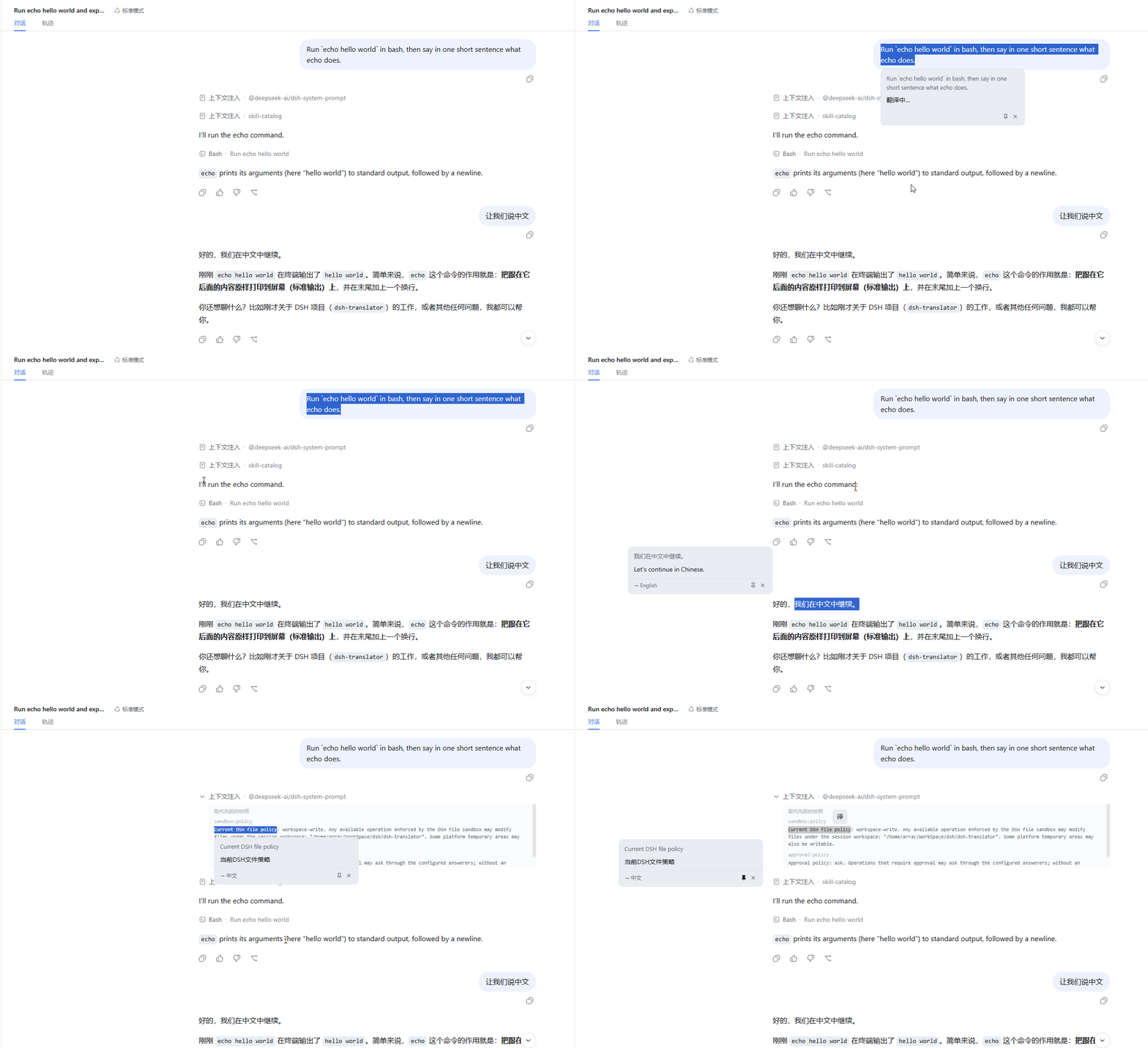
Select text → the floating 「译」 button appears at the selection's top-right corner:
Click it → the translation card opens (English → Chinese):
Chinese → English direction is automatic:

Configure it in DSH settings → Plugins → 划词翻译:
Full workflow — select, translate, drag, pin, close:
Install
From npm:
dsh plugin --profile web add @nicearrack/dsh-translator@latest
From a local checkout:
dsh plugin --profile web add /path/to/dsh-translator
From git:
dsh plugin --profile web add github:nicearrack/dsh-translator
Git installs run the package's
preparebuild script. pnpm ≥ 10 requires one-time authorization: addallowBuilds: { "@nicearrack/dsh-translator": true }to the profile'spnpm-workspace.yamlif the first install is refused.
Update
# update to the newest release
dsh plugin --profile web update @nicearrack/dsh-translator

# or pin a specific version
dsh plugin --profile web update @nicearrack/dsh-translator@0.2.0
Fresh releases: npm registry metadata can lag after a publish (a few minutes, occasionally longer). If
@lateststill resolves to an older version, pin the exact one —@nicearrack/dsh-translator@0.2.0— or checknpm view @nicearrack/dsh-translator versions.After updating, restart the DSH instance (
dsh --profile web) so the new host bundle loads; the client bundle picks up on the next page refresh.
Uninstall
dsh plugin --profile web remove @nicearrack/dsh-translator
Restart the instance (dsh --profile web) for the removal to take effect.
License
相关推荐Related
-
 nexu-io/open-design
🎨 Best DeepSeek Harness Design Plugin. The open-source Claude Design alternative. 🖥️ Local-first desktop app. 🖼️ Your…
nexu-io/open-design
🎨 Best DeepSeek Harness Design Plugin. The open-source Claude Design alternative. 🖥️ Local-first desktop app. 🖼️ Your…
-
 freestylefly/awesome-gpt-image-2
Prompt as Code | GPT-Image2 工业级提示词引擎与模板库,530+ 个案例逆向工程,20+ 套工业级模板,并提炼出Skills,持续更新中
freestylefly/awesome-gpt-image-2
Prompt as Code | GPT-Image2 工业级提示词引擎与模板库,530+ 个案例逆向工程,20+ 套工业级模板,并提炼出Skills,持续更新中
-
 anywhere-labs/dsh-desktop
为 DeepSeek Harness (DSH) 插件生态打造的现代化桌面端解决方案。万物皆「插件」,桌面本身也是「插件」。
anywhere-labs/dsh-desktop
为 DeepSeek Harness (DSH) 插件生态打造的现代化桌面端解决方案。万物皆「插件」,桌面本身也是「插件」。
- Nagi-ovo/voyager Enhancement suite for Gemini, AI Studio, Claude & ChatGPT — plus a prompt manager for any web UI, DeepSeek Harness inclu…
-
 walkinglabs/learn-harness-engineering
Harness engineering beginner tutorial, from 0 to 1
walkinglabs/learn-harness-engineering
Harness engineering beginner tutorial, from 0 to 1
-
 awesome-dsh-plugin/awesome-dsh-plugin
A curated list of plugins for DeepSeek Harness (dsh) · DeepSeek Harness 插件精选列表
awesome-dsh-plugin/awesome-dsh-plugin
A curated list of plugins for DeepSeek Harness (dsh) · DeepSeek Harness 插件精选列表
-
 MemTensor/MemOS
Self-evolving memory OS for LLM & AI Agents: ultra-persistent memory, hybrid-retrieval, and cross-task skill reuse, with…
MemTensor/MemOS
Self-evolving memory OS for LLM & AI Agents: ultra-persistent memory, hybrid-retrieval, and cross-task skill reuse, with…
- yjh051108/dsh-routing-suite dsh-routing-suite — injector + router-standard kit: install the runtime injector first, then the task-aware reasoning-mo…