nonmean/dsh-plugin-explorer
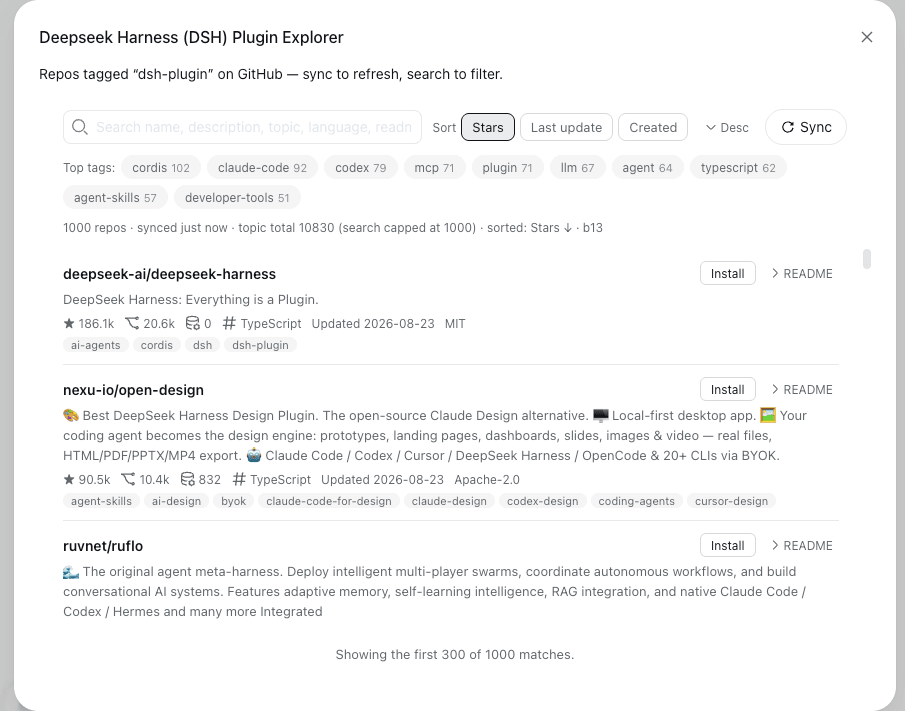
A local tool for the DeepSeek Harness web GUI that browses the GitHub dsh-plugin topic: every repo's name, README, and statistics (stars, forks, open issues, language, license, last update, topics), with a Sync button to refresh the data, an in-memory search, top-tag filtering, and sorting (stars / last
catalog 简介 / catalog descriptioncatalog description:DSH client plugin: browse GitHub repos tagged dsh-plugin (name, README, stats) with sync and search
项目介绍Project Overview
dsh-plugin-explorer 是 DSH 网页 GUI 的客户端插件,在侧边栏加入 Plugin Explorer,浏览 GitHub dsh-plugin 主题仓库,支持同步、搜索、标签筛选、排序、查看 README 及按包名安装/卸载。适合在本地发现和管理 DSH 插件。注意:GitHub 搜索有 1000 条上限,安装或卸载后需重启 GUI 才生效。
dsh-plugin-explorer is a DSH web GUI client plugin that adds a sidebar Plugin Explorer for browsing GitHub repositories under the dsh-plugin topic. It syncs repository data, searches cached snapshots, filters by tags, sorts results, renders READMEs, and installs or uninstalls validated package names. Use it to discover and manage DSH plugins locally. Caveat: GitHub search is capped at 1,000 results, and install or uninstall changes require a GUI restart.
请帮我了解并安装插件:【dsh-plugin-explorer】【https://github.com/nonmean/dsh-plugin-explorer】把上面这条消息直接发给当前会话里的 DSH,让它帮你了解并安装。安装命令不一定准确,发给 DSH 更稳。Send this message to DSH in your current session. CLI install commands may not be accurate across systems — DSH will figure it out for you.
或使用命令行安装(适合开发者)Or use CLI install (for developers)
命令行安装CLI Install
dsh plugin --profile web add github:nonmean/dsh-plugin-explorer把 nonmean/dsh-plugin-explorer 加入你的 DSH 配置(web profile)即可启用。
READMEREADME
dsh-plugin-explorer
Announcement: This plugin is tested with DeepSeek Harness
v0.1.1-rc.1.
A local tool for the DeepSeek Harness web GUI that browses the GitHub
dsh-plugin topic: every repo's
name, README, and statistics (stars, forks, open issues, language,
license, last update, topics), with a Sync button to refresh the data, an
in-memory search, top-tag filtering, and sorting (stars / last
update / created, ascending or descending).
It is a client plugin
(dsh.client dual-face package) that mounts one entry into the sidebar's
footer action list (sidebar.footer.action): a Plugin Explorer trigger
beside Settings that opens the tool's modal.
Screenshots
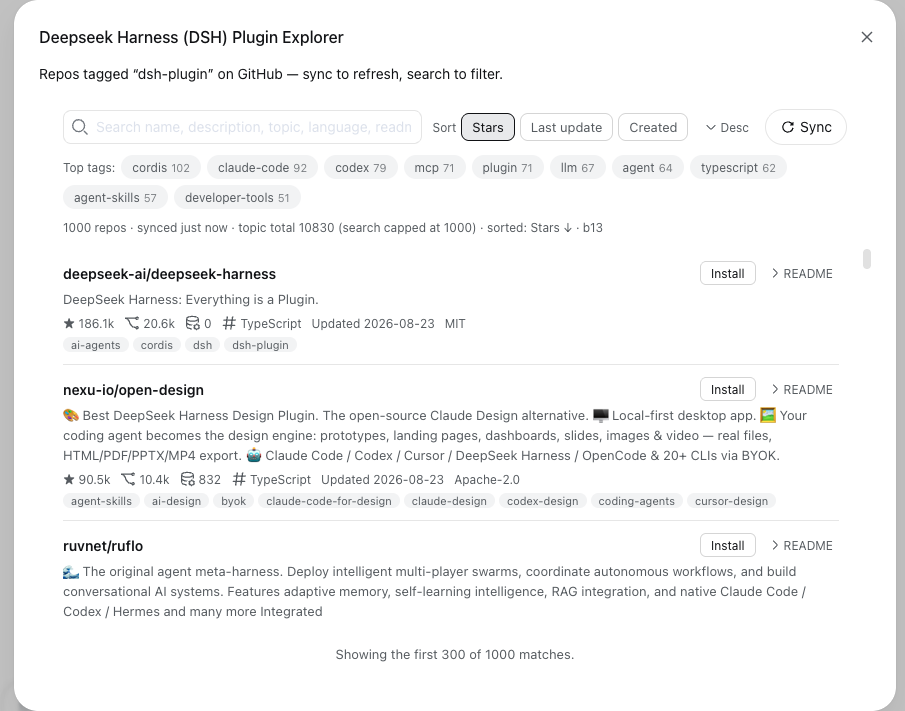
The Plugin Explorer modal, browsing dsh-plugin repos with sync, search,
tag filtering, and sorting:
The sidebar entry point — a Plugin Explorer trigger beside Settings:

Using the tool
- Open the web GUI (
http://127.0.0.1:3080) and refresh the page. - Click Plugin Explorer in the sidebar footer (bottom-left, next to Settings).
- Press Sync to fetch the topic's repos from the GitHub search API
(sorted by stars). Keywords in the search box and the selected tag
are folded into the GitHub query (e.g.
topic:dsh-plugin agent topic:python), so a scoped sync fetches exactly that matching subset instead of GitHub's 1000-result cap truncating the whole topic, and the fetched subset replaces the cached snapshot. The status line shows the GitHub query of the last sync. - Search filters the cached snapshot by repo name, description, topics, language, license, and README text (readmes the tool already fetched).
- Top tags below the search box lists the ten most common topic tags by
repo count (generic tags —
dsh,dsh-plugin,dsh-plugins,deepseek,deepseek-harness,ai-agent,ai-agents— are excluded); click one to filter to repos carrying that tag (click again or use Clear tag to remove the filter). The tag filter combines with search. - Sort (next to search): three field buttons — Stars, Last update, Created (the active one is highlighted) — plus an explicit Asc/Desc toggle (default: stars, descending). Created needs creation dates, which a fresh sync fills in (the status line says so when the cached snapshot predates them).
- Expand a repo's README to load and render it (fetched lazily on first expand, then cached).
- Install / Uninstall (next to the README toggle): the button shows
Install once a repo's README is known to carry an install command
(
dsh plugin add <pkg>,pnpm add <pkg>,npm install <pkg>, oryarn add <pkg>— only the package name is detected, never a command line). If no install instruction can be found in the README (or the repo has no README at all), the button is disabled and reads Cannot install directly in grey. The README is fetched lazily, so for repos never expanded the button starts as plain Install; clicking it probes the README first and flips to the disabled grey state when it turns out to carry no install command. Once a repo's package is installed in the profile, the button switches to a danger-tinted Uninstall that removes it again (dsh plugin --profile web remove <package>). The installed state is authoritative — the host reads the profile's actual dependencies and the list refreshes on modal open and after every successful install/uninstall (a failed install never flips the button). Both actions require an acknowledgement prompt; only the package name crosses the wire — never a command line — and the host validates it against npm naming rules before spawning the CLI. If pnpm 10+/11 blocks dependency build scripts (ERR_PNPM_IGNORED_BUILDS), the host flips the exact packages pnpm listed totruein the profile'spnpm-workspace.yamlallowBuildsmap and retries the install once.
Data persists in localStorage under dsh-plugin-explorer:repos:v1 and
dsh-plugin-explorer:readmes:v1, so the list survives restarts and works
offline. The readme cache is size-bounded (oldest entries evicted).
Status line
The line under the toolbar summarizes the current view: repo counts, when the
snapshot was synced, the topic total, the active tag, the GitHub query of the
last sync, a hint when creation dates are missing, the active sort
(· sorted: Stars ↓), and a build tag (e.g. · b13) identifying the exact
bundle the browser runs. If the build tag is missing or older than the
latest, the browser is on a stale bundle — refresh the page.
GitHub API notes
- Unauthenticated REST rate limits apply (60 req/h core, 10 req/min search, per IP). One full sync costs up to 10 search requests; READMEs cost one request each and are cached. Rate-limit hits abort gracefully with a message and keep the previous data (a partial sync is preserved).
- The tool talks to
api.github.comstraight from the browser (CORS is permissive); no token is required for public data. If you hit limits often, set aGITHUB_TOKEN? No — the browser cannot read your env; the tool is intentionally anonymous.
Architecture
src/
  index.ts              node half: default-exported PluginInstallerGateway
                        (a Typert Remote service; source-mode dispatch)
  installer.ts          host: install/uninstall/installed remotes that drive
                        the dsh CLI, plus pnpm build-script approval (js-yaml)
  types.ts              wire types (InstallRequest/InstallResult) shared by
                        both halves
  client/
    index.ts            browser half: inject ['slots', 'remote', 'typert'],
                        mounts the installer Remote lazily, registers
                        RepoExplorer into 'sidebar.footer.action'
    RepoExplorer.tsx    trigger + modal: sync, search, tags, sort, README
                        expand, install/uninstall prompts
    RepoExplorer.module.css
    install-remote.ts   hand-written Typert Remote descriptors + type merges
    install-guide.ts    README install-command detection
    github.ts           GitHub REST client + localStorage cache + helpers
The browser bundle (lib/client.js) is emitted by tsdown in the shell's
closure-factory format: window.__ModuleLoader__.load({ id, factory }) with
the frozen platform module table as externals (react, @deepseek-ai/cordis,
@deepseek-ai/dsh-client-ui-primitives, ...), CSS Modules compiled by
lightningcss and injected as <style data-plugin> tags.
Installer Remote
The installer is a Typert Remote gateway (pluginInstaller): the browser
mounts hand-written descriptors (add, uninstall, installed) and the api
gateway dispatches to the host service through its @Remote markers. The
wire contract mirrors the host method signatures exactly — one request
parameter per action — and the install endpoint is named add because the
client namespace service reserves install and remove for its own members
(mounting a colliding name throws). Only a validated npm package name crosses
the wire; the CLI is spawned with an argument array, never a shell.
Mounting into the GUI
The tool is mounted through the web profile's user patch layer (no changes
to the DeepSeek Harness checkout):
# ~/.dsh/profiles/web/cordis.patch.yml
- insert:
    - id: dsh-plugin-explorer
      name: dsh-plugin-explorer
plus a symlink so the profile can resolve the package:
ln -s /Users/boxiao/Documents/dev/dhs-plugin-explorer \
      /Users/boxiao/.dsh/profiles/node_modules/dsh-plugin-explorer
New rows are read at GUI boot (config hot-reload is off in the web profile),
so a restart of the dsh web process was required once. After that,
rebuilds of lib/client.js hot-reload through the client-plugin HMR chain
(the host polls the bundle and broadcasts rebuilt over SSE; no refresh
needed). Host-half changes (the installer gateway) load only at boot, so they
require a GUI restart.
Development loop
pnpm install          # registry dev deps only; dsh types resolve through a
                      # node_modules/@deepseek-ai -> ~/.dsh/profiles/node_modules/@deepseek-ai
                      # symlink (the exact package versions the GUI runs)
pnpm run typecheck    # tsc --noEmit against the real dsh .d.ts artifacts
pnpm run build        # tsc -p tsconfig.host.json (host half: decorators are
                      # lowered to plain JS) then tsdown: lib/index.js +
                      # lib/client.js (+ .map)
pnpm run watch        # tsdown --watch (browser half only); bundle rewrites
                      # trigger client HMR. Host-half source edits need a
                      # `tsc -p tsconfig.host.json` run first, then a GUI restart.
Known limitations
- GitHub search caps topic results at 1000 of ~2370 repos; the status line reports the topic total and the capped list length.
- The list renders the first 300 matches at once (scroll container); the status line notes when more matches exist.
- Unauthenticated rate limits can interrupt a sync; partial results are kept and the UI explains the reset time.
- Install/uninstall edits the profile's dependencies; the change mounts or unmounts only after a GUI restart (the result message says so).
相关推荐Related
-
 nexu-io/open-design
🎨 Best DeepSeek Harness Design Plugin. The open-source Claude Design alternative. 🖥️ Local-first desktop app. 🖼️ Your…
nexu-io/open-design
🎨 Best DeepSeek Harness Design Plugin. The open-source Claude Design alternative. 🖥️ Local-first desktop app. 🖼️ Your…
-
 freestylefly/awesome-gpt-image-2
Prompt as Code | GPT-Image2 工业级提示词引擎与模板库,530+ 个案例逆向工程,20+ 套工业级模板,并提炼出Skills,持续更新中
freestylefly/awesome-gpt-image-2
Prompt as Code | GPT-Image2 工业级提示词引擎与模板库,530+ 个案例逆向工程,20+ 套工业级模板,并提炼出Skills,持续更新中
-
 anywhere-labs/dsh-desktop
为 DeepSeek Harness (DSH) 插件生态打造的现代化桌面端解决方案。万物皆「插件」,桌面本身也是「插件」。
anywhere-labs/dsh-desktop
为 DeepSeek Harness (DSH) 插件生态打造的现代化桌面端解决方案。万物皆「插件」,桌面本身也是「插件」。
- Nagi-ovo/voyager Enhancement suite for Gemini, AI Studio, Claude & ChatGPT — plus a prompt manager for any web UI, DeepSeek Harness inclu…
-
 walkinglabs/learn-harness-engineering
Harness engineering beginner tutorial, from 0 to 1
walkinglabs/learn-harness-engineering
Harness engineering beginner tutorial, from 0 to 1
-
 awesome-dsh-plugin/awesome-dsh-plugin
A curated list of plugins for DeepSeek Harness (dsh) · DeepSeek Harness 插件精选列表
awesome-dsh-plugin/awesome-dsh-plugin
A curated list of plugins for DeepSeek Harness (dsh) · DeepSeek Harness 插件精选列表
-
 MemTensor/MemOS
Self-evolving memory OS for LLM & AI Agents: ultra-persistent memory, hybrid-retrieval, and cross-task skill reuse, with…
MemTensor/MemOS
Self-evolving memory OS for LLM & AI Agents: ultra-persistent memory, hybrid-retrieval, and cross-task skill reuse, with…
- yjh051108/dsh-routing-suite dsh-routing-suite — injector + router-standard kit: install the runtime injector first, then the task-aware reasoning-mo…