Nono-neko/dsh-browser
Cordis bundle plugin for DeepSeek Harness(DSH). Built‑in multi‑tab browser powered by Puppeteer, provides browser_open/browser_read agent tools & workspace file preview inside DSH Web GUI.
项目介绍Project Overview
DSH Browser 是 DSH 的外部插件,在聊天界面内嵌入一个多标签浏览器:地址栏、后退/前进、首页、系统外打开,以及工作区文件浏览(HTML 预览以 CSP sandbox 隔离)。代理由宿主端的无头 Chromium(Puppeteer)渲染,因此受 X-Frame-Options 限制的页面也能正常加载。Agent 可调用 browser_open 将链接推送至面板、browser_read 抓取页面可读文本。使用时机:在 DSH 内同时查看网页与工作区文件、并让代理引用外部资料时。注意:代理无持久登录、仅支持 GET;browser_read 只能看到静态 HTML。
DSH Browser is an external DSH plugin that embeds a multi-tab browser inside the chat interface: address bar, back/forward, home, open-in-system, and workspace file browsing (HTML previews served in a CSP sandbox). The host-side headless Chromium (Puppeteer) renders every page, so sites sending X-Frame-Options load correctly. Agents can call browser_open to push URLs into the panel and browser_read to fetch readable text. Use it when you need to view web pages and workspace files side-by-side inside DSH while letting the agent reference external material. Caveat: the proxy has no persistent login and is GET-only; browser_read sees only static HTML.
请帮我了解并安装插件:【dsh-browser】【https://github.com/Nono-neko/dsh-browser】把上面这条消息直接发给当前会话里的 DSH,让它帮你了解并安装。安装命令不一定准确,发给 DSH 更稳。Send this message to DSH in your current session. CLI install commands may not be accurate across systems — DSH will figure it out for you.
或使用命令行安装(适合开发者)Or use CLI install (for developers)
命令行安装CLI Install
dsh plugin --profile web add @nono-neko/dsh-browser把 Nono-neko/dsh-browser 加入你的 DSH 配置(web profile)即可启用。
READMEREADME
DSH Browser
English | 中文
Embedded browser for the DSH Web GUI: browse the web and your workspace files inside the chat interface — multi-tab, address bar, per-workspace tab persistence — plus agent tools (
browser_open,browser_read). Pages are rendered by a headless Chromium (Puppeteer) on the host, so sites that sendX-Frame-Optionsload correctly.
An external plugin package for DeepSeek Harness (DSH). It is a single
dual-face cordis bundle: the host half owns the agent tools, the
/api/dsh-browser route family (Puppeteer page proxy + SSE open-event stream
- workspace file listing/serving), the settings namespace, and the
system-prompt announcement; the browser half renders the sidebar entry, the
multi-tab panel, and the plugin settings card. Hot-pluggable — mounted via
dsh plugin --profile <name> add link:<repo>.
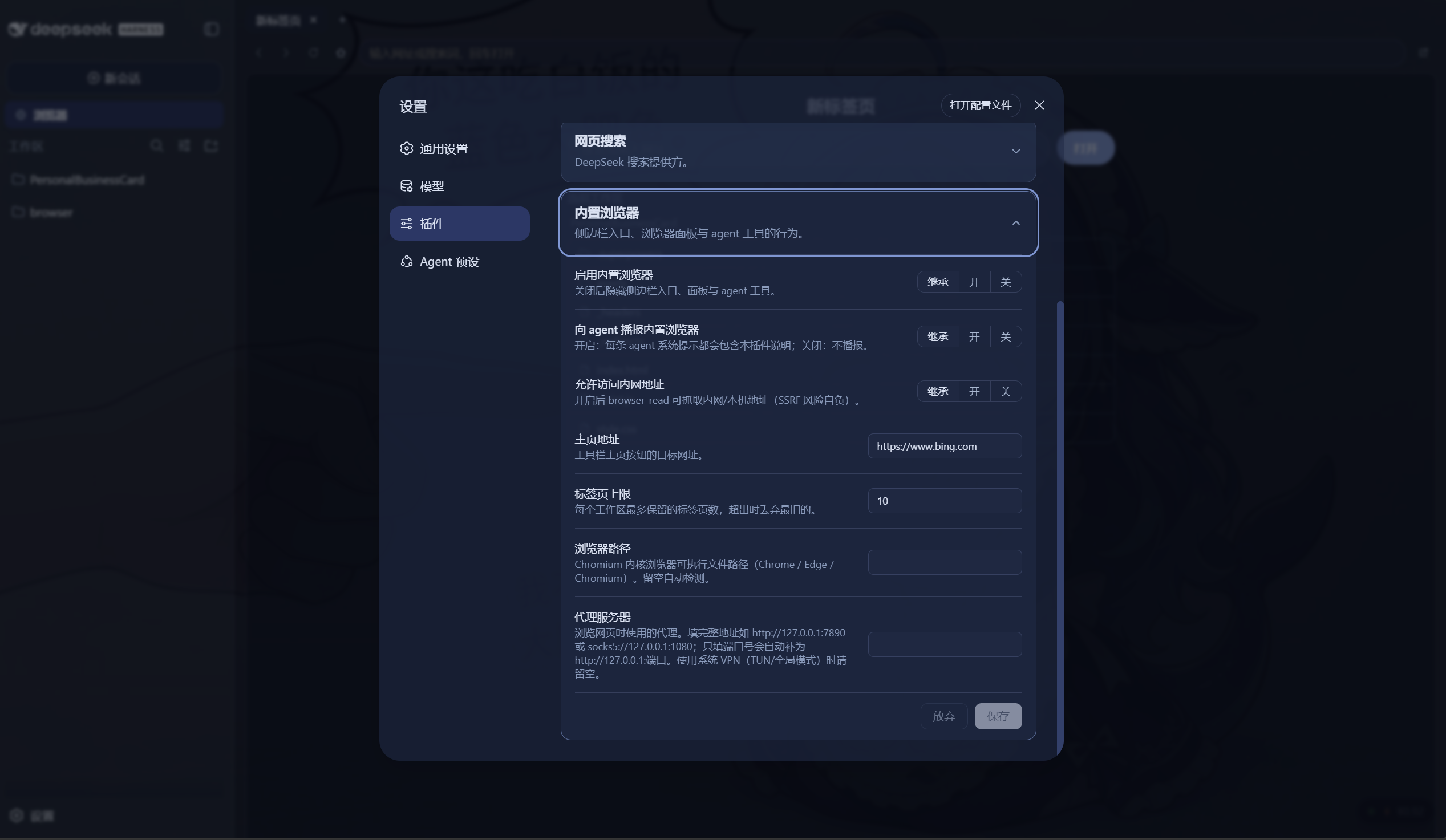
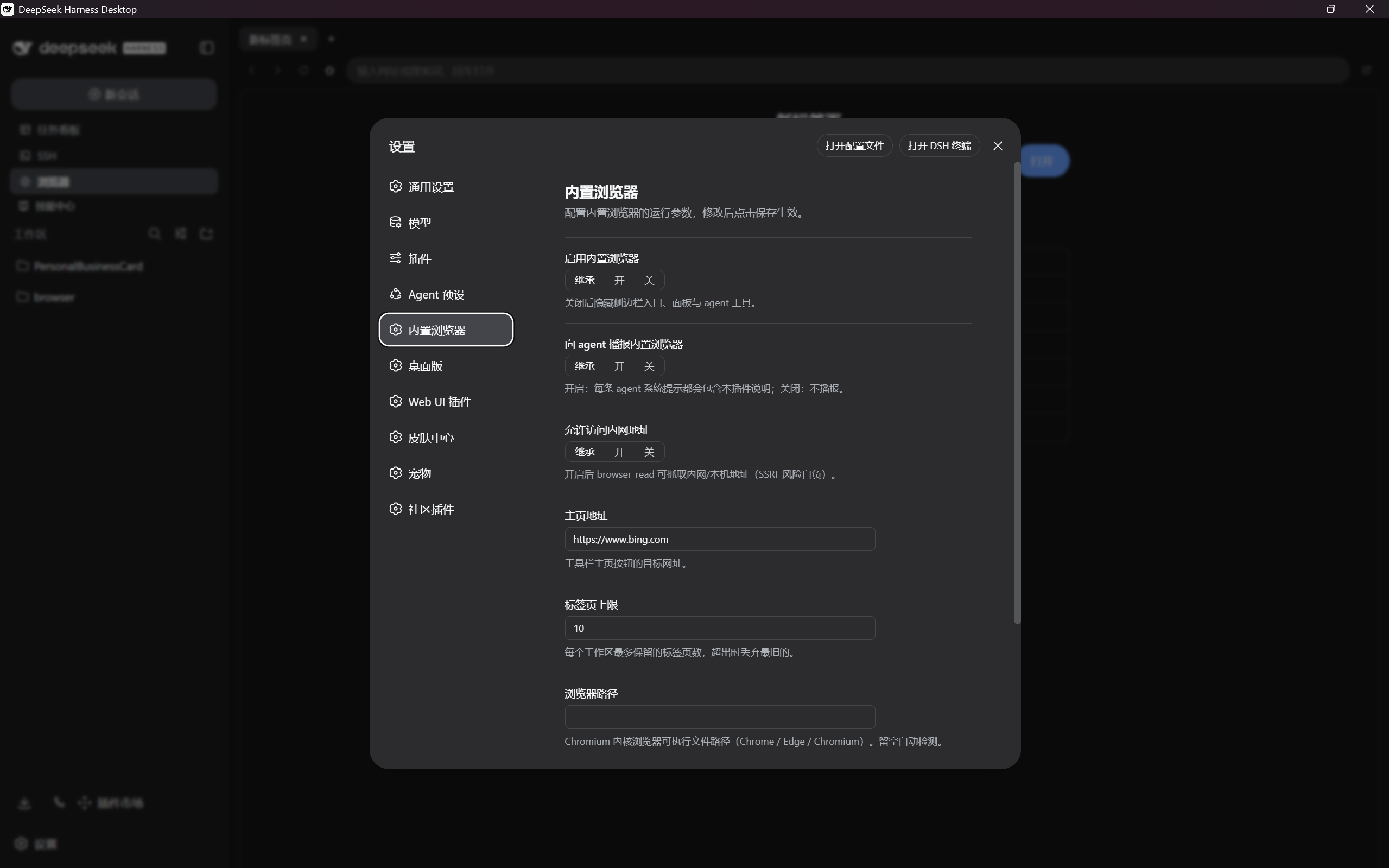
Platform support. Works with both DSH Web and Desktop. Core functionality requires no DSH source changes. On Web, the visual settings card under Settings → Plugins needs a one-time source patch (Option A), or you can use config files instead (Option B). On Desktop it appears as a standalone "Embedded browser" entry in the left nav — no source changes needed.
Prerequisites
A Chromium-based browser must be installed on the host machine (Chrome,
Edge, or Chromium). The plugin auto-detects the executable on Windows, macOS,
and Linux; you can also set an explicit path in the settings card. The plugin
uses puppeteer-core (not puppeteer), so it never downloads its own
Chromium.
What it does
- Entry: a "Browser" row in the sidebar, below the New Session button.
- Panel: takes over the center column with a tab strip, a toolbar
(back / forward / reload / home / open-in-system-browser), an address bar
(URL or search, Enter opens), and an iframe content area. Each page is
rendered by a shared headless Chromium on the host — the proxy route waits
for
networkidle, reads the fully-executed DOM, injects a<base>and a link-interception script, and returns it to the iframe. Inactive tabs stay mounted and stateful; iframes lazy-load on first activation. - Link interception: clicks on
http(s)links inside a proxied page are caught and posted to the panel —target="_blank"/window.openopens a new tab, ordinary links navigate the current tab. Nothing ever pops the system browser. - Tabs per workspace: the tab set is persisted per project root
(localStorage, debounced + flushed on page hide). Switching sessions swaps
the whole tab set; switching back restores it. A configurable cap (default
- trims the oldest inactive tab.
- Workspace browsing: the new-tab page lists the current workspace
directory (folders navigate, breadcrumbs, up button); clicking a file opens
it in the panel through the host's file route. HTML previews get a
<base>injection so relative images/styles resolve, and a CSPsandboxheader so a previewed file can never run scripts in the GUI origin. - Agent tools:
browser_openpushes a URL into the panel (a new tab opens and the panel gains focus);browser_readfetches a page from the host and returns extracted readable text (static-HTML approximation, no JavaScript). - Settings card: On Web, an "Embedded browser" card appears under Settings → Plugins; on Desktop, a standalone "Embedded browser" page appears in the left navigation. Both support staged edits, save/discard, and inherit/reset semantics. Fields: enable, agent announcement, home page, tab cap, private-address override, browser executable path, proxy server.
- Agent announcement: a system-prompt section tells every agent the plugin exists, what its tools do, and its limits (same mechanism dsh-ssh uses).
Install
# from a local checkout (development)
dsh plugin --profile <name> add link:<repo>

# from npm (once published)
dsh plugin --profile <name> add @nono-neko/dsh-browser
Restart dsh web; the sidebar entry appears. The web profile needs the
@deepseek-ai/* client packages the bundle injects (any rc.6 web deployment
has them). Make sure a Chromium-based browser is installed on the host.
Uninstall
# remove from a profile
dsh plugin --profile <name> remove @nono-neko/dsh-browser

# if installed from a local checkout
dsh plugin --profile <name> remove link:<repo>
Restart dsh web after removal. The Web whitelist patch (Option A), if
applied, can be reverted by removing 'dsh-browser' from
WEB_SETTINGS_NAMESPACES in api-proxy.ts.
Configuration
The plugin reads its settings from a layered source: schema defaults, then the
plugin's cordis.yml entry (composition base), then the user settings
document. All fields are optional.
| Field | Type | Default | Description |
|---|---|---|---|
enabled |
boolean | true |
Mount the sidebar entry, tools, and proxy routes. |
announceToAgent |
boolean | true |
Inject a system-prompt section telling agents about browser_open / browser_read. |
defaultHome |
string | https://www.bing.com |
URL loaded by the new-tab / home button. |
maxTabs |
number | 10 |
Per-workspace tab cap; oldest inactive tab is trimmed. |
allowPrivateAccess |
boolean | false |
Let browser_read fetch private / loopback addresses. |
browserExecutable |
string | auto-detect | Absolute path to a Chromium-based browser (Chrome / Edge / Chromium). |
proxyServer |
string | empty | Route Puppeteer traffic through a proxy, e.g. http://127.0.0.1:7890. |
Option A — Visual settings card (one-time DSH source patch)
The plugin provides an interactive settings form:
- Web: Settings → Plugins → Embedded browser — requires a one-time DSH source patch (see below). Core functionality works without it.
- Desktop: standalone Embedded browser entry in the left nav — works out of the box, no source changes needed
| Web settings card | Desktop settings page |
|---|---|
 |
 |
The Web visual settings card needs a one-time DSH source patch. As of DSH rc.6, the settings API only exposes namespaces in a hard-coded allowlist inside
packages/host/apiproxy/src/api-proxy.ts(WEB_SETTINGS_NAMESPACES). An external plugin's namespace is filtered out even after it registers correctly, so the card renders "not exposed" until you add'dsh-browser'to that array and restartdsh web. This patch only enables the visual settings card — core features (browsing, agent tools, etc.) work without it. The DSH team has noted that moving this declaration tosettings.register()so plugins can self-expose is deferred work.
Edit packages/host/apiproxy/src/api-proxy.ts in your DSH checkout:
const WEB_SETTINGS_NAMESPACES = [
  'agent-loop', 'shell', 'locale', 'permission', 'ui-conversation',
  'ui-theme', 'web-search-deepseek', 'dsh-browser',  // <-- add this
] as const
DSH runs through tsx, so no rebuild is needed — restart dsh web and the
card becomes editable.
Option B — Config file only (no one-time patch needed)
If you do not want to patch DSH, set the same fields directly. Two layers are available:
Plugin entry config (cordis.yml or your profile's plugin config) — the
composition base, applies to every user of that profile:
plugins:
  dsh-browser:
    defaultHome: https://www.google.com
    maxTabs: 20
    proxyServer: http://127.0.0.1:7890
User settings document (~/.dsh/settings.yaml) — per-user overrides that
layer on top of the entry config:
dsh-browser:
  browserExecutable: C:\Program Files\Google\Chrome\Application\chrome.exe
  allowPrivateAccess: true
The settings card stays read-only ("not exposed") in this mode, but every field is honored from the files above.
Development
pnpm install    # @deepseek-ai/* SDK packages are public on npm (or a mirror)
pnpm build      # tsc types + tsdown dual-half bundle (lib/index.js + lib/client.js)
pnpm typecheck  # tsc --noEmit
pnpm test       # vitest
The build emits two artifacts from one config: the node half (lib/index.js,
esm) and the browser half (lib/client.js, a window.__ModuleLoader__
closure-factory served at /plugins/dsh-browser/client.js). CSS Modules are
compiled into the client bundle by lightningcss; the client bundle enforces a
purity gate — value imports from @deepseek-ai/* are only allowed for the
platform seed modules, everything else must inline or go through cordis
services.
Security model
- Loopback fence: every
/api/dsh-browserroute (proxy, SSE, file) refuses non-loopback clients (socket address + Host header + same-origin markers). A LAN-exposed dsh web cannot serve workspace files or the proxy to unpaired devices. - Workspace gate: file listing and serving canonicalize the requested root (realpath) and require it to be a registered workspace or inside one; every requested path is re-checked after resolution, so symlinks cannot escape the root.
- Served HTML sandbox: workspace-previewed HTML is served with
Content-Security-Policy: sandbox— scripts never execute in the GUI origin (which holds the session's loopback API access). - Proxied pages are not sandboxed: the Puppeteer-rendered HTML is returned without CSP / X-Frame-Options so it can render in the panel iframe. The loopback fence is the security boundary — only local clients can reach the proxy route. Proxied pages cannot access the GUI origin's APIs because they are served from a different path and the browser's same-origin policy applies to the iframe content.
- SSRF guard on
browser_read: the target hostname is resolved through DNS before the request leaves the process and every address must be public (private/loopback/link-local/reserved ranges are refused). Redirects are followed manually and each hop is re-checked. TheallowPrivateAccesssetting is an explicit override; the risk is yours. - Proxy route uses Puppeteer: the headless Chromium fetches the page, so
the SSRF guard from
browser_readdoes not apply to the panel proxy. TheproxyServersetting lets you route browsing traffic through a local VPN / proxy. - Size/time caps:
browser_readbodies over 2 MB answer an error before being read; served workspace files over 64 MB are refused; each Puppeteer render times out after 30 seconds.
Limitations
- No persistent login: each proxied page opens a fresh Puppeteer page and closes it after rendering. Cookies and login state are not retained between requests, so sites that require authentication will show a logged-out view.
- GET only: the panel proxy supports GET requests. Form submissions (POST)
and file uploads are not proxied — they will execute inside the iframe and
may be blocked by the target site's
X-Frame-Options. - JavaScript-rendered navigation: the initial page is fully rendered by
Puppeteer, but subsequent in-page navigation (SPA routing, form posts)
happens inside the iframe and may hit
X-Frame-Optionson the new URL. Ordinary<a>links are intercepted and re-proxied. browser_readsees only static HTML: JavaScript-rendered pages come back without their client-side content, and it cannot use your logins.- Browsing consumes real network traffic on the host machine.
License
Apache-2.0
相关推荐Related
-
 nexu-io/open-design
🎨 Best DeepSeek Harness Design Plugin. The open-source Claude Design alternative. 🖥️ Local-first desktop app. 🖼️ Your…
nexu-io/open-design
🎨 Best DeepSeek Harness Design Plugin. The open-source Claude Design alternative. 🖥️ Local-first desktop app. 🖼️ Your…
-
 ruvnet/ruflo
🌊 The original agent meta-harness. Deploy intelligent multi-player swarms, coordinate autonomous workflows, and build c…
ruvnet/ruflo
🌊 The original agent meta-harness. Deploy intelligent multi-player swarms, coordinate autonomous workflows, and build c…
-
 esengine/DeepSeek-Reasonix
DeepSeek-native AI coding agent for your terminal. Engineered around prefix-cache stability — leave it running.
esengine/DeepSeek-Reasonix
DeepSeek-native AI coding agent for your terminal. Engineered around prefix-cache stability — leave it running.
-
 Tencent/WeKnora
Open-source LLM knowledge platform: turn raw documents into a queryable RAG, an autonomous reasoning agent, and a self-m…
Tencent/WeKnora
Open-source LLM knowledge platform: turn raw documents into a queryable RAG, an autonomous reasoning agent, and a self-m…
- Nagi-ovo/voyager Enhancement suite for Gemini, AI Studio, Claude & ChatGPT — plus a prompt manager for any web UI, DeepSeek Harness inclu…
-
 anywhere-labs/deepseek-harness-desktop
为 DeepSeek Harness (DSH) 插件生态打造的现代化桌面端解决方案。万物皆「插件」,桌面本身也是「插件」。
anywhere-labs/deepseek-harness-desktop
为 DeepSeek Harness (DSH) 插件生态打造的现代化桌面端解决方案。万物皆「插件」,桌面本身也是「插件」。
-
 freestylefly/awesome-gpt-image-2
Prompt as Code | GPT-Image2 工业级提示词引擎与模板库,470+ 个案例逆向工程,20+ 套工业级模板,并提炼出Skills,持续更新中
freestylefly/awesome-gpt-image-2
Prompt as Code | GPT-Image2 工业级提示词引擎与模板库,470+ 个案例逆向工程,20+ 套工业级模板,并提炼出Skills,持续更新中
-
 EverMind-AI/EverOS
One portable memory layer for every AI agent: local-first, Markdown-native, user-owned, and self-evolving across apps, t…
EverMind-AI/EverOS
One portable memory layer for every AI agent: local-first, Markdown-native, user-owned, and self-evolving across apps, t…