omdsh-dev/dsh-feishu-notify
DSH 插件:agent 会话结束时通过飞书自定义机器人发送通知卡片。已适配 DSH 0.1.0-rc.7(@deepseek-ai/cordis / @deepseek-ai/schemastery 发行线)。
catalog 简介 / catalog descriptioncatalog description:为dsh新增飞书的卡片通知:会话结束/需要等待输入
项目介绍Project Overview
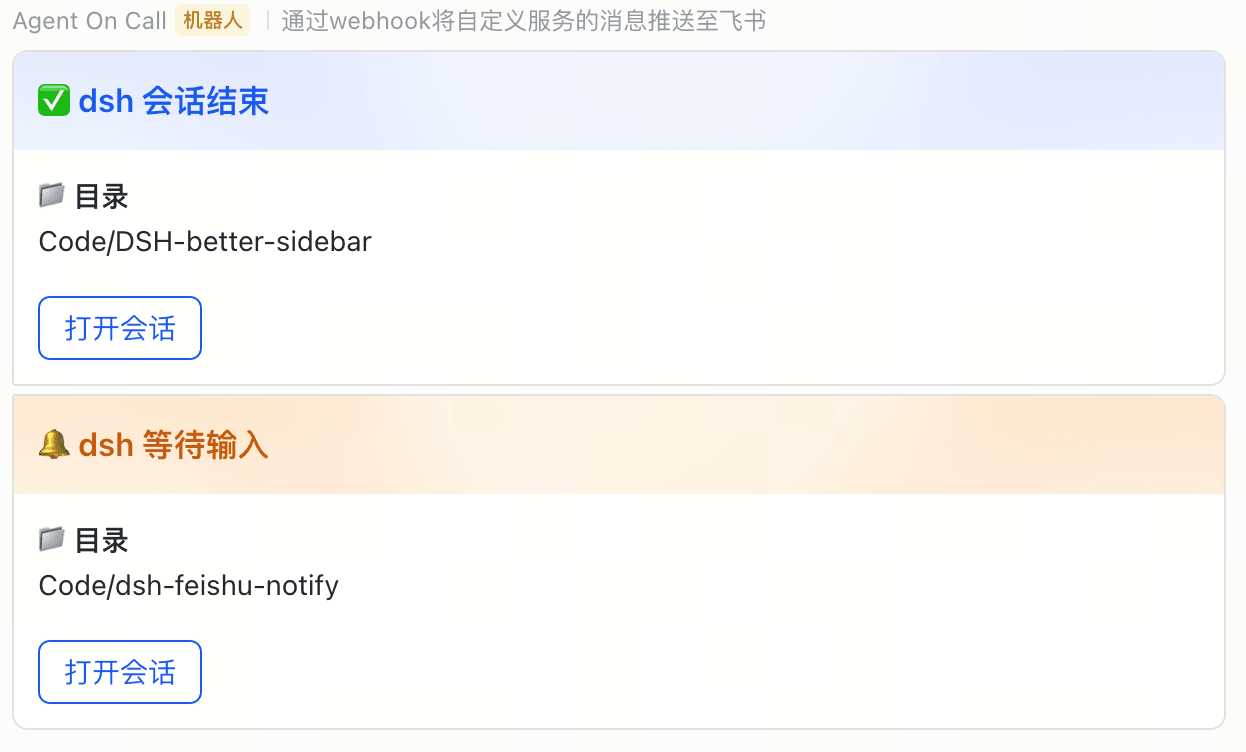
dsh-feishu-notify 是 DSH 插件,在 agent 会话结束或调用 ask_user_question 等待输入时,通过飞书自定义机器人发送通知卡片,含工作目录与可选「打开会话」按钮;subagent 不通知。适合需远程感知任务完成或待输入的场景。注意 webhookUrl 等同密钥,勿泄露;当前按钮仅跳转 webui,不支持直达会话。
dsh-feishu-notify is a DSH plugin that sends Feishu bot card notifications when an agent session ends or ask_user_question waits for input, showing the working directory and an optional "open session" button; subagent sessions are not notified. Use it to track task completion or pending input remotely. Caveat: the webhook URL is secret, and the button currently opens the webui rather than the specific session.
请帮我了解并安装插件:【dsh-feishu-notify】【https://github.com/omdsh-dev/dsh-feishu-notify】把上面这条消息直接发给当前会话里的 DSH,让它帮你了解并安装。安装命令不一定准确,发给 DSH 更稳。Send this message to DSH in your current session. CLI install commands may not be accurate across systems — DSH will figure it out for you.
或使用命令行安装(适合开发者)Or use CLI install (for developers)
命令行安装CLI Install
dsh plugin --profile web add git+https://github.com/omdsh-dev/dsh-feishu-notify.git把 omdsh-dev/dsh-feishu-notify 加入你的 DSH 配置(web profile)即可启用。
READMEREADME
dsh-feishu-notify
DSH 插件:agent 会话结束时通过飞书自定义机器人发送通知卡片。已适配 DSH 0.1.0-rc.7(@deepseek-ai/cordis / @deepseek-ai/schemastery 发行线)。
作用
| 时机 | 卡片 |
|---|---|
| 会话结束(agent 进入 idle) | ✅「dsh 会话结束」 |
模型调用 ask_user_question 等待输入 |
🔔「dsh 等待输入」 |
卡片含工作目录(末两段)与可选的「打开会话」按钮;subagent 会话不通知;webhook 发送失败只记日志,不影响 agent 主流程。
注意:由于 dsh-external/issues#397 目前不支持使用 sessionId + URL 跳转,现在的「打开会话」按钮只会跳转到 webui 中。
安装
前置:git、pnpm、运行中的 DSH(≥ 0.1.0-rc.7)。
方式 A:直接从 git 安装(推荐)
# <profile> 换成实际名字,GUI 部署一般是 web
dsh plugin --profile <profile> add git+https://github.com/omdsh-dev/dsh-feishu-notify.git
- 包声明了
dsh.bundle(cordis.patch.yml插入feishu-notify插件行),dsh plugin add会自动挂载到 profile 的 bundle 层,无需手改 cordis.patch.yml。 - 编译产物
lib/已提交到仓库,git 安装无需构建(pnpm 的 allowBuilds 策略会拦截 prepare 脚本)。 - 更新:
dsh plugin --profile <profile> update dsh-feishu-notify。
方式 B:本地克隆构建后安装
git clone https://github.com/omdsh-dev/dsh-feishu-notify.git
cd dsh-feishu-notify
pnpm install && pnpm build
dsh plugin --profile <profile> add <路径>/dsh-feishu-notify
配置(两种方式相同)
在 ~/.dsh/settings.yaml 末尾追加 feishu-notify: 段(字段说明见下),然后重启 DSH 进程。
配置(~/.dsh/settings.yaml)
feishu-notify:
  enabled: true
  webhookUrl: <你的飞书群自定义机器人 Webhook 地址>
  webhookSecret: ""   # 仅开启「签名校验」时填,否则留空 ""
  webUrl: ""          # 「打开会话」按钮跳转地址;留空则不显示按钮
webhookUrl:飞书群 → 群设置 → 群机器人 → 添加机器人 → 自定义机器人 → 复制 Webhook 地址。它是私有 URL(等同密钥),不要泄露或提交到任何仓库;留空则不发送通知。webhookSecret:创建机器人时开启「签名校验」才需要,取机器人设置里的密钥。webUrl:你的 DSH 网页端地址。- YAML 留空请写
"";不写该行则回落默认值(secret 空、webUrl 为http://127.0.0.1:3080)。 - settings.yaml 热重载,之后改配置无需重启。
配置优先级(与 rc.7 首方插件一致):schema 默认值 → cordis.patch.yml 行内 config:(若配)→ settings.yaml 的 feishu-notify: 段。每次通知都会重读,改完即时生效。
验证
- 发一条消息,模型回复完成后飞书收到「会话结束」卡;模型调用
ask_user_question时收到「等待输入」卡;subagent 结束不通知。 - 单独验证 webhook:
DSH_NOTIFY_WEBHOOK_URL=<你的地址> pnpm send-test(可选加DSH_NOTIFY_WEBHOOK_SECRET)。 - 单测:
pnpm test(fetch 桩,不发真实消息)。
更新 / 卸载
- 更新:方式 A(git 安装)执行
dsh plugin --profile <profile> update dsh-feishu-notify;方式 B 则git pull && pnpm build后重新 add。更新后重启 DSH。 - 卸载:删除 cordis.patch.yml 中的两行 → 重启 → profile 目录
pnpm remove dsh-feishu-notify。
与 DSH 0.1.0-rc.7 的适配说明
- 依赖迁移到 DSH 发行线使用的 fork:
@deepseek-ai/cordis、@deepseek-ai/schemastery(替代上游cordis/schemastery)。 - 事件负载改为直接使用已发布的
@deepseek-ai/dsh-agent/@deepseek-ai/dsh-session类型,删除手写的结构类型。 - 修复:
agent/status的 subject 是Agent,会话 id 字段为agent.id(旧代码读agent.sessionId会得到undefined,导致卡片链接失效)。 - settings 注册改用
@deepseek-ai/dsh-settings的settingsNamespace+register,并导出Configschema 作为feishu-notify:配置段形状(rc.7 插件约定)。
相关推荐Related
-
 nexu-io/open-design
🎨 Best DeepSeek Harness Design Plugin. The open-source Claude Design alternative. 🖥️ Local-first desktop app. 🖼️ Your…
nexu-io/open-design
🎨 Best DeepSeek Harness Design Plugin. The open-source Claude Design alternative. 🖥️ Local-first desktop app. 🖼️ Your…
-
 freestylefly/awesome-gpt-image-2
Prompt as Code | GPT-Image2 工业级提示词引擎与模板库,530+ 个案例逆向工程,20+ 套工业级模板,并提炼出Skills,持续更新中
freestylefly/awesome-gpt-image-2
Prompt as Code | GPT-Image2 工业级提示词引擎与模板库,530+ 个案例逆向工程,20+ 套工业级模板,并提炼出Skills,持续更新中
-
 anywhere-labs/dsh-desktop
为 DeepSeek Harness (DSH) 插件生态打造的现代化桌面端解决方案。万物皆「插件」,桌面本身也是「插件」。
anywhere-labs/dsh-desktop
为 DeepSeek Harness (DSH) 插件生态打造的现代化桌面端解决方案。万物皆「插件」,桌面本身也是「插件」。
- Nagi-ovo/voyager Enhancement suite for Gemini, AI Studio, Claude & ChatGPT — plus a prompt manager for any web UI, DeepSeek Harness inclu…
-
 walkinglabs/learn-harness-engineering
Harness engineering beginner tutorial, from 0 to 1
walkinglabs/learn-harness-engineering
Harness engineering beginner tutorial, from 0 to 1
-
 awesome-dsh-plugin/awesome-dsh-plugin
A curated list of plugins for DeepSeek Harness (dsh) · DeepSeek Harness 插件精选列表
awesome-dsh-plugin/awesome-dsh-plugin
A curated list of plugins for DeepSeek Harness (dsh) · DeepSeek Harness 插件精选列表
-
 MemTensor/MemOS
Self-evolving memory OS for LLM & AI Agents: ultra-persistent memory, hybrid-retrieval, and cross-task skill reuse, with…
MemTensor/MemOS
Self-evolving memory OS for LLM & AI Agents: ultra-persistent memory, hybrid-retrieval, and cross-task skill reuse, with…
- yjh051108/dsh-routing-suite dsh-routing-suite — injector + router-standard kit: install the runtime injector first, then the task-aware reasoning-mo…