opensetk/dsh-xiaohei
一颗住在 DSH Web UI 右下角的桌面宠物:跟随 agent 的运行状态实时切换姿态, 点击还能获得俏皮反馈。是一个完整的 Host + 浏览器双半 Web UI 插件示例, 所有 API 均按 DSH 0.1.0-rc.6 实测验证。
catalog 简介 / catalog descriptioncatalog description:dsh的罗小黑插件
项目介绍Project Overview
dsh-pet 是一款 DSH Web UI 插件,以"宿主+浏览器"双半结构在右下角呈现一只随 agent 状态实时切换七种姿态(空闲、忙碌、思考、输出、干活、完成、受挫)的桌面宠物。宿主侧监听 session/event 并通过纯函数状态机折叠姿态,浏览器侧以 shell.overlay 浮层渲染并支持 800ms 轮询与点击互动。适用于为 DSH 会话注入可视化状态反馈。需注意:必须同时配置 profile 依赖与 cordis.patch.yml 宿主行,并按 DSH 0.1.0-rc.6 验证,其他版本请核对 session/event、useSessions、shell.overlay 等 API。
dsh-pet is a DSH Web UI plugin that displays a desktop pet in the lower-right corner, switching through seven moods (idle, busy, thinking, streaming, tool, done, error) in real time as the agent runs. It uses a host-plus-browser two-half architecture: the Node side listens to session/event and folds moods via a pure-function state machine, while the browser side renders the overlay through the shell.overlay slot with 800ms polling and click interactions. Use it to add visual state feedback to DSH sessions. Caveat: you must configure both the profile dependency and the cordis.patch.yml host entry, and the plugin is verified against DSH 0.1.0-rc.6—check APIs like session/event, useSessions, and shell.overlay for other versions.
请帮我了解并安装插件:【dsh-xiaohei】【https://github.com/opensetk/dsh-xiaohei】把上面这条消息直接发给当前会话里的 DSH,让它帮你了解并安装。安装命令不一定准确,发给 DSH 更稳。Send this message to DSH in your current session. CLI install commands may not be accurate across systems — DSH will figure it out for you.
或使用命令行安装(适合开发者)Or use CLI install (for developers)
命令行安装CLI Install
dsh plugin --profile web add github:opensetk/dsh-xiaohei#dsh-plugin把 opensetk/dsh-xiaohei 加入你的 DSH 配置(web profile)即可启用。
READMEREADME
dsh-pet 🐾
一颗住在 DSH Web UI 右下角的桌面宠物:跟随 agent 的运行状态实时切换姿态,
点击还能获得俏皮反馈。是一个完整的 Host + 浏览器双半 Web UI 插件示例,
所有 API 均按 DSH 0.1.0-rc.6 实测验证。
- 宿主半(Node):监听持久化
session/event,折叠出每会话的宠物姿态 - 浏览器半(
dsh.clientbundle):注册进shell.overlay全局浮层槽位,渲染宠物形象 - 姿态状态机是纯函数(
src/moods.ts),可回放重建,与实时事件流同一套逻辑
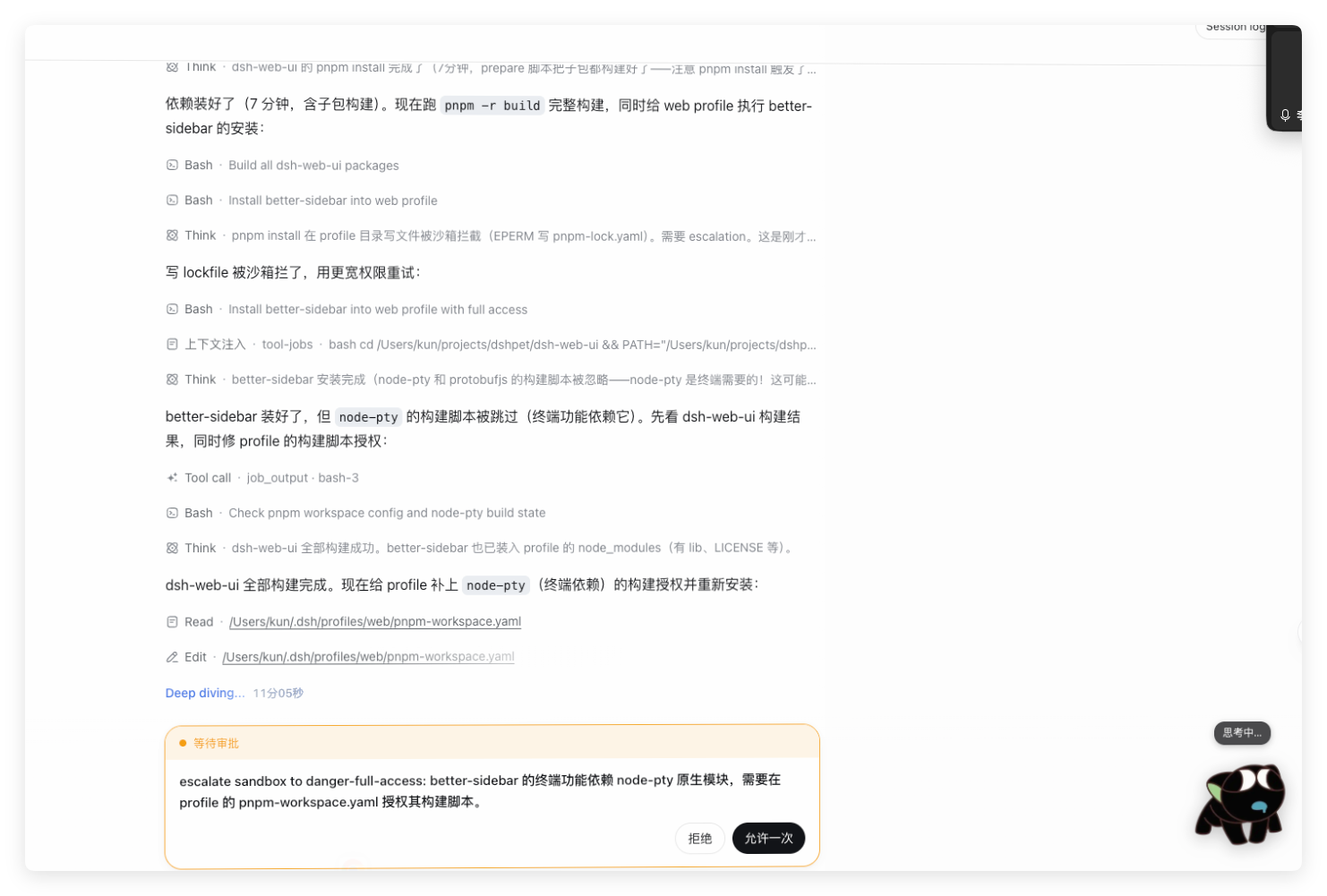
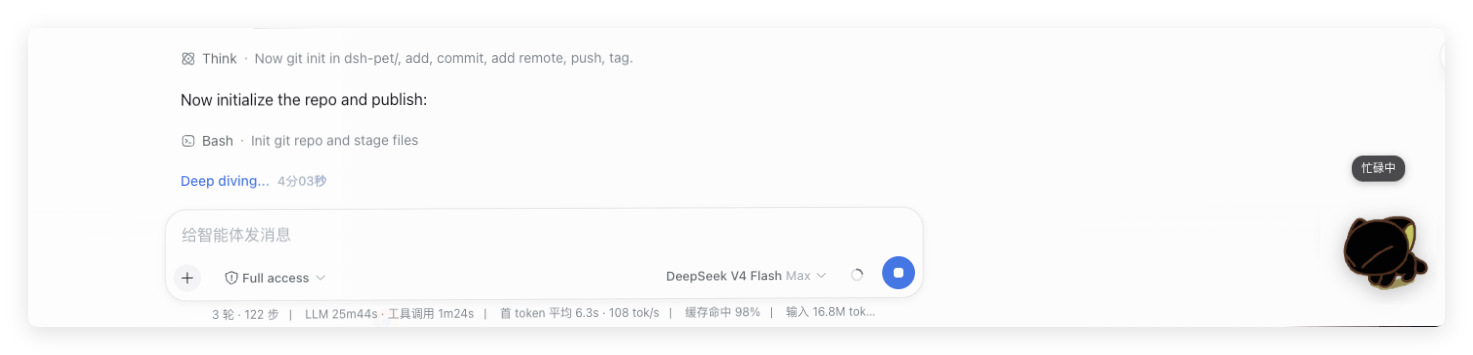
效果预览

它做什么
宿主侧逐事件折叠出七种姿态,浏览器经 HTTP 路由 /pet-mood?sessionId=… 轮询(800ms):
| 姿态 | 触发事实(session/event) |
宠物表现 |
|---|---|---|
空闲 idle |
无活动 | 😴 陪着你~ |
忙碌 busy |
turn/start |
👋 摇摆「忙忙哒」 |
思考 thinking |
step/start |
🍗 吃鸡腿「边想边吃…」 |
输出 streaming |
assistant/chunk(text-delta 非空文本) |
🏃 奔跑「冲鸭鸭!」 |
干活 tool |
tool/call(结果未回) |
🎮 玩嘿咻「和嘿咻玩会儿~」 |
完成 done |
assistant/message / tool/result 成功 |
🎉 庆祝「耶!搞定~」 |
受挫 error |
turn/end 失败(reason.kind 为 error/aborted)/ tool/result 带 error |
🤸 翻滚「呜哇…」 |
鼠标点击宠物 → 随机播放一个互动动画(吃鸡腿 / 偷吃 / 玩嘿咻 / 蠕动 / 翻滚)+ 气泡文案。
轮询不可用时回退到
useSessions快照粗粒度推导(running/pendingInteraction/completed), 保证宠物永远有表现。
架构
┌──────────────────────── 宿主(Node 进程) ────────────────────────┐
│  dsh-pet (lib/index.js)                                           │
│    ctx.on('session/event', (session, event) => …)                 │
│      ① 用 foldMood 折叠出姿态(事件载荷在 event.data)              │
│      ② 存入 ctx.pet 服务(每会话 { mood, lastSeq },按 seq 去重)   │
│      ③ HTTP 路由 GET /pet-mood?sessionId=… 返回姿态 JSON           │
└───────────────────────────────────────────────────────────────────┘
                              │ dsh-client-modules 扫描 dsh.client
                              ▼
┌──────────────────────── 浏览器(Web UI) ─────────────────────────┐
│  dsh-pet client bundle (lib/client.js)                            │
│    window.__ModuleLoader__.load({ id, factory }) 注册自身          │
│    apply(ctx): ctx.slots.register({name:'shell.overlay',…}, Pet)  │
│    PetAvatar: useSessions(快照) 定位当前会话,fetch 轮询           │
│               /pet-mood(800ms)→ 七态动画;失败时回退快照推导     │
└───────────────────────────────────────────────────────────────────┘
姿态来源:宿主半逐事件维护七态(服务端消费、回放、跨会话一致);
浏览器半轮询该路由渲染,轮询不可用时回退 useSessions 快照粗粒度推导。
目录结构
dsh-pet/
├── package.json            # dsh.client 声明 + exports["./client"] + 构建脚本
├── scripts/build.mjs       # 复用本机 DSH 安装里的 @deepseek-ai 包构建两枚 bundle
├── cordis.patch.yml        # 把宿主插件插入 web profile 的 patch(示例)
├── assets/                 # 宠物素材(GIF/PNG,构建时内联进 bundle)+ manifest.json
├── lib/                    # 构建产物(已提交,供 GitHub 直接安装)
└── src/
    ├── moods.ts            # 姿态状态机(纯函数,宿主+浏览器复用,可回放)
    ├── index.ts            # 宿主插件:监听 session/event → 折叠 → ctx.pet 服务
    └── client/
        ├── index.ts        # 浏览器插件入口(inject/apply,注册 shell.overlay 槽位)
        ├── Pet.tsx         # React 宠物组件(角落形象 + 姿态动画 + 点击反馈)
        └── assets.ts       # 素材引用(全部 data URL 内联)
素材来源
宠物 GIF/PNG 素材(assets/,构建时内联进 bundle)来自以下公开资源,仅供学习交流使用:
- https://www.baidu.com/link?url=1LbFrMD32vPsyvYDbZ_G9MnR7FsdpOfvLzbAEhbtMtPxaLf2HVY5Ok9gJQTwswrl&wd=&eqid=958f2f820009c39d000000056a7de487
- https://www.acfun.cn/a/ac14920751
若原作者不希望被使用,请联系移除。
快速开始(本机接入)
前置
- Node ≥ 20,装有
dsh(dsh --version可运行) - 本插件按 DSH
0.1.0-rc.6开发;其他版本以实际 API 为准(见文档底部"版本适配")
1. 构建
cd dsh-pet
node scripts/build.mjs        # 等价 npm run build
产物:
lib/index.js—— 宿主插件(Node 侧)lib/client.js—— 浏览器插件(≈1.1MB,素材全部内联;必须以window.__ModuleLoader__.load({ id, factory })格式输出,构建脚本已处理)
@deepseek-ai/dsh-client-runtime等包未完整发布到 npm,构建脚本直接复用 本机 DSH 安装(@deepseek-ai/dsh)里的同一套包,避免版本漂移。
2. 接入 web profile
让宠物"两个半"都生效需要两处配置(缺一不可):
# ① 声明依赖(profile 依赖集 = 浏览器 scanning 的包集)
#    编辑 ~/.dsh/profiles/web/package.json:
#    "dependencies": { "dsh-pet": "file:/绝对路径/dsh-pet" }
#    或在 profile 目录执行:pnpm add dsh-pet@file:/绝对路径/dsh-pet

# ② 插入宿主插件行(编辑 ~/.dsh/profiles/web/cordis.patch.yml):
#    - insert:
#      - id: dsh-pet-host
#        name: dsh-pet
3. 重启并验证
dsh web # 重启(浏览器需刷新页面)
验证要点:
- 启动日志无
dsh-pet相关 FAILED / 报错 - 页面源码(查看源代码)的
window.__DSH_BOOT__清单里有"id": "dsh-pet"条目 curl http://127.0.0.1:3080/plugins/dsh-pet/client.js返回 200,且首行为window.__ModuleLoader__.load({id:"dsh-pet",...- 右下角出现宠物,会话跑起来时姿态切换
从 GitHub 安装
仓库已提交预构建产物 lib/(并带 prepare 脚本兜底),无需构建授权:
# 在 profile 目录(如 ~/.dsh/profiles/web)
dsh plugin --profile web add github:opensetk/dsh-xiaohei#dsh-plugin
# 然后把宿主行加进 ~/.dsh/profiles/web/cordis.patch.yml(见上文),重启
若 pnpm ≥ 10 拦截 prepare 构建,在 profile 的
pnpm-workspace.yaml中加:allowBuilds: { dsh-pet: true }。
给 Agent 的安装指南
安装教程以 skill 文件形式存放在 docs/install-dsh-pet.skill.md(网络路径:https://raw.githubusercontent.com/opensetk/dsh-xiaohei/main/docs/install-dsh-pet.skill.md)。
复制下面这句话发给 DSH / agent 即可自动安装:
请打开并阅读 https://raw.githubusercontent.com/opensetk/dsh-xiaohei/main/docs/install-dsh-pet.skill.md ,按里面的安装教程把 dsh-pet 安装进我的 DSH web profile。
工作原理(关键点)
宿主侧
apply(ctx) 里所有注册都是 ctx 副作用,插件卸载自动清理(HMR 不留残留):
ctx.on('session/event', (session, event) => {
  // 注意:第一参是 Session 实例(取 .id),不是字符串!
  // event = { type, seq, time, data },业务字段全部在 event.data 里
  const pet = ctx.get('pet')   // ← 必须 ctx.get('pet'),不能 ctx.pet!
  pet?.fold(session.id, event.seq, event)
})
坑:Cordis 里
ctx.<服务>属性访问必须先声明inject,否则抛cannot get property "…" without inject,且该错误会被事件系统静默吞掉 (监听器看着"不生效")。用ctx.get('…')方法调用即可。
浏览器侧
exports["./client"] 暴露带 inject/apply 的客户端插件;模块宿主
(dsh-client-modules)按包名扫描 dsh.client 声明后,把 bundle 收进
window.__DSH_BOOT__,页面启动时以经典 script 加载,bundle 必须同步调用
window.__ModuleLoader__.load({ id, factory }) 注册自己(factory 是 CJS 形态,
依赖经 loader 的 require 解析——平台 seed 含 react、react/jsx-runtime、
@deepseek-ai/cordis 等)。注册后 apply(ctx) 把组件挂进 shell.overlay
(list 槽位),组件用框架注入的 useSessions 标准件订阅会话快照:
const snap = useSessions((s) => s)   // 选择器返回快照引用,随 store 更新变化
// 按 snap.current + snap.byId[current] 的 running/pendingInteraction/completed 推导姿态
常见问题
| 现象 | 原因 | 处理 |
|---|---|---|
| 页面完全没有宠物 | profile 未声明依赖 / 未插入宿主行 / 服务未重启 | 按"快速开始"三步走;检查 __DSH_BOOT__ 清单 |
failed to import loader entry … loaded without registering "dsh-pet" via __ModuleLoader__.load |
lib/client.js 不是 __ModuleLoader__.load 注册格式(例如被普通 ESM 构建覆盖) |
重新执行 node scripts/build.mjs,确认产物首行为 window.__ModuleLoader__.load({id:"dsh-pet",… |
| 宠物不动/不随会话变化 | useSessions 选择器返回常量;或页面缓存了旧 bundle |
选择器须返回快照:useSessions((s) => s);浏览器强制刷新(Cmd+Shift+R) |
| 宿主插件 FAILED | 版本 API 不匹配等 | 看启动日志;确认 DSH 版本 |
| 宿主折叠"不生效"却无报错 | 监听器里用了 ctx.pet 属性访问(inject 守卫静默吞错) |
改用 ctx.get('pet') |
版本适配
本插件按 DSH 0.1.0-rc.6 验证。适配其他版本时重点核对:
session/event广播参数与事件结构(dsh-session的Session.append:{type, seq, time, data})turn/end的reason形态({kind: …},合并可扩展)assistant/chunk的chunk为StreamChunk(text-delta/reasoning-delta/tool-call-delta…)shell.overlay槽位声明与ctx.slots.register(options, component)签名(dsh-client-ui-layout/dsh-client-ui-slots)- 客户端
useSessions快照结构(SessionListState:current/byId/running/pendingInteraction/completed)
License
MIT
相关推荐Related
-
 ruvnet/ruflo
🌊 The original agent meta-harness. Deploy intelligent multi-player swarms, coordinate autonomous workflows, and build c…
ruvnet/ruflo
🌊 The original agent meta-harness. Deploy intelligent multi-player swarms, coordinate autonomous workflows, and build c…
-
 amruthpillai/reactive-resume
A one-of-a-kind resume builder that keeps your privacy in mind. Completely secure, customizable, portable, open-source a…
amruthpillai/reactive-resume
A one-of-a-kind resume builder that keeps your privacy in mind. Completely secure, customizable, portable, open-source a…
-
 volcengine/OpenViking
Self-evolving Context Database for AI Agents. Unify Agent Memory, Knowledge RAG and Skills.
volcengine/OpenViking
Self-evolving Context Database for AI Agents. Unify Agent Memory, Knowledge RAG and Skills.
-
 Molunerfinn/PicGo
:rocket: The Ultimate Image Uploader for Efficient Creators. Supports Obsidian, Typora, VS Code etc. and 60+ image hosti…
Molunerfinn/PicGo
:rocket: The Ultimate Image Uploader for Efficient Creators. Supports Obsidian, Typora, VS Code etc. and 60+ image hosti…
-
 titanwings/colleague-skill
将冰冷的离别化为温暖的 Skill,欢迎加入数字生命1.0!Transforming cold farewells into warm skills? It's giving rebirth era. Welcome to Digital …
titanwings/colleague-skill
将冰冷的离别化为温暖的 Skill,欢迎加入数字生命1.0!Transforming cold farewells into warm skills? It's giving rebirth era. Welcome to Digital …
-
 nocobase/nocobase
NocoBase is an open-source AI + no-code platform for building business systems fast. Instead of generating everything fr…
nocobase/nocobase
NocoBase is an open-source AI + no-code platform for building business systems fast. Instead of generating everything fr…
-
 Tencent/WeKnora
Open-source LLM knowledge platform: turn raw documents into a queryable RAG, an autonomous reasoning agent, and a self-m…
Tencent/WeKnora
Open-source LLM knowledge platform: turn raw documents into a queryable RAG, an autonomous reasoning agent, and a self-m…
- Nagi-ovo/voyager Enhancement suite for Gemini, AI Studio, Claude & ChatGPT — plus a prompt manager for any web UI, DeepSeek Harness inclu…