PAKIKNOWLEDGE/dsh-client-ui-skin-claude
适用于DeepSeek Harness(dsh)Web界面的Claude风格皮肤——暖黑画布、Anthropic黏土色调强调、衬线UI
项目介绍Project Overview
DSH 客户端 Claude 风格界面皮肤,提供暖黑画布(#141413)与陶橙(#d97757)配色,并集成 Anthropic 原生字体切换(Sans/Serif/Mono),支持明暗双主题自动跟随系统。适用于希望统一 Web UI 视觉风格的用户。注意:npm 包不包含字体文件,需从仓库 fonts/ 目录手动下载安装后刷新页面才生效。
A DSH client UI skin that applies Claude's visual style, featuring a warm-black canvas (#141413) with terracotta-orange (#d97757) accents and Anthropic's native font switching (Sans/Serif/Mono). It follows the system's light and dark theme automatically. Use it to unify the Web UI appearance. Note: the npm package does not bundle font files; download them from the repository's fonts/ directory, install manually, then refresh the page.
请帮我了解并安装插件:【dsh-client-ui-skin-claude】【https://github.com/PAKIKNOWLEDGE/dsh-client-ui-skin-claude】把上面这条消息直接发给当前会话里的 DSH,让它帮你了解并安装。安装命令不一定准确,发给 DSH 更稳。Send this message to DSH in your current session. CLI install commands may not be accurate across systems — DSH will figure it out for you.
或使用命令行安装(适合开发者)Or use CLI install (for developers)
命令行安装CLI Install
dsh plugin --profile web add @pakiknowledge/dsh-client-ui-skin-claude把 PAKIKNOWLEDGE/dsh-client-ui-skin-claude 加入你的 DSH 配置(web profile)即可启用。
READMEREADME
dsh-client-ui-skin-claude
 English | 中文
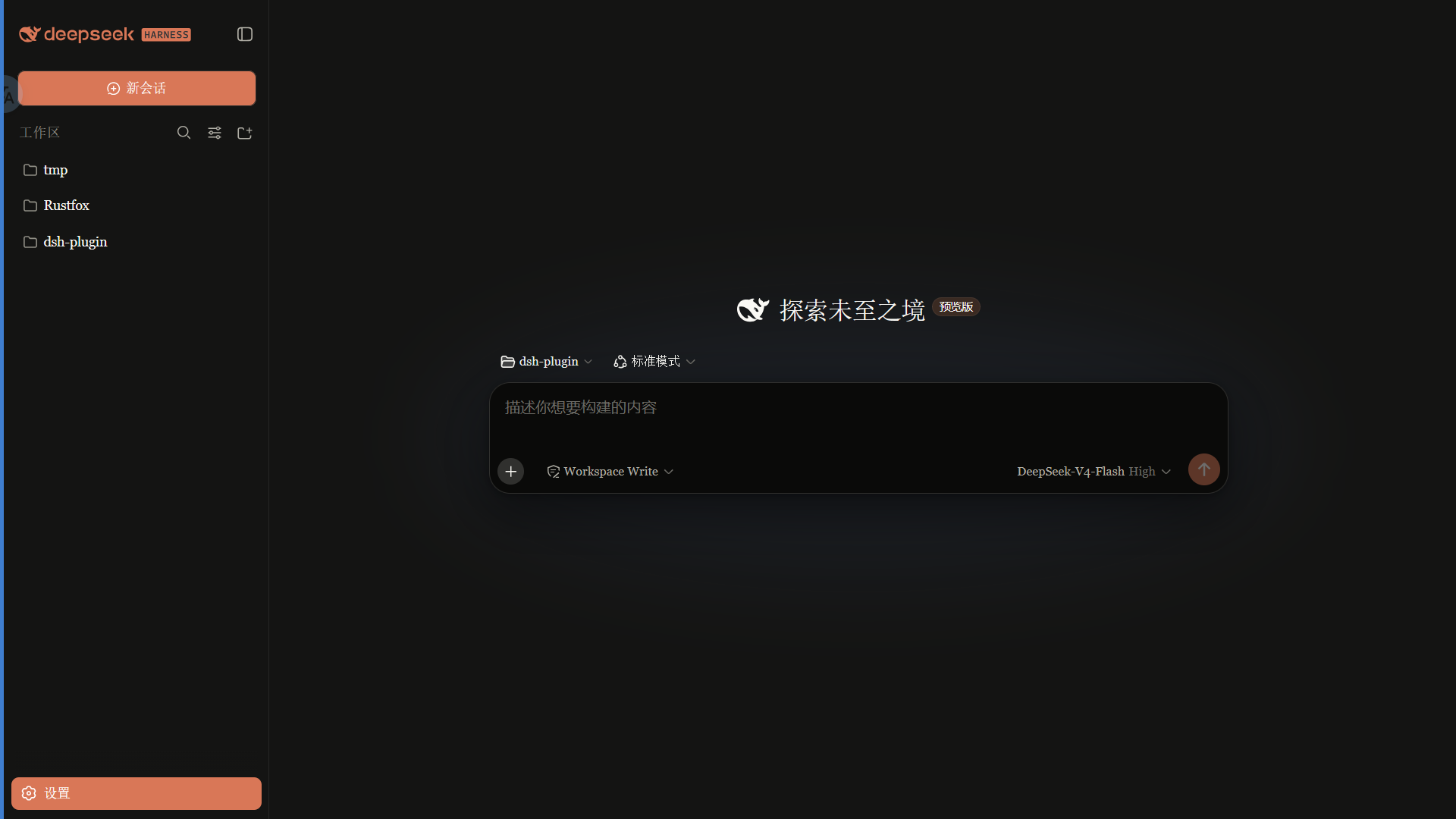
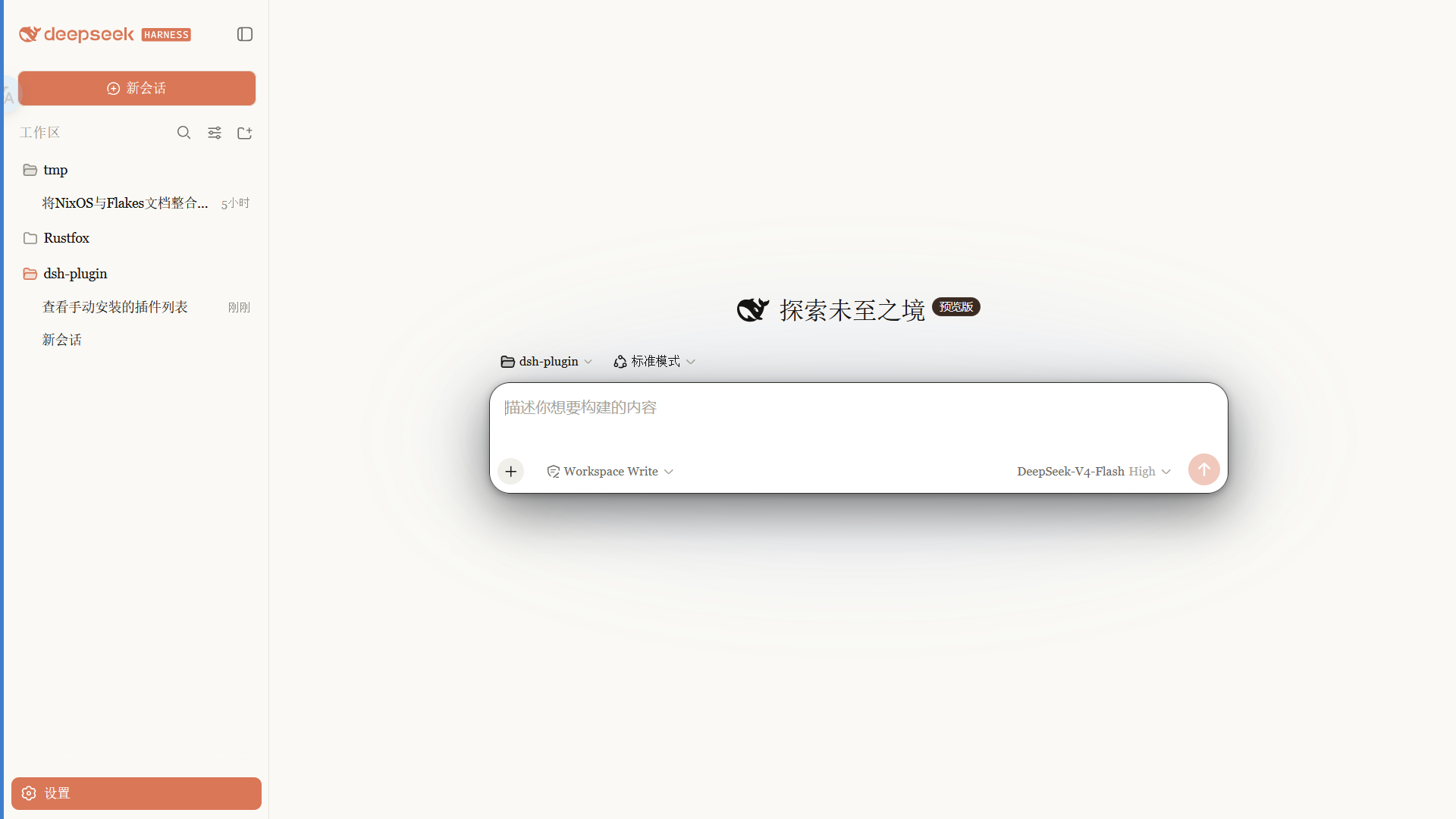
Claude 风格的 DSH Web 界面皮肤:暖黑画布、陶橙点缀,内置 Anthropic 字体切换,跟随原生亮/暗主题。
 ·
· 
特性
- 暖黑(#141413)画布 + Anthropic 陶橙(#d97757)点缀
- 字体模式:
- Anthropic 原生(默认):UI 用 Anthropic Sans,对话正文用 Anthropic Serif,代码用 Anthropic Mono
- 皮肤衬线:保留原来的衬线 UI 风格
- 系统默认:不覆盖 DSH 字体
- 细滚动条、陶橙选中 / 焦点、胶囊徽章
- 亮 / 暗双主题,跟随系统切换
字体
重要:npm 包不随包分发字体文件。 字体文件放在仓库
fonts/供下载;安装后刷新 / 重启 web 才会生效。
| 字体 | 用途 | 文件 |
|---|---|---|
| Anthropic Sans Web Text | 界面 / UI | fonts/AnthropicSansWebText.ttf |
| Anthropic Serif Web Text | 对话正文 / Markdown | fonts/AnthropicSerifWebText.ttf |
| Anthropic Mono Variable | 代码 / 代码块 | fonts/AnthropicMonoVariable.ttf |
安装:Windows 双击 .ttf → 「安装」;macOS 用「字体册」导入。安装后刷新页面生效。
字体版权归 Anthropic 所有,仅供个人使用,不适用 MIT 许可(详见 LICENSE 字体声明)。
安装
从 npm 安装(推荐,预构建免授权):
dsh plugin --profile web add @pakiknowledge/dsh-client-ui-skin-claude
或从 GitHub 安装:
dsh plugin --profile web add github:PAKIKNOWLEDGE/dsh-client-ui-skin-claude
装完重启 dsh web,刷新页面。
切换字体
打开 设置 → 常规 → 字体风格:
- Anthropic 原生(默认):Sans UI / Serif 正文 / Mono 代码
- 皮肤衬线:Georgia 等衬线 UI
- 系统默认:保持 DSH 默认字体
选择立即生效,并保存在浏览器 localStorage。
如果之前单独安装过
dsh-anthropic-fonts,建议先卸载,避免两套字体变量互相覆盖。
切换皮肤
同一时刻只启用一个皮肤。编辑 ~/.dsh/cordis.patch.yml:
# dsh-skin managed 段之外
- insert:
    - id: ui-skin-claude
      name: '@pakiknowledge/dsh-client-ui-skin-claude'
(并把当前启用皮肤的 disabled: true 加上。)配置 watcher 几秒内热加载,刷新页面生效。
卸载
- 删除
~/.dsh/cordis.patch.yml里的ui-skin-claudeinsert 行 dsh plugin --profile web remove @pakiknowledge/dsh-client-ui-skin-claude- 重启
dsh web
许可
MIT
相关推荐Related
-
 nexu-io/open-design
🎨 Best DeepSeek Harness Design Plugin. The open-source Claude Design alternative. 🖥️ Local-first desktop app. 🖼️ Your…
nexu-io/open-design
🎨 Best DeepSeek Harness Design Plugin. The open-source Claude Design alternative. 🖥️ Local-first desktop app. 🖼️ Your…
-
 ruvnet/ruflo
🌊 The original agent meta-harness. Deploy intelligent multi-player swarms, coordinate autonomous workflows, and build c…
ruvnet/ruflo
🌊 The original agent meta-harness. Deploy intelligent multi-player swarms, coordinate autonomous workflows, and build c…
-
 Molunerfinn/PicGo
:rocket: The Ultimate Image Uploader for Efficient Creators. Supports Obsidian, Typora, VS Code etc. and 60+ image hosti…
Molunerfinn/PicGo
:rocket: The Ultimate Image Uploader for Efficient Creators. Supports Obsidian, Typora, VS Code etc. and 60+ image hosti…
-
 Tencent/WeKnora
Open-source LLM knowledge platform: turn raw documents into a queryable RAG, an autonomous reasoning agent, and a self-m…
Tencent/WeKnora
Open-source LLM knowledge platform: turn raw documents into a queryable RAG, an autonomous reasoning agent, and a self-m…
- Nagi-ovo/voyager Enhancement suite for Gemini, AI Studio, Claude & ChatGPT — plus a prompt manager for any web UI, DeepSeek Harness inclu…
-
 freestylefly/awesome-gpt-image-2
Prompt as Code | GPT-Image2 工业级提示词引擎与模板库,470+ 个案例逆向工程,20+ 套工业级模板,并提炼出Skills,持续更新中
freestylefly/awesome-gpt-image-2
Prompt as Code | GPT-Image2 工业级提示词引擎与模板库,470+ 个案例逆向工程,20+ 套工业级模板,并提炼出Skills,持续更新中
-
 tt-a1i/archify
Agent skill for beautiful, verifiable architecture, workflow, sequence, data-flow, and lifecycle diagrams—self-contained…
tt-a1i/archify
Agent skill for beautiful, verifiable architecture, workflow, sequence, data-flow, and lifecycle diagrams—self-contained…
-
 EverMind-AI/EverOS
One portable memory layer for every AI agent: local-first, Markdown-native, user-owned, and self-evolving across apps, t…
EverMind-AI/EverOS
One portable memory layer for every AI agent: local-first, Markdown-native, user-owned, and self-evolving across apps, t…