penguin-oo/dsh-pathlink
在DeepSeek Harness聊天中Ctrl+点击文件路径和链接:路径将在操作系统文件管理器中打开其所在文件夹,链接将在新的浏览器标签页中打开。
项目介绍Project Overview
dsh-pathlink 是 DeepSeek Harness 的 web 端插件,自动识别聊天消息、代码块和工具卡片中的文件路径与 URL,加虚线下划线;Ctrl/⌘+点击路径会在系统文件管理器中打开所在文件夹并选中文件,点击链接则新开浏览器标签,普通点击不影响选择复制。适用于需从对话快速定位文件或打开链接时。仅限 web GUI;路径识别为启发式,偶有过度匹配,不存在时会提示。
dsh-pathlink is a DeepSeek Harness web-profile plugin that recognizes file paths and URLs in rendered chat messages, code blocks, and tool cards, marking them with a dotted underline. Ctrl/⌘+click a path to reveal it in the OS file manager (folder opens, file selected), or a link to open it in a new browser tab; plain clicks remain inert for selection and copy. Use it to jump from chat to files or links quickly. Web GUI only; heuristic path matching may occasionally over-match, with a toast for missing paths.
请帮我了解并安装插件:【dsh-pathlink】【https://github.com/penguin-oo/dsh-pathlink】把上面这条消息直接发给当前会话里的 DSH,让它帮你了解并安装。安装命令不一定准确,发给 DSH 更稳。Send this message to DSH in your current session. CLI install commands may not be accurate across systems — DSH will figure it out for you.
或使用命令行安装(适合开发者)Or use CLI install (for developers)
命令行安装CLI Install
dsh plugin --profile web add dsh-pathlink把 penguin-oo/dsh-pathlink 加入你的 DSH 配置(web profile)即可启用。
READMEREADME
dsh-pathlink
Ctrl+click file paths and links in DeepSeek Harness chat.
Recognizes file paths and URLs in rendered chat messages (assistant replies, user bubbles, code blocks, tool cards), marks them with a subtle dotted underline, and opens them with Ctrl+click (⌘ on macOS):
- Path → containing folder — the file's folder opens in the OS file manager
with the file selected (Windows
explorer /select, macOSopen -R, Linuxxdg-openon the parent directory). A path that names a directory opens the directory itself. - Link → new browser tab — covers bare URLs the renderer did not linkify (e.g. in user bubbles); markdown links already open in new tabs natively.
Plain clicks stay inert, so text selection and copy are never disturbed. When a path does not exist, a small toast explains why instead of failing silently.
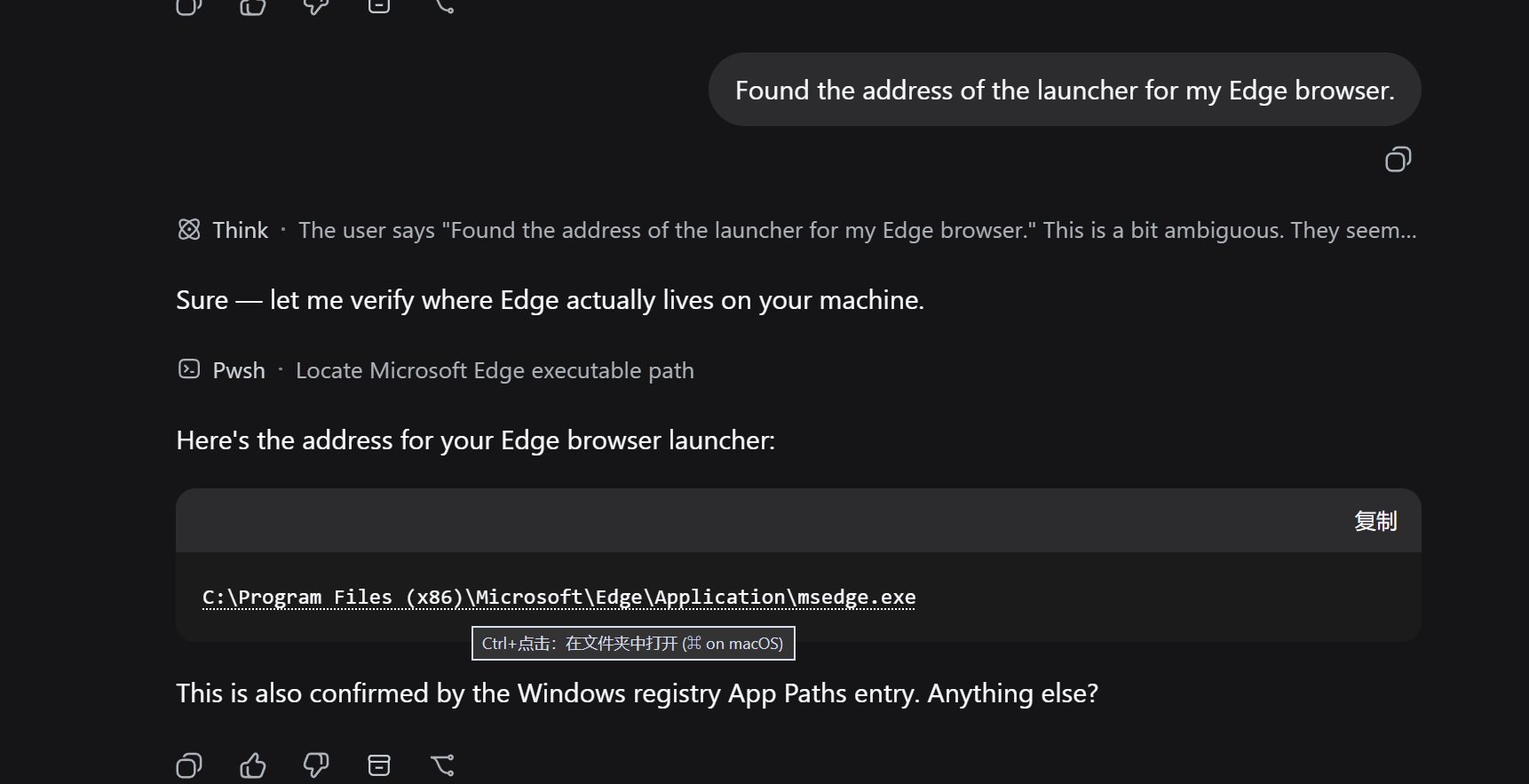
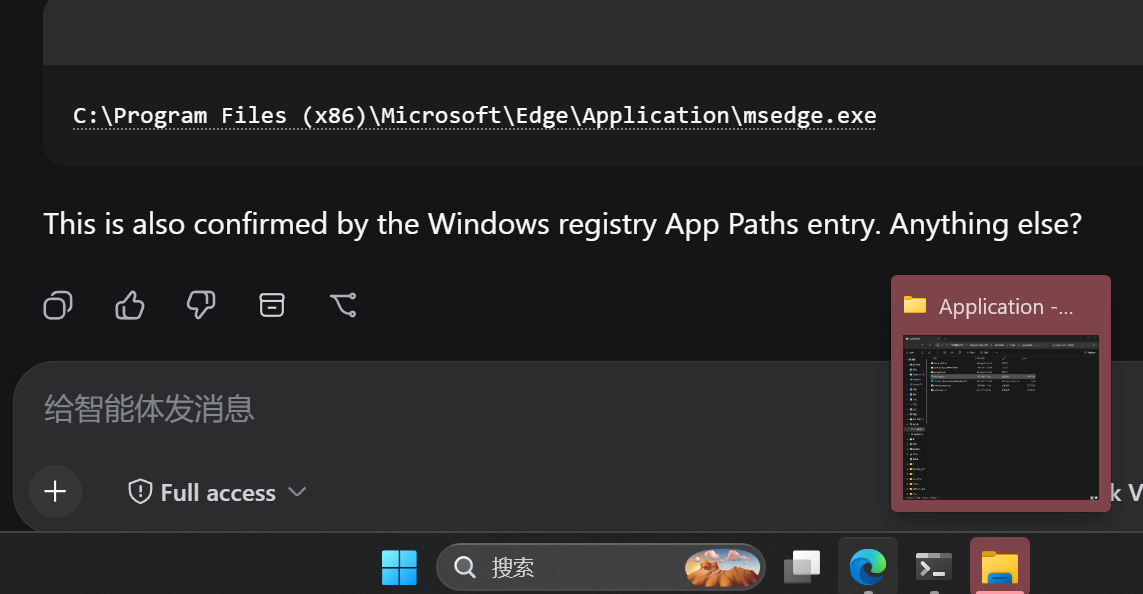
① Hovering a path shows the Ctrl+click hint — Ctrl+click opens the containing folder with the file selected · ② The recognized path in a real conversation (dotted underline).
Install
dsh plugin --profile web add dsh-pathlink
or via GitHub:
dsh plugin --profile web add github:penguin-oo/dsh-pathlink
Restart the web GUI afterwards. Requires the web profile (a browser is the only surface that can receive the click).
Usage
- Wait for a settled message that mentions a path or a link — recognized tokens get a dotted underline.
- Hold Ctrl (or ⌘ on macOS) and click.
- Path → folder opens in Explorer/Finder with the file selected.
- Link → opens in a new browser tab.
- Relative paths resolve against the session's workspace directory first, then the harness working directory; missing paths show a toast.
Config
| Key | Default | Meaning |
|---|---|---|
maxPathChars |
1024 |
Longest accepted path text, in characters |
How it works
- Client half (
dsh.client, platformweb): a MutationObserver-driven scanner watches the rendered conversation containers (data-chat-flow/data-conversation-scroll), recognizes paths and URLs in text nodes, wraps matches in inert inline spans, and handles one delegated capture-phase click listener. The officialchatFileMentionsseam is deliberately not used so the plugin never conflicts with the built-in deliverables provider and covers every surface uniformly. - Host half (
pathlinkRemote service): one read-onlyopenmethod that resolves relative paths against the addressed session's working directory, verifies existence, and launches the platform file manager. No durable state; it never creates or resumes an Agent or Session.
Development
npm install
npm run build   # bundle src/client → lib/client.js
npm run smoke   # Remote markers + Typert manifest validation
node scripts/e2e-synthetic.mjs   # browser E2E against http://127.0.0.1:3738
docs/demo.html is built with node scripts/build-demo.mjs (reuses the
production recognizer) and screenshotted by node scripts/e2e-screenshot.mjs.
Limitations
- Web GUI only (the click surface is a browser); the host opener covers Windows / macOS / Linux.
- Path recognition is heuristic: CJK directory names survive, but a path whose final segment is a bare English word (no extension) followed directly by prose may occasionally be over-matched — the existence check then shows the not-found toast instead of opening anything wrong.
License
MIT
Acknowledgements
Built for the DeepSeek Harness plugin ecosystem — thanks to the community on LINUX DO for feedback and testing.
相关推荐Related
-
 nexu-io/open-design
🎨 Best DeepSeek Harness Design Plugin. The open-source Claude Design alternative. 🖥️ Local-first desktop app. 🖼️ Your…
nexu-io/open-design
🎨 Best DeepSeek Harness Design Plugin. The open-source Claude Design alternative. 🖥️ Local-first desktop app. 🖼️ Your…
-
 freestylefly/awesome-gpt-image-2
Prompt as Code | GPT-Image2 工业级提示词引擎与模板库,530+ 个案例逆向工程,20+ 套工业级模板,并提炼出Skills,持续更新中
freestylefly/awesome-gpt-image-2
Prompt as Code | GPT-Image2 工业级提示词引擎与模板库,530+ 个案例逆向工程,20+ 套工业级模板,并提炼出Skills,持续更新中
-
 anywhere-labs/dsh-desktop
为 DeepSeek Harness (DSH) 插件生态打造的现代化桌面端解决方案。万物皆「插件」,桌面本身也是「插件」。
anywhere-labs/dsh-desktop
为 DeepSeek Harness (DSH) 插件生态打造的现代化桌面端解决方案。万物皆「插件」,桌面本身也是「插件」。
- Nagi-ovo/voyager Enhancement suite for Gemini, AI Studio, Claude & ChatGPT — plus a prompt manager for any web UI, DeepSeek Harness inclu…
-
 walkinglabs/learn-harness-engineering
Harness engineering beginner tutorial, from 0 to 1
walkinglabs/learn-harness-engineering
Harness engineering beginner tutorial, from 0 to 1
-
 awesome-dsh-plugin/awesome-dsh-plugin
A curated list of plugins for DeepSeek Harness (dsh) · DeepSeek Harness 插件精选列表
awesome-dsh-plugin/awesome-dsh-plugin
A curated list of plugins for DeepSeek Harness (dsh) · DeepSeek Harness 插件精选列表
-
 MemTensor/MemOS
Self-evolving memory OS for LLM & AI Agents: ultra-persistent memory, hybrid-retrieval, and cross-task skill reuse, with…
MemTensor/MemOS
Self-evolving memory OS for LLM & AI Agents: ultra-persistent memory, hybrid-retrieval, and cross-task skill reuse, with…
- yjh051108/dsh-routing-suite dsh-routing-suite — injector + router-standard kit: install the runtime injector first, then the task-aware reasoning-mo…