pengyue-polaron/deepseek-harness-genui
DeepSeek Harness 的代码优先生成式 UI
项目介绍Project Overview
DeepSeek Harness GenUI 是一个 DSH 插件,让 Coding Agent 为当前任务生成交互界面。核心能力是使用普通 React + TypeScript 构建应用,将用户的选择、表单输入和草稿保存到任务状态,供下一轮 Agent 读取。当任务涉及复杂关系展示或多个关联选择时使用,例如日程规划、科学模型探索或代码路径追踪;纯问答、改写、摘要仍用文字。注意:生成代码在沙箱中运行,外部请求仅限于声明过的无凭证 HTTPS 路由,临时链接 7 天后过期。
DeepSeek Harness GenUI is a DSH plugin that lets a Coding Agent build a focused interactive interface for the current task. The core capability is code-first React + TypeScript apps whose selections, form answers, and drafts save to task state, so the next Agent turn can read them and continue. Use it when a task shows a hard relationship or needs several connected choices, such as calendar planning, scientific exploration, or code-path tracing; plain questions, rewriting, and summaries still belong in prose. Caveat: generated code runs sandboxed, external requests are limited to declared credential-free public HTTPS routes, and temporary links expire after 7 days.
请帮我了解并安装插件:【deepseek-harness-genui】【https://github.com/pengyue-polaron/deepseek-harness-genui】把上面这条消息直接发给当前会话里的 DSH,让它帮你了解并安装。安装命令不一定准确,发给 DSH 更稳。Send this message to DSH in your current session. CLI install commands may not be accurate across systems — DSH will figure it out for you.
或使用命令行安装(适合开发者)Or use CLI install (for developers)
命令行安装CLI Install
dsh plugin --profile web add dsh-plugin-genui把 pengyue-polaron/deepseek-harness-genui 加入你的 DSH 配置(web profile)即可启用。
READMEREADME
DeepSeek Harness GenUI
English | 简体中文


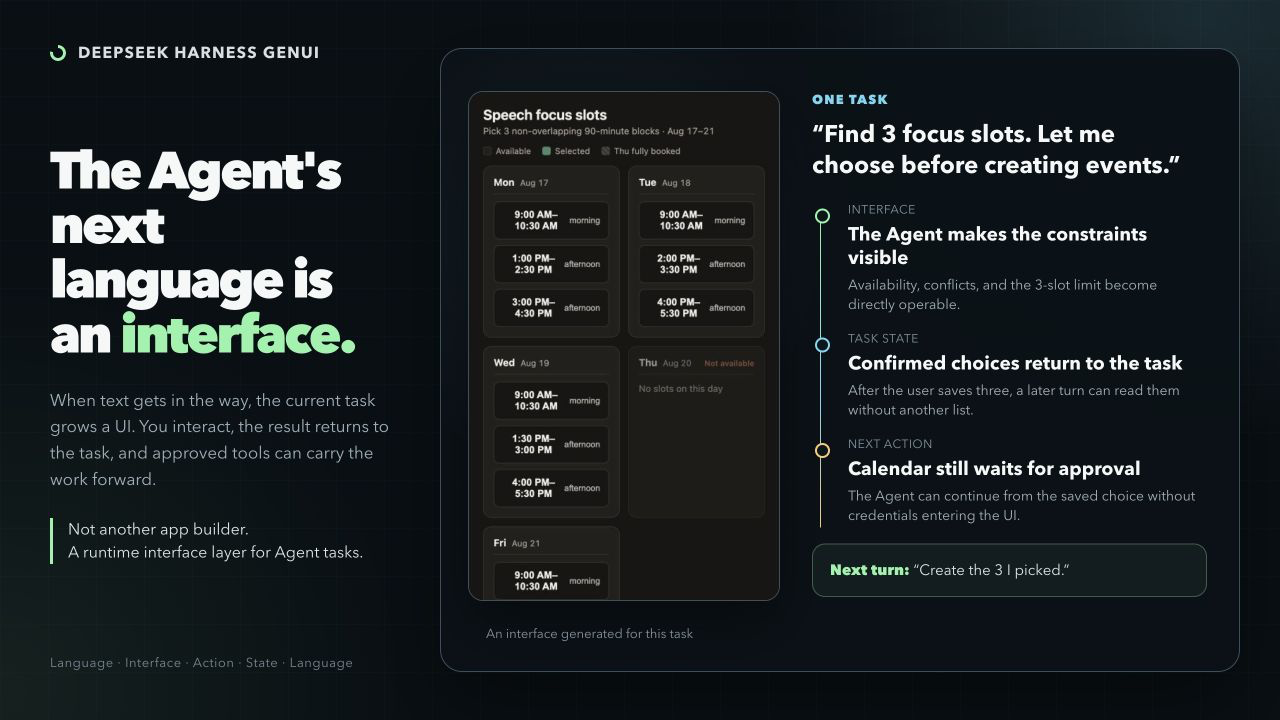
Some tasks are awkward in text. DeepSeek Harness GenUI lets an Agent create a focused interface for the current task: something that explains a difficult relationship or collects a complex user response.
The plugin is code-first. The Coding Agent writes ordinary React + TypeScript, not a component-tree DSL or IR. The interface can save what the user selected, entered, or changed so the next Agent turn can read it and continue the task.
When an Interface Helps
Use an interface when the user needs to see a difficult relationship or make several connected choices. Plain questions, rewriting, summaries, and simple lists stay in prose.
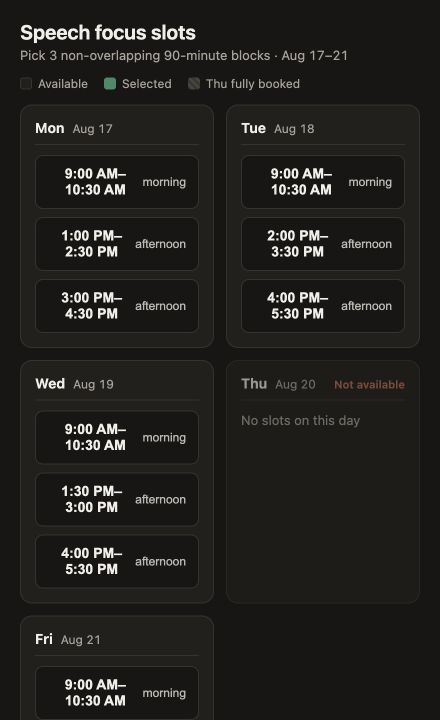
| Pick calendar slots Turn candidate availability into a short list of useful 90-minute writing blocks. The interface saves the three choices to the task. A later calendar action remains separate and asks for approval. |
 |
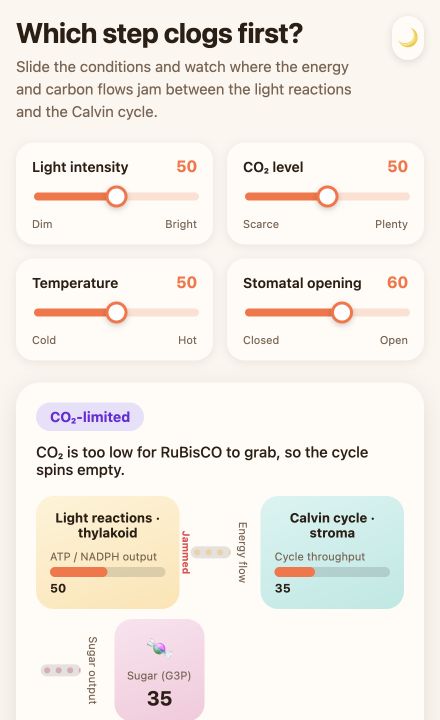
| Explore photosynthesis Move light, carbon dioxide, temperature, and stomatal controls to find the limiting step. The diagram changes with the controls, making each variable's effect easier to explore than to describe. |
 |
| Trace a code path Ask from the CLI for a source-grounded explanation of a real project flow. The result is a local explorer with files, functions, branches, and the path selected by the user. |
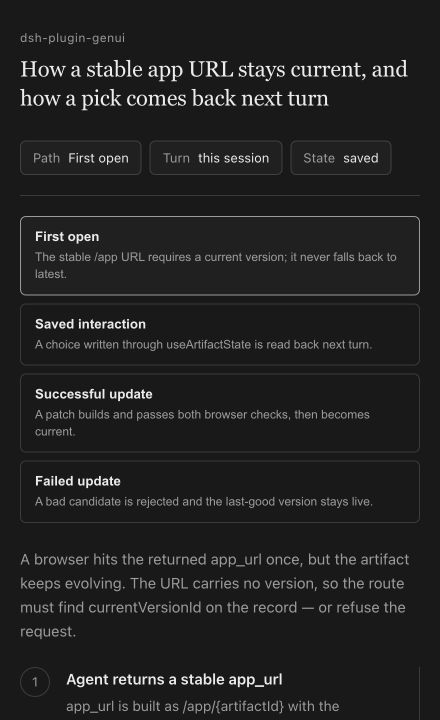 |
Inline & Canvas
The same app can sit inside the answer or open beside the conversation.
| Inline | Canvas |
|---|---|
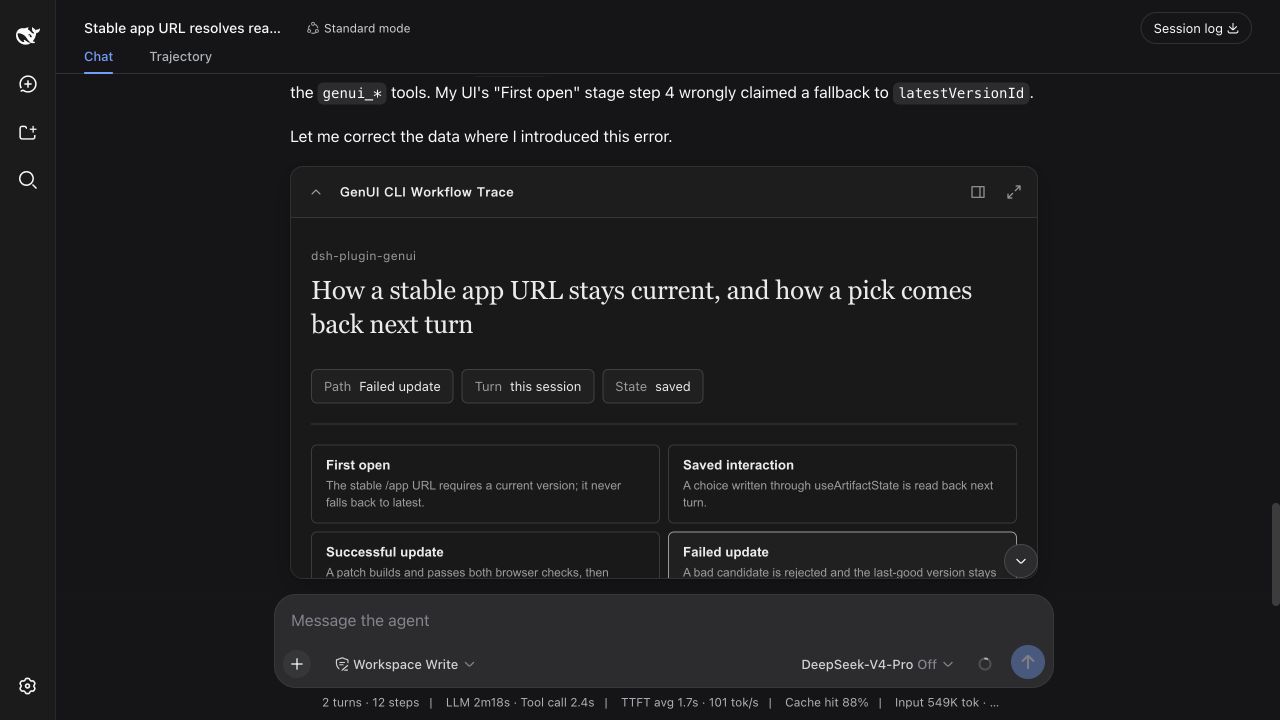 |
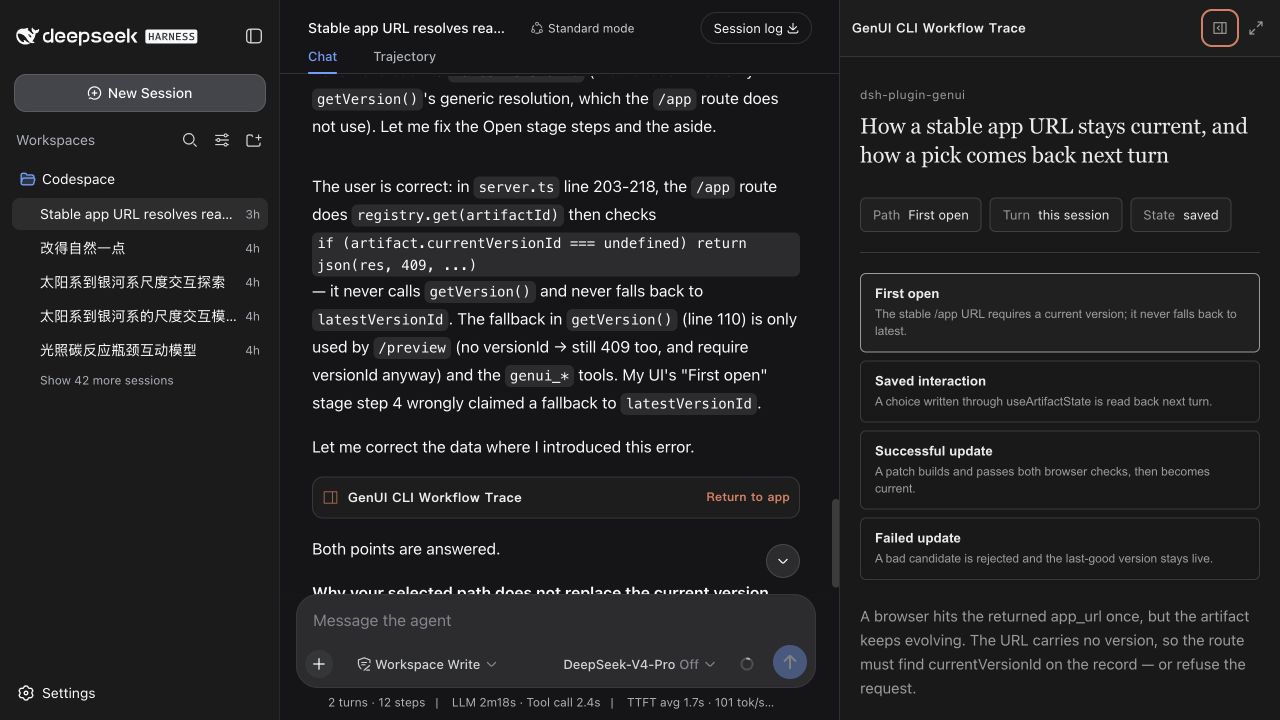 |
| A compact control or focused choice. | More room without covering the conversation. |
Inline, Canvas, fullscreen, and CLI/localhost are different surfaces over the same task state. Selections and inputs saved in one surface remain available to later Agent turns.
CLI Example
The terminal profile returns a localhost app. A follow-up can refer to the path already selected in that app.
❯ Explain how a generated app reaches the permission-gated runtime in this
  repository. Build an interactive code-path explorer and return a localhost URL.

  I mapped src/tools.ts → src/artifacts/builder.ts → src/runtime/server.ts
  → src/artifacts/registry.ts.

  http://127.0.0.1:<port>/genui/app/<task-app>

❯ Where does the path I selected stop?

  It reaches the permission check in src/runtime/server.ts, then stops before
  the connected tool runs because access has not been allowed.
How It Works
- The Agent writes ordinary React + TypeScript and the plugin builds and checks it.
- The interface saves semantic values—selections, form answers, drafts, and progress—to the current task. A follow-up can read those values instead of asking the user to repeat them.
- The app declares only the Harness/MCP/Skill tools or credential-free public HTTPS routes it needs. Before opening a connected app, Harness presents the complete access list for one task-scoped decision; changed capabilities are shown again, and undeclared calls are blocked.
- Later edits update the same app. A failed update never replaces the current working version.
In Web, access can be reviewed or revoked from the app card. MCP credentials never enter generated code.
Why Code-First
Most generative UI systems ask developers to prebuild widgets or maintain a trusted component catalog. This plugin lets the Coding Agent build task-specific React instead. The generated code still runs inside a sandbox, meaningful user state stays with the task, connected actions remain permission-gated, and a failed update never replaces the last working version.
That makes GenUI more expressive than a fixed component catalog, but deliberately narrower than a cross-client UI protocol: it is built for DeepSeek Harness and its task lifecycle.
Task Apps or Component Trees?
Both approaches are useful, but they optimize for different work:
| Choose a component-schema renderer when... | Choose this plugin when... |
|---|---|
| The result is a compact card, table, chart, or form assembled from a known catalog. | The task needs a purpose-built React app whose structure and interactions are not known in advance. |
| Small, predictable model output and portable rendering matter most. | Free-form simulations, spatial tools, connected workflows, or multi-step state matter most. |
| An interaction can be represented as a component event. | The user's selections and edits need to become task state that the next Agent turn can read. |
This project does not replace lightweight dsh-ui component renderers. It covers the code-first, task-specific side of GenUI.
DESIGN.md
Open Settings → Plugins → Plugin configuration to set the default design for new apps. Choose automatic selection or a built-in profile, import a custom DESIGN.md, or export the selected one as a starting point. Once selected, it becomes the default for apps created later, so the style does not need to be repeated in every prompt. Existing apps keep their original design.
DESIGN.md controls the design language, not the page structure. React + TypeScript remains free to implement simulations, graphics, maps, timelines, code graphs, animation, and irregular layouts.
| Design | Visual language |
|---|---|
material-3 |
Google Material 3: tonal surfaces, expressive color, clear hierarchy, and touch-friendly controls |
apple-human-interface |
Apple Human Interface: calm, precise, content-led, and familiar system-like controls |
shadcn-ui |
shadcn/ui: semantic tokens, crisp borders, compact forms, and complete interaction states |
Install
Use Node.js ^22.19.0 || >=24. The plugin supports DeepSeek Harness ^0.1.0-rc.6.
dsh plugin --profile web add dsh-plugin-genui
dsh --profile web
The Web profile supports Inline, Canvas, fullscreen, and localhost links. For a terminal profile, replace web with tui; TUI returns localhost links and does not embed Canvas. Connect MCP servers to the same profile as usual.
The plugin does not download or launch a browser. Every candidate is compiled and checked against the source contracts before it can replace the last working version. The repository CI separately exercises the sandboxed runtime in Chromium; plugin users do not need it.
Try It in Two Minutes
Start a new Web session and paste one of these prompts:
Plan a Saturday route with a museum, a riverside garden, and dinner. Build an
interface where I can change the times and make the garden optional.
Trace how a generated app reaches the permission-gated runtime in this
repository. Build an interactive code-path explorer grounded in the source.
Build an interactive double-slit experiment. Let me change wavelength, slit
spacing, and screen distance and see the interference pattern update.
After changing and saving something in the interface, ask:
What did I just choose in the interface? Continue from the saved result.
The useful proof is not only that an interface appears—it is that the next Agent turn can continue from the interaction.
Safety
Generated code runs in a sandbox. Direct API requests are limited to declared, credential-free public HTTPS routes. Temporary links and grants expire after 7 days; saved task state expires 7 days after its last update. Return to the app card in the task to review or remove access.
The plugin uses DeepSeek Harness + Cordis, React 18 + TypeScript, and esbuild. Repository tests use Playwright and Vitest.
Development
Building from source requires pnpm 11.
Chromium is needed only to run the repository's browser end-to-end tests. It is not installed or launched by the plugin.
pnpm install
pnpm exec playwright install chromium
pnpm run typecheck
pnpm test
pnpm run package:plugin
Acceptance scenarios · Contributing · MIT
相关推荐Related
-
 ruvnet/ruflo
🌊 The original agent meta-harness. Deploy intelligent multi-player swarms, coordinate autonomous workflows, and build c…
ruvnet/ruflo
🌊 The original agent meta-harness. Deploy intelligent multi-player swarms, coordinate autonomous workflows, and build c…
-
 amruthpillai/reactive-resume
A one-of-a-kind resume builder that keeps your privacy in mind. Completely secure, customizable, portable, open-source a…
amruthpillai/reactive-resume
A one-of-a-kind resume builder that keeps your privacy in mind. Completely secure, customizable, portable, open-source a…
-
 volcengine/OpenViking
Self-evolving Context Database for AI Agents. Unify Agent Memory, Knowledge RAG and Skills.
volcengine/OpenViking
Self-evolving Context Database for AI Agents. Unify Agent Memory, Knowledge RAG and Skills.
-
 Molunerfinn/PicGo
:rocket: The Ultimate Image Uploader for Efficient Creators. Supports Obsidian, Typora, VS Code etc. and 60+ image hosti…
Molunerfinn/PicGo
:rocket: The Ultimate Image Uploader for Efficient Creators. Supports Obsidian, Typora, VS Code etc. and 60+ image hosti…
-
 titanwings/colleague-skill
将冰冷的离别化为温暖的 Skill,欢迎加入数字生命1.0!Transforming cold farewells into warm skills? It's giving rebirth era. Welcome to Digital …
titanwings/colleague-skill
将冰冷的离别化为温暖的 Skill,欢迎加入数字生命1.0!Transforming cold farewells into warm skills? It's giving rebirth era. Welcome to Digital …
-
 nocobase/nocobase
NocoBase is an open-source AI + no-code platform for building business systems fast. Instead of generating everything fr…
nocobase/nocobase
NocoBase is an open-source AI + no-code platform for building business systems fast. Instead of generating everything fr…
-
 Tencent/WeKnora
Open-source LLM knowledge platform: turn raw documents into a queryable RAG, an autonomous reasoning agent, and a self-m…
Tencent/WeKnora
Open-source LLM knowledge platform: turn raw documents into a queryable RAG, an autonomous reasoning agent, and a self-m…
-
 anywhere-labs/deepseek-harness-desktop
为 DeepSeek Harness (DSH) 插件生态打造的现代化桌面端解决方案。万物皆「插件」,桌面本身也是「插件」。
anywhere-labs/deepseek-harness-desktop
为 DeepSeek Harness (DSH) 插件生态打造的现代化桌面端解决方案。万物皆「插件」,桌面本身也是「插件」。