sakka6868/dsh-skin
DSH skin plugin: Alphacoders popular wallpapers as the DeepSeek Harness Web GUI background — gallery, search, local image upload, light/dark mask
项目介绍Project Overview
dsh-skin-alphacoders 是一款 DSH 皮肤插件,将 Alphacoders 热门静态壁纸及 MoeWalls/Pexels 动态视频作为 DeepSeek Harness Web 界面背景,支持画廊浏览、搜索、收藏、自动切换、双视频无缝循环与主题适配。适用场景:希望个性化研究/工作界面视觉环境的用户。注意:动态壁纸需手动从源站下载后上传,单次上传上限 200MB,且需联网访问第三方站点。
dsh-skin-alphacoders is a DSH skin plugin that sets the DeepSeek Harness Web GUI background to popular static wallpapers from Alphacoders or looping video backdrops from MoeWalls/Pexels, with gallery browsing, search, favorites, auto-change, seamless dual-video relay, and per-theme adaptation. Use it to customize the research or workspace visual environment. Caveat: live wallpapers require manually downloading clips from the source site and uploading locally, capped at 200MB, and need network access to third-party sites.
请帮我了解并安装插件:【dsh-skin】【https://github.com/sakka6868/dsh-skin】把上面这条消息直接发给当前会话里的 DSH,让它帮你了解并安装。安装命令不一定准确,发给 DSH 更稳。Send this message to DSH in your current session. CLI install commands may not be accurate across systems — DSH will figure it out for you.
或使用命令行安装(适合开发者)Or use CLI install (for developers)
命令行安装CLI Install
dsh plugin --profile web add dsh-skin-alphacoders把 sakka6868/dsh-skin 加入你的 DSH 配置(web profile)即可启用。
READMEREADME
dsh-skin-alphacoders
English | 中文



A DSH skin plugin that turns Alphacoders popular wallpapers into the DeepSeek Harness Web GUI background, plus live wallpapers (video backdrops) from MoeWalls and Pexels. A dual-half (Host + Client) Cordis plugin following the DSH package conventions.
Features
Static wallpapers (Alphacoders)
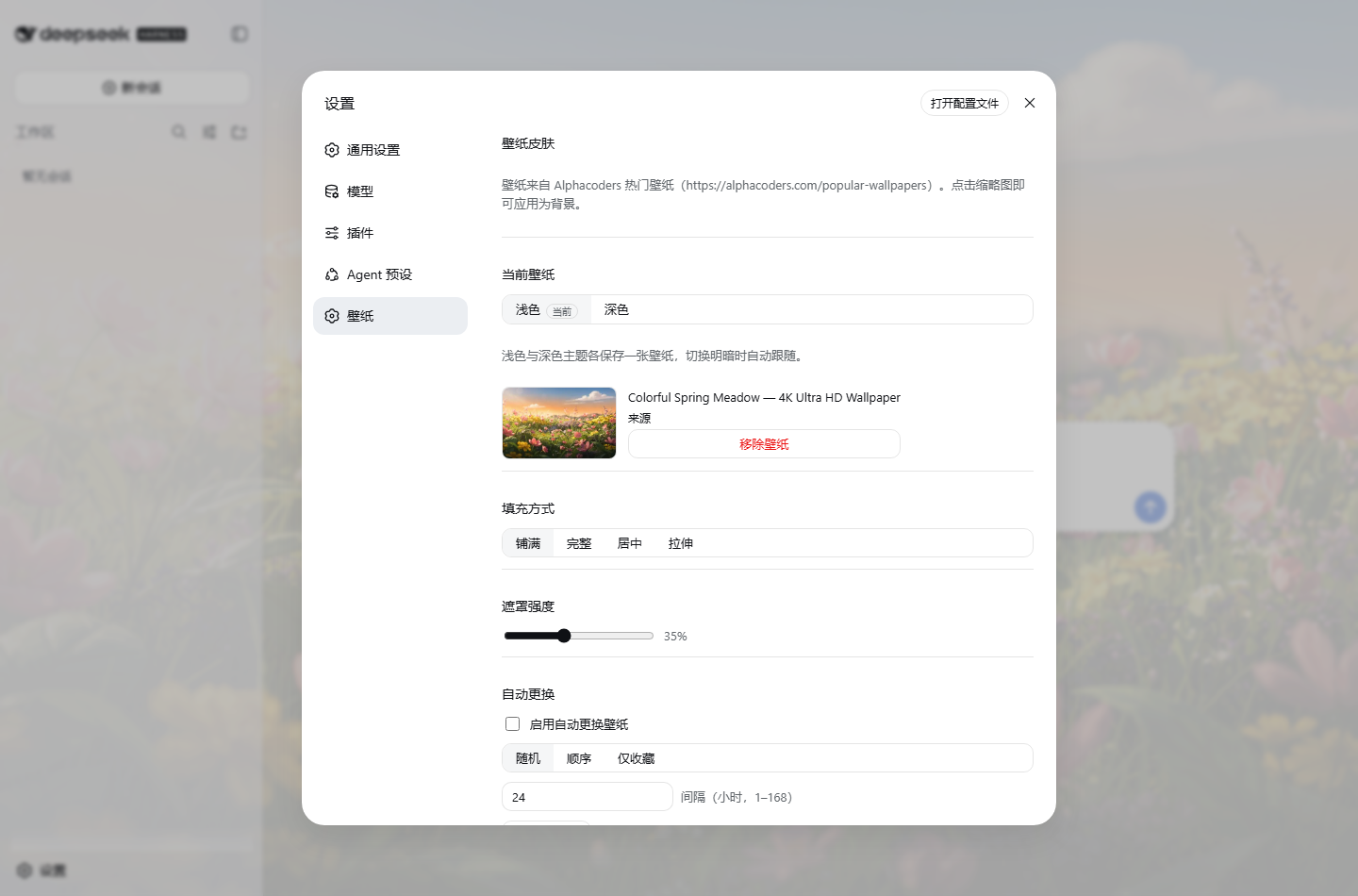
- Gallery: a "Wallpaper" settings section browsing the popular wallpapers (15 per page, pagination, lazy loading).
- Search: keyword search via the Alphacoders search page (single page, up to 30 results); clearing the search restores the popular list.
- One-click apply: click a thumbnail to apply it as the background; the main surfaces (conversation, sidebar) turn translucent through theme token overrides so the wallpaper shows through — while the settings panel, floating surfaces and pop-over menus stay fully opaque (
--dsw-alias-bg-layer-2/ layer-3), keeping their text crisp.
Live wallpapers (video backdrops, v3)
- MoeWalls / Pexels sources: switch between two video sources inside the live tab; browse thumbnails by category/search/pagination.
- Download-based flow (v3.4): clicking a thumbnail opens the source site (moewalls.com / pexels.com) in a new tab so you download the clip there, then set it via "Upload local image/video" — the plugin never streams from the source, so upstream rate-limiting can't stall the loop.
- Local video upload (v3.4): accepts PNG/JPEG/WebP/GIF images and WebM/MP4 videos; a video becomes a looping live wallpaper stored under
$DSH_HOME/storages/skin-alphacoders/, restored after restart; 200MB upload cap. - Seamless loop (v3.3): two
<video>elements relay with an instantaneous swap (no cross-fade) — no stall and no dark/bright flash per cycle, close to Wallpaper Engine; glass blur / mask / fade apply to the video layer too.
Visuals & display
- Glass blur (v3): a 0–30px blur applied to the wallpaper layer only — app surfaces and their text sit above it and stay sharp (glassmorphism without hurting legibility).
- Ken Burns drift (v3.1): a slow zoom/pan keeps static wallpapers alive.
- Layered gradient mask (v3.1): dimmed edges + translucent center + soft vignette + brand glow, all driven by one slider; white fog on light themes, black dim on dark, following the DSH theme (
light/dark/system). - Wallpaper fade-in (v3.1): a new wallpaper fades in over 0.8s; slider drags and theme flips never flash.
- Display controls: four fill modes (cover/contain/center/stretch) and a 0–90% mask strength for readability.
More (v2)
- Per-theme wallpapers: the light and dark schemes each keep their own wallpaper and follow automatically when you switch light/dark.
- Favorites: star any gallery card; favorites persist in
user-data.jsonand apply with one click. - Auto change: periodic auto-swap —
random(fresh remote picks),sequence(walk the favorites in order) orfavorites(random favorite) — plus a "Change now" button; interval 1–168 hours. - History (v3.1): applied wallpapers are recorded (up to 5 entries, same-wallpaper entries deduped and moved to the top); one click restores an older backdrop.
- Persistence: preferences persist through the Host settings namespace
ui-skininto$DSH_HOME/settings.yamland restore on restart; favorites/history live in$DSH_HOME/storages/skin-alphacoders/user-data.json. - Performance: the background prefers the 1920px variant (
thumb-1920-<id>) instead of downloading 5K/8K originals; gallery/search/live lists have in-memory TTL caches. - Clean unload: removing the plugin row removes its route, scheduler and styles; the GUI returns to the default look.
Install
Option 1: from npm (recommended)
# Installs the built package into the web profile
dsh plugin --profile web add dsh-skin-alphacoders
Option 2: build from source
# 1. Build this package (produces lib/)
pnpm install && pnpm build   # or npm install && npm run build

# 2. Install into the web profile
dsh plugin --profile web add "file:<absolute path to this package>"
Either way, register the plugin row in $DSH_HOME/profiles/web/cordis.patch.yml:
# $DSH_HOME/profiles/web/cordis.patch.yml
- insert:
    - id: skin-alphacoders
      name: 'dsh-skin-alphacoders'
      config:
        cacheTtlMs: 3600000      # optional: list cache TTL (ms)
        requestTimeoutMs: 20000  # optional: fetch timeout (ms)
        localMaxBytes: 209715200 # optional: local upload cap in bytes (200MB default)
Restart dsh web; the section lives under Settings → Wallpaper.
Dev tip: pnpm's
file:dependency hardlinks a copy, so during iteration replacenode_modules/dsh-skin-alphacoderswith a directory junction to the source folder (or re-rundsh plugin addafter each rebuild).
Architecture
┌─ Host half (node) ───────────────────────────────────────────┐
│  alphacoders: fetch + parse popular-wallpapers?page=N        │
│  (server-rendered schema.org ImageObject, 15/page)           │
│  moewalls (v3): REST list/categories → Chrome fallback →     │
│  HTML page; details resolve by page URL; video proxied +     │
│  disk cache (LRU 10)                                        │
│  pexels (v3.3): Chrome-rendered search pages, JSON-LD parse │
│  (videos.pexels.com CDN, played directly)                   │
│  in-memory TTL caches (lists 6h, details 6h, categories 24h)│
│  ctx.settings.register('ui-skin', SkinSettingsSchema)        │
│  user-data.json (favorites ≤200, history ≤5, atomic write)   │
│  auto-change scheduler (setTimeout chain, per-mode pools)    │
│  HTTP routes (via ctx.webServer):                            │
│    GET  /skin-alphacoders/wallpapers?page=N | ?query=Q       │
│    GET  /skin-alphacoders/moewalls/{categories,list,detail,video} │
│    GET  /skin-alphacoders/pexels/list                        │
│    GET  /skin-alphacoders/settings | POST (field-allowlist)  │
│    GET  /skin-alphacoders/user-data                          │
│    POST /skin-alphacoders/favorites (+ /favorites/remove)    │
│    POST /skin-alphacoders/history/remove                     │
│    POST /skin-alphacoders/theme / auto-change/now            │
│    POST /skin-alphacoders/local (image/video upload)         │
│    GET  /skin-alphacoders/health                             │
└──────────────────────────────────────────────────────────────┘
        same-origin fetch (no CORS surface)
┌─ Client half (browser) ──────────────────────────────────────┐
│  skin-store: local snapshot of the settings route + subscribe│
│  user-data store: favorites/history snapshot                 │
│  per-theme mirror: theme/change re-syncs the flat wallpaper  │
│  fields from the active scheme's slot (fromTheme marker)     │
│  background: body::before wallpaper layer + ::after mask     │
│              + video relay (two <video> elements, instant    │
│              swap, no dark/bright flash)                     │
│              + ctx.theme.overrideTokens surface translucency │
│              (signature-deduped against theme/change storms) │
│  settings.section "Wallpaper": static gallery + live gallery │
│  + upload + favorites + history + auto-change + theme tabs   │
└──────────────────────────────────────────────────────────────┘
Why not the settingsScope transport
The api-proxy settings wire is a Host allowlist (locale, ui-theme, …); a namespace registered by a plugin outside the repository answers settings-not-exposed. The Host half therefore persists through the owner seam (SettingsScope.update, no allowlist) and the browser half reads/writes through the plugin's own HTTP route — the durable document is still the ui-skin section of $DSH_HOME/settings.yaml.
Configuration
| Field | Default | Meaning |
|---|---|---|
cacheTtlMs |
3600000 |
Gallery page cache lifetime in memory (ms) |
requestTimeoutMs |
20000 |
Timeout for fetching remote sites (ms) |
localMaxBytes |
209715200 |
Local upload (image/video) size cap in bytes |
Copyright & compliance
- Wallpaper copyright belongs to their authors and Alphacoders / MoeWalls / Pexels; personal use only, no bulk downloading or redistribution.
- Requires network access to those sites and their image/video CDNs.
Verification
e2e/verify.mjs is a Puppeteer (system Chrome) end-to-end check. Install the plugin and start dsh --profile web --port 3090 (a test instance can be targeted via the E2E_URL env var), then:
node e2e/verify.mjs
Covers (70 assertions): gallery render, favorites round-trip, per-theme wallpapers, light/dark linkage, persistence across reload, history restore (deduped), auto-change, glass blur/filter boost/Ken Burns/gradient mask, search, live list/pagination/site-open, local image & video upload, seamless video relay, local file cleanup, user-data persistence, no page errors.
相关推荐Related
-
 nexu-io/open-design
🎨 Best DeepSeek Harness Design Plugin. The open-source Claude Design alternative. 🖥️ Local-first desktop app. 🖼️ Your…
nexu-io/open-design
🎨 Best DeepSeek Harness Design Plugin. The open-source Claude Design alternative. 🖥️ Local-first desktop app. 🖼️ Your…
-
 ruvnet/ruflo
🌊 The original agent meta-harness. Deploy intelligent multi-player swarms, coordinate autonomous workflows, and build c…
ruvnet/ruflo
🌊 The original agent meta-harness. Deploy intelligent multi-player swarms, coordinate autonomous workflows, and build c…
-
 Molunerfinn/PicGo
:rocket: The Ultimate Image Uploader for Efficient Creators. Supports Obsidian, Typora, VS Code etc. and 60+ image hosti…
Molunerfinn/PicGo
:rocket: The Ultimate Image Uploader for Efficient Creators. Supports Obsidian, Typora, VS Code etc. and 60+ image hosti…
-
 Tencent/WeKnora
Open-source LLM knowledge platform: turn raw documents into a queryable RAG, an autonomous reasoning agent, and a self-m…
Tencent/WeKnora
Open-source LLM knowledge platform: turn raw documents into a queryable RAG, an autonomous reasoning agent, and a self-m…
- Nagi-ovo/voyager Enhancement suite for Gemini, AI Studio, Claude & ChatGPT — plus a prompt manager for any web UI, DeepSeek Harness inclu…
-
 freestylefly/awesome-gpt-image-2
Prompt as Code | GPT-Image2 工业级提示词引擎与模板库,470+ 个案例逆向工程,20+ 套工业级模板,并提炼出Skills,持续更新中
freestylefly/awesome-gpt-image-2
Prompt as Code | GPT-Image2 工业级提示词引擎与模板库,470+ 个案例逆向工程,20+ 套工业级模板,并提炼出Skills,持续更新中
-
 tt-a1i/archify
Agent skill for beautiful, verifiable architecture, workflow, sequence, data-flow, and lifecycle diagrams—self-contained…
tt-a1i/archify
Agent skill for beautiful, verifiable architecture, workflow, sequence, data-flow, and lifecycle diagrams—self-contained…
-
 EverMind-AI/EverOS
One portable memory layer for every AI agent: local-first, Markdown-native, user-owned, and self-evolving across apps, t…
EverMind-AI/EverOS
One portable memory layer for every AI agent: local-first, Markdown-native, user-owned, and self-evolving across apps, t…