Saknutella/dsh-thinking-quips
Playful bilingual quips and dynamic loading icons for the DeepSeek Harness (DSH) running-turn indicator.
Project Overview项目介绍
dsh-thinking-quips is a DSH-native bundle plugin (v0.10.0) for the web client, shipped as a "bundle-manifest" package that personalises the DeepSeek Harness status line — the line shown while the agent is working (DSH's default Deep diving...). It installs via dsh plugin --profile web add github:Saknutella/dsh-thinking-quips, is registered by adding dsh-thinking-quips to dsh.profile.bundles in $DSH_HOME/profiles/web/package.json alongside @deepseek-ai/dsh-base and @deepseek-ai/dsh-web-app, and is activated by restarting dsh web. The repository has no dependencies, no build step, no configuration file, and no network requests; it adds one hand-written client file, stores its settings in localStorage, and leaves stock DSH packages untouched.
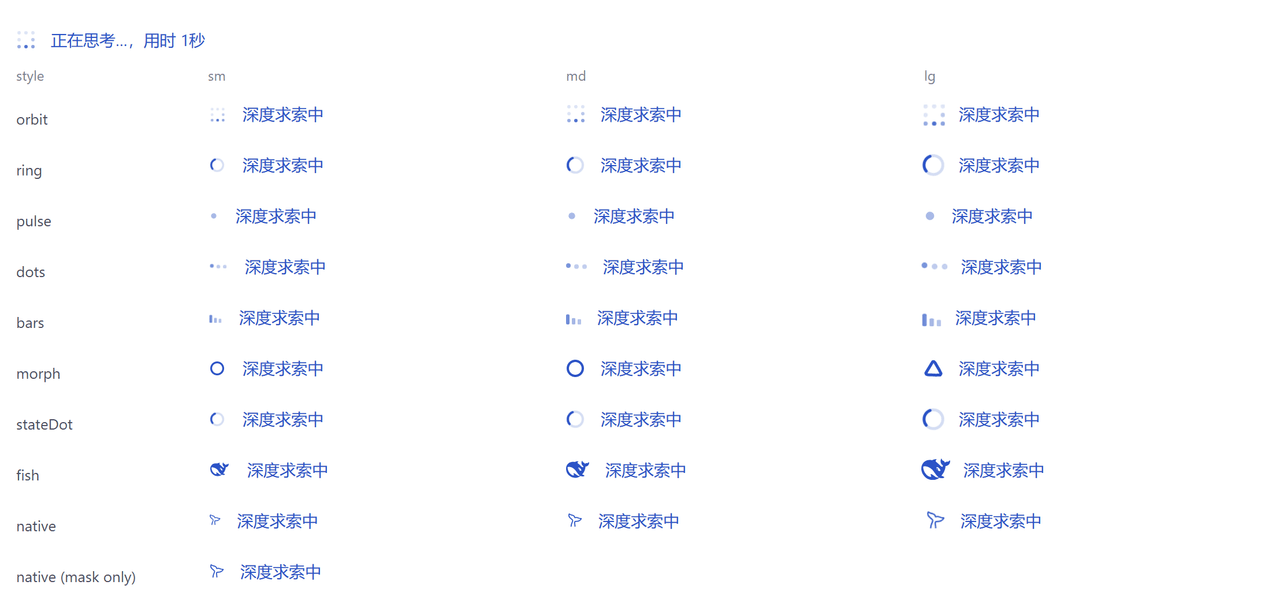
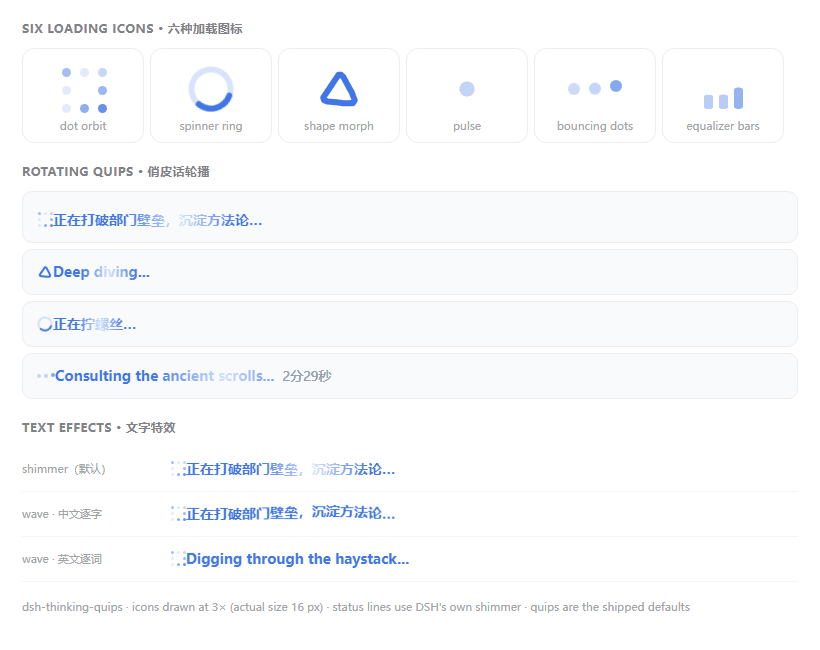
The plugin offers nine loading icons — dot orbit, spinner ring, shape morph, pulse, bouncing dots, equalizer bars, plus DSH's own StateDot spinner, logo mark, and a 60-frame APNG whale cloned from the live line — each available in S/M/L, with rotating bilingual quips edited through a small modal split into # Chinese and # English sections and a Language control with Follow UI / English only / Chinese only / Mixed modes. It provides a font-colour picker (hex, RGB, native colour wheel), one-click colour presets including brand blue, violet, teal, amber, and rainbow, all fitted to the on-screen background and floored at a 4.5:1 contrast ratio so the same chip stays legible in both light and dark themes; rainbow cycles through six fitted colours while its chip remains a static spectrum, respects Slow/Normal/Fast pacing, and freezes at the first colour under prefers-reduced-motion. A Sweep brightness slider writes the official TextShimmer token, Match theme fits the active theme's accent to 4.5:1, and a Time-per-quip control lets users tune how long each phrase stays on screen.
Text effects are limited to two choices — Shimmer (DSH's own sweep, since the plugin renders the official TextShimmer) and Wave (per-character lift) — because a hand-painted "glow" was retired as visually indistinguishable from the official sweep. An optional elapsed-time readout can be Inline (folded into the quip, the 0.2 shape) or Beside (a separate grey note, the 0.1 shape), or turned off entirely, sourced from turn.start.time and formatted via the official formatRunDuration. An "Indicator only" mode injects just the icon so the plugin can coexist with another status-text plugin. The plugin requires DSH ≥ 0.2.0-rc.2 on the web surface and detects both [data-chat-running] and the older [class*="turnStatus"] selectors, so 0.1.x shells keep working; uninstallation requires removing it from dsh.profile.bundles, running dsh plugin --profile web remove dsh-thinking-quips, and restarting dsh web. The repository is MIT-licensed.
dsh-thinking-quips 是一个 DSH 原生 Web 端 bundle 插件(v0.10.0),专用于个性化 DeepSeek Harness 的状态行,即会话中智能体工作时展示的那行默认文字(例如 Deep diving...)。它通过 dsh plugin --profile web add github:Saknutella/dsh-thinking-quips 安装,并在 $DSH_HOME/profiles/web/package.json 的 dsh.profile.bundles 中加入条目,重启 dsh web 即可生效。无需依赖、构建步骤、配置文件或网络请求,仅有一个手写客户端文件,设置存于 localStorage,且不修改任何 stock DSH 包。
插件提供九种加载图标(点轨道、自旋环、形状变形、脉冲、弹跳点、均衡器条以及 DSH 自带的 StateDot、Logo 标识和会游泳的鲸鱼 APNG),分 S/M/L 三档,并支持循环双语短语、中英文/混合语言切换、十六进制/RGB/原生色环取色以及品牌蓝、紫罗兰、青绿、琥珀与彩虹等一键预设。颜色控制保证在明暗主题下对比度不低于 4.5:1,彩虹模式下颜色循环仍维持此标准,且在系统请求减少动画时定格。
文字效果提供 Shimmer(DSH 官方 TextShimmer)与 Wave(逐字起伏)两种,时长可内联于短语文本或以灰色旁注呈现,并可关闭;动画速度有 Slow/Normal/Fast 三档,鲸鱼图标因动画内嵌于 60 帧 APNG 而由插件按节奏补充游动提示。插件要求 DSH ≥ 0.2.0-rc.2 Web 表面,同时通过 [data-chat-running] 与 class*="turnStatus" 两种选择器兼容 0.1.x 外壳,卸载时需从 dsh.profile.bundles 移除条目并执行 dsh plugin --profile web remove dsh-thinking-quips。
请帮我安装这个 DSH 插件。安装前先完成【兼容性检查 + 安全性检查】,检查通过再动手。

插件:dsh-thinking-quips(Saknutella/dsh-thinking-quips)
仓库:https://github.com/Saknutella/dsh-thinking-quips
本站详情页:https://www.yhbd.top/plugins/saknutella-dsh-thinking-quips/
本站登记:类型 plugin · 归类 原生 DSH 插件 · 许可证 MIT · ⭐ 2 · 最近提交 2026-10-01 · 主语言 JavaScript

按下面顺序执行,每步先把结论告诉我,再进入下一步:

【1 兼容性检查】
① 我这边:DSH 版本、Node 版本、操作系统、当前 profile(web / desktop)。
② 读它的 README、package.json、插件 manifest,列出它要求的 DSH 版本 / Node 版本 / 操作系统 / 外部依赖 / 需要另外先装的运行时。
③ 逐条比对,结论只写「满足 / 不满足 / 未知」三种;不满足的给出可行替代方案。
④ 检查是否和我已装的插件冲突:命令名重复、skill / tool 重名、端口占用、重复注册的 MCP server。

【2 安全性检查】
① 仓库可信度:和上面「本站登记」是否一致;star / fork 数、创建时间、最近提交,是否归档或长期停更。
② 安装脚本:逐行看 package.json 的 preinstall / install / postinstall,以及 install.sh、setup.ps1 之类脚本。出现 curl|bash、下载后直接执行、混淆代码、访问与插件功能无关的域名,立刻停下来告诉我,不要继续装。
③ 依赖:列出新增依赖,标出无人维护、或与知名包拼写近似的可疑包(typosquatting)。
④ 权限与副作用:它会读写哪些目录、访问哪些域名、需要哪些 DSH 权限(filesystem / network / shell / clipboard 等),以及怎么卸载和回滚。
⑤ 如果它要求 sudo / 管理员权限,或权限明显超出功能所需,先停下来问我。

【3 安装】
上面两步没有「不满足」和「高危项」时才执行;用官方推荐方式安装,不要自行提权。

【4 汇报】
用表格输出:检查项 / 结论 / 依据 / 是否需要我决策。拿不准的一律写「未知」并说明要我怎么确认——不要猜,也不要替我决定。
Send this message to DSH in your current session: it verifies compatibility and security first (answering met / not met / unknown item by item) and only installs once everything checks out — it will stop and ask you if it finds a high-risk item. The box scrolls; the copy is the full prompt. CLI install commands may not be accurate across systems, so DSH is the safer route.把上面这条消息直接发给当前会话里的 DSH:它会先核对兼容性与安全性(逐条给「满足 / 不满足 / 未知」),确认没问题再安装,有高危项会停下来问你。框内可滚动,复制到的是完整提示词;安装命令不一定准确,发给 DSH 更稳。
- Only 2 stars - very few users, little community feedback星标只有 2,几乎没人在用,遇到问题缺少社区反馈
DSH walks through these 9 checksDSH 会逐条核对这 9 项
Compatibility兼容性
- DSH, Node, OS and profile requirementsDSH 版本 / Node 版本 / 操作系统 / profile 是否满足要求
- External dependencies and runtimes (Electron / Python / Docker, ...)外部依赖与运行时(Electron / Python / Docker 等)是否齐备
- Conflicts with installed plugins: command names, skill / tool names, ports, duplicate MCP registration与已装插件是否冲突:命令名、skill / tool 重名、端口占用、重复 MCP 注册
Security安全性
- Repo matches the facts registered here; archived or abandoned?仓库是否与页面登记一致,是否归档或长期停更
- Safety of preinstall / install / postinstall and install.sh / setup.ps1preinstall / install / postinstall 与 install.sh、setup.ps1 是否安全
- curl|bash, download-then-execute, obfuscation, unrelated domains → stop immediatelycurl|bash、下载即执行、混淆代码、无关域名 → 立刻停止
- Typosquatting or unmaintained packages among the new dependencies新增依赖里有没有 typosquatting 或无人维护的包
- Requested permissions vs. what the feature actually needs申请了哪些权限、是否超出功能所需(filesystem / network / shell / clipboard)
- Any sudo / admin requirement, plus uninstall and rollback是否要求 sudo / 管理员权限,以及卸载与回滚方式
Anything uncertain must be marked unknown with a note on how to confirm it. This site's signal screen is a static snapshot, not a security audit.拿不准的必须标「未知」并说明要我怎么确认。本站的信号筛查是静态快照,不能替代安全审计。
Or use CLI install (for developers)或使用命令行安装(适合开发者)
CLI Install命令行安装
dsh plugin --profile web add github:Saknutella/dsh-thinking-quips把 Saknutella/dsh-thinking-quips 加入你的 DSH 配置(web profile)即可启用。
READMEREADME
dsh-thinking-quips
v0.11.5 · a DSH bundle (install-and-go) · web client plugin
Lightweight personalisation for the DeepSeek Harness status line — the line the
conversation shows while the agent is working (DSH's default Deep diving...).
Rotating bilingual quips, sixteen loading icons in three sizes, one-click colour presets,
theme-colour matching that reaches 4.5:1, and an optional elapsed-time readout, all in
Settings → Playful quips (its own page in the settings nav, not a row under General).
Incremental by design: no dependencies, no build step, no config file, no network
requests. One hand-written client file, settings in localStorage, and stock DSH
packages are not modified.
Features
- Sixteen loading icons — dot orbit (default), shape morph, pulse, bouncing dots,
equalizer bars, eight drawn sprites from two contributed design families
(a jelly block that squashes, a metronome arm, a mallet with sparks, a pinwheel, two rings
rippling outwards, a bead running its track, a pair of sparkle stars and a bouncing ball with
its own shadow), plus three that reuse what DSH already ships: the official
StateDotspinner (the plugin's own ring went in 0.11.2 — the two were the same gesture), its logo mark, and DSH's own running whale (cloned out of the live line, animation included) — each in S / M / L. DSH's whale is one of the choices rather than a permanent neighbour, so the line always shows exactly one indicator; pick Official whale to have it back. - Rotating quips — your own list, one per line, split into
# Chinese/# Englishsections and edited in a small modal; the Language control picks which section shows (Follow UI, English only, Chinese only, or Mixed). - Font colour — preview swatch, hex, RGB, or the native colour wheel.
- Colour presets — brand blue, violet, teal, amber and rainbow, one click each. Every chip is fitted to the background that is on screen and floored at 4.5:1, so the same chip stays legible in the light and the dark theme, and picking one stops Match theme from following (you named a colour). Brand blue writes the plugin's default sentinel, so "brand blue" still means DSH's own default rather than an override of it. Rainbow cycles the line's colour — icon included — through six colours that are each fitted and floored, so the promise holds at every moment of the cycle, while the chip itself stays a still spectrum; the cycle follows Slow / Normal / Fast and freezes at the first colour when the system asks for reduced motion.
- Sweep brightness — 0–100%, how much brighter the official sweep's moving highlight is
than the text (0% makes it the text colour, i.e. an invisible sweep; 100% is white). It
writes the token the official
TextShimmerpaints that highlight with. - Match theme — one click fits the active theme's accent colour to at least 4.5:1 against the live background, and keeps following theme switches until you stop it.
- Text effect — Shimmer (default: DSH's own sweep, because the plugin renders the
official
TextShimmercomponent) or Wave (each character/word lifts in turn). Two choices, not four: the hand-painted "glow" copy of the official sweep was indistinguishable from it side by side, so it was retired. - Elapsed time — Inline folds the duration into the quip so it animates with
the text (the DSH 0.2 shape), Beside shows it as a separate grey note outside the
animation (the 0.1 shape), or turn it off. The time comes from DSH's own turn
start (
turn.start.time) and formats exactly like the officialformatRunDuration. - Animation speed — Slow / Normal / Fast in one click. Normal is the shipped pace and overrides nothing; the others scale the plugin's own animations. DSH's own whale carries its animation inside the image (a 60-frame APNG), so for that one the plugin adds its own swim cue at the chosen pace instead.
- Time per quip.
- Indicator only — inject just the icon and leave the status text alone, so it can sit alongside another status-text plugin.
Showing the opening section of the README — the full document lives in the repository以上为 README 开头摘要,完整文档在仓库内 · View the full README on GitHub →在 GitHub 查看完整 README →
Related相关推荐
-
 theBigGavin/marketingdashboard
面向金融与产业研究的一屏式实时行情大屏:A股/港股/美股指数、大宗商品、美债收益率、板块热点、主力资金流、7×24 快讯、产业链自选股、AI 大模型 Token 追踪。A real-time market research cockpit …
theBigGavin/marketingdashboard
面向金融与产业研究的一屏式实时行情大屏:A股/港股/美股指数、大宗商品、美债收益率、板块热点、主力资金流、7×24 快讯、产业链自选股、AI 大模型 Token 追踪。A real-time market research cockpit …
-
 hancao97/hanai-investment-dsh
Local-first A-share research workbench for DeepSeek Harness: market dashboards, watchlists, valuation, four investor age…
hancao97/hanai-investment-dsh
Local-first A-share research workbench for DeepSeek Harness: market dashboards, watchlists, valuation, four investor age…
- PerryLink/dsh-data-quality DeepSeek Harness plugin: deterministic data profiling, cleaning, and verification (dsh-data-quality)
-
 maddogfinance/dsh-trading
Trading research workbench for DeepSeek Harness (dsh): typed market-data seam, deterministic indicators, interactive cha…
maddogfinance/dsh-trading
Trading research workbench for DeepSeek Harness (dsh): typed market-data seam, deterministic indicators, interactive cha…
- ali-meoo/meoo-cli meoo cli 是秒悟(Meoo)官方推出的命令行工具,让 Claude Code、Codex、Cursor、Qoder等本地 agent 在帮你写完前端代码后,能直接接管「数据库、用户登录、文件存储、部署上线」的所有云端工作——你只需要…
-
 lehhair/dsh-diff-viewer
DSH Web GUI PiUI-style diff viewer plugin: replaces the stock DiffBlock for write/edit tool calls via ui-tool diff-card …
lehhair/dsh-diff-viewer
DSH Web GUI PiUI-style diff viewer plugin: replaces the stock DiffBlock for write/edit tool calls via ui-tool diff-card …
- seed-forge/harness-ai-kit Package manager for AI agent assets — 42 skills, 5 CLIs, 1 plugin. Skills for AI/LLM agent engineering, eval-driven dev,…
- YottaMeta/deepseek-harness DeepSeek Harness: Everything is a Plugin.