sanshanya/better-model-provider
DeepSeek Harness的按模型能力声明:推理努力级别(wire拼写)+请求模态(视觉),适用于兼容OpenAI的提供商。设置部分,零运行时harness依赖,无YAML。
Project Overview项目介绍
better-model-provider is a DeepSeek Harness plugin that adds a Model capabilities page in the settings sidebar. It edits reasoningEfforts, input modalities, and token capacities per model—declarations on custom routes, sparse overrides on official-catalog routes. Use it to expose reasoning levels, enable image input, or tune context windows and max tokens. Note: API keys and route lifecycle remain on the official Models page, and built-in dedicated-adapter models do not appear here.
better-model-provider 是 DeepSeek Harness 插件,在设置侧栏提供"模型能力"页。核心能力是按行编辑自定义模型的 reasoningEfforts、输入模态与 token 上限(写在自己的路由声明中),以及为官方目录路由配置稀疏覆盖。适用于需要解锁推理档位、为模型开启图像输入或调整上下文容量的场景。注意:API 密钥与路由生命周期仍需在官方 Models 页管理;内置专用适配器模型不显示于此。
请帮我了解并安装插件:【better-model-provider】【https://github.com/sanshanya/better-model-provider】Send this message to DSH in your current session. CLI install commands may not be accurate across systems — DSH will figure it out for you.把上面这条消息直接发给当前会话里的 DSH,让它帮你了解并安装。安装命令不一定准确,发给 DSH 更稳。
Or use CLI install (for developers)或使用命令行安装(适合开发者)
CLI Install命令行安装
dsh plugin --profile web add github:sanshanya/better-model-provider把 sanshanya/better-model-provider 加入你的 DSH 配置(web profile)即可启用。
READMEREADME
better-model-provider
Per-model capability editing for DeepSeek Harness: reasoning-effort levels (with wire spellings), input modalities, and token capacities — declarations on your own routes, sparse overrides on official-catalog routes.
Custom models: edit declarations. Official models: edit overrides. Provider configuration remains official.
Why
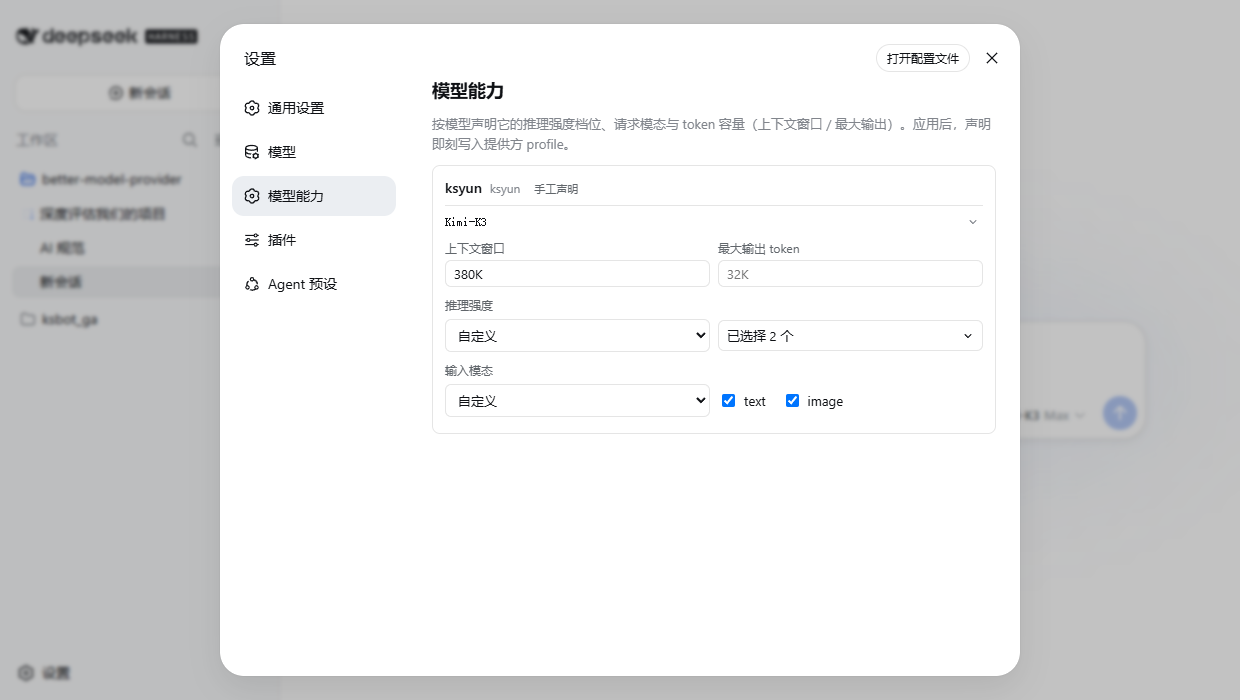
Two per-model fields stayed YAML-only: reasoningEfforts and input. Until declared, the picker shows no effort control and image sessions refuse the model (... does not accept image input). This page edits them plus contextWindow / maxTokens — one row fully configures one model.
Install
dsh plugin --profile web add github:sanshanya/better-model-provider#master
CI rebuilds and republishes ready-built artifacts to the master branch on every green main push, so this path never builds locally. Installing the default branch (github:sanshanya/better-model-provider) builds from source and prints one pnpm allowBuilds key to add, then rerun add; a local link: install must npm install && npm run build first. Restart dsh web, and the Settings sidebar gains Model capabilities.
dsh plugin --profile web rm better-model-provider
Use
- Configure the provider and API key on the official Models page first — keys and route lifecycle are always managed there; this page does not repeat them.
- Expand a model row and edit its capabilities:
- Reasoning effort: pick Custom, check the levels you need; to offer "off" too, check
off(its wire value may stay blank). - Vision models: check
imageunder input modalities — otherwise sending an image to this model gets refused. - Capacities: K/M spelling reads best (
380K,1M). Tap Apply and the change takes effect at once.
- Reasoning effort: pick Custom, check the levels you need; to offer "off" too, check
- Official-catalog routes: tap Manage official models and edit. Every change here stores only the difference from the official default — everything else keeps following catalog updates; Reset to official defaults undoes all of one model's edits at once.
- Manage official providers (N) unfolds installed-but-unconfigured routes: pick one, apply the first change, and the route comes into being (its API key still goes on the official page).
Dedicated-adapter apps (built-in DeepSeek / OpenAI Codex) declare their capabilities on their own settings pages and never appear here.
Compatibility
We declare compatibility with the whole dsh 0.1.x line: contract @deepseek-ai/dsh-api-remotes >=0.1.0-rc.7 <0.2.0, real-harness lanes verified on rc.7, rc.8, 0.1.1-rc.2, and 0.1.2-alpha.1/alpha.2 — a daily CI canary re-proves both published channels (latest and alpha) against their current npm dist-tags. Surfaces outside the contract degrade silently. Development gates, live lanes, and invariants: see CONTRIBUTING.md.
License
MIT
Related相关推荐
-
 ysr666/dsh-vision-router
Eyes for text-only DeepSeek Harness agents: built-in free vision chain (no key) + pixel-level vision tools (Q&A, groundi…
ysr666/dsh-vision-router
Eyes for text-only DeepSeek Harness agents: built-in free vision chain (no key) + pixel-level vision tools (Q&A, groundi…
-
 Mars-Sea/dsh-commandcode-provider
Command Code provider plugin for DeepSeek Harness (dsh). Adds Command Code model access, live model catalog, plan-aware …
Mars-Sea/dsh-commandcode-provider
Command Code provider plugin for DeepSeek Harness (dsh). Adds Command Code model access, live model catalog, plan-aware …
-
 franksong2702/dsh-codex-connect
Use openai-codex models and image generation via ChatGPT OAuth for DeepSeek Harness.
franksong2702/dsh-codex-connect
Use openai-codex models and image generation via ChatGPT OAuth for DeepSeek Harness.
-
 Stormycry-cryp/dsh-AuthInOne
Self-contained DeepSeek Harness (DSH) plugin for Provider/Auth login, model switching, image fallback, token/cost analyt…
Stormycry-cryp/dsh-AuthInOne
Self-contained DeepSeek Harness (DSH) plugin for Provider/Auth login, model switching, image fallback, token/cost analyt…
-
 labring/sealos-skills
AI agent skills for Sealos — deploy any project, provision databases, object storage & more with one command. Works with…
labring/sealos-skills
AI agent skills for Sealos — deploy any project, provision databases, object storage & more with one command. Works with…
-
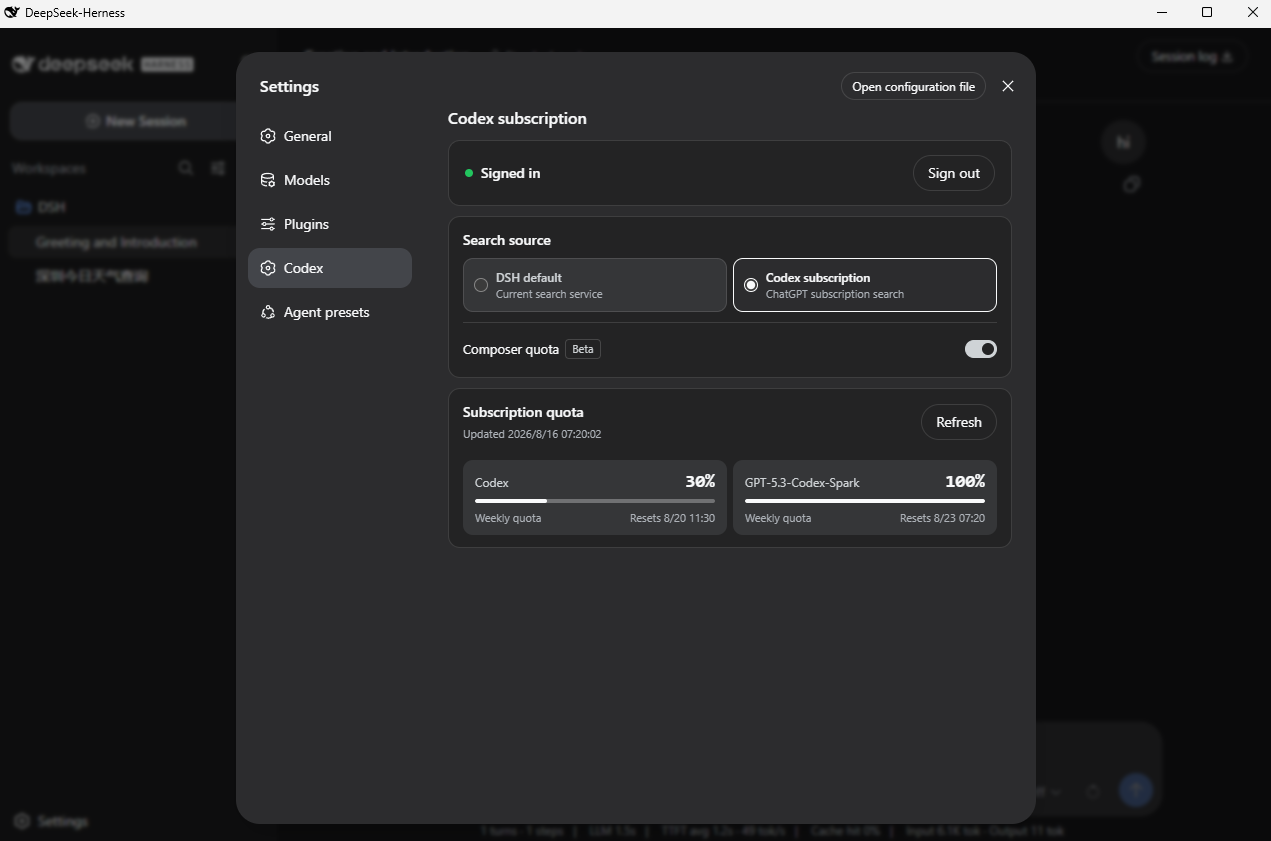 WSL043/dsh-codex-subscription
把 ChatGPT / Codex 订阅接入 DeepSeek Harness:OAuth、模型、额度、搜索和图片生成,无需 API Key 或 Codex CLI。
WSL043/dsh-codex-subscription
把 ChatGPT / Codex 订阅接入 DeepSeek Harness:OAuth、模型、额度、搜索和图片生成,无需 API Key 或 Codex CLI。
-
 BlockRunAI/dsh-clawrouter
A safety gate for DeepSeek Harness: a stronger model reviews dangerous tool calls before they run. Plus vision and Block…
BlockRunAI/dsh-clawrouter
A safety gate for DeepSeek Harness: a stronger model reviews dangerous tool calls before they run. Plus vision and Block…
-
 MJorgin/dsh-media-skills
Free image reading & generation for DeepSeek Harness (rc.7 / rc.8 / v0.1.1-rc.1 / rc.2 / v0.1.2-alpha.3) — paste-image r…
MJorgin/dsh-media-skills
Free image reading & generation for DeepSeek Harness (rc.7 / rc.8 / v0.1.1-rc.1 / rc.2 / v0.1.2-alpha.3) — paste-image r…