siberiah2o/dsh-plugin-terminal
DeepSeek Harness(DSH Web GUI)的底部终端面板插件
Project Overview项目介绍
DSH web GUI bottom terminal panel: multi-tab, PTY-backed (ConPTY/openpty), session+scrollback persisted across restarts, per-tab working directory. xterm.js 6 with truecolor, Unicode v11, 10000-line scrollback; tunable shortcut (default Ctrl+) and shell via Settings → Plugins. Designed for full-screen TUIs like codex/claude code. Install only through dsh plugin`, not plain npm. Caveat: over remote http (not https / not localhost) the clipboard API is blocked, so copy falls back to execCommand and Paste uses the browser's native context menu.
DSH 网页端的底部终端面板插件,支持多标签页、跨重启恢复会话与工作目录记忆。基于 xterm.js 6 与 PTY 通道,提供深色终端主题、可配置快捷键(默认 Ctrl+)与高度拖拽。在 Settings → Plugins 中配置 toggleShortcut 和 shellCommand。适用于在 DSH 内并行运行 codex 或 claude code 等全屏 TUI 工具。需通过 dsh plugin` 安装,不可直接用 npm;通过远程 http(非 https/非 localhost)访问时,剪贴板 API 不可用,会回退到 execCommand。
请帮我了解并安装插件:【dsh-plugin-terminal】【https://github.com/siberiah2o/dsh-plugin-terminal】Send this message to DSH in your current session. CLI install commands may not be accurate across systems — DSH will figure it out for you.把上面这条消息直接发给当前会话里的 DSH,让它帮你了解并安装。安装命令不一定准确,发给 DSH 更稳。
Or use CLI install (for developers)或使用命令行安装(适合开发者)
CLI Install命令行安装
dsh plugin --profile web add dsh-plugin-terminal把 siberiah2o/dsh-plugin-terminal 加入你的 DSH 配置(web profile)即可启用。
READMEREADME
dsh-plugin-terminal
Bottom terminal panel for the DeepSeek Harness (DSH) Web GUI — an interactive multi-tab shell pinned to the bottom of the page (ConPTY on Windows, openpty on Linux/macOS).
中文 · MIT
Install
dsh plugin --profile web add dsh-plugin-terminal && dsh web
Note: this is a DSH (DeepSeek Harness) plugin — do not use plain
npm i dsh-plugin-terminal; it must be installed throughdsh pluginto activate.
Screenshots
| Collapsed | Expanded | Multi-tab |
|---|---|---|
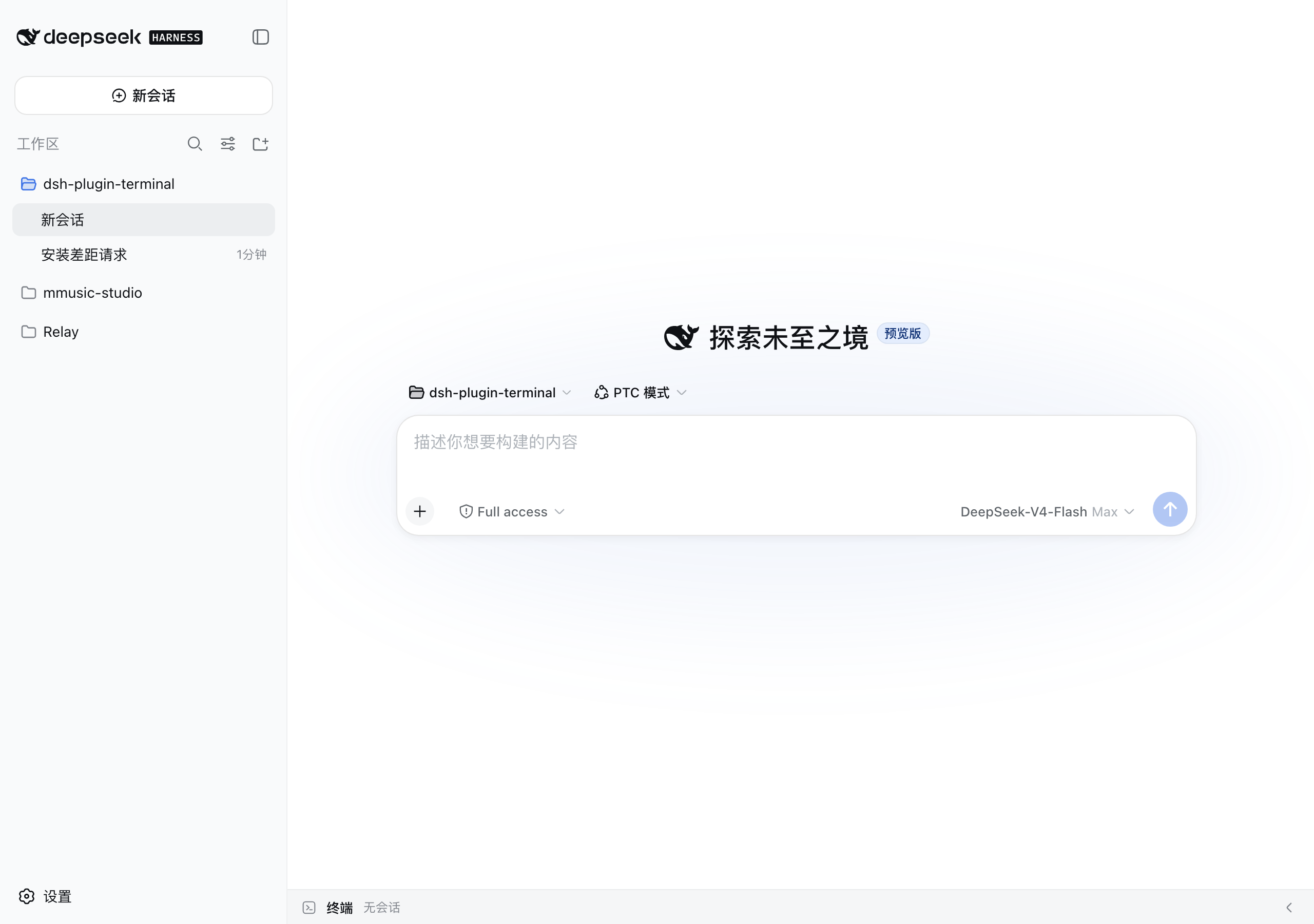 |
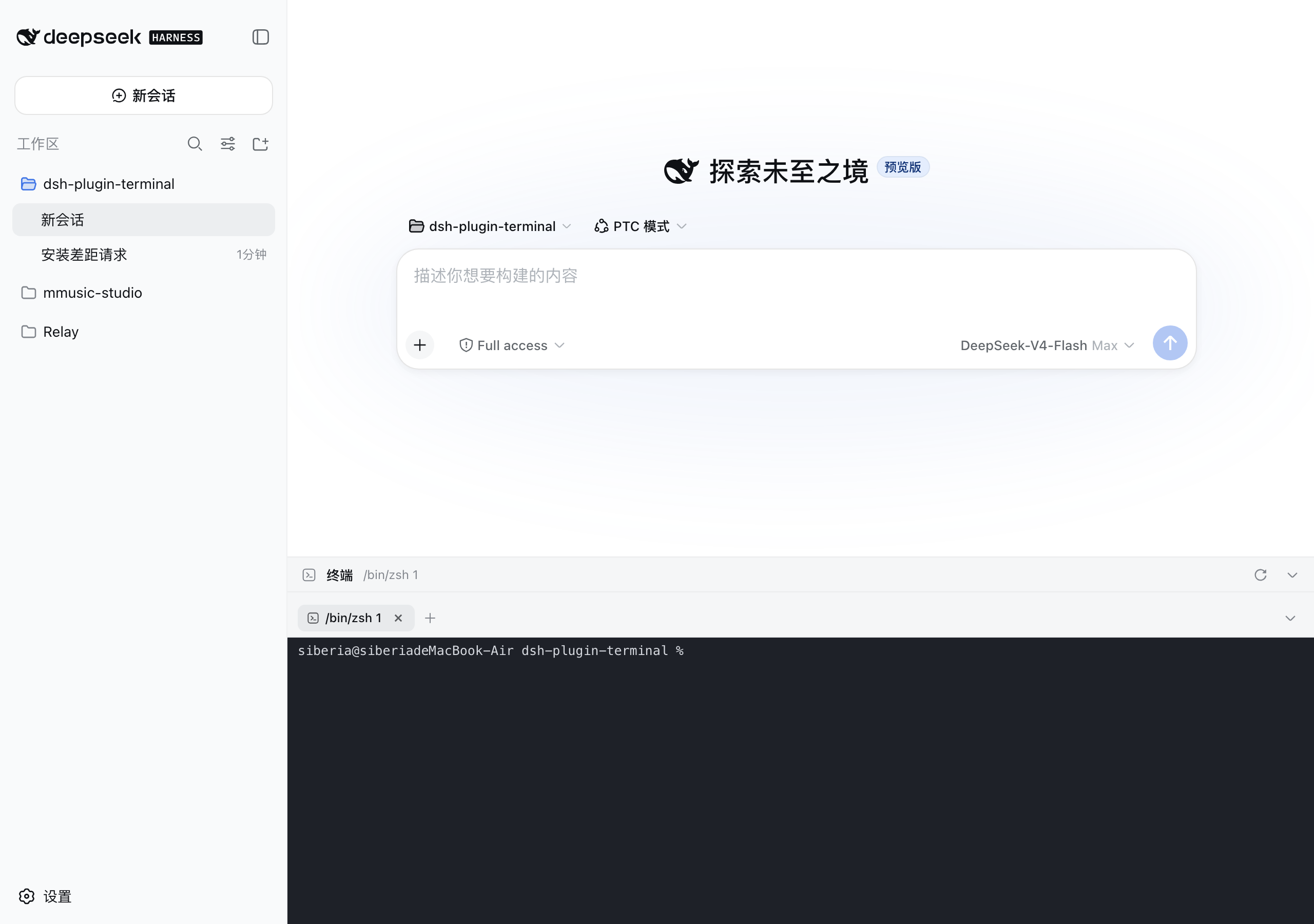 |
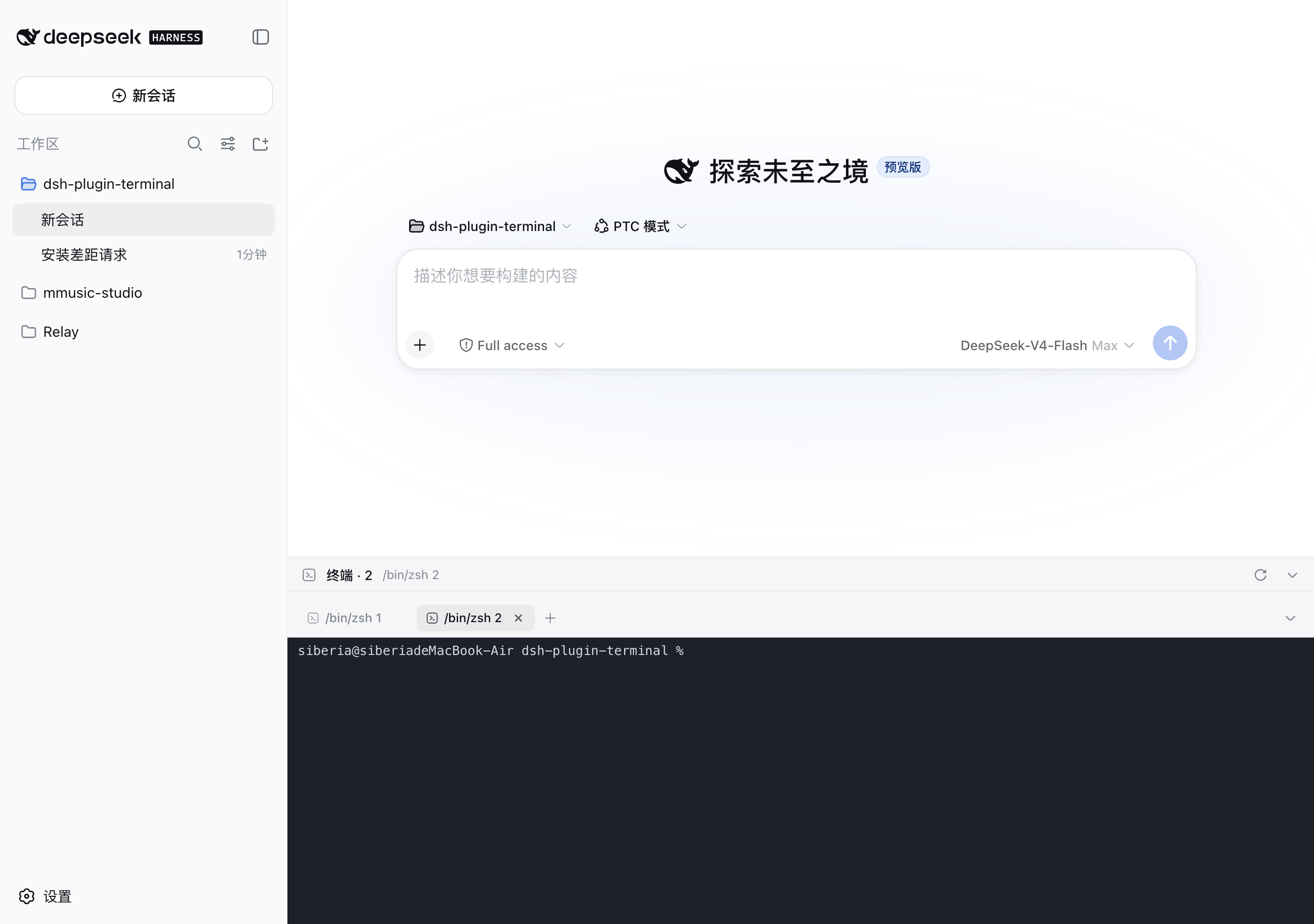 |
Features
- Bottom panel pinned to the viewport, aligned with the conversation column; the input box always stays above the terminal
- Configurable shortcut toggles (default
Ctrl+``, e.g.Ctrl+J`); drag the top grip to resize (120px–78% viewport, remembered) - Multi-tab:
+new, ✕ close, ⟳ restart; processes keep running on tab switch; live sessions restore after refresh or workspace switch - Every terminal remembers its working directory: new tabs start in the current DSH workspace; after a
dsh webrestart, ⟳ brings the process back in its original directory instead of the server launch directory - Terminals survive dsh web restarts: session metadata + scrollback are persisted live to
$DSH_HOME/plugin-data/terminal/; after a restart they come back as "exited" history tabs (full screen replay, one-click restart of the process); tabs you closed stay closed - xterm.js 6: colors, blinking cursor, alternate screen, Unicode v11 (CJK width tables), 10000-line scrollback
- WebSocket duplex channel to the PTY; dark terminal surface in both light and dark themes
- Copy/paste: select with the mouse and release to copy, right-click to paste;
Ctrl+Vpastes,Ctrl+Shift+C/Ctrl+Shift+Vcopy/paste when the clipboard API is available- ⚠️ When the GUI is opened over remote http (not https / not localhost) browsers disable
navigator.clipboard(insecure context) - the plugin falls back toexecCommandcopy and lets the browser's native context-menu Paste through, so both still work
- ⚠️ When the GUI is opened over remote http (not https / not localhost) browsers disable
Configuration
Plugin behavior lives in the DSH settings document ($DSH_HOME/settings.yaml, section terminal), editable from the GUI at Settings → Plugins. Changes apply to sessions created afterwards — no restart needed; tabs that already exist keep the command they started with.
| Field | Default | Meaning |
|---|---|---|
toggleShortcut |
`ctrl+`` | Keyboard shortcut toggling the bottom panel. Format: `[ctrl |
shellCommand |
(empty — auto-detect) | Command line used to start new terminal sessions. Empty means the platform default (pwsh/powershell/cmd on Windows, $SHELL on POSIX). |
Example — launch cmder on Windows and bind the panel to Ctrl+J:
terminal:
  toggleShortcut: ctrl+j
  shellCommand: cmd.exe /k "C:\cmder\vendor\init.bat"
Notes:
shellCommandis used verbatim (no flags are injected): the command line is split on spaces with double quotes honored, so quoted paths work.- If the shortcut is a key the terminal also consumes (Ctrl+J is the shell's line feed), a press while a terminal pane has focus goes to the shell instead of toggling the panel.
- Operator override: the environment variables
DSH_PLUGIN_TERMINAL_TOGGLE_SHORTCUTandDSH_PLUGIN_TERMINAL_SHELL_COMMANDtake precedence over the settings document (and are the only way to configure headless compositions without the settings service).
Running codex / claude code in the panel
These AI coding CLIs are full-screen TUIs (ANSI escapes + alternate screen + truecolor) and demand a lot from the terminal link. The plugin is tuned for them:
- Child env gets TERM=xterm-256color and COLORTERM=truecolor (when unset), plus LANG/LC_ALL=en_US.UTF-8 and PYTHONIOENCODING=utf-8 on non-Windows, preventing 256-color fallback and CJK mojibake
- xterm.js 6 answers OSC 10/11/12 queries out of the box (Codex theme detection via background-color query just works)
- unicodeVersion "11" keeps mixed CN/EN output aligned; drawBoldTextInBrightColors: false keeps true colors on bold text; CJK fallbacks in the font stack; 10000-line scrollback (500k-char server ring buffer)
If rendering still misbehaves:
- Claude Code: run /tui fullscreen in the session (or CLAUDE_CODE_NO_FLICKER=1 claude) to switch to the flicker-free fullscreen renderer; /tui default reverts
- Inside tmux: make sure TERM=tmux-256color and tmux >= 3.4, add
set -ga terminal-overrides ',xterm-256color:RGB'if needed - Windows mojibake: use Windows Terminal, chcp 65001, enable the "Beta: Use Unicode UTF-8" system option; fall back to WSL if it persists
- Update the CLI: most rendering bugs are regressions already fixed in newer versions
License
MIT
Related相关推荐
-
 chuspeeism/dashi-taskboard
现代化可灵活嵌入的任务面板,支持 Codex、DeepSeek Harness
chuspeeism/dashi-taskboard
现代化可灵活嵌入的任务面板,支持 Codex、DeepSeek Harness
-
 ccch1mneyyy/working-activity
Lively Working-line extension for pi CLI and DSH
ccch1mneyyy/working-activity
Lively Working-line extension for pi CLI and DSH
-
 Aisland-SJL/dsh-worktable
🖥️ Agent-project workbench for DeepSeek Harness — sidebar app drawer + dockable split workspace + a live control room w…
Aisland-SJL/dsh-worktable
🖥️ Agent-project workbench for DeepSeek Harness — sidebar app drawer + dockable split workspace + a live control room w…
-
 zhoushoujianwork/easyeda-agent
嘉立创EDA专业版(EasyEDA Pro)自动化:给 AI harness 装上画板的「手」—— 一套 typed 原理图/PCB 动作,CLI / Agent Skill / stdio MCP 三形态融合接入。承接嘉立创「不以卖板赚钱…
zhoushoujianwork/easyeda-agent
嘉立创EDA专业版(EasyEDA Pro)自动化:给 AI harness 装上画板的「手」—— 一套 typed 原理图/PCB 动作,CLI / Agent Skill / stdio MCP 三形态融合接入。承接嘉立创「不以卖板赚钱…
-
 morluto/rea
Reverse engineer anything with agents, from app behavior down to native binaries.
morluto/rea
Reverse engineer anything with agents, from app behavior down to native binaries.
-
 linhay/harmony-next.skills
Offline HarmonyOS NEXT developer skill library for AI coding assistants. Covers API 12–26 declarations, ArkTS/ArkUI, NDK…
linhay/harmony-next.skills
Offline HarmonyOS NEXT developer skill library for AI coding assistants. Covers API 12–26 declarations, ArkTS/ArkUI, NDK…
- pax-beehive/dsh-hub-cli Open-source CLI, schemas, resolver, and DSH agent tools for DSH Plugin Hub
- ericshang98/Perfect-Web-Clone Pixel-perfect clones of any webpage. Paste a URL, get a measured Vite + React replica.