sjh9714/dsh-win32
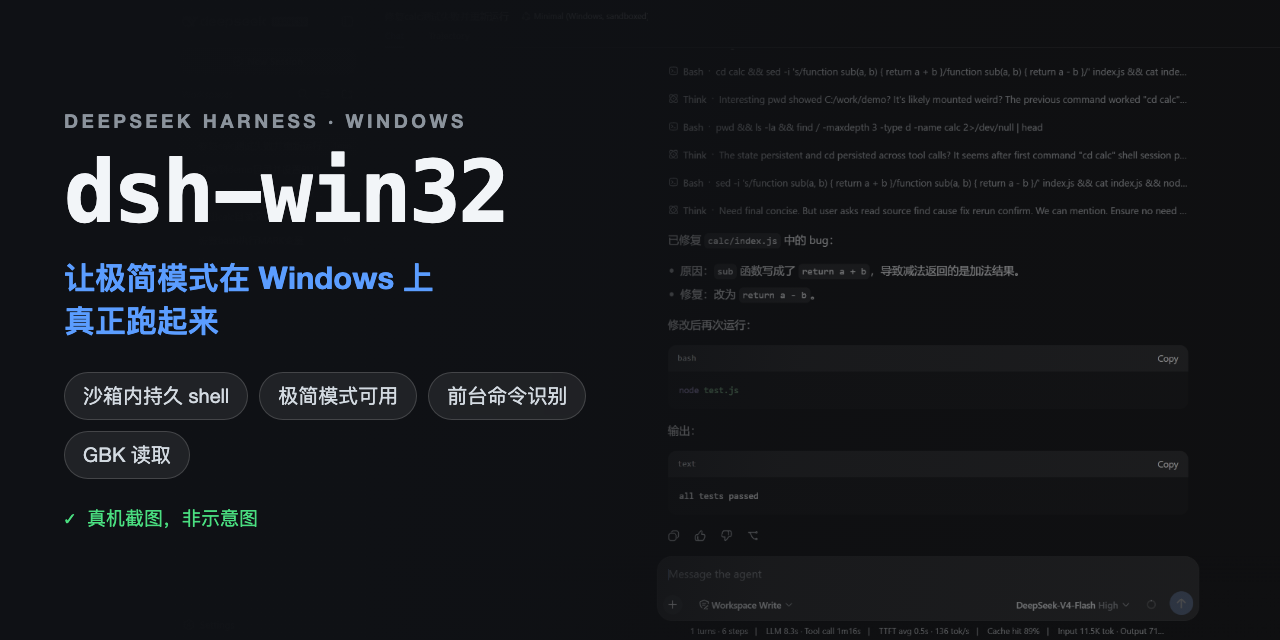
搞定Windows上的DSH。一行命令安装极简模式持久shell,沙箱也已内置。
项目介绍Project Overview
dsh-win32 是一款 DSH 插件,校验官方 PowerShell 与 Windows ACL 沙箱环境,针对已知的 koffi 运行时故障进行安全修复并创建桌面快捷方式。在原生 Windows 上启用 Workspace Write、会话异常或需恢复旧版 Git Bash/builbox 预设时运行。局限:依赖 PowerShell 7,需自行安装;不自动安装 Git 或 WSL。
dsh-win32 is a DSH plugin that verifies the official persistent PowerShell and Windows ACL sandbox, applies safe repairs to known broken koffi runtimes, and creates a desktop shortcut for DSH. Use it when running DSH natively on Windows, troubleshooting session startup failures, or migrating from legacy Git Bash and busybox presets. It does not install PowerShell 7, Git, WSL, or any extra DSH bundle on the current path.
请帮我了解并安装插件:【dsh-win32】【https://github.com/sjh9714/dsh-win32】把上面这条消息直接发给当前会话里的 DSH,让它帮你了解并安装。安装命令不一定准确,发给 DSH 更稳。Send this message to DSH in your current session. CLI install commands may not be accurate across systems — DSH will figure it out for you.
或使用命令行安装(适合开发者)Or use CLI install (for developers)
命令行安装CLI Install
dsh plugin --profile web add github:sjh9714/dsh-win32把 sjh9714/dsh-win32 加入你的 DSH 配置(web profile)即可启用。
READMEREADME
dsh-win32
Fix DSH on Windows. No WSL.
Official PowerShell. Workspace Write. One command.
npx dsh-win32 setup
Current DeepSeek Harness already includes persistent PowerShell and a Windows ACL sandbox. dsh-win32 checks that official stack, finds known Windows failures, applies the repairs it can prove safe, and creates a desktop shortcut.
It does not install Git, PowerShell, busybox, WSL, or another DSH bundle on the current path.
中文 · Windows evidence and legacy details




See the current setup
Reproduced setup flow. This is not a screen recording.
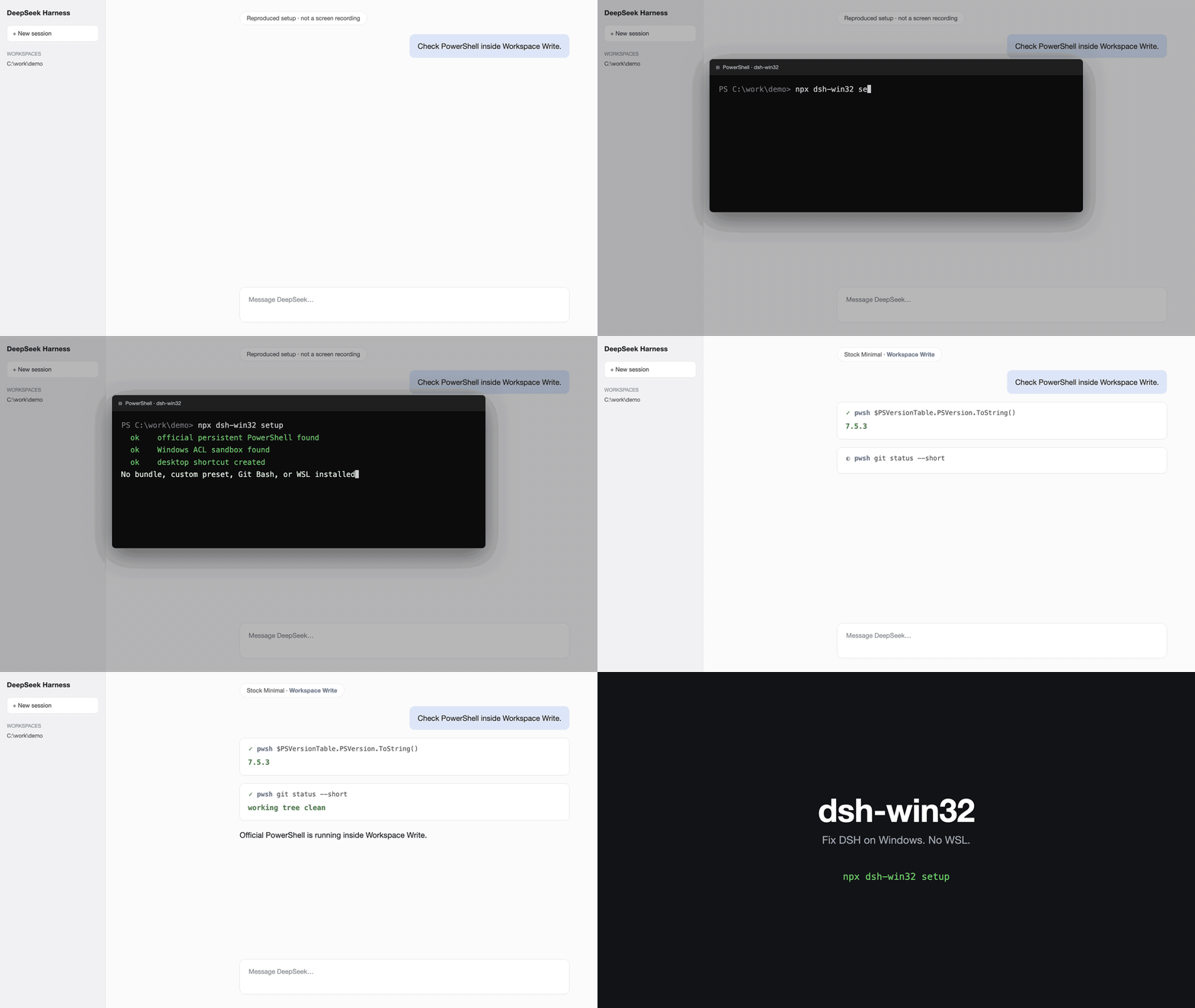
The command checks the official persistent PowerShell and Workspace Write packages, creates the shortcut, and leaves the profile on the stock Minimal preset.
What setup does
- Checks the latest published DSH Windows package contract
- Checks PowerShell 7 and known broken koffi runtimes
- Creates a
DeepSeek Harnessdesktop shortcut for the Web profile - Leaves the official profile and preset unchanged
- Shows the exact next steps for a first session
After setup, open DSH, add a workspace, choose the stock Minimal preset, and keep Workspace Write enabled.
Use another profile without creating a shortcut.
npx dsh-win32 setup --profile desktop --no-shortcut
--sandboxed remains accepted for old notes and scripts. Current DSH already provides the sandbox, so the flag makes no extra change.
Live verification of an installed stack
npx dsh-win32 verify
npx dsh-win32 verify --json
verify is a model- and API-key-free acceptance run against an already installed @deepseek-ai/dsh dependency tree. It does not use registry metadata as proof. In an isolated temporary home and workspace it invokes the installed model-facing persistent pwsh tool through the official terminal, subprocess, Workspace Write policy, and Windows ACL sandbox components.
A pass requires all of these live observations:
- 64-bit PowerShell 7 launches and reports a real executable
- two
pwshcalls retain the same PTY, current directory, and environment state - exact content is written and read inside the temporary workspace
- a normal-process control can write the isolated outside target, while confined PowerShell is denied and creates no file
- the shell recovers after denial; cancellation tears down its PTY; a replacement call works; and a second cancellation tears down cleanly
- every runtime resource, temporary home, and temporary workspace is removed
No user DSH profile, config, workspace, or PowerShell profile is loaded or changed. Secret-bearing environment variables are not passed to the worker, and reports contain no tested paths or terminal output. Native Windows and a DSH-supported Node release are required; Node 23 is explicitly unsupported.
If a timeout or output limit leaves worker or descendant containment unconfirmed, verification fails and preserves the isolated snapshot instead of deleting files under a potentially live process.
The boundary is deliberate: this composes the installed official components and invokes the real persistent tool, but it does not start the complete stock Minimal host/preset or make a model request. A pass must therefore be read as component-chain acceptance, not as an end-to-end stock-session claim.
Doctor and safe repair
npx dsh-win32 doctor
npx dsh-win32 doctor --json
npx dsh-win32 fix
doctor verifies the published DSH Windows package contract and checks local Windows failures. Its JSON output follows the dsh-doctor/v1 envelope. Use verify when you need live evidence from the installed stack rather than registry metadata.
fix only repairs installed koffi versions that are known broken or fail a real runtime load. It verifies the load again after repair.
Legacy DSH
DSH rc.6 and older did not ship the current official PowerShell stack. The previous Git Bash and busybox presets remain available behind an explicit flag.
npx dsh-win32 setup --legacy
npx dsh-win32 setup --legacy --sandboxed
npx dsh-win32 doctor --legacy
The legacy Git Bash preset needs danger-full-access. The legacy busybox preset can run in Workspace Write. Neither path installs Git automatically.
Read the implementation evidence, compatibility history, and complete legacy limitations.
Honest limits
doctorchecks published package metadata;verifyseparately reports and loads the selected installed DSH identity.verifydoes not boot the complete stock Minimal host/preset, so host wiring and UI session ownership remain outside its pass claim.- PowerShell 7 is recommended. dsh-win32 does not install it.
- A legacy busybox session uses ash rather than Bash.
- Editing a legacy encoded file writes UTF-8.
- Treat
C:\tmpas outside the expected legacy write fence until the upstream Windows path issue is fixed.
License
MIT.
相关推荐Related
-
 nexu-io/open-design
🎨 Best DeepSeek Harness Design Plugin. The open-source Claude Design alternative. 🖥️ Local-first desktop app. 🖼️ Your…
nexu-io/open-design
🎨 Best DeepSeek Harness Design Plugin. The open-source Claude Design alternative. 🖥️ Local-first desktop app. 🖼️ Your…
-
 ruvnet/ruflo
🌊 The original agent meta-harness. Deploy intelligent multi-player swarms, coordinate autonomous workflows, and build c…
ruvnet/ruflo
🌊 The original agent meta-harness. Deploy intelligent multi-player swarms, coordinate autonomous workflows, and build c…
-
 amruthpillai/reactive-resume
A one-of-a-kind resume builder that keeps your privacy in mind. Completely secure, customizable, portable, open-source a…
amruthpillai/reactive-resume
A one-of-a-kind resume builder that keeps your privacy in mind. Completely secure, customizable, portable, open-source a…
-
 esengine/DeepSeek-Reasonix
DeepSeek-native AI coding agent for your terminal. Engineered around prefix-cache stability — leave it running.
esengine/DeepSeek-Reasonix
DeepSeek-native AI coding agent for your terminal. Engineered around prefix-cache stability — leave it running.
-
 volcengine/OpenViking
Self-evolving Context Database for AI Agents. Unify Agent Memory, Knowledge RAG and Skills.
volcengine/OpenViking
Self-evolving Context Database for AI Agents. Unify Agent Memory, Knowledge RAG and Skills.
-
 Molunerfinn/PicGo
:rocket: The Ultimate Image Uploader for Efficient Creators. Supports Obsidian, Typora, VS Code etc. and 60+ image hosti…
Molunerfinn/PicGo
:rocket: The Ultimate Image Uploader for Efficient Creators. Supports Obsidian, Typora, VS Code etc. and 60+ image hosti…
-
 titanwings/distilly
Distilly — Distill how they think into reusable Skills for any Agent or Bot. Formerly Colleague Skill(原同事 Skill).
titanwings/distilly
Distilly — Distill how they think into reusable Skills for any Agent or Bot. Formerly Colleague Skill(原同事 Skill).
-
 titanwings/colleague-skill