skiuniverse/dsh-running-liang
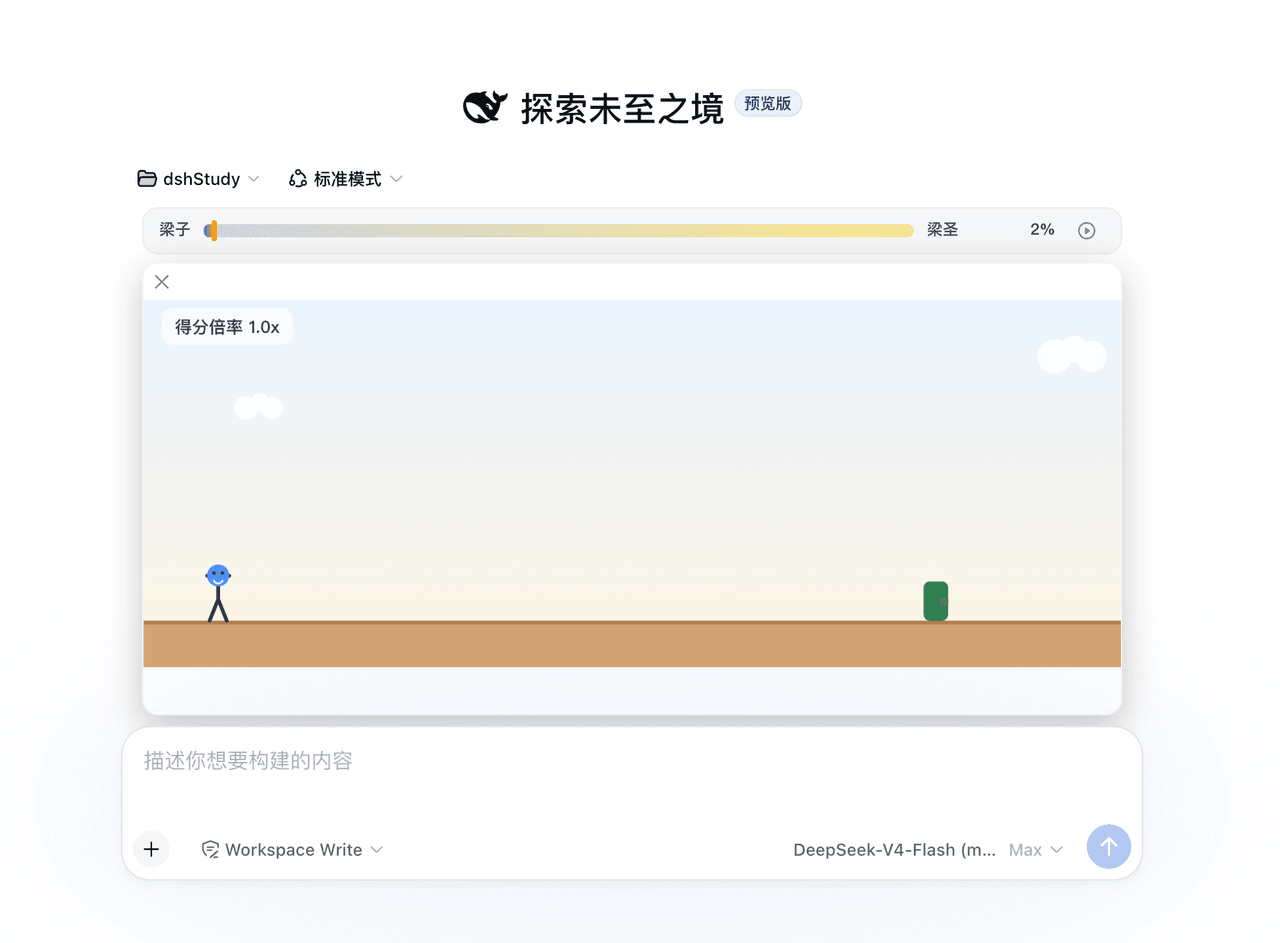
一个 Chrome 恐龙风格的小游戏,适用于 DeepSeek Harness Web:在等待代理时游玩,得分从梁子到梁圣。
项目介绍Project Overview
梁大快跑是 DSH Web 的 Chrome 恐龙风格小游戏插件,在代理回复时于输入栏上方显示进度条与播放键,点击即可跑跳、下蹲、躲避障碍并累计分数至“梁圣”。适合等待回复时消遣;回合结束会折叠暂停,失焦或聚焦输入框也会暂停,且仅在会话运行时可玩(除非开启 idle 测试开关)。
Liangda Runner is a Chrome-Dino-style mini-game plugin for DSH Web. While the agent replies, it shows a progress strip above the input bar with a play button; click to run, jump, duck, avoid obstacles, and score toward “Liang Saint.” Use it to pass time during replies. The game pauses when the turn ends, the panel folds, focus enters the input, or clicks leave the panel; play normally requires an active session unless idle testing is enabled.
请帮我了解并安装插件:【dsh-running-liang】【https://github.com/skiuniverse/dsh-running-liang】把上面这条消息直接发给当前会话里的 DSH,让它帮你了解并安装。安装命令不一定准确,发给 DSH 更稳。Send this message to DSH in your current session. CLI install commands may not be accurate across systems — DSH will figure it out for you.
或使用命令行安装(适合开发者)Or use CLI install (for developers)
命令行安装CLI Install
dsh plugin --profile web add dsh-running-liang把 skiuniverse/dsh-running-liang 加入你的 DSH 配置(web profile)即可启用。
READMEREADME
Liangda Runner · dsh-running-liang
English | 中文
Poor folks play cars, rich folks play watches, the richest play Liangda Runner. 穷玩车,富玩表,顶富就玩梁大快跑。
Developed 100% via vibe coding by DeepSeek Harness + DeepSeek-V4-Flash. For fun only.
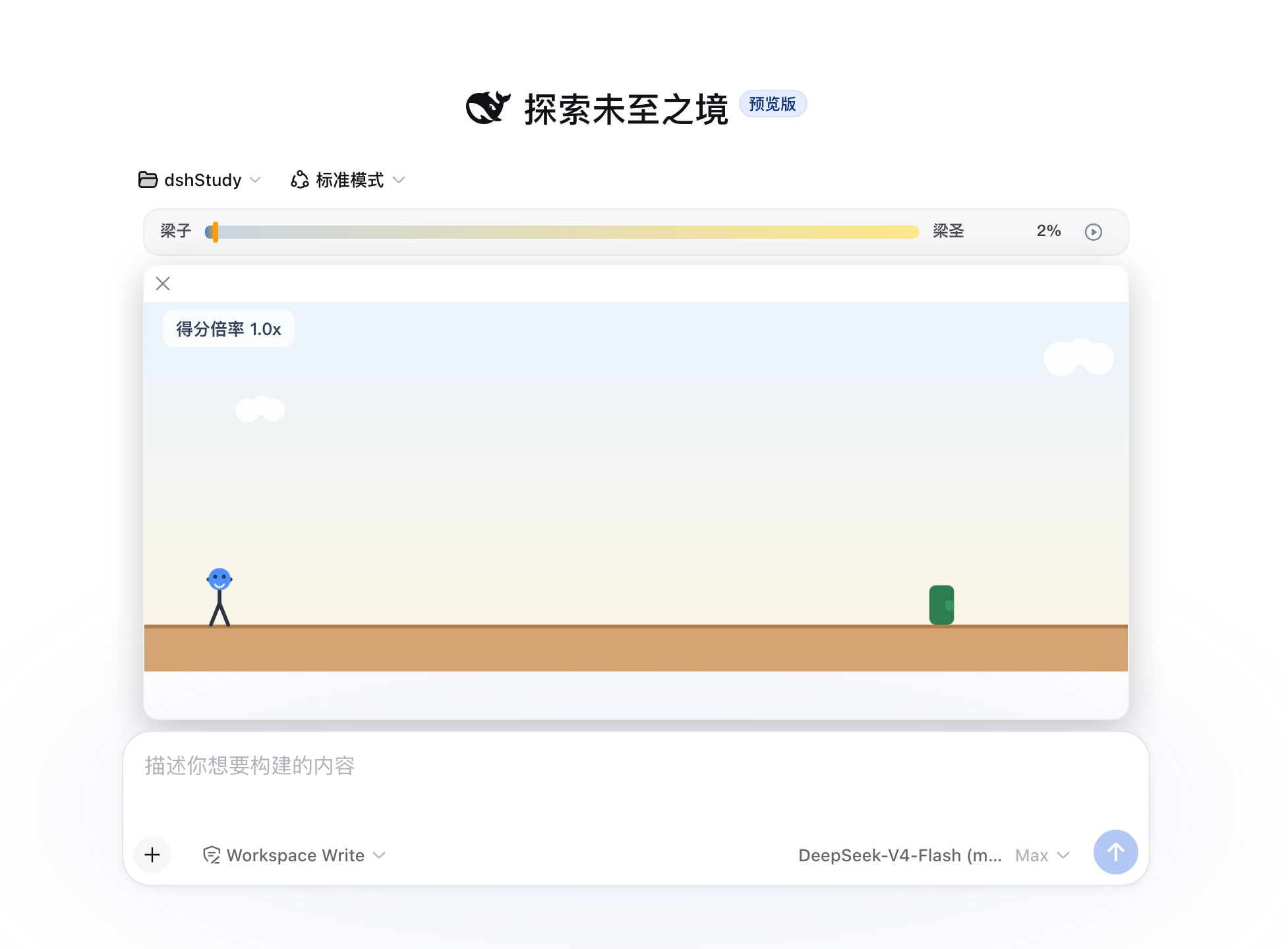
A Chrome-dino-style mini-game for DeepSeek Harness Web: while the agent is replying, a progress strip sits above the input bar (same row as the goal bar) with a play key — click it, run, jump (Space/↑), duck (↓), score from 梁子 toward 梁圣, and watch the progress bar survive the game and every reply.
Inspired by Chrome's Dino Run — the offline T-Rex Runner game shipped in the Chrome browser (Chromium project).
Install
dsh plugin --profile web add dsh-running-liang
or GitHub-only:
dsh plugin --profile web add skiuniverse/dsh-running-liang
Restart dsh web, send a message, and press the strip's play key.
How it plays
- Waiting window: the strip (and the game once expanded) lives while the session is running; on turn end the game pauses with a brief overlay, then collapses back to the strip.
- Fold = pause: clicking the play key (or ×) folds the panel and pauses — expanding again reopens PAUSED; any key or a click on the surface resumes. Collapsing never resets speed or score.
- Blur-pause: focusing the input OR clicking anywhere outside the game panel pauses; keys only control the game while focus is outside input fields.
- Speed tiers: every round (turn) restarts at tier 0, climbing one tier every 15 s of game time up to tier 4 (1.0/1.2/1.5/2.0/2.5× speed; 1.0/1.2/1.5/2.5/5.0 pts per second — the HUD shows the score rate). Hold the jump key for longer airtime; duck in the air to fall faster.
- Obstacles: cacti/rocks on the ground; low and high flying birds from tier 3 — jump the low ones, duck the high ones.
- Death: collision shows a settlement screen — the remaining progress to 梁圣 (x%) or the 梁圣 seconds you had survived (x.xxs); any key (or a click) restarts. Score, tier and saint status reset on restart.
- 梁圣: reach the threshold (default 150) and the strip shows
100% · <seconds>— surviving seconds since reaching 梁圣 in this round (not a lifetime total).
Avatar
- Built-in default: a stick figure with a DeepSeek-whale face, shipped in
assets/avatars/. - Custom: drop images into
~/.dsh/plugins/dsh-running-liang/avatars/(created on demand) or upload them from Settings → Plugins → plugin configuration → Liangda Runner. Pick any avatar there; a missing file falls back to the default.
Configuration
In Settings → Plugins → plugin configuration → Liangda Runner: threshold (梁圣 threshold, default 150), tierInterval (seconds per tier, default 15), allowIdlePlay (test switch: allow starting the game while the agent is idle), and customizable jump/duck keys (jump defaults Space, ↑ always jumps too; duck defaults ArrowDown). The tier table and physics are fixed constants.
Development
npm install
npm run typecheck   # tsc --noEmit
npm test            # vitest (engine / tiers / layout / store / render / avatar-files)
npm run build       # lib/index.js (host) + lib/client.js (browser bundle)
npm run check       # pre-publish self-check
Architecture notes: the client registers into the official DSH slots — conversation.input.dock (the strip + growing game panel, same flow as the goal bar) and settings.plugin.item (the settings card under Plugins → plugin configuration). The settings-card registration carries the legacy list id and the current keyed-slot key; the host serves the matching settings namespace so current DSH versions can discover the card. The host also registers a webServer route /dsh-running-liang/avatars (list / serve / upload). Long-lived state remains in localStorage; avatar files live on disk so they survive browser storage wipes.
License
MIT — see LICENSE.
相关推荐Related
-
 ruvnet/ruflo
🌊 The original agent meta-harness. Deploy intelligent multi-player swarms, coordinate autonomous workflows, and build c…
ruvnet/ruflo
🌊 The original agent meta-harness. Deploy intelligent multi-player swarms, coordinate autonomous workflows, and build c…
-
 amruthpillai/reactive-resume
A one-of-a-kind resume builder that keeps your privacy in mind. Completely secure, customizable, portable, open-source a…
amruthpillai/reactive-resume
A one-of-a-kind resume builder that keeps your privacy in mind. Completely secure, customizable, portable, open-source a…
-
 volcengine/OpenViking
Self-evolving Context Database for AI Agents. Unify Agent Memory, Knowledge RAG and Skills.
volcengine/OpenViking
Self-evolving Context Database for AI Agents. Unify Agent Memory, Knowledge RAG and Skills.
-
 Molunerfinn/PicGo
:rocket: The Ultimate Image Uploader for Efficient Creators. Supports Obsidian, Typora, VS Code etc. and 60+ image hosti…
Molunerfinn/PicGo
:rocket: The Ultimate Image Uploader for Efficient Creators. Supports Obsidian, Typora, VS Code etc. and 60+ image hosti…
-
 titanwings/colleague-skill
将冰冷的离别化为温暖的 Skill,欢迎加入数字生命1.0!Transforming cold farewells into warm skills? It's giving rebirth era. Welcome to Digital …
titanwings/colleague-skill
将冰冷的离别化为温暖的 Skill,欢迎加入数字生命1.0!Transforming cold farewells into warm skills? It's giving rebirth era. Welcome to Digital …
-
 nocobase/nocobase
NocoBase is an open-source AI + no-code platform for building business systems fast. Instead of generating everything fr…
nocobase/nocobase
NocoBase is an open-source AI + no-code platform for building business systems fast. Instead of generating everything fr…
-
 Tencent/WeKnora
Open-source LLM knowledge platform: turn raw documents into a queryable RAG, an autonomous reasoning agent, and a self-m…
Tencent/WeKnora
Open-source LLM knowledge platform: turn raw documents into a queryable RAG, an autonomous reasoning agent, and a self-m…
-
 anywhere-labs/deepseek-harness-desktop
为 DeepSeek Harness (DSH) 插件生态打造的现代化桌面端解决方案。万物皆「插件」,桌面本身也是「插件」。
anywhere-labs/deepseek-harness-desktop
为 DeepSeek Harness (DSH) 插件生态打造的现代化桌面端解决方案。万物皆「插件」,桌面本身也是「插件」。