SnowCrescenter-tech/dsh-milestone
Git风格的DeepSeek Harness里程碑时间线——悬停查看元数据,点击跳转至任意消息。会话里程碑导航栏:像Git提交图一样定位每条提问,悬停查看时间/轮次/耗时/TTFT,点击即跳转。
Project Overview项目介绍
dsh-milestone is a navigation plugin built exclusively for the DeepSeek Harness (DSH) web UI. It adds a Git-style milestone timeline to multi-turn DSH conversations, where each user message corresponds to one dot on the timeline. You can install it directly via DSH's official command-line interface by running dsh plugin --profile <your-profile> add dsh-milestone, and it works out of the box without modifying DSH core source code. After installation, you can launch the DSH web UI with npx @deepseek-ai/dsh web to access the plugin.
This plugin is designed for DSH users who regularly hold long multi-turn conversations, especially developers working on complex tasks that need to refer back to old questions frequently. Once installed, the timeline automatically appears on the side of any conversation with two or more user messages. It comes with a full set of navigation features including a full-session message list, in-session and cross-session search, message bookmarking, and keyboard navigation, and can be collapsed into a draggable floating ball that remembers its position.
The plugin requires Node.js version 24 or higher, which matches the official DSH requirement, and it is released under the open source MIT license. There are several known limitations: jumping to very old messages requires automatically loading the corresponding DOM content, so extremely deep history may fail to locate; sessions with over 500 user messages may see slightly slower search and update speeds; and bookmarks are isolated per session and cannot be shared across conversations.
dsh-milestone 是专为 DeepSeek Harness (DSH) 开发的原生插件,用于给 DSH 网页界面的多轮对话添加 Git 风格的里程碑导航时间线。它为每一条用户提问生成一个圆点,悬停可查看提问内容与元信息,点击即可瞬间跳转到目标位置,解决了长对话中来回翻找历史消息的痛点。可通过 DSH 官方插件命令直接从 npm 安装,无需修改 DSH 源码。
这款插件适合经常在 DSH 中进行长多轮对话的用户,尤其适合处理复杂开发任务、需要反复查找历史提问的开发者。安装完成后,打开任意超过两轮提问的多轮对话,右侧就会自动出现里程碑时间线。它支持整会话提问列表、会话内和跨会话搜索、消息收藏、键盘导航,还可一键折叠为可拖动记忆位置的悬浮球。
该插件要求 Node.js 版本不低于 24,和 DSH 官方要求一致,采用 MIT 许可开源。已知限制包括:跳转极早的消息需要自动加载对应 DOM,极端深层历史可能定位失败;超过 500 条提问的极长会话会让搜索和更新略有变慢;书签按会话隔离,不支持跨会话共享。
请帮我安装这个 DSH 插件。安装前先完成【兼容性检查 + 安全性检查】,检查通过再动手。

插件:dsh-milestone(SnowCrescenter-tech/dsh-milestone)
仓库:https://github.com/SnowCrescenter-tech/dsh-milestone
本站详情页:https://www.yhbd.top/plugins/snowcrescenter-tech-dsh-milestone/
本站登记:类型 plugin · 归类 原生 DSH 插件 · 许可证 MIT · ⭐ 24 · 最近提交 2026-09-12 · 主语言 TypeScript

按下面顺序执行,每步先把结论告诉我,再进入下一步:

【1 兼容性检查】
① 我这边:DSH 版本、Node 版本、操作系统、当前 profile(web / desktop)。
② 读它的 README、package.json、插件 manifest,列出它要求的 DSH 版本 / Node 版本 / 操作系统 / 外部依赖 / 需要另外先装的运行时。
③ 逐条比对,结论只写「满足 / 不满足 / 未知」三种;不满足的给出可行替代方案。
④ 检查是否和我已装的插件冲突:命令名重复、skill / tool 重名、端口占用、重复注册的 MCP server。

【2 安全性检查】
① 仓库可信度:和上面「本站登记」是否一致;star / fork 数、创建时间、最近提交,是否归档或长期停更。
② 安装脚本:逐行看 package.json 的 preinstall / install / postinstall,以及 install.sh、setup.ps1 之类脚本。出现 curl|bash、下载后直接执行、混淆代码、访问与插件功能无关的域名,立刻停下来告诉我,不要继续装。
③ 依赖:列出新增依赖,标出无人维护、或与知名包拼写近似的可疑包(typosquatting)。
④ 权限与副作用:它会读写哪些目录、访问哪些域名、需要哪些 DSH 权限(filesystem / network / shell / clipboard 等),以及怎么卸载和回滚。
⑤ 如果它要求 sudo / 管理员权限,或权限明显超出功能所需,先停下来问我。

【3 安装】
上面两步没有「不满足」和「高危项」时才执行;用官方推荐方式安装,不要自行提权。

【4 汇报】
用表格输出:检查项 / 结论 / 依据 / 是否需要我决策。拿不准的一律写「未知」并说明要我怎么确认——不要猜,也不要替我决定。
Send this message to DSH in your current session: it verifies compatibility and security first (answering met / not met / unknown item by item) and only installs once everything checks out — it will stop and ask you if it finds a high-risk item. The box scrolls; the copy is the full prompt. CLI install commands may not be accurate across systems, so DSH is the safer route.把上面这条消息直接发给当前会话里的 DSH:它会先核对兼容性与安全性(逐条给「满足 / 不满足 / 未知」),确认没问题再安装,有高危项会停下来问你。框内可滚动,复制到的是完整提示词;安装命令不一定准确,发给 DSH 更稳。
- 24 stars - an early-stage project星标 24,属于早期项目
DSH walks through these 9 checksDSH 会逐条核对这 9 项
Compatibility兼容性
- DSH, Node, OS and profile requirementsDSH 版本 / Node 版本 / 操作系统 / profile 是否满足要求
- External dependencies and runtimes (Electron / Python / Docker, ...)外部依赖与运行时(Electron / Python / Docker 等)是否齐备
- Conflicts with installed plugins: command names, skill / tool names, ports, duplicate MCP registration与已装插件是否冲突:命令名、skill / tool 重名、端口占用、重复 MCP 注册
Security安全性
- Repo matches the facts registered here; archived or abandoned?仓库是否与页面登记一致,是否归档或长期停更
- Safety of preinstall / install / postinstall and install.sh / setup.ps1preinstall / install / postinstall 与 install.sh、setup.ps1 是否安全
- curl|bash, download-then-execute, obfuscation, unrelated domains → stop immediatelycurl|bash、下载即执行、混淆代码、无关域名 → 立刻停止
- Typosquatting or unmaintained packages among the new dependencies新增依赖里有没有 typosquatting 或无人维护的包
- Requested permissions vs. what the feature actually needs申请了哪些权限、是否超出功能所需(filesystem / network / shell / clipboard)
- Any sudo / admin requirement, plus uninstall and rollback是否要求 sudo / 管理员权限,以及卸载与回滚方式
Anything uncertain must be marked unknown with a note on how to confirm it. This site's signal screen is a static snapshot, not a security audit.拿不准的必须标「未知」并说明要我怎么确认。本站的信号筛查是静态快照,不能替代安全审计。
Or use CLI install (for developers)或使用命令行安装(适合开发者)
CLI Install命令行安装
dsh plugin --profile demo add dsh-milestone把 SnowCrescenter-tech/dsh-milestone 加入你的 DSH 配置(web profile)即可启用。
READMEREADME

dsh-milestone
DeepSeek Harness 的会话里程碑导航条
像 Git 提交图一样,一眼定位每一次提问,一键跳转到任何位置。




English: A Git-style milestone timeline for the DeepSeek Harness web UI — one dot per user message, hover for content and metadata (time, turn, duration, TTFT, tokens), click to jump anywhere, and collapse the whole rail into a draggable floating ball. Full-session list, in-session & cross-session search,
#msg=deep-link bookmarks, keyboard navigation. Install:dsh plugin --profile demo add dsh-milestone.
为什么需要它?
- 上百轮对话之后,想找回「第 17 轮那个提问」?只能不停往上翻,在代码块和思考过程里大海捞针。
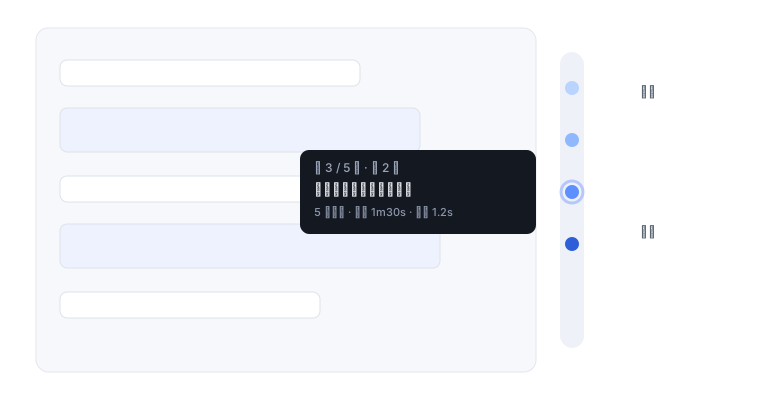
- 右侧挂一条圆点时间线:一个提问一个圆点,悬停看内容,点击瞬间跳转——长对话的「导航地图」。
- 官方 slot 机制挂载,不修改 harness 源码,装完即用。
快速开始
# 从 npm 安装(推荐)
dsh plugin --profile demo add dsh-milestone

# 或从 GitHub 源码安装
dsh plugin --profile demo add "github:SnowCrescenter-tech/dsh-milestone#main"

# 启动 Web UI
npx @deepseek-ai/dsh web    # → http://127.0.0.1:3080
打开一个多轮对话(至少 2 条提问),会话视图右侧就会出现里程碑条。
要求 Node.js
>= 24(harness 官方要求)。
功能详解
圆点时间线
每个提问一个圆点,点击平滑跳转;悬停即看内容与元信息。圆点等距排列、不随对话长度变形,颜色由浅入深标出先后,同 Git 提交图。滚轮可在里程碑条上直接滑动选点,视口内最近的提问亮起白环。
折叠为悬浮球
一键把整条时间线收成一颗半透明悬浮球:点击展开,拖动可把它放到屏幕任意角落(拖动时不触发展开),松手即记住位置,刷新或下次会话仍在。设置里可选「固定 / 可拖动」,也可一键重置位置——右侧被其它面板(如 dsh-better-sidebar、explorer)占用时,把它拖到顺手的地方即可。
全部提问列表
一键打开面板,序号 + 轮次 + 预览一次看全,点击任意一条直接跳转。列表直接来自整个会话的投影,不用手动翻页——对藏在最早期的消息来说,比在小圆点上逐个找快得多。
站内搜索
Showing the opening section of the README — the full document lives in the repository以上为 README 开头摘要,完整文档在仓库内 · View the full README on GitHub →在 GitHub 查看完整 README →
Related相关推荐
-
 extracurricular-ai/dsh-filesnap
DSH Rewind & Redo — by FileSnap. 把对话和它改过的文件一起恢复到某一轮之前(受claude code rewind启发并改进),不需要 git 仓库,并且可以撤销恢复(redo受opencode启发并改进),…
extracurricular-ai/dsh-filesnap
DSH Rewind & Redo — by FileSnap. 把对话和它改过的文件一起恢复到某一轮之前(受claude code rewind启发并改进),不需要 git 仓库,并且可以撤销恢复(redo受opencode启发并改进),…
-
 SenmuuuuW/dsh-whale-report
深迹 DeepTrace — Your Agent, in numbers. DSH 插件:从会话事件日志生成日报/周报/月报/年报/自定义区间,确定性洞察与协作复盘,只读、不改写历史。
SenmuuuuW/dsh-whale-report
深迹 DeepTrace — Your Agent, in numbers. DSH 插件:从会话事件日志生成日报/周报/月报/年报/自定义区间,确定性洞察与协作复盘,只读、不改写历史。
-
 PerryLink/dsh-checkpoint-rewind
Claude Code /rewind for DeepSeek Harness — git-first workspace snapshots before every mutation, turn-boundary session fo…
PerryLink/dsh-checkpoint-rewind
Claude Code /rewind for DeepSeek Harness — git-first workspace snapshots before every mutation, turn-boundary session fo…
- giter00/dsh-headroom deepSeek harness上下文压缩工具
- PerryLink/dsh-session-sync Cross-device DeepSeek Harness session sync: a dedicated git mirror with append-only keep-both conflict resolution (fork …
-
 XieZongChen/dsh-md-notes
A note-taking plugin for DeepSeek Harness (DSH). It provides a full MD notes manager and MD notes editor, letting you qu…
XieZongChen/dsh-md-notes
A note-taking plugin for DeepSeek Harness (DSH). It provides a full MD notes manager and MD notes editor, letting you qu…
-
 TencentCloud/tencentcloud-agentobs-sdk-dsh
tencentcloud-agentobs-sdk-dsh 是一个 DeepSeek Harness (DSH) 可观测插件,直接将 GenAI trace 数据上报到腾讯云日志服务 (CLS)。 它观察 DSH 原生的 session、…
TencentCloud/tencentcloud-agentobs-sdk-dsh
tencentcloud-agentobs-sdk-dsh 是一个 DeepSeek Harness (DSH) 可观测插件,直接将 GenAI trace 数据上报到腾讯云日志服务 (CLS)。 它观察 DSH 原生的 session、…
-
 linyp/dsh-plugin-langfuse
Langfuse observability for DeepSeek Harness (dsh): exports agent sessions as OpenTelemetry trace trees (GenAI semconv) t…
linyp/dsh-plugin-langfuse
Langfuse observability for DeepSeek Harness (dsh): exports agent sessions as OpenTelemetry trace trees (GenAI semconv) t…