spirits001/dsh-tokensforce
DeepSeek Harness(dsh)插件——tokensforce 网关集成:一键登录接入、供应商分组和使用仪表板标签页
项目介绍Project Overview
dsh-tokensforce 为 DeepSeek Harness 接入 TokensForce 词元网关,登录一次即可使用模型,无需手动配置 API Key。适合多企业/多组场景,支持用量仪表盘。注意:安装后官方 DeepSeek 提供方首跑引导会被禁用。
dsh-tokensforce integrates the TokensForce token gateway into DeepSeek Harness. After a single login, models are ready without manual API key entry. It supports multi-org/group selection and includes a usage dashboard. Use it when you need token-gateway access. Note: it disables the default DeepSeek provider's first-run setup.
请帮我了解并安装插件:【dsh-tokensforce】【https://github.com/spirits001/dsh-tokensforce】把上面这条消息直接发给当前会话里的 DSH,让它帮你了解并安装。安装命令不一定准确,发给 DSH 更稳。Send this message to DSH in your current session. CLI install commands may not be accurate across systems — DSH will figure it out for you.
或使用命令行安装(适合开发者)Or use CLI install (for developers)
命令行安装CLI Install
dsh plugin --profile web add dsh-tokensforce把 spirits001/dsh-tokensforce 加入你的 DSH 配置(web profile)即可启用。
READMEREADME
dsh-tokensforce


为 DeepSeek Harness(dsh)接入 TokensForce 词元网关:登录一次,模型即用。不需要手动填 API Key,不需要改配置文件。
安装
dsh plugin --profile web add dsh-tokensforce
dsh web
打开 http://127.0.0.1:3080,登录向导会自动弹出。
如果
dsh plugin add报ERR_PNPM_ADDING_TO_ROOT(旧版 pnpm),在~/.dsh/profiles/web目录下手动pnpm add -w dsh-tokensforce, 再把包名加入该目录package.json的dsh.profile.bundles列表即可。
使用
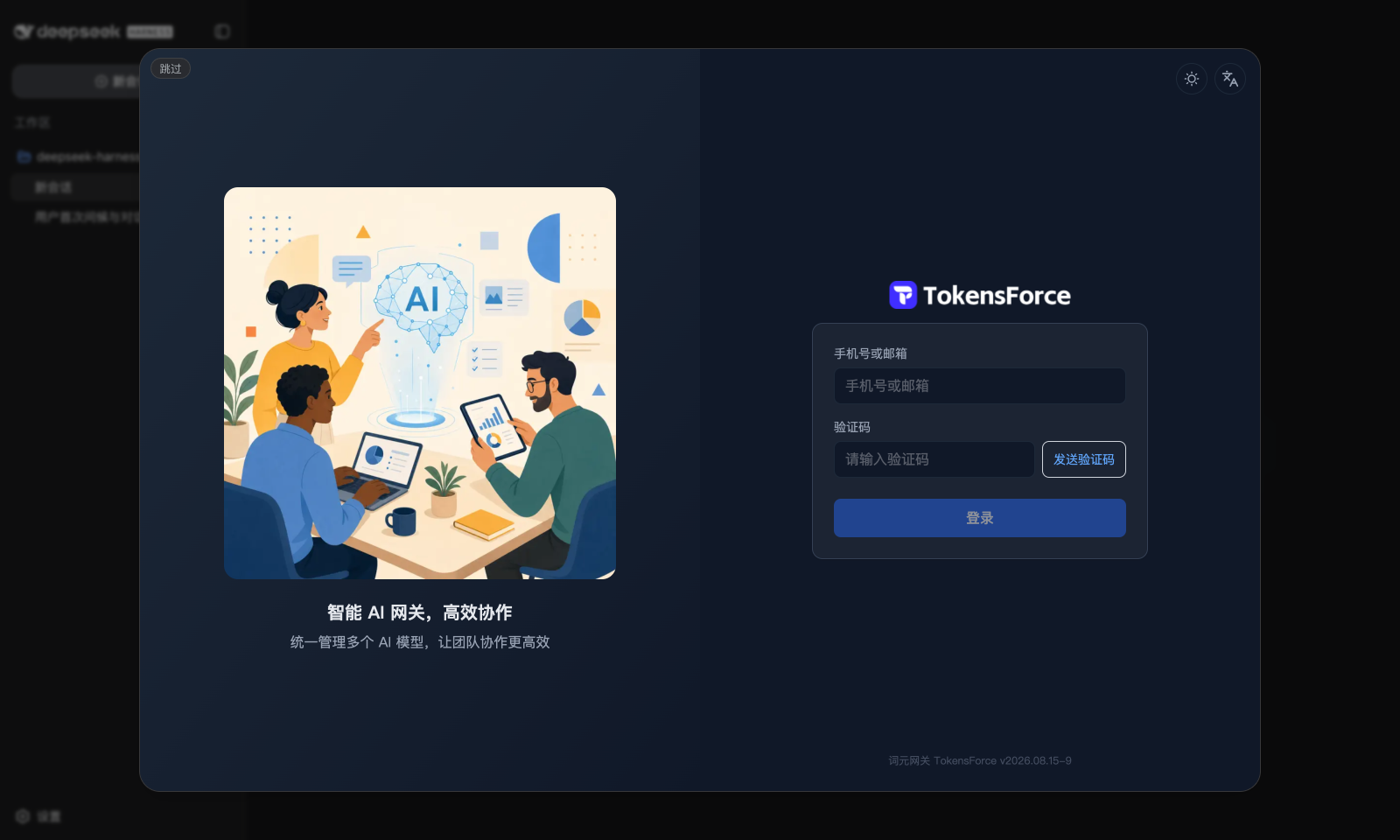
首跑:dsh 启动且尚未配置任何模型时,自动弹出近全屏的 TokensForce 登录窗口 (就是 tokensforce.com 的登录页,邮箱验证码登录,与网页版完全一致):
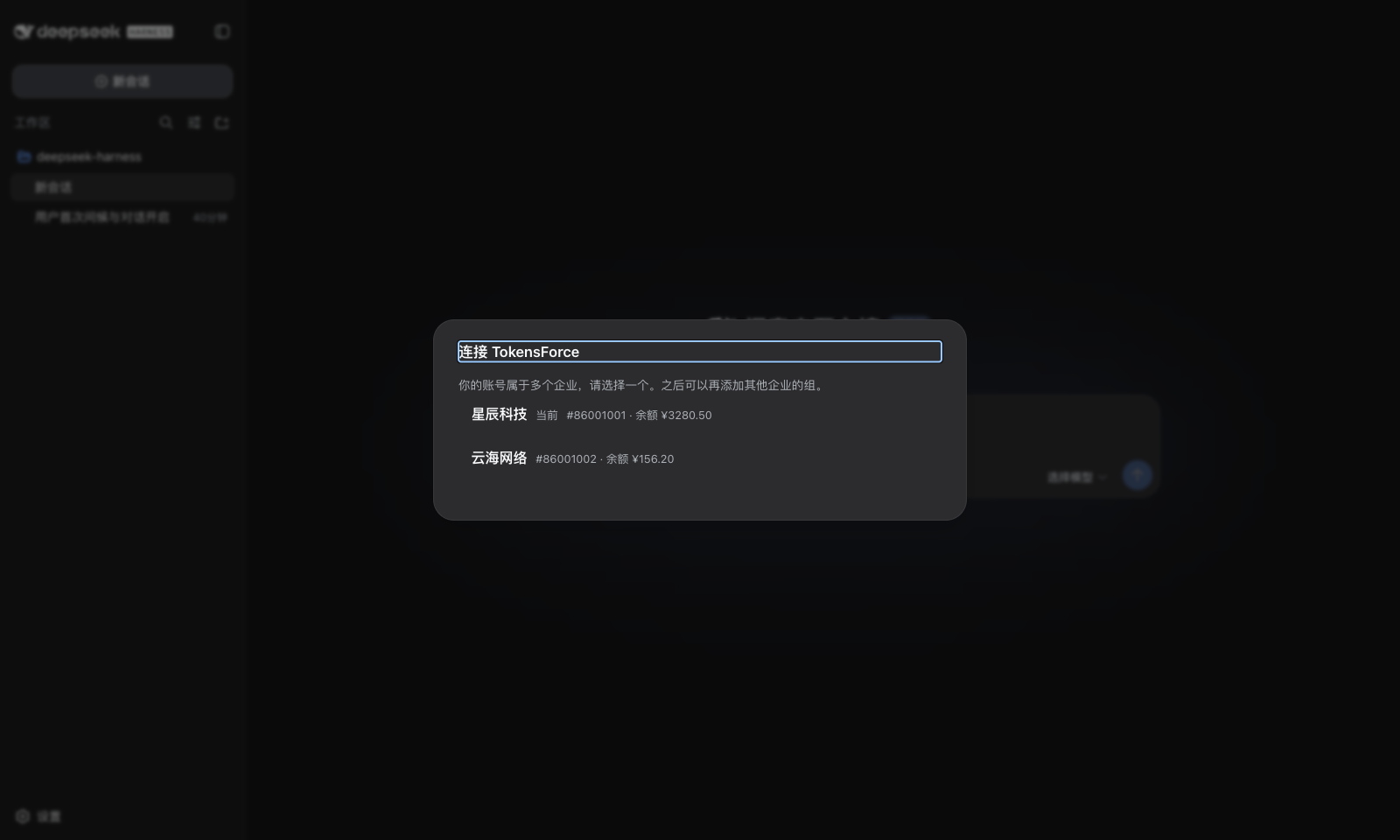
选企业 / 选组:账号属于多个企业或企业下有多个组时让你选,只有一个则自动跳过;
完成:所选组的 API Key 与网关地址自动写入,选个模型就能开始对话。 每个组在「设置 → 模型」里是一行独立的提供方,可编辑、删除、发现模型。 每个模型写入显式 1M 上下文(压缩时机、设置页容量显示都以此为准,不会显示成 dsh 的 256K 占位默认);网关若披露了某个模型的真实上下文,则按披露值精确到该模型。
之后再添加其他组:打开设置,点右上角的「连接 TokensForce」按钮。 登录态保留 7 天,期间添加新组不用重新登录。
用量仪表盘:会话视图里多一个「TokensForce」标签(与「对话」「轨迹」并列), 点开就是 tokensforce 控制台仪表盘(用量、费用、排行),与网页版一致; 未登录或登录过期时,该标签内直接显示登录窗口,登录后自动进入仪表盘。
常见问题
装上后官方 DeepSeek 提供方去哪了?
本插件会禁用 llm-deepseek 的首跑引导,避免开屏出现两处要 Key 的提示;
模型引擎仍走 dsh 自带的 OpenAI 兼容通道。卸载插件即恢复原状。
我们公司自己部署了 tokensforce,能用吗?
能。安装后把 node_modules/dsh-tokensforce/lib/client.js 里的
SITE_ORIGIN 改成你的站点地址并重启 dsh;站点侧需放行登录页嵌入
(nginx 对 /login 不发 X-Frame-Options 等,可参考 tokensforce 的实现)。
更正式的做法是 fork 本仓库,改 src/client/logic.ts 中的常量后自行构建。
密钥存在哪?
组密钥经 dsh 自带的凭据机制存在你本机(~/.dsh/.credentials.yaml),
浏览器只保留登录态(JWT,7 天有效)。模型请求由 dsh 宿主进程直连网关,
不经过浏览器。
反馈
- 使用问题:Issues
- 维护与二次开发:见 CONTRIBUTING.md
License
相关推荐Related
-
 nexu-io/open-design
🎨 Best DeepSeek Harness Design Plugin. The open-source Claude Design alternative. 🖥️ Local-first desktop app. 🖼️ Your…
nexu-io/open-design
🎨 Best DeepSeek Harness Design Plugin. The open-source Claude Design alternative. 🖥️ Local-first desktop app. 🖼️ Your…
-
 freestylefly/awesome-gpt-image-2
Prompt as Code | GPT-Image2 工业级提示词引擎与模板库,530+ 个案例逆向工程,20+ 套工业级模板,并提炼出Skills,持续更新中
freestylefly/awesome-gpt-image-2
Prompt as Code | GPT-Image2 工业级提示词引擎与模板库,530+ 个案例逆向工程,20+ 套工业级模板,并提炼出Skills,持续更新中
-
 anywhere-labs/dsh-desktop
为 DeepSeek Harness (DSH) 插件生态打造的现代化桌面端解决方案。万物皆「插件」,桌面本身也是「插件」。
anywhere-labs/dsh-desktop
为 DeepSeek Harness (DSH) 插件生态打造的现代化桌面端解决方案。万物皆「插件」,桌面本身也是「插件」。
- Nagi-ovo/voyager Enhancement suite for Gemini, AI Studio, Claude & ChatGPT — plus a prompt manager for any web UI, DeepSeek Harness inclu…
-
 walkinglabs/learn-harness-engineering
Harness engineering beginner tutorial, from 0 to 1
walkinglabs/learn-harness-engineering
Harness engineering beginner tutorial, from 0 to 1
-
 awesome-dsh-plugin/awesome-dsh-plugin
A curated list of plugins for DeepSeek Harness (dsh) · DeepSeek Harness 插件精选列表
awesome-dsh-plugin/awesome-dsh-plugin
A curated list of plugins for DeepSeek Harness (dsh) · DeepSeek Harness 插件精选列表
-
 MemTensor/MemOS
Self-evolving memory OS for LLM & AI Agents: ultra-persistent memory, hybrid-retrieval, and cross-task skill reuse, with…
MemTensor/MemOS
Self-evolving memory OS for LLM & AI Agents: ultra-persistent memory, hybrid-retrieval, and cross-task skill reuse, with…
- yjh051108/dsh-routing-suite dsh-routing-suite — injector + router-standard kit: install the runtime injector first, then the task-aware reasoning-mo…