studyzy/dsh-suggest-prompt
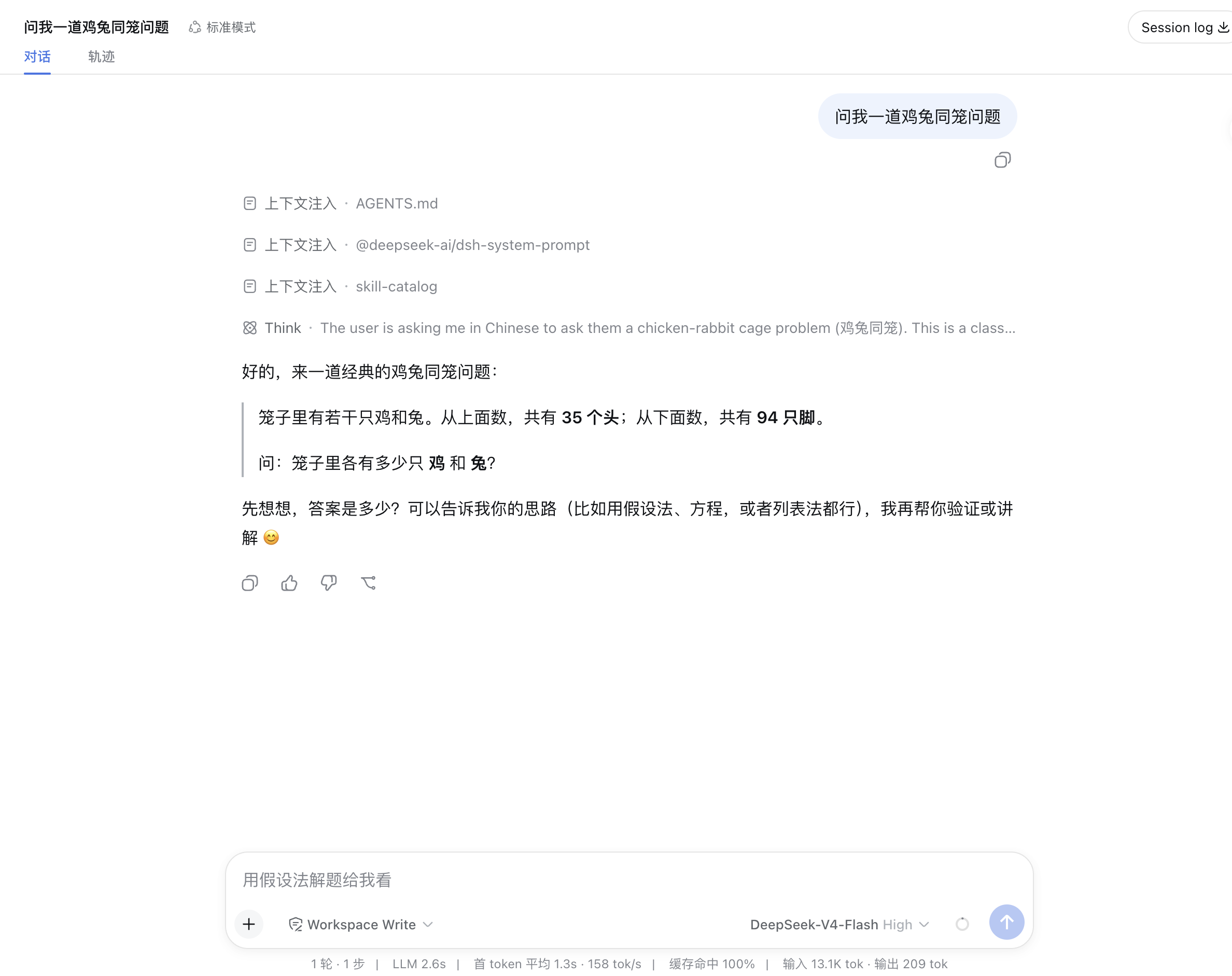
为 DeepSeek Harness 开发的「建议提示词」插件:每个 agent 回合完成后,通过一次有界的辅助 LLM 调用,在会话日志中写入一条建议的下一条提示词;Web 端把它渲染成输入框内部的浅色幽灵占位文字,按 Tab(默认)即可采纳进草稿(与 Claude Code 一致)。
catalog 简介 / catalog descriptioncatalog description:dsh-plugin 根据AI回复给出建议的下一个提示词
安装Install
dsh plugin --profile web add @studyzy/dsh-suggest-prompt把 studyzy/dsh-suggest-prompt 加入你的 DSH 配置(web profile)即可启用。
READMEREADME
dsh-suggest-prompt


为 DeepSeek Harness 开发的「建议提示词」插件:每个 agent 回合完成后,通过一次有界的辅助 LLM 调用,在会话日志中写入一条建议的下一条提示词;Web 端把它渲染成输入框内部的浅色幽灵占位文字,按 Tab(默认)即可采纳进草稿(与 Claude Code 一致)。
想快速上手?直接看 使用说明(面向终端用户的操作指南)。
Read this in English · 中文文档
对于开发者 / 维护者:本仓库是单个 bundle 包(@studyzy/dsh-suggest-prompt)的权威源码,把宿主生成与浏览器渲染合并为一个可一键安装的 bundle:
| 包 | 作用 |
|---|---|
@studyzy/dsh-suggest-prompt |
宿主插件(., ./invariant, ./types):在 turn/end(reason=completed)时生成建议,发布 suggestPrompt 会话投影。浏览器插件(./client):读取投影,渲染为输入框内部的浅色幽灵占位文字(inputActions.setDraft),按配置的快捷键填入草稿。 |
特性
一个自动「接话」助手:AI 答完后,它替你预测下一句该说什么——既省去反复输入,又不会打断你的思路。
- 默认轻量:不配置
provider/model时继承主请求最近一次记录的路由,无需为建议单独选模型;需要时也可显式指定任意路由(例如本地 OpenAI 兼容网关)。 - 免思考、快速便宜:建议生成默认携带
reasoningEffort: off(DeepSeek 序列化为thinking: disabled),不消耗推理预算;模型不支持该参数时自动去掉并重试一次。 - 界面配置模型路由:日常只需在 WebUI「设置 → 插件」的「建议提示词」卡片里选择建议生成的 provider / model(或跟随会话路由),保存后下一完成回合生效,无需手动改配置文件;
~/.dsh/settings.yaml由界面代写。 - 只发最后一轮:默认只把最后一轮的用户输入与 AI 最终回答发给建议模型(
maxRecentTurns默认为1),中间的工具调用 / 推理过程一律不发送。 - 有界调用:字节 / 令牌 / 超时上限、转录长度预算、建议可见字符上限,全部可配置。
- 安全:转录在发送前脱敏(密钥形状被掩蔽);输出净化(控制序列、围栏、引号剥离、单行化)并做语义过滤(元文本、评价套话、助手口吻等被当作「无建议」丢弃)。
- 无建议是常态:模型回复为空或不合格时静默跳过,不报错、不写事件、不打扰。
- 免调用重显:删回空草稿会重新显示已持久化的建议,不再发新的模型请求。
- 快捷键可配:采纳快捷键默认
Tab,可在「建议提示词」设置卡片里按实际按键录制(如Alt+Slash、Ctrl+Enter)。
效果预览
每个 agent 回合完成后,建议模型会在输入框里以浅色幽灵占位文字的形式显示一条预测,按 Tab 即可采纳进草稿:
安装
前置条件
- Node.js
^22.19或>=24、pnpm。 - 一个基于 deepseek-harness 的 dsh 部署(web profile),dsh ≥ 0.1.1-rc.1(0.1.1 变更了会话投影注册契约,本插件的宿主端按该契约适配;在 0.1.0 下投影不会同步到 Web 端)。浏览器端需要
conversation.input.overlay槽位与inputActions.setDraft(deepseek-harness 的标准 web 输入机均已提供)。
从 GitHub 安装(默认方式,一行命令)
本插件是一个单包 bundle:仓库根 @studyzy/dsh-suggest-prompt 声明了 dsh.bundle(自带 cordis.patch.yml),因此用 dsh plugin add 指向 GitHub 仓库即可安装,装完自动成为 profile 的一个 bundle 层,无需手动改配置文件。
# 从 GitHub 安装(推荐)
dsh plugin --profile web add git@github.com:studyzy/dsh-suggest-prompt.git

# 或 HTTPS
dsh plugin --profile web add https://github.com/studyzy/dsh-suggest-prompt.git
装完后重启正在运行的 dsh web 服务即可。安装后 profile 层叠顺序变为 dsh-base → dsh-web-app → @studyzy/dsh-suggest-prompt。
卸载:
dsh plugin --profile web remove @studyzy/dsh-suggest-prompt
git 安装的 pnpm ≥10 提示:git 托管的插件在安装时通过
prepare脚本构建,pnpm ≥10 会拦截该脚本直到放行。若add报错,把 pnpm 打印的包键加进~/.dsh/profiles/web/pnpm-workspace.yaml的allowBuilds,再重跑add。
本地源码安装(开发用)
dsh plugin --profile web add /path/to/dsh-suggest-prompt
通过 npm 安装(发布后)
dsh plugin --profile web add @studyzy/dsh-suggest-prompt
说明:无论哪种来源,装完都是同一个 bundle 层。日常建议模型的 provider / model 通过 WebUI 设置卡片配置(见下「配置」),不需要在安装时手动指定。
配置
配置分两层:日常的路由配置走界面,一次性的资源上限在 bundle 自带的补丁层提供(可在 profile 补丁层覆盖)。
通过 WebUI 界面配置建议模型(日常)
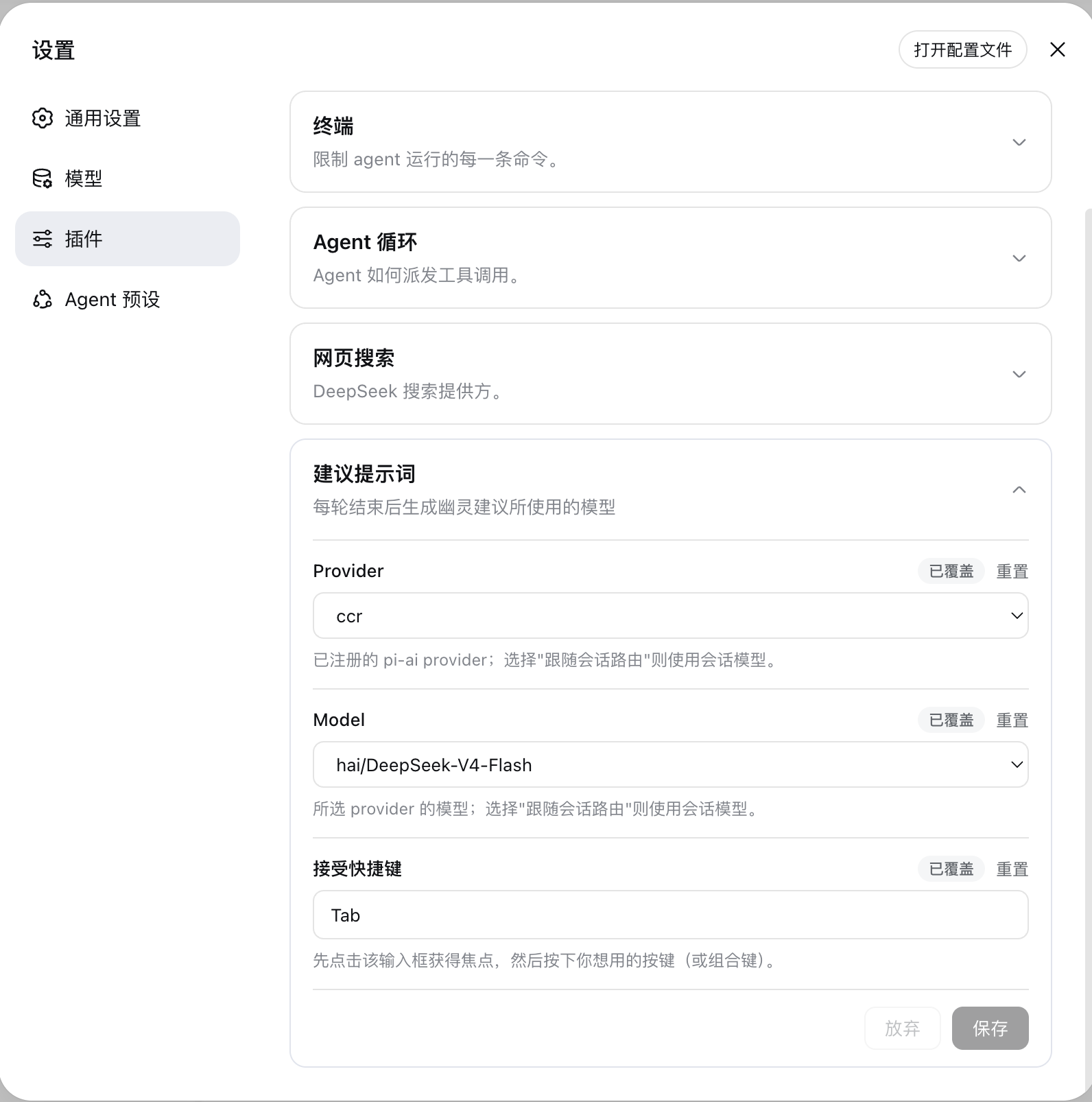
「设置 → 插件」会出现「建议提示词」卡片。这是日常配置建议模型的主入口,无需手动改配置文件:
- Provider / Model:从已安装的 provider 目录(内置
DeepSeek与 pi-ai 各 provider)中选择建议生成使用的路由;选择「跟随会话路由」则不覆盖,继承主请求路由。 - Accept shortcut:点击输入框获得焦点后,直接按下想用的按键或组合键,按键即录制显示(先按
Alt再按Slash→Alt+Slash,Ctrl+Alt+X显示为三个键),无需手动打字;保存后写入~/.dsh/settings.yaml。 - 编辑是暂存式的(带「未保存」标记与「放弃 / 保存」按钮),保存会由界面写入
~/.dsh/settings.yaml的suggest-prompt小节;保存后下一个完成回合生效,无需重启。 - 下拉只会列出目录中显式声明的模型;某 provider 未声明模型列表时,模型字段退化为自由文本输入。
- 依赖
dsh-settings的设置能力:没有挂载设置服务的组装(如 headless)不显示此卡片,此时仍可在补丁层配置provider/model/acceptKey。
补丁层字段(安装即带默认,可覆盖)
以下字段由 bundle 自带的 cordis.patch.yml 提供默认值,通常无需改动;需要自定义时,在 profile 补丁层(~/.dsh/profiles/web/cordis.patch.yml)用 - insert: 覆盖同名 entry 的 config。provider / model / acceptKey 可在 WebUI 设置卡片中配置;其余字段不在 WebUI 设置卡片中:
| 字段 | 含义 | 默认值 |
|---|---|---|
maxInputBytes |
最终框架化用户提示的最大 UTF-8 字节数 | 4096 |
maxOutputTokens |
建议生成输出令牌上限 | 512 |
timeoutMs |
辅助请求端到端截止时间(毫秒) | 60000 |
maxRecentTurns |
转录尾部保留的最近完成回合数 | 1(只取最后一轮的用户输入 + AI 最终回答) |
maxTranscriptChars |
转录字符预算 | 12000 |
maxSuggestionChars |
建议的可见字符上限 | 240 |
provider / model |
各自独立覆盖主请求路由的对应字段;省略的字段自动继承主请求路由 | 继承(也可经界面配置) |
acceptKey |
采纳建议的输入框快捷键 | Tab(界面可录制为 Alt+Slash、Ctrl+Enter 等) |
maxOutputTokens提示:建议生成默认关闭思考(reasoningEffort: off),推理不消耗输出预算;但对无法关闭思考的模型(如部分 pi-ai 路由)会降级重试,此时思考仍会消耗预算——maxOutputTokens偏小时,流会在输出建议文本之前就以max-tokens结束。这类模型请留足预算(例如512)。
工作方式
- 宿主在
turn/end(reason=completed)时触发生成;按会话 + 回合去重,下一个完成回合会中止上一个在途生成。 - 建议写入会话日志的
suggest-prompt/suggested事件,suggestPrompt投影把它暴露给 Web 端。 - 幽灵文字只在满足以下条件时显示:建议对应最新完成回合、agent 空闲、草稿为空;键入即隐藏,删回空草稿重新显示。
- 按
acceptKey(默认 Tab)把建议填入草稿(可编辑后再发送);焦点不在输入框或处于 IME 组合输入时不触发,Tab 也只在显示幽灵文字时才被拦截(否则保持默认焦点行为)。
模型体验
- 系统提示词:把模型限定为「以用户口吻预测下一条提示词」,禁止生成内容或元文本,给出具体正反例;回复语言跟随会话(最后一条用户消息含 CJK →
简体中文,否则English)。 - 模型看到的输入:默认只有最后一轮的
[User Message]/[Assistant Response]带标签块(已脱敏、受maxTranscriptChars约束)。 - 请求前记录:确切的框架化输入与系统提示在派发前写入
suggest-prompt/request事件,满足「模型可见 ⟺ 日志可重建」。 - 免思考:辅助请求默认携带
reasoningEffort: off(DeepSeek 序列化为thinking: disabled),追求快速与低成本;模型不支持时自动去掉该字段重试一次(拒绝发生在任何网络 I/O 之前,几乎无额外开销)。 - 成本:每个完成回合至多一次辅助请求,受
maxInputBytes/maxOutputTokens约束;主 agent 请求不增加任何 token。
安全
- 转录脱敏:AWS
AKIA…、OpenAIsk-…、GitHubghp_/gho_/ghu_、Slackxox-…、JWT、Striperk_…等密钥形状在发送前被掩蔽为占位标签。 - 输出净化:ANSI/OSC/CSI/DCS 序列、C0/C1 控制符、双向覆盖符、孤立代理项被剥离;引号与代码围栏被去除;压缩为单行并截断到
maxSuggestionChars。 - 语义过滤:元文本("no suggestion"、"stay silent")、错误回显、评价套话("thanks"、"looks good"、谢谢、不错)、助手口吻("Let me…"、"I'll…"、我来、我帮你)、多句 / 过长回复、孤立单词会被当作「无建议」丢弃,而不是显示。
已知限制
- 每个完成回合都会生成(与输入框是否已有内容无关),幽灵文字只在草稿为空时显示。
- 被中止(取代)的生成不会为较早回合留下建议。
- 空回复或被过滤的回复 = 该回合无建议:不写
suggest-prompt/suggested事件,投影保持null,也不记录警告。 - 投影保留最后一条建议:重新打开旧会话会显示其最终建议,且不发起新的模型调用。
- 建议模型的路由与预算由部署配置决定;无法关闭思考的模型(如部分 pi-ai 路由)会回退为模型默认的推理行为,想获得最快的建议体验,建议选支持关闭思考的路由(如内置 DeepSeek)。
开发
pnpm install
pnpm build      # host tsc + client tsdown bundle
pnpm test       # vitest
pnpm typecheck
pnpm test:e2e       # browser e2e against an isolated dsh web (needs DEEPSEEK_API_KEY)
pnpm test:e2e:local # local e2e against your real ~/.dsh (macOS: visible browser)
E2E(CI):
pnpm test:e2e会起一个隔离$DSH_HOME,用dsh plugin add安装本插件、dsh web起服务,再用 Playwright 走 WebUI(配置 DeepSeek Key、把建议模型设为 DeepSeek Flash),输入一道数学题后断言输入框出现下一条建议的幽灵文字。需要环境变量DEEPSEEK_API_KEY(无则跳过)与全局dsh;CI 里由DEEPSEEK_API_KEYsecret 注入。默认pnpm test不含 e2e。
E2E(本地):
pnpm test:e2e:local复用你的真实~/.dsh(不装 dsh、不跑 onboarding、不连工作区——本机已就绪),把当前源码 link 进本地 web profile(dsh plugin add),起dsh web后用 Playwright 把「建议提示词」模型设为 DeepSeek Flash(ccr /hai/DeepSeek-V4-Flash),输入「出一道小学数学题给我」并断言幽灵建议出现。macOS 下弹出可见浏览器,Linux 下 headless。会写真实~/.dsh(suggest-prompt 模型与 profile 依赖来源)——仅限本地开发验证,不入 CI。
安装说明:本仓库依赖已发布的
@deepseek-ai/*包(deepseek-harness 工作区)。上游少数内部包(@deepseek-ai/dsh-compact、@deepseek-ai/dsh-type-meta、@deepseek-ai/dsh-environment)尚未出现在 npm registry,本仓库通过根package.json的pnpm.overrides把它们映射到本地stubs/空包;同时用一条@deepseek-ai/dsh-*: 0.1.1-rc.1override 把整个 dsh 依赖集统一到当前插件所适配的 0.1.1-rc.1(与本仓库针对 0.1.1 投影契约的适配保持一致),因此pnpm install可直接成功;等 registry 补齐、上游稳定后,这两处 overrides 与stubs/均可清理。完整测试矩阵在 harness monorepo 内运行;本仓库是单 bundle 包的权威源码副本。pnpm build产出宿主 ESM(lib/{index,invariant}.js)、浏览器 bundle(lib/client.js)与lib/types/声明。
prepare脚本:package.json的prepare脚本会在pnpm install(含dsh plugin add <git-url>的安装流程)时自动运行pnpm build现场构建lib/,产物不入库。因此源码改动后无需手动构建即可被本地 dsh 加载;从 Git 安装也总能拿到完整产物(含类型声明)。
许可
MIT
dsh-suggest-prompt
阅读中文版 · English
Suggested-next-prompt plugin for the DeepSeek Harness. After every completed agent turn, a bounded auxiliary LLM call writes one suggested next prompt into the session log; the web side renders it as ghost placeholder text inside the composer — press Tab (default) to adopt it into the draft (the Claude Code behavior).
For developers / maintainers: this repository is the authoritative source of record for a single bundle package (@studyzy/dsh-suggest-prompt) that merges the host generation and the browser rendering into one one-command-installable bundle:
| Package | Role |
|---|---|
@studyzy/dsh-suggest-prompt |
Host plugin (., ./invariant, ./types): generates the suggestion on turn/end (reason completed) and publishes the suggestPrompt session projection. Browser plugin (./client): reads the projection, renders the suggestion as ghost placeholder text inside the composer (inputActions.setDraft), and fills the draft on the configured shortcut. |
Features
An automatic "next line" companion: after the AI answers, it predicts what you'd say next — saving repeated typing without interrupting your flow.
- Lightweight by default: without
provider/modelthe suggestion inherits the route of the most recently logged main request — no model to pick just for suggestions; set them explicitly to route anywhere (for example a local OpenAI-compatible gateway). - No thinking, fast and cheap: the auxiliary call carries
reasoningEffort: offby default (DeepSeek serializes it asthinking: disabled) so no budget is spent on a chain of thought; models that rejectoffretry once without the field. - Route configured in the WebUI: day-to-day, pick the suggestion provider/model from the "建议提示词" card under Settings → Plugins (or keep "follow session route"); saving takes effect on the next completed turn — no manual config-file edits.
~/.dsh/settings.yamlis written by the UI for you. - Last turn only: by default only the last completed turn's user input and assistant final answer are sent to the suggestion model (
maxRecentTurnsdefaults to1); intermediate tool calls / reasoning are never included. - Bounded: byte / token / timeout caps, a transcript budget, and a visible-character cap on the suggestion — all configurable.
- Safe: transcripts are secret-redacted before framing; output is sanitized (control sequences, fences, quotes stripped, single line) and semantically filtered (meta-text, evaluative filler, assistant-voice phrasing are dropped as "no suggestion").
- Silent no-suggestion: an empty or rejectable model reply is skipped quietly — no error, no event, no noise.
- Re-arm without a call: deleting back to an empty draft re-shows the persisted suggestion with no new model request.
- Configurable shortcut: the adopt shortcut is set via
acceptKey(defaultTab) and can be recorded from the "建议提示词" settings card (e.g.Alt+Slash,Ctrl+Enter).
Preview
After every completed agent turn, the suggestion model renders the predicted next prompt as light ghost placeholder text inside the composer. Press Tab to adopt it into the draft:
Install
Prerequisites
- Node.js
^22.19or>=24, pnpm. - A dsh deployment built from the DeepSeek Harness (web profile), dsh ≥ 0.1.1-rc.1 (0.1.1 changed the session-projection registration contract; this plugin's host half is adapted to it — on 0.1.0 the projection is not synced to the web side). The browser side needs the
conversation.input.overlayslot andinputActions.setDraft— both standard in the deepseek-harness web input machine.
From GitHub (default, one command)
This is a single-package bundle: the repo root @studyzy/dsh-suggest-prompt declares dsh.bundle (it ships its own cordis.patch.yml), so dsh plugin add pointing at the GitHub repository installs it as one bundle layer of the profile — no manual config-file edits.
# From GitHub (recommended)
dsh plugin --profile web add git@github.com:studyzy/dsh-suggest-prompt.git

# Or HTTPS
dsh plugin --profile web add https://github.com/studyzy/dsh-suggest-prompt.git
Then restart the running dsh web service. After install the profile layering becomes dsh-base → dsh-web-app → @studyzy/dsh-suggest-prompt.
Uninstall:
dsh plugin --profile web remove @studyzy/dsh-suggest-prompt
pnpm ≥10 git note: git-hosted plugins build on install via their
preparescript, which pnpm blocks until allowed. Ifaddfails, add the exact key pnpm printed toallowBuildsin~/.dsh/profiles/web/pnpm-workspace.yaml, then re-runadd.
Local source (development)
dsh plugin --profile web add /path/to/dsh-suggest-prompt
From npm (once published)
dsh plugin --profile web add @studyzy/dsh-suggest-prompt
Note: every source ends up as the same bundle layer. The day-to-day suggestion provider/model is configured from the WebUI settings card (see Configuration below) — nothing to set at install time.
Configuration
Configuration is split in two: the day-to-day route is set in the UI, and the one-time resource caps ship with sensible defaults in the bundle's patch layer (overridable in your profile patch layer).
Configure the suggestion model in the WebUI (day-to-day)
A "建议提示词" card appears under Settings → Plugins. This is the primary entry point for choosing the suggestion route — no manual config-file edits:
- Provider / Model: pick the route the auxiliary call uses from the installed provider catalog (built-in DeepSeek + pi-ai routes); choosing "Follow session route" keeps the main request route.
- Accept shortcut: focus the field, then press the key or key combo you want — the pressed keys are recorded and shown (press
AltthenSlash→Alt+Slash; a three-key combo likeCtrl+Alt+Xdisplays as three keys), no typing needed. - Edits are staged (with an "Unsaved" marker and Discard / Save buttons); saving writes the
suggest-promptsection of~/.dsh/settings.yamlfor you, and takes effect on the next completed turn — no restart needed. - The dropdowns list only explicitly declared models; a provider without a declared model list degrades the model field to free-text input.
- This rides the
dsh-settingscapability: assemblies without a settings service (e.g. headless) do not show the card and keep usingprovider/model/acceptKeyin the patch layer.
Patch-layer fields (defaults ship with the bundle, overridable)
The following are provided with defaults by the bundle's own cordis.patch.yml and normally need no changes; to customize, override the same entry's config via - insert: in your profile patch layer (~/.dsh/profiles/web/cordis.patch.yml). provider / model / acceptKey are editable from the WebUI card; the rest are not in the WebUI settings card:
| Field | Meaning | Default |
|---|---|---|
maxInputBytes |
Maximum UTF-8 bytes in the final framed user prompt | 4096 |
maxOutputTokens |
Suggestion output-token cap | 512 |
timeoutMs |
End-to-end auxiliary request deadline (ms) | 60000 |
maxRecentTurns |
Transcript tail keeps at most this many recent completed turns | 1 (only the last turn's user input + assistant final answer) |
maxTranscriptChars |
Transcript character budget | 12000 |
maxSuggestionChars |
Visible-character cap for the suggestion | 240 |
provider / model |
Each independently overrides the matching member of the main request route; omitted members inherit the main route | inherited (also editable from the WebUI) |
acceptKey |
Composer shortcut that adopts a displayed suggestion | Tab (recordable in the UI as Alt+Slash, Ctrl+Enter, ...) |
On
maxOutputTokens: suggestion generation disables thinking by default (reasoningEffort: off), so reasoning does not consume the output budget; but a model that cannot turn thinking off (some pi-ai routes) falls back to a retry where thinking still spends budget — a smallmaxOutputTokensthen ends the stream withmax-tokensbefore any suggestion text is produced. Leave a generous budget (e.g.512) for such models.
How it works
- The host triggers generation on
turn/end(reasoncompleted), deduplicated per session and turn; the next completed turn aborts the in-flight generation. - The suggestion is appended to the session log as the
suggest-prompt/suggestedevent, and thesuggestPromptprojection exposes it to the web side. - The ghost text shows only when the suggestion answers the latest completed turn, the agent is idle, and the draft is empty; typing hides it, deleting back to an empty draft re-shows it.
- Pressing
acceptKey(default Tab) fills the draft (editable, not sent). It is ignored while focus is outside the composer or during IME composition; Tab is intercepted only while ghost text is displayed (otherwise it keeps its default focus behavior).
Model Experience
- System prompt: binds the model to predicting the user's next prompt in the user's own voice, forbids generating content or meta-text, and gives concrete examples and anti-examples; the reply language follows the conversation (
简体中文when the last user message contains CJK, otherwiseEnglish). - What the model sees: by default only the last turn, framed as labelled
[User Message]/[Assistant Response]blocks (redacted, bounded bymaxTranscriptChars). - Pre-dispatch logging: the exact framed input and system prompt are recorded in the
suggest-prompt/requestevent before dispatch, satisfying the model-visible ⟺ logged invariant. - No thinking: the auxiliary request carries
reasoningEffort: offby default (DeepSeek serializes it asthinking: disabled) for speed and low cost; a model that rejectsoffretries once without the field (the rejection happens before any network I/O, so the retry is nearly free). - Cost: at most one auxiliary request per completed turn, bounded by
maxInputBytes/maxOutputTokens; the main agent request gains zero tokens.
Security
- Transcript redaction: AWS
AKIA…, OpenAIsk-…, GitHubghp_/gho_/ghu_, Slackxox-…, JWTs, and Striperk_…secret shapes are masked before the transcript reaches the model. - Output sanitization: ANSI/OSC/CSI/DCS sequences, C0/C1 control characters, bidirectional overrides, and lone surrogates are stripped; quotes and code fences are removed; text is collapsed to one line and truncated to
maxSuggestionChars. - Semantic filtering: meta-text ("no suggestion", "stay silent"), error echo, evaluative filler ("thanks", "looks good"), assistant-voice phrasing ("Let me…", "I'll…"), multi-sentence or over-long replies, and stray single words are dropped as "no suggestion" instead of shown.
Known Limitations
- Generation runs after every completed turn regardless of whether the composer already holds text; the ghost text is only displayed while the draft is empty.
- A superseded (aborted) generation leaves no suggestion for the older turn.
- An empty or filtered reply means "no suggestion" for that turn: no
suggest-prompt/suggestedevent is written, the projection staysnull, and no warning is logged. - The projection persists the last suggestion, so reopening an old session shows its final suggestion without a new model call.
- The suggestion route and budget are deployment configuration; a model that cannot turn thinking off (some pi-ai routes) falls back to its default reasoning behavior — for the fastest suggestions, pick a route that supports
off(such as the built-in DeepSeek).
Development
pnpm install
pnpm build      # host tsc + client tsdown bundle
pnpm test       # vitest
pnpm typecheck
pnpm test:e2e       # browser e2e against an isolated dsh web (needs DEEPSEEK_API_KEY)
pnpm test:e2e:local # local e2e against your real ~/.dsh (macOS: visible browser)
E2E (CI):
pnpm test:e2eboots an isolated$DSH_HOME, installs this bundle viadsh plugin add, startsdsh web, and drives the WebUI with Playwright (stores the DeepSeek key, sets the suggestion model to DeepSeek Flash, sends a math question, then asserts a ghost next-prompt suggestion appears). It requiresDEEPSEEK_API_KEY(skipped otherwise) and a globally installeddsh; CI injects the key as a secret. The defaultpnpm testdoes not include e2e.
E2E (local):
pnpm test:e2e:localreuses your real~/.dsh(no dsh install, no onboarding, no workspace pick — your machine is already set up). It links the current source into the local web profile viadsh plugin add, startsdsh web, then drives Playwright to set the "建议提示词" suggestion model to DeepSeek Flash (ccr /hai/DeepSeek-V4-Flash), sends "出一道小学数学题给我", and asserts a ghost suggestion appears. On macOS the browser runs headful (watch it drive the UI); headless elsewhere. It writes to your real~/.dsh(the suggest-prompt model and the profile's dependency source) — local development only, not part of CI.
Install caveat: this repo depends on the published
@deepseek-ai/*packages (the DeepSeek Harness workspace). A small number of internal packages referenced by the publisheddsh-*releases are not yet on the npm registry (@deepseek-ai/dsh-compact,@deepseek-ai/dsh-type-meta,@deepseek-ai/dsh-environment); the rootpackage.jsonpnpm.overridesmap them to the local emptystubs/packages. A second override (@deepseek-ai/dsh-*: 0.1.1-rc.1) pins the whole dsh dependency set to the 0.1.1-rc.1 release this plugin targets (aligned with its projection-contract adaptation), sopnpm installsucceeds out of the box — remove both overrides andstubs/once the registry is complete and the upstream stabilizes. The full test matrix runs inside the harness monorepo; this repo is the source-of-record copy for the single bundle package.pnpm buildemits the host ESM (lib/{index,invariant}.js), the browser bundle (lib/client.js), and thelib/types/declarations.
The
preparescript:package.json'spreparerunspnpm buildonpnpm install(includingdsh plugin add <git-url>), buildinglib/on the spot. The build output is never committed, so source edits take effect for a local dsh load without a manual build, and a Git install always receives a complete artifact set (types included).
License
MIT
相关推荐Related
- deepseek-ai/deepseek-harness DeepSeek Harness: Everything is a Plugin.
- deepseek-ai/deepseek-harness DeepSeek Harness (dsh) — 由 DeepSeek AI 开发的开源 agent harness(智能体框架)。一切皆插件:核心 + 插件 + 技能 = 可热插拔的 AI 编程工作台。DeepSeek Harness: …
-
 ruvnet/ruflo
🌊 The original agent meta-harness. Deploy intelligent multi-player swarms, coordinate autonomous workflows, and build c…
ruvnet/ruflo
🌊 The original agent meta-harness. Deploy intelligent multi-player swarms, coordinate autonomous workflows, and build c…
-
 amruthpillai/reactive-resume
A one-of-a-kind resume builder that keeps your privacy in mind. Completely secure, customizable, portable, open-source a…
amruthpillai/reactive-resume
A one-of-a-kind resume builder that keeps your privacy in mind. Completely secure, customizable, portable, open-source a…
-
 volcengine/OpenViking
Self-evolving Context Database for AI Agents. Unify Agent Memory, Knowledge RAG and Skills.
volcengine/OpenViking
Self-evolving Context Database for AI Agents. Unify Agent Memory, Knowledge RAG and Skills.
-
 Molunerfinn/PicGo
:rocket: The Ultimate Image Uploader for Efficient Creators. Supports Obsidian, Typora, VS Code etc. and 60+ image hosti…
Molunerfinn/PicGo
:rocket: The Ultimate Image Uploader for Efficient Creators. Supports Obsidian, Typora, VS Code etc. and 60+ image hosti…
-
 titanwings/colleague-skill
将冰冷的离别化为温暖的 Skill,欢迎加入数字生命1.0!Transforming cold farewells into warm skills? It's giving rebirth era. Welcome to Digital …
titanwings/colleague-skill
将冰冷的离别化为温暖的 Skill,欢迎加入数字生命1.0!Transforming cold farewells into warm skills? It's giving rebirth era. Welcome to Digital …
-
 nocobase/nocobase
NocoBase is an open-source AI + no-code platform for building business systems fast. Instead of generating everything fr…
nocobase/nocobase
NocoBase is an open-source AI + no-code platform for building business systems fast. Instead of generating everything fr…