
stvlynn/dsh.fish
Discover and install DeepSeek Harness plugins, skills, MCP servers, agent presets, bundles, and profiles.
项目介绍Project Overview
dsh.fish 是 DeepSeek Harness 的插件注册表,把带 dsh-plugin 标签的仓库整理成可搜索的多语言目录。它按实际可加载内容分类插件,提供质量评分、提交溯源、社区评分,并通过网页、CLI 与 hub 插件共用同一安装计划。适合在终端或代理会话中发现、安装技能、MCP 服务器、预设等。注意:收录依赖每小时爬取与清单探测,未正确声明的仓库可能无法识别。
dsh.fish is a plugin registry for DeepSeek Harness. It turns repositories tagged with dsh-plugin into a searchable, multilingual catalog, classifies artifacts by what the harness can actually load, and provides quality scores, commit provenance, community ratings, and one shared install plan across the web, CLI, and hub plugin. Use it to discover or install skills, MCP servers, presets, profiles, and hooks. Caveat: indexing relies on hourly crawls and manifest detection, so improperly declared repositories may not appear.
请帮我了解并安装插件:【dsh.fish】【https://github.com/stvlynn/dsh.fish】把上面这条消息直接发给当前会话里的 DSH,让它帮你了解并安装。安装命令不一定准确,发给 DSH 更稳。Send this message to DSH in your current session. CLI install commands may not be accurate across systems — DSH will figure it out for you.
或使用命令行安装(适合开发者)Or use CLI install (for developers)
命令行安装CLI Install
dsh plugin --profile web add @dsh-fish/hub把 stvlynn/dsh.fish 加入你的 DSH 配置(web profile)即可启用。
READMEREADME

dsh.fish
The plugin registry for DeepSeek Harness.
Discover, trust, and install plugins — from the web, the terminal, or your agent.


DeepSeek Harness is built on "everything is a plugin" but ships no registry — its
README asks authors to tag repositories with the dsh-plugin topic and leaves
discovery there. dsh.fish turns that topic into a searchable, multilingual
catalog with a shared, machine-executable install plan.
Features
- Typed catalog — bundles, profiles, skills, MCP servers, agent presets and hook bridges, classified by probing what the harness can actually load, not by self-declared tags.
- Transparent trust signals — every artifact carries a public, reproducible quality score (S/A/B/C), a maintenance status, and 7d/30d star velocity. The formula is served at
GET /api/v1/scoring, not buried in a blog post. - Rising, not just popular — per-sweep metrics snapshots power a
risingsort that surfaces what is gaining stars this week. - One install plan, three surfaces — the same domain-owned plan renders as a copy-pasteable command on the web, executes in the CLI, and runs inside the harness via the hub plugin. They cannot drift apart.
- Commit-pinned provenance — each artifact shows the exact commit it was indexed at, linked back to GitHub.
- Community ratings from the harness — a 1–5 scale with comments, written only from the dsh CLI or hub plugin (
dsh-fish rate,hub_rate) where the rater actually used the artifact. The web renders the average, the distribution and every comment read-only, and republishes the aggregate asaggregateRatingstructured data. - A real API — versioned REST endpoints plus a full-catalog snapshot with an ETag sync contract for mirrors and bots.
- Six languages, first-class — per-locale SSR pages and Atom feeds, hreflang and structured data on every plugin page, machine-translated READMEs, per-plugin OG cards and shields-style README badges.
Screenshots
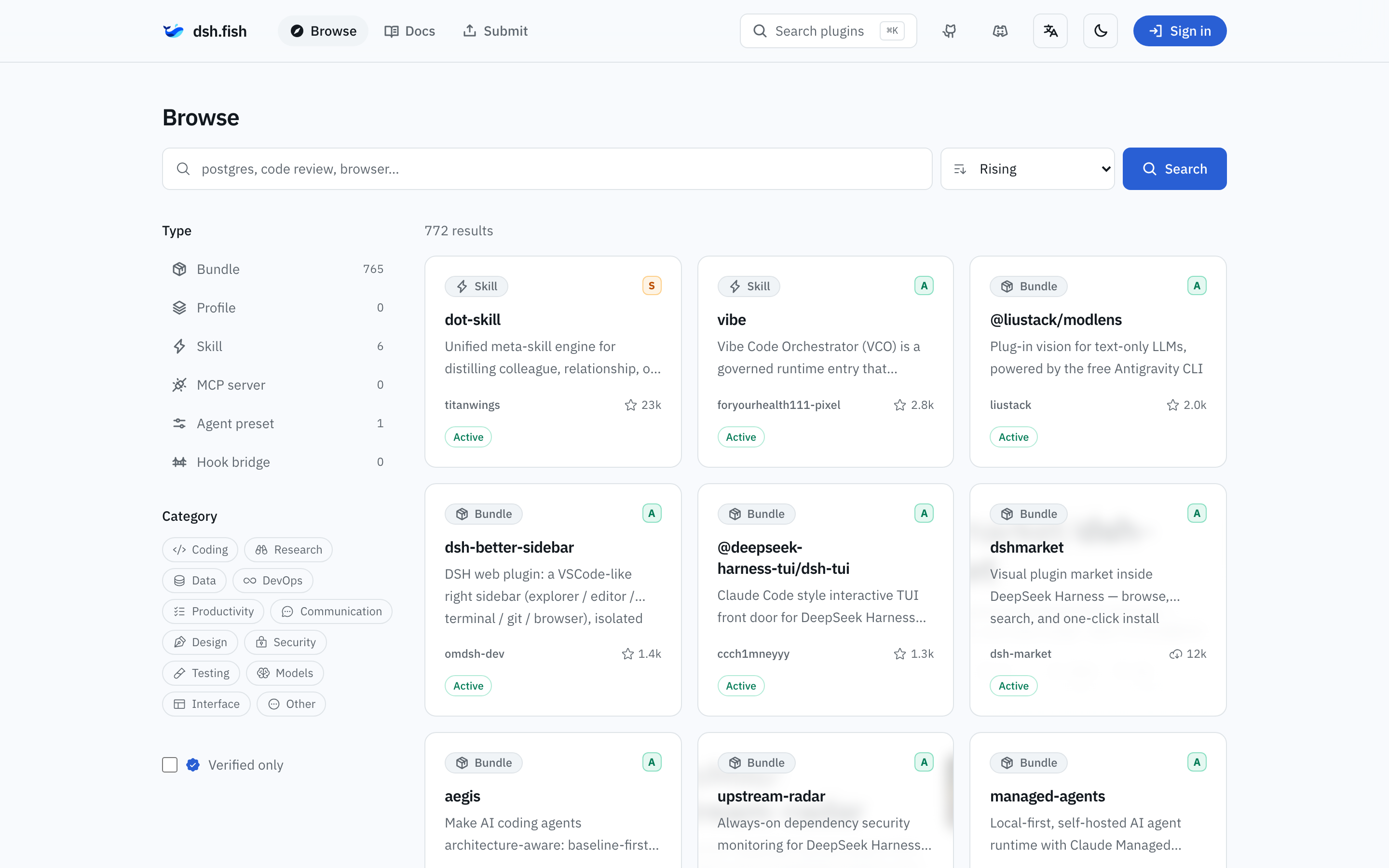
Browse by kind, category, popularity — or what is rising right now.
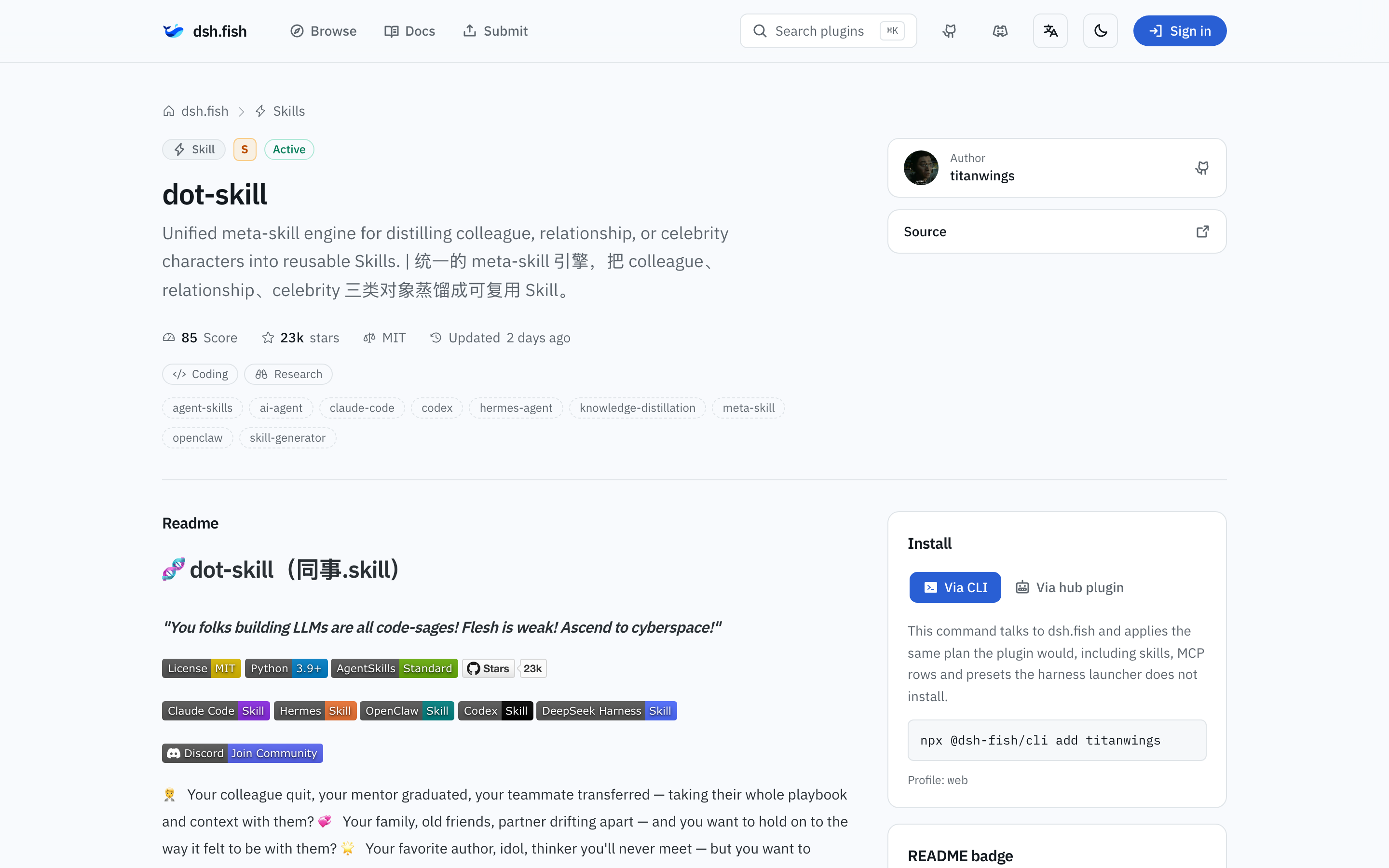
Every plugin page: quality score, install panel, commit provenance, and a copyable README badge.
Quick start
Browse the catalog at dsh.fish — search, filter by kind and category, read the install plan, copy the command.
Terminal — the CLI applies the plan for you:
npx @dsh-fish/cli add <artifact-id>
add / find / list / remove / update match the skills CLI
vocabulary and actually write skills, MCP rows, presets and hook bridges into
$DSH_HOME.
Inside the harness — add the hub plugin once:
dsh plugin --profile web add @dsh-fish/hub
It registers hub_search, hub_show, hub_install, hub_list, hub_remove,
hub_update and hub_account, so an agent can discover and install artifacts
without leaving the session. Signing in uses the OAuth device flow.
<profile> is whichever profile the harness boots. A desktop build has its own:
Local DSH runs local-dsh, so use its
bundled launcher and name that profile.
dsh plugin --profile local-dsh add @dsh-fish/hub
Publishing a plugin? Tag your repository with the dsh-plugin topic. The
hourly crawl inspects its package.json, SKILL.md or agent.cordis.yml and
classifies what the harness can actually load. MCP servers and hook bridges are
declared in package.json as dsh.hub.kind with a dsh.hub.mcp or
dsh.hub.hook block — see
docs/project/architecture.md
for the manifest shape.
What it indexes
| Kind | What it is | How it installs |
|---|---|---|
| Bundle | npm package declaring dsh.bundle.patch |
dsh plugin --profile <p> add <spec> |
| Profile | ordered dsh.profile.bundles stack |
one add per bundle, in order |
| Skill | SKILL.md bundle or flat Markdown |
files written under $DSH_HOME/skills |
| MCP server | external server declared via dsh.hub.mcp |
a dsh-mcp-client row in the profile patch |
| Agent preset | directory holding one agent.cordis.yml |
written to $DSH_HOME/.agent-presets/<id> |
| Hook bridge | Claude Code / Codex bridge declared via dsh.hub.hook |
a bridge plugin row in the profile patch |
Repository layout
backend/    Domain-Driven Design: domain, application, infrastructure, interfaces
frontend/   Feature-Sliced Design: app, pages, widgets, features, entities, shared
packages/
  dsh-plugin-hub/   `@dsh-fish/hub` — the bundle users install into their harness
  dsh-cli/          `@dsh-fish/cli` — `npx @dsh-fish/cli add <id>`
docs/       architecture, layer conventions, operations, ADRs
Both halves deploy as one Cloudflare Worker: Hono at /api/*, React Router
SSR everywhere else, D1 for the catalog, KV for sessions, and a Cron Trigger
that re-crawls every hour.
Development
pnpm install
pnpm run dev    # http://localhost:5173
Quality gates: pnpm run typecheck && pnpm run test && pnpm run test:e2e && pnpm run build.
Deployment, bindings and secrets: docs/operations/deployment.md.
Conventions and architecture: AGENTS.md, docs/project/architecture.md, docs/decisions/.
Community
- Source and issues — github.com/stvlynn/dsh.fish
- Discord — discord.gg/PwZDHH4mv3
License
相关推荐Related
-
 nexu-io/open-design
🎨 Best DeepSeek Harness Design Plugin. The open-source Claude Design alternative. 🖥️ Local-first desktop app. 🖼️ Your…
nexu-io/open-design
🎨 Best DeepSeek Harness Design Plugin. The open-source Claude Design alternative. 🖥️ Local-first desktop app. 🖼️ Your…
-
 freestylefly/awesome-gpt-image-2
Prompt as Code | GPT-Image2 工业级提示词引擎与模板库,530+ 个案例逆向工程,20+ 套工业级模板,并提炼出Skills,持续更新中
freestylefly/awesome-gpt-image-2
Prompt as Code | GPT-Image2 工业级提示词引擎与模板库,530+ 个案例逆向工程,20+ 套工业级模板,并提炼出Skills,持续更新中
-
 anywhere-labs/dsh-desktop
为 DeepSeek Harness (DSH) 插件生态打造的现代化桌面端解决方案。万物皆「插件」,桌面本身也是「插件」。
anywhere-labs/dsh-desktop
为 DeepSeek Harness (DSH) 插件生态打造的现代化桌面端解决方案。万物皆「插件」,桌面本身也是「插件」。
- Nagi-ovo/voyager Enhancement suite for Gemini, AI Studio, Claude & ChatGPT — plus a prompt manager for any web UI, DeepSeek Harness inclu…
-
 walkinglabs/learn-harness-engineering
Harness engineering beginner tutorial, from 0 to 1
walkinglabs/learn-harness-engineering
Harness engineering beginner tutorial, from 0 to 1
-
 awesome-dsh-plugin/awesome-dsh-plugin
A curated list of plugins for DeepSeek Harness (dsh) · DeepSeek Harness 插件精选列表
awesome-dsh-plugin/awesome-dsh-plugin
A curated list of plugins for DeepSeek Harness (dsh) · DeepSeek Harness 插件精选列表
-
 MemTensor/MemOS
Self-evolving memory OS for LLM & AI Agents: ultra-persistent memory, hybrid-retrieval, and cross-task skill reuse, with…
MemTensor/MemOS
Self-evolving memory OS for LLM & AI Agents: ultra-persistent memory, hybrid-retrieval, and cross-task skill reuse, with…
- yjh051108/dsh-routing-suite dsh-routing-suite — injector + router-standard kit: install the runtime injector first, then the task-aware reasoning-mo…