taltara/mddl-harness
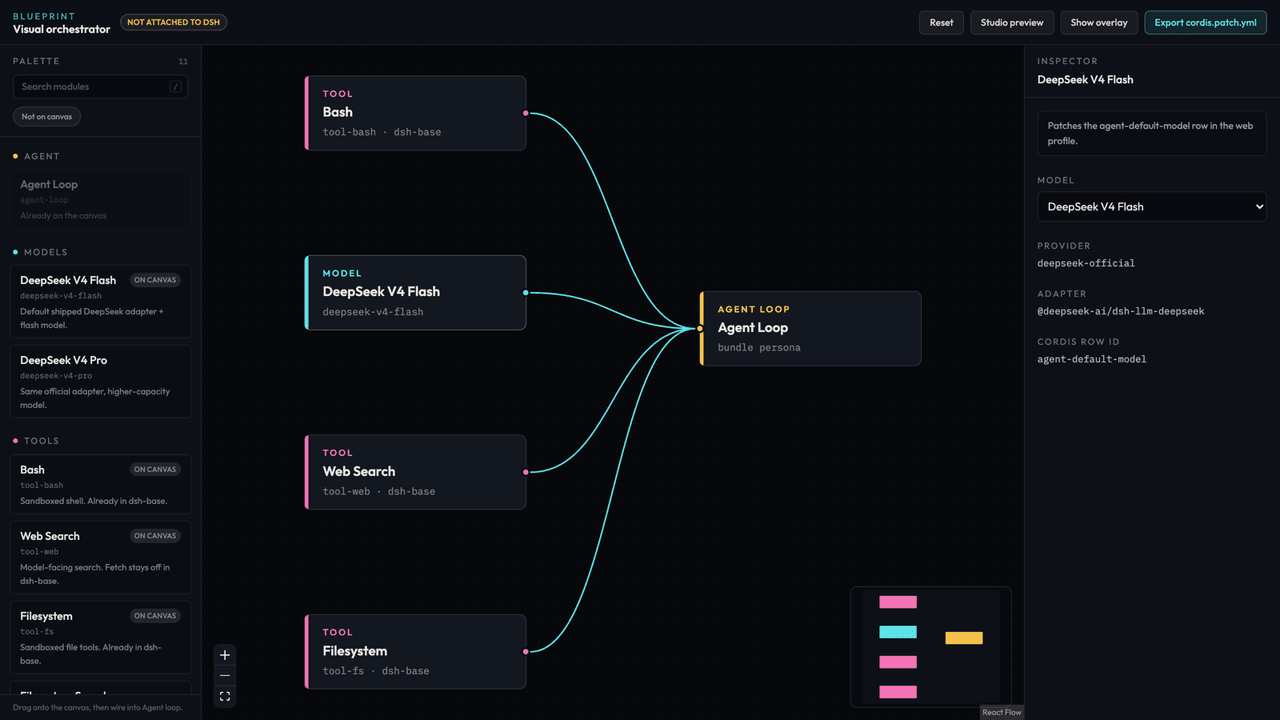
Visual orchestrator for DeepSeek Harness — drag models and tools onto a canvas, export a real cordis.patch.yml overlay.
项目介绍Project Overview
mddl-harness 是 DeepSeek Harness 的可视化编排插件。在画布上拖拽模型与工具节点、连线成 agent 图,导出为 cordis.patch.yml 覆盖层,配套 dsh-overlay-check 做静态校验,并生成基于 capmark 的能力声明报告。适用于需要图形化构建、修与审计 DSH 配置的场景。注意:当前不提供实时执行与远程调试,且行 ID 仍随 DSH 上游版本变动。
mddl-harness is a visual orchestrator for DeepSeek Harness. Drag model and tool nodes onto a canvas, wire them into an agent graph, and export a cordis.patch.yml overlay. The dsh-overlay-check package lints overlays statically, and dsh-blueprint surfaces a preflight capability disclosure using capmark manifests. Use it when designing or auditing DSH agent graphs graphically. Caveat: it is a Phase 1 design tool with no live execution; row IDs track upstream DSH release candidates, which still break across versions.
请帮我了解并安装插件:【mddl-harness】【https://github.com/taltara/mddl-harness】把上面这条消息直接发给当前会话里的 DSH,让它帮你了解并安装。安装命令不一定准确,发给 DSH 更稳。Send this message to DSH in your current session. CLI install commands may not be accurate across systems — DSH will figure it out for you.
或使用命令行安装(适合开发者)Or use CLI install (for developers)
命令行安装CLI Install
dsh plugin --profile web add github:taltara/mddl-harness把 taltara/mddl-harness 加入你的 DSH 配置(web profile)即可启用。
READMEREADME
mddl harness
Visual orchestrator for DeepSeek Harness. Drag models and tools onto a canvas, then export a real cordis.patch.yml overlay.
This is not a fork of dsh and not a child-process wrapper around npx @deepseek-ai/dsh. Upstream already ships a web profile, Cordis patches, and session/event telemetry. We compile graphs into that overlay format so the work can later mount as a dsh-plugin.
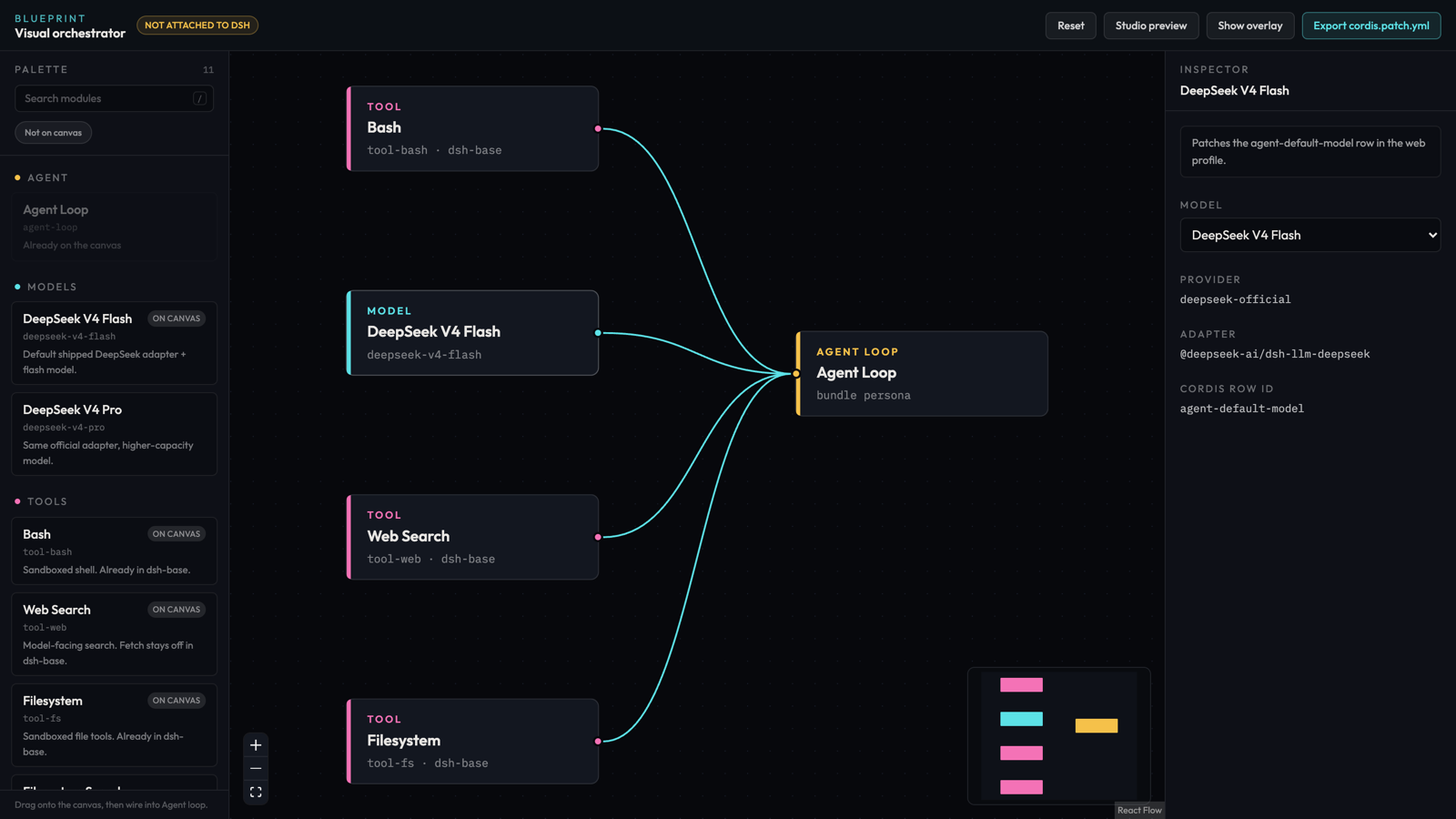
Drag models and tools onto the canvas, wire them into the agent loop, and export
the overlay. pnpm dev opens it at http://localhost:5173.
Why this stack
| PDF plan | What we actually do |
|---|---|
| Next.js App Router | Vite + React SPA. DSH serves static dist; RSC is dead weight. |
Fictional dsh.yaml |
cordis.patch.yml (id replace + insert) |
Spawn dsh run over Socket.io |
Later: Cordis plugin listening to session/event / agent/* |
| Config inside expanded nodes | Dumb nodes + inspector (keeps XYFlow at 60fps) |
| xterm.js inside nodes | Docked preview only. Terminal belongs in a later host plugin. |
Packages
@mddl/graph-schema— graph IR and the shipped DSH row catalog@mddl/compiler— graph → Cordis patch YAML, plus overlay linting@mddl/studio— visual editordsh-blueprint— Blueprint tab inside the DSH web client (readme)dsh-overlay-check— the overlay safety checks on their own, no dependencies, for anything that writes config (readme)
Run
pnpm install
pnpm dev
Studio: http://localhost:5173
pnpm lint       # biome check
pnpm format     # biome check --write
pnpm test
pnpm typecheck
CI runs lint, typecheck, test, and build on every push.
The canvas is saved to localStorage as you edit, so a reload keeps your graph.
Reset in the header restores the starter graph.
Find modules in the palette by name, row id, package, or description. Press
/ to jump to search, and Not on canvas hides what you already placed.
Apply an exported overlay. --patch is resolved from your terminal cwd, not the studio. Running ./cordis.patch.yml from ~ looks for /Users/<you>/cordis.patch.yml.
After Export (typical macOS download):
npx @deepseek-ai/dsh web --patch "$HOME/Downloads/cordis.patch.yml"
Or use the starter overlay in this repo (from the repo root):
npx @deepseek-ai/dsh web --patch "$PWD/examples/cordis.patch.yml"
What Phase 1 does not do
Live harness execution, profile install, or a DSH client slot. "Preview telemetry" is a local animation that proves the glow/edge path. Real run state comes from session/event in a later phase.
Capability disclosure
Before an overlay row is written, the preflight reports what each inserted package declares it may do, using a capmark manifest if the package ships one:
warning  capability-high-risk  "build-helper" declares fs:read, proc:spawn.
                               proc:spawn hands over broad control — read its
                               manifest before applying.
This is the one decision a runtime gate cannot make. A plugin's apply() runs
in-process with full Node privileges the moment its row loads, before any tool
call exists, so the write is the last point where installing it is still a
choice. It reports and never blocks: almost no plugin carries a manifest today,
and refusing them would make the check useless against a real profile.
dsh-overlay-check stays dependency-free; this lives in dsh-blueprint.
Roadmap
Shipped in dsh-blueprint 0.5.0: reading the live loader tree, linting the
config you actually booted, writing an overlay back behind a marker-delimited
block, refusing to write a row that would stop the harness booting, snapshots
with one-click restore, importing the running config onto the canvas, and
compiling to agent presets so the canvas changes what a session actually gets.
Next, in order:
- Map
session/eventonto canvas telemetry, replacing the local animation. - English and 中文 both first class.
- Model rows beyond the shipped DeepSeek adapters.
If a harness will not start
A row naming a package the profile cannot load stops the harness booting
outright, rather than disabling one entry. dsh-blueprint refuses to write one,
but if you get there by another route, two things help:
dsh --profile <name> --dump-default-configreads the bundles while skipping the profile and home user layers, so it still answers when the overlay is the problem. Confirmed on rc.7: a row written into a profile'scordis.patch.ymlshows in--dump-configand is absent from--dump-default-config.- The DSH handbook's recovery runbook by the sandbaseai folks is the most thorough write-up of getting back from this, including which user layer owns which file.
Status
Early. DSH is itself a developer preview with breaking changes between release
candidates, so the row ids and patch shape here track a moving target. Verified
against @deepseek-ai/dsh 0.1.0-rc.7 and 0.1.1-rc.2.
One thing 0.1.1-rc.2 does not fix: agent-presets.roots set in an overlay is
replaced at boot with the shipped root, and --dump-config still prints your
value because the override is applied after the composition it prints. See
deepseek-harness#403.
dsh-overlay-check warns on it rather than letting an overlay claim it
silently.
License
MIT. See LICENSE.
相关推荐Related
-
 nexu-io/open-design
🎨 Best DeepSeek Harness Design Plugin. The open-source Claude Design alternative. 🖥️ Local-first desktop app. 🖼️ Your…
nexu-io/open-design
🎨 Best DeepSeek Harness Design Plugin. The open-source Claude Design alternative. 🖥️ Local-first desktop app. 🖼️ Your…
-
 ruvnet/ruflo
🌊 The original agent meta-harness. Deploy intelligent multi-player swarms, coordinate autonomous workflows, and build c…
ruvnet/ruflo
🌊 The original agent meta-harness. Deploy intelligent multi-player swarms, coordinate autonomous workflows, and build c…
-
 amruthpillai/reactive-resume
A one-of-a-kind resume builder that keeps your privacy in mind. Completely secure, customizable, portable, open-source a…
amruthpillai/reactive-resume
A one-of-a-kind resume builder that keeps your privacy in mind. Completely secure, customizable, portable, open-source a…
-
 volcengine/OpenViking
Self-evolving Context Database for AI Agents. Unify Agent Memory, Knowledge RAG and Skills.
volcengine/OpenViking
Self-evolving Context Database for AI Agents. Unify Agent Memory, Knowledge RAG and Skills.
-
 Molunerfinn/PicGo
:rocket: The Ultimate Image Uploader for Efficient Creators. Supports Obsidian, Typora, VS Code etc. and 60+ image hosti…
Molunerfinn/PicGo
:rocket: The Ultimate Image Uploader for Efficient Creators. Supports Obsidian, Typora, VS Code etc. and 60+ image hosti…
-
 titanwings/colleague-skill
将冰冷的离别化为温暖的 Skill,欢迎加入数字生命1.0!Transforming cold farewells into warm skills? It's giving rebirth era. Welcome to Digital …
titanwings/colleague-skill
将冰冷的离别化为温暖的 Skill,欢迎加入数字生命1.0!Transforming cold farewells into warm skills? It's giving rebirth era. Welcome to Digital …
-
 nocobase/nocobase
NocoBase is an open-source AI + no-code platform for building business systems fast. Instead of generating everything fr…
nocobase/nocobase
NocoBase is an open-source AI + no-code platform for building business systems fast. Instead of generating everything fr…
-
 Tencent/WeKnora
Open-source LLM knowledge platform: turn raw documents into a queryable RAG, an autonomous reasoning agent, and a self-m…
Tencent/WeKnora
Open-source LLM knowledge platform: turn raw documents into a queryable RAG, an autonomous reasoning agent, and a self-m…